
README file from
Github
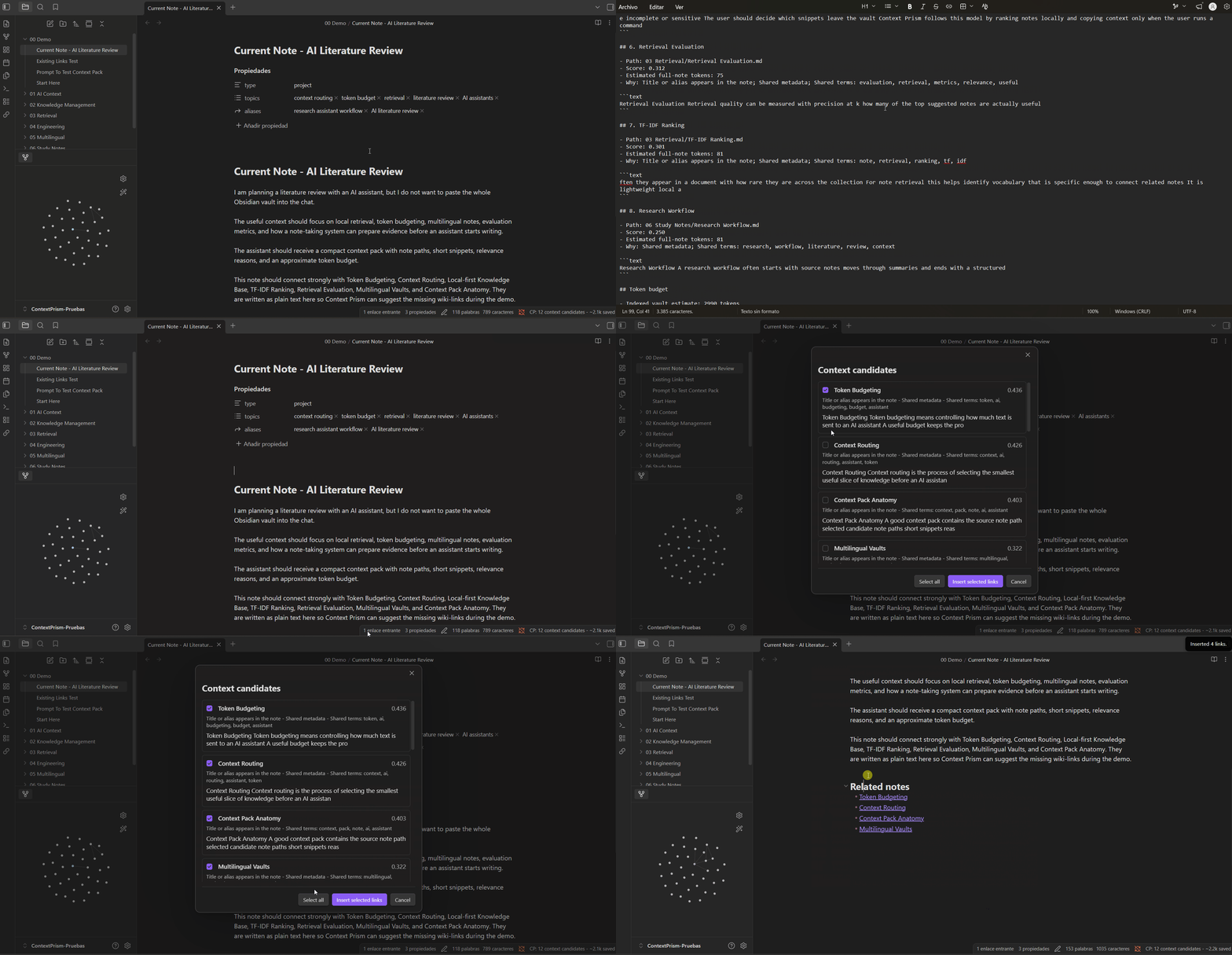
Context Prism turns an Obsidian vault into a local retrieval layer. It ranks notes related to the active file, explains why they were selected, estimates avoided context, and copies a compact Markdown pack that can be pasted into ChatGPT, Claude, Codex, Antigravity, Cursor, or any assistant that benefits from focused context.
Nothing is sent to external services. The index is built locally from Markdown files through the Obsidian plugin API.
Demo
Highlights
- Token-aware context packs for AI-assisted workflows
- Passive suggestions for the active note
- Multilingual indexing profiles:
multilingual,en,es,fr,de,it,pt - Mixed-language vault support through comma-separated language profiles
- Title, alias, metadata, and TF-IDF vocabulary ranking
- Explainable candidate reasons and snippets
- Optional review modal for inserting durable wiki-links
- Folder include and exclude filters
- No telemetry, network calls, or external AI dependency
Why It Exists
AI assistants often waste context by reading too many notes before discovering which files matter. Context Prism moves that discovery step into the vault:
- The active note becomes the query.
- Related notes are ranked locally.
- The user copies a compact context pack.
- The assistant receives focused evidence instead of broad vault dumps.
The result is a more controlled workflow for large vaults, multilingual notes, and AI-assisted knowledge work.
Usage
- Open a Markdown note.
- Check the status bar for prepared context candidates.
- Run
Copy AI context pack for current note. - Paste the pack into your AI assistant before asking for analysis, writing help, or implementation planning.
- Optionally run
Review link suggestions for current noteto insert selected links under the configured footer heading.
Language Support
Context Prism defaults to multilingual, which removes common stopwords across supported language profiles. For more precise ranking, configure Index languages in settings:
en
es
en, es
fr, de, it
multilingual
The current language layer is lexical and Unicode-aware. It is designed for local retrieval, not translation or semantic embedding.
Development
Use Node.js 20.19 or newer. Node.js 22 LTS is recommended.
npm install
npm run dev
Production validation:
npm run typecheck
npm test
npm run build
npm audit
Manual Installation
Copy these files into <vault>/.obsidian/plugins/context-prism/:
main.jsmanifest.jsonstyles.css
Reload Obsidian and enable Context Prism under Community plugins.
Project Docs
Release Checklist
- Update
manifest.json,package.json, andversions.json. - Run
npm run typecheck,npm test,npm run build, andnpm audit. - Create a GitHub release with a tag that exactly matches
manifest.json. - Attach
main.js,manifest.json, andstyles.css.
Pushing a matching version tag can run the release workflow and attach those assets automatically.
Privacy
Context Prism reads Markdown files through the local Obsidian API and stores settings in the plugin data file. It does not make network requests, collect analytics, or send note content outside the vault.
License
MIT