
README file from
Github
Professional or Academic Grade Citations in Obsidian with the Cite Wide plugin
An Obsidian plugin for rigorous, vault-wide citation management. Converts numeric footnotes into stable hex identifiers that survive reorderings, logs each citation into a per-citation file for Bases/Dataview queries, dedupes citations that point at the same URL, and parses pasted research output from Perplexity / Google AI / Claude into the same canonical format on the way in.
Part of the Content Farm ecosystem of Plugins
Cite Wide is part of a suite of plugins designed to help you build a robust, citation-aware knowledge base in Obsidian. Other plugins in the suite include:
- Cite Wide - Vault-wide citation management
- Image Gin - Image generation and embedding for several Generative AI image generation services.
- Perplexed - Versatile prompt modal to query Perplexity AI or Perplexica, with additional API support in free form. Governs quality and consistency of AI responses.
- Metafetch - Reference management and citation tracking across your Obsidian vault.
- Filestarter Kit - Clean, updated starter to clone with various common operations. Our favorite: YAML frontmatter templates and easy form inputs. Others: assemble table of contents, normalize whitespace. Others are primarily there as examples of how to use the Obsidian API and build a plugin.
Content Farm is a loosely coupled monorepo, open source, and we operate an Open Project Board on GitHub where you can request features, share ideas, track progress, and contribute. If you're not getting into the code, we recommend you install each plugin separately to avoid potential frustrations.
Contributors welcome, just post to the board and we will get going.
Features
Obsidian (in reader mode) (and several other content tools) reorder citations into perfect integer sequence based on their order of appearance.
- This opens the door to using unique variables within the citation delimiters, which can be used to enable greater functionality across not only the Obsidian vault, but many other content tools -- including publishing to the web.

Reference Management System, Inline, Reference Definition Section, and Vault-Wide Source Management
🔢 Unique Hex Code Generation
- Converts numeric citations
[1]into unique hex codes[^a1b2c3] - Consistent algorithm ensures the same reference always generates the same hex code
- Maintains vault-wide consistency across all documents
📊 Reference Tracking
- Logs unique hex codes and their reference information into an Obsidian base, which requires saving sources to a dedicated folder
- Ensures consistent hex codes per reference, across all files in the vault.
- Maintains vault-wide consistency across all documents
🌐 Automatic Property Extraction from URL
- Extract metadata from a link using a curl request, generating a response with more complete metadata.
- Watch reference definitions magically reformat and populate as the response is parsed.
- If promoted to a vault-wide source, a reference file with complete metadata is created, accessible through Bases.
- formatted citations from URLs use Jina.ai Reader API
- Highlights a URL and automatically generates citation in a preferred format.
- Default is our preferred format:
[^1b34df]: 2016, May. "[Originals, by Adam Grant | Bob's Books](https://bobsbeenreading.com/2016/05/08/originals-by-adam-grant/)" schoultz. [Bob's Books](https://bobsbeenreading.com/). - Updates existing footnotes or creates new ones
- Works without API key, but adding one can avoid rate limits
Handle diverse LLM Output syntax
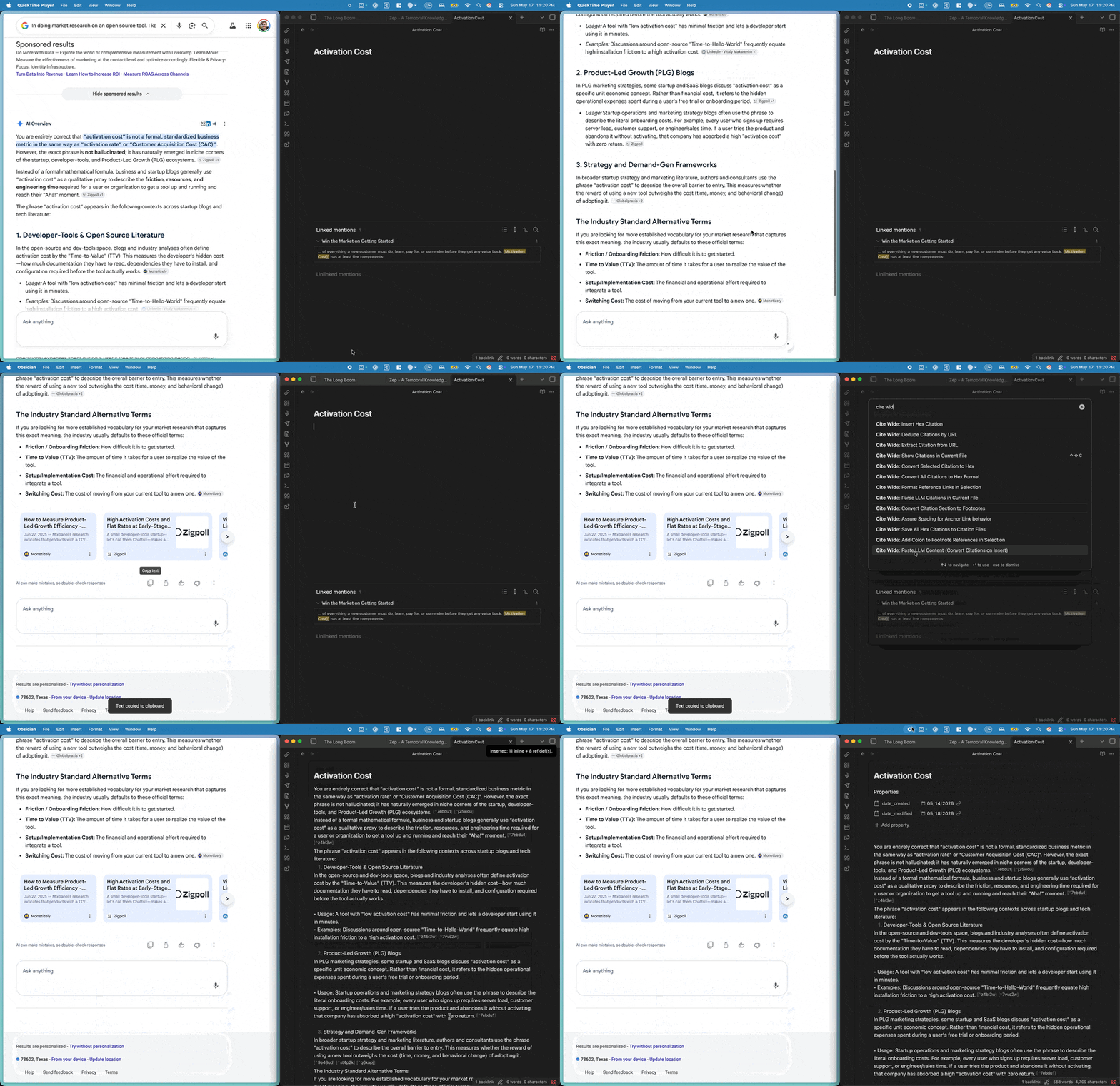
🤖 LLM Output Transforms to Preferred Format (v0.2.0)

Two commands for handling pasted research output from device-native LLM tools (Google AI, Perplexity AI, and similar). Both share the same parser;
- one runs in-place on an existing file,
- one intercepts at paste-time before content lands in the file at all.
Recognized inline patterns: comma-multi [1, 2, 3] (Google AI), adjacent-multi [1][2] (Perplexity), space-separated singles [1] [2] [3], and word-or-punctuation-glued text.[1] / changes[2].
Recognized reference-list patterns: [N] [Title](url) (Google AI markdown link) and [N] Title https://url (Perplexity title-then-URL). Both are converted to the Lossless canonical [^hex]: [Title](url) markdown-link shape on the way out.
Spec conformance on output: every converted line gets a final whitespace pass that ensures (a) one space between content and citation (after ., ,, :, ;, !, ?, or any non-whitespace word boundary), and (b) one space between consecutive [^hex] [^hex] markers — per the Lossless inline-citation spec.
Command: Parse LLM Citations in Current File

- Opens a modal listing every detected
[N]numeric citation in the current file with its proposed[^hex]replacement, the reference-def text preview, and clickable line links to every inline occurrence. - Per-row controls: checkbox to opt in/out, per-row Convert button that handles a single citation in place and re-renders the modal so you can keep working incrementally, line-link anchors that scroll the editor.
- Header: single tri-state All checkbox (browser-native indeterminate state when some-but-not-all are selected) and an Apply button for batch conversion.
- Multi-form citations partially convert: if
[1, 2, 3]has a ref def only for[2], the output is[1] [^xxx] [3]— orphan numerics survive untouched and get flagged. - Already-
[^hex]citations are preserved verbatim — mid-file human conversions never get re-touched. - Detects collisions (same numeric defined twice — likely two LLM-output sections pasted into one file) and refuses to corrupt them; surfaces orphans (cited inline but no ref def, and vice versa) as flags.
Command: Paste LLM Content (Convert Citations on Insert)
- Opens a modal with a big textarea + provider radio (Google AI Overviews / Perplexity) + Insert button. Paste your LLM output, click Insert, and the converted form lands at the cursor in one step.
- Stops the colliding-numerics problem at its source instead of post-hoc — no risk that two pasted Perplexity responses with overlapping
[1]…[N]series corrupt each other in the same file. - Collects the host document's hex namespace before generating new hex IDs, so the inserted citations never collide with
[^hex]markers already in the file.
🎨 Smart Formatting
- Moves citations after punctuation (e.g.,
text[1].→text. [1]) - Ensures proper spacing between multiple citations
- Maintains clean, readable document structure
📊 Bases Integration
- Automatically creates citation files in a dedicated folder for Dataview/Bases queries
- Rich metadata including title, author, URL, usage count, and file tracking
- Comprehensive frontmatter for powerful Dataview/Bases queries and organization
🧩 Commands
Command: Convert Reference Pairings to Hex Modal

Command: Clean Reference Section

Command: Assure Spacing for Anchor Link behavior

Command: Extract Citation from URL

Getting Started
pnpm install
pnpm add -D esbuild @types/node builtin-modules
pnpm build
pnpm dev
Make it show up in Obsidian
Create a symbolic link into the plugins directory:
Here is my example, but you will need to use your own path structure:
ln -s /Users/<username>/<your/preferred/path/to/cite-wide> /Users/<username>/<your-content-folder>/<your-vault-folder>/.obsidian/plugins/cite-wide
Configuration
Citations Folder Setup
The plugin automatically creates citation files for Dataview integration:
- Open Obsidian Settings → Community Plugins → Cite Wide
- Set your preferred citations folder (default: "Citations")
- Citation files will be created automatically when you use citation commands
Jina.ai API Key Setup (Optional)
The URL citation extraction feature works without an API key, but adding one can help avoid rate limits:
- Get a Jina.ai API key from https://jina.ai/
- Open Obsidian Settings → Community Plugins → Cite Wide
- Enter your API key in the settings (optional)
- Save the settings
Note: The feature works perfectly without an API key, but you may encounter rate limits with heavy usage.
Using URL Citation Extraction
- Highlight a URL in your document
- Run the "Extract Citation from URL" command (Ctrl/Cmd + P)
- The URL will be replaced with a citation reference like
[^a1b2c3] - A properly formatted citation will be added to the Footnotes section
Example:
- URL:
https://bobsbeenreading.com/2016/05/08/originals-by-adam-grant/ - Becomes:
[^1b34df]: 2016, May. "[Originals, by Adam Grant | Bob's Books](https://bobsbeenreading.com/2016/05/08/originals-by-adam-grant/)" schoultz. [Bob's Books](https://bobsbeenreading.com/).
For existing footnotes:
- Before:
[^028ee3]: @https://bobsbeenreading.com/2016/05/08/originals-by-adam-grant/ - After:
[^028ee3]: 2016, May. "[Originals, by Adam Grant | Bob's Books](https://bobsbeenreading.com/2016/05/08/originals-by-adam-grant/)" schoultz. [Bob's Books](https://bobsbeenreading.com/).
Dataview Integration
The plugin automatically creates citation files with rich metadata for powerful Dataview queries. Each citation file includes:
Citation File Structure
---
hexId: "a1b2c3"
title: "Article Title"
author: "Author Name"
url: "https://example.com/article"
date: "2024"
source: "example.com"
tags: []
created: "2024-01-15T10:30:00.000Z"
lastModified: "2024-01-15T10:30:00.000Z"
referenceText: "Full reference text"
usageCount: 1
filesUsedIn: ["path/to/file.md"]
---
Example Dataview Queries
Basic citation table:
TABLE title, author, date, usageCount
FROM "Citations"
SORT created DESC
Most used citations:
TABLE title, author, source, filesUsedIn
FROM "Citations"
WHERE usageCount > 1
SORT usageCount DESC
Citations by author:
TABLE title, date, usageCount, url
FROM "Citations"
WHERE author
SORT author ASC, date DESC
See examples/dataview-citations-examples.md for comprehensive Dataview query examples.