
README file from
GithubChain
A plugin for Obsidian that helps to organise notes.
When a knowledge base grows to thousands of notes, it becomes to hard to add information while keeping it retrievable. As a solution, you could link each new note to the last note on the same topic. Notes on the same topic will natually form long sequences, a.k.a. chains.
Chain plugin adds 2 features:
- Link a new note to a chain in 2 clicks, even if your knowledge base contains thousands of notes collected over many years.
- Display all notes in a chain so you can read them as a diary.
A typical workflow is:
- Learn something interesting!
- Create a new note and write down your thoughts. Don't waste effort on categorising it: don't add tags, don't choose name, don't reference other notes as in Zettelkasten.
- When you have time, add add a reference from the new note to another note on the same topic. Chain plugin has a command for that. It also displays all unlinked notes, so you won't forget.
Chains bring the same benefit as tags, but more scalable. For instance, to merge one tag with another, you need to modify all notes that contain the tag. On the contrary, to merge two chains, you can create one note that references both chains, which will merge them into one. This scalability makes a knowledge base with thousands of notes manageable.
Example: a small chain about lasagna
Imagine writing notes while reading the Wikipedia article on lasagna. The contents of each note:
A — pasta-sheets.md
Flat rectangular pasta sheets, the structural element of lasagna.
B — layering.md
Cooked [[pasta-sheets]] alternate with sauce and cheese in a stacked assembly.
C — bechamel.md
Milk thickened with a butter-and-flour roux, often seasoned with nutmeg.
D — lasagne-al-forno.md
Oven-baked lasagna: [[layering]] separated by a coat of [[bechamel]] between each layer.
E — bolognese.md
---
chain: lasagna
---
The Emilia-Romagna variant of [[lasagne-al-forno]], dressed with slow-cooked ragù bolognese.
The resulting reference graph:
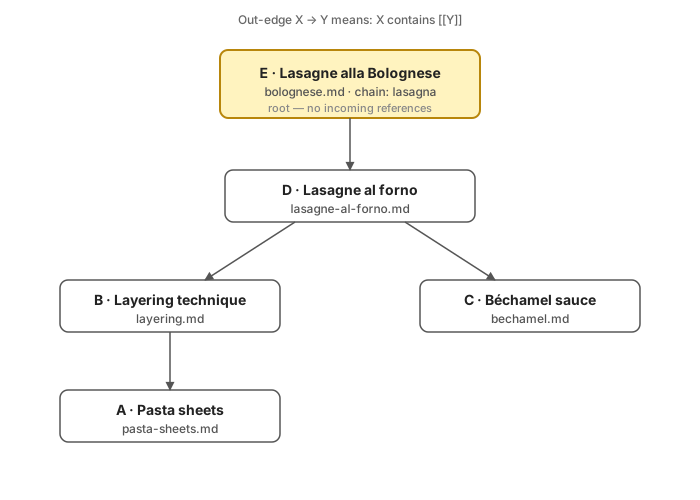
bolognese.md (E) is the root of the note chain - it has no incoming references. When writing another note about lasagna, reference bolognese.md - new note willl become the root of this root chain.
Features
- Side panel listing roots of maximum-inclusion chains, sorted by creation time (newest first). Chains untouched for more than 30 days fade to half opacity.
- Cycle detection — multi-note cycles in the reference graph render with a
↺marker in red. - Thread view — open any chain as a single scrolling document of all its rendered notes.
- Link chain modal — fuzzy-search chains by their
chain:frontmatter title and insert a[[wikilink]]at the cursor. - Create successor — spawn a new note that backlinks to the active one, following the chain workflow.
- Tag indices — Refresh index generates a managed index note per tag, plus a master index, so tag-based grouping is also navigable as a chain.
- CLI — the same queries from your shell:
list,get,create,list-notes. - Claude Code skill —
manage-notestranslates natural-language requests ("create a note in chain X") into CLI invocations.
Install (Obsidian)
The plugin is not yet in the community registry. The easiest way to install it — and to receive auto-updates on every release — is via BRAT:
- Install Obsidian42 - BRAT from Settings → Community plugins → Browse and enable it.
- Open Settings → BRAT → Add Beta plugin and paste:
swalrus1/obsidian-note-chain - Confirm. BRAT downloads the latest release and enables Note Chain automatically. New releases are picked up by BRAT on Obsidian startup.
[!TIP] The Create successor command delegates filename generation to Obsidian's built-in Unique Note Creator core plugin (or the community ZK Prefixer plugin). Enable one of them if you plan to use that command.
Commands
| Command | What it does |
|---|---|
Open Note Chain |
Reveal the side panel in the right leaf. |
Link chain |
Fuzzy-search chains and insert a [[wikilink]] at the cursor. |
Create successor |
Create a new note that backlinks to the active one. |
Show thread view |
Open the active note's chain as a single scrolling thread. |
Refresh index |
Build / refresh a managed index note per tag, plus a master tag index. |
CLI
The CLI gives you the same chain queries from a shell — useful for scripts, integrations, or any tool that isn't Obsidian itself. It runs against the vault directory directly; Obsidian doesn't need to be open.
Build
just build-cli # → cli/dist/cli.js
The CLI bundle is not shipped on tags; build it locally.
Run
Point the CLI at your vault either with a flag or an environment variable:
export OBSIDIAN_VAULT=/path/to/vault
# …or pass --vault /path/to/vault on every invocation
Commands
just cli list                          # YAML: {name, root_note} per chain
just cli get <name>                    # print the root note path for a chain
just cli create <parent-note-path>     # create a successor that backlinks to <parent>
just cli list-notes <root-note-path>   # print every note in the chain (BFS from root)
get matches the chain's chain: frontmatter exactly. If no title matches, it falls back to an exact match on the relative file path. Multiple matches fail with the candidate list. Basename is not used as an identifier.
create mirrors the plugin's Create successor workflow: it writes YYYYMMDDHHMMSS.md at the vault root (with a -N suffix on collision) and seeds the body with [[<parent-basename>]]\n.
[!TIP] Exit codes:
0success,1usage error,2not found / ambiguous,3I/O error. Stable enough to drive&&/||in shell pipelines.
Claude Code skill: manage-notes
A natural-language frontend over the CLI. Ask in plain English; the skill resolves chain references, invokes the right CLI commands, and emits one relative note path per line on stdout.
Install
export OBSIDIAN_VAULT=/path/to/vault
just install-skill   # symlinks skills/manage-notes into ~/.claude/skills/
Examples
"list all chains"                      → every root note path
"what notes are in chain projects/q3"  → BFS over that chain
"create a note in topic algorithms"    → new note, prints its path
"get the root of chain my-project"     → the root's relative path
The skill treats chain, topic, category, section, directory, area, thread, project as synonyms.
[!WARNING] The skill refuses anything that requires reading note contents — "summarize chain X", "what's in note Y", "find a note that mentions Z". Use the regular Claude Code tools for those.
How it works
- A reference graph is built from Obsidian's resolved-link cache (
outLinks/inLinks). The CLI builds the same shape from the filesystem by parsing wikilinks itself. - An iterative Kosaraju SCC pass identifies source SCCs — strongly connected components with no incoming edges from other components. Single-node sources are root notes; multi-node sources are cycles (one alphabetically-first basename is picked as the cycle root).
- Chain titles come from a candidate-elimination algorithm over the
chain:frontmatter field within each chain.
Pure logic lives in core/; Obsidian-specific glue is in src/; the CLI is in cli/; the skill is in skills/. See docs/premise.md for the workflow motivation and docs/architecture.md for the code map.
Development
just deps              # npm install
just dev               # watch-mode build of the plugin
just build             # production build (main.js)
just build-cli         # CLI bundle (cli/dist/cli.js)
just test              # run all vitest suites (plugin + core + CLI)
just update <vault>    # build and install into <vault>/.obsidian/plugins/note-chain/
Tests cover both the pure core/ logic and the CLI end-to-end against ephemeral vaults created via fs.mkdtempSync.