
README file from
GithubCard Workspace
Card Workspace is a left-sidebar Obsidian plugin. It gathers folders, tags, properties, outgoing links, backlinks, and card boxes into a readable card stream beside the editor. Gather context, shape a working view, and bring what matters into the note you are writing.
Each Markdown card shows a title and a formatting-free excerpt, so a set of notes stays readable without collapsing into filenames. It is not Obsidian Canvas, and dragging a card does not change your vault structure. Click a card to open its note; Markdown and other supported files stay in their original folders.
Documentation: card-workspace.
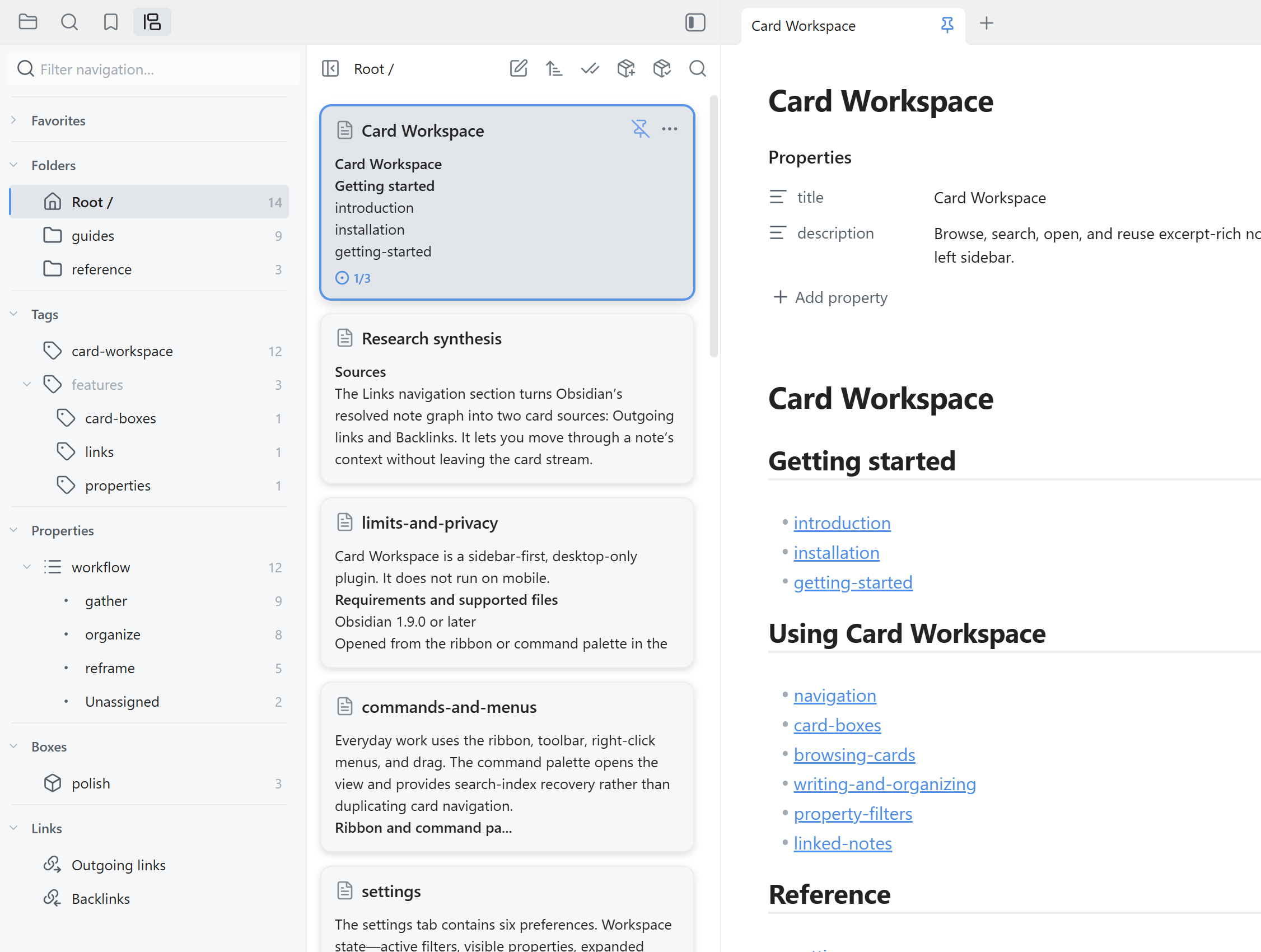
Table of contents
- Why Card Workspace
- Installation
- Quick start
- Features
- Compatibility and limitations
- Privacy
- Development
- Releasing
- Support and license
Why Card Workspace
Card Workspace is for people who scan and collect notes while writing: research topics, long-running projects, reading lists, and any body of work that crosses folder boundaries. It gives you direct controls instead of another query language.
- Gather — browse a folder, include its subfolders when useful, and narrow the stream with tags and frontmatter properties. Or follow a note’s outgoing links and backlinks.
- Organize — sort, group, and pin the stream, then save a useful view as a card box.
- Reframe — keep that context beside the editor, or drag a Markdown card into the note you are writing.
Installation
Card Workspace can be installed from Obsidian’s Community Plugins directory. You can also install a specific version manually from GitHub Releases.
Install from Community Plugins
- Open Settings → Community plugins in Obsidian.
- Turn off Restricted mode if it is enabled.
- Select Browse and search for Card Workspace.
- Select Install, then Enable.
The plugin’s directory page can also hand installation back to Obsidian.
Install from GitHub Releases
Use this route when you need a version other than the current Community Plugins release.
- Download the release from the Releases page.
- Extract
main.js,manifest.json, andstyles.cssinto your vault’s.obsidian/plugins/card-workspace/folder. - Open Settings → Community plugins.
- Turn off Restricted mode if needed.
- Enable Card Workspace in the installed plugins list.
Quick start
- Select the ribbon icon, or run Open Card Workspace view from the command palette. The panel opens in the left sidebar.
- Pick a folder in the navigation pane, then narrow it with tags or property values. You can also switch the source to a card box, or start from the note you are reading with its outgoing links or backlinks.
- Browse the card stream. Use search, sorting, grouping, or pins to shape the view, then click a card to open its note.
- Right-click a navigation item or card for more actions. Drag a Markdown card into an open editor to insert a link or content.
Card Workspace restores the last folder you browsed. If it was the vault root, it restores the whole vault. It does not reopen the last card box or linked-note source.
Features
- Navigation pane. A resizable column sits next to the card stream, so folders, tags, properties, card boxes, and favorites are one click away. Drag the divider to resize it, or hide it so the cards use the full width. When the sidebar is too narrow for two columns, the layout falls back to a single pane and the header toggle swaps between navigation and cards.
- Folder browsing. Choose a folder and include its subfolders when useful, then narrow the stream with tags and frontmatter properties. Those browse filters apply to folder sources only. They pause in a card box or a links view, with a paused-filter hint, and resume when you return to a folder.
- Card boxes. Save a folder, tag, and property view as a reusable collection. Matching notes keep appearing as the vault changes. Add or exclude individual notes by hand, and give each box its own sort, grouping, and pins. Source files stay where they are. A linked-note view can be saved as a fixed snapshot.
- Linked notes. Switch between outgoing links and backlinks around the active note. Let the source follow the editor, or pin it while you inspect other notes. Both directions default to reference count, highest first, and remember their sort independently. Each file remains one card with a badge counting references between it and the current note. Backlinks show three reference contexts by default; choose 1, 2, 3, or all in settings, and expand the remaining contexts within a card. Repeated references in one paragraph share a context while retaining their occurrence count. Both directions use the ordinary card Markdown renderer. Outgoing heading and block links show the destination content; plain links show the linked note’s opening content with the ordinary preview line budget. Backlinks show the source reference context. Repeated links to the same destination location share one preview. Click a snippet to open the source reference or destination it displays.
- Local full-text search. Search the current folder, card box, outgoing links, or backlinks. Markdown cards show highlighted snippets in source order, using the same lightweight list, read-only task, heading, code, and link cues as ordinary previews, with two display lines per snippet: an independent setting allows up to 1–5 snippets per card (default 2). Overlapping contexts are merged; short hit lines include following prose. Click a snippet or press Enter/Space to locate its hit while keeping the note's editing or reading mode. Each card retains its hit count; title-only matches highlight the title and keep the usual opening preview. Clearing search restores the usual preview. Chinese search uses characters and adjacent character pairs; pinyin is not indexed.
- Arrange the stream. Sort by edited time, created time, or filename, and group the cards. Pin notes to keep them at the top. Pins only reorder cards that already match the active filters and search.
- Drag into the editor. Drop a Markdown card at the cursor to insert a wikilink, an embed, the note body, or its title and body. Choose each time, or set a default. Turn on Enable section drag insertion in Behavior settings to choose a heading section or the whole note. Section content includes its child headings and stops at the next heading of the same or higher level; copying preserves the original Markdown. This option is off by default.
- Card image previews. Since 1.3.4, images default to a right thumbnail with Crop to fill. In plugin settings, switch to an image below the title, choose Show whole image, or turn images off. Local PNG, JPEG, WebP, and BMP body embeds load near the viewport. Thumbnails are cached across restarts. See image previews.
- Bulk actions. Click to select individual cards, Shift-click a range, or select the whole view. Then move notes, add or remove tags, change card-box membership, merge Markdown notes with a live preview, or delete the selection.
- Favorites. Keep frequently used folders, files, tags, and boxes in one section, and reorder them by drag in any mix of kinds.
- Context menus. Right-click in the navigation pane or on a card to create notes, folders, canvases, and bases, rename, duplicate, move, delete, copy vault or system paths, reveal in the system file explorer, and search within a folder. Rename or delete a tag with confirmation; the change updates notes, active filters, favorites, and card-box rules.
- Open your way. Hover-preview a note, or open it in the current tab, a new tab, a split, or a window. Click a card to open its note; switch notes in the editor and the matching card is selected.
- Virtualized scrolling. Only visible cards are rendered, so large sources stay practical to scan.
Compatibility and limitations
- Desktop only. Card Workspace does not run on mobile.
- Left sidebar. Open it from the ribbon icon or the command palette.
- Obsidian version. Requires Obsidian 1.13.0 or later, because the settings page and the plugin dialogs use the setting groups, confirmation dialog, and declarative settings APIs introduced by 1.11 and 1.13. Behavior and compatibility follow what is declared in
manifest.json. Earlier Obsidian versions keep receiving the last compatible release (1.3.4). - Supported files. Markdown (
.md) cards receive full previews and full-text search. Bases (.base), Canvas (.canvas), and Excalidraw (.excalidrawand.excalidraw.md) use a title and placeholder and are searched by title.
Privacy
All processing stays inside your vault. The plugin does not make external network requests. File operations go through Obsidian’s local Vault and FileManager APIs. The bundled search engine stores its local index in IndexedDB. Source notes stay in their existing folders.
Development
npm install
npm run build
For watch mode:
npm run dev
Run type checks and tests:
npm run check
npm test
Releasing
This repo creates draft GitHub Releases from bare semver tags through .github/workflows/release.yml.
-
Determine the target version from
manifest.json:TAG=$(node -p "require('./manifest.json').version") -
Sync the release metadata:
npm run release:prepare -- "$TAG"To also raise the minimum supported Obsidian version, pass it as the second argument:
npm run release:prepare -- "$TAG" 1.13.0 -
Run the normal checks plus release validation:
npm run check:svelte npm run check npm run build npm test npm run release:check -- "$TAG" -
Commit the version bump, then create and push an annotated bare semver tag that exactly matches
manifest.json.version(for example<version>, notv<version>):git tag -a "$TAG" -m "$TAG" git push origin main git push origin "$TAG" -
The workflow creates a draft GitHub Release containing
main.js,manifest.json, andstyles.css. -
Add release notes on GitHub and publish the draft release.
Support and license
If you run into issues, please open a ticket on GitHub Issues.
Card Workspace is released under the MIT License.