
README file from
GithubCalendar Plus
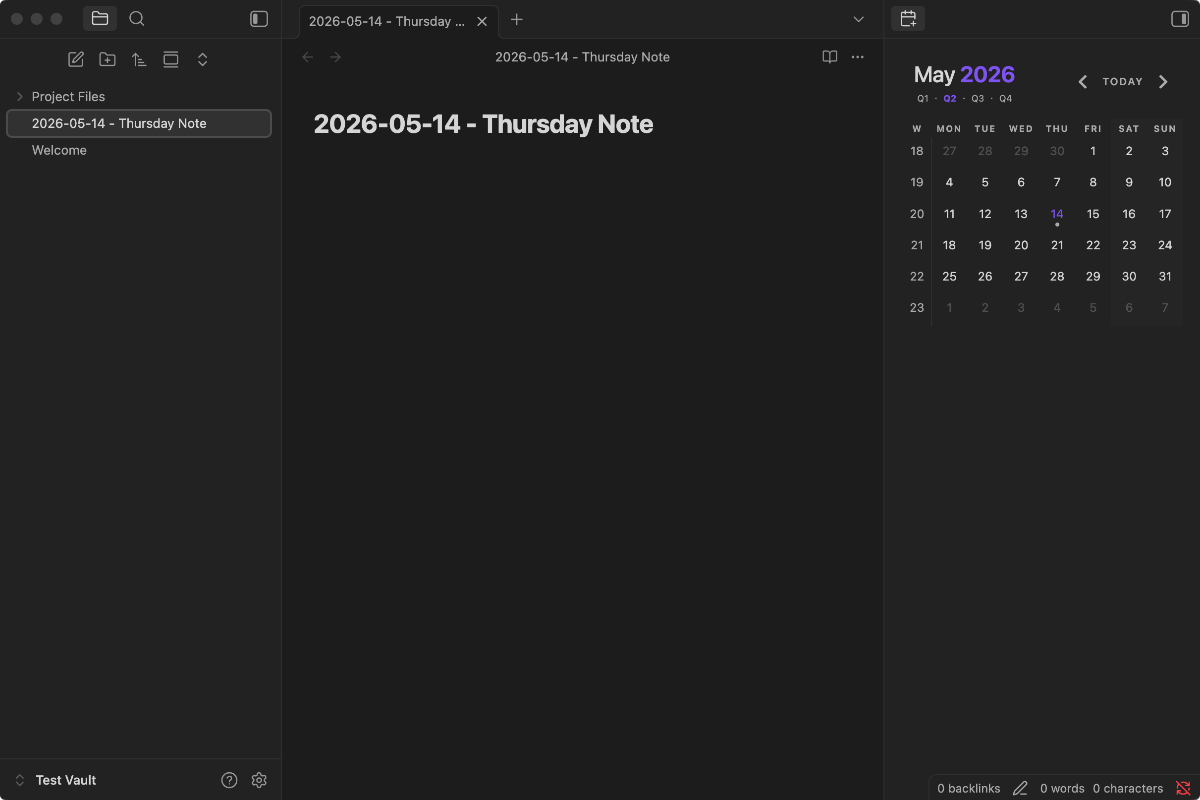
Calendar Plus is a substantial rewrite/reworking of Liam Cain's original Calendar and Periodic Notes plugins for Obsidian, with a few important new features. Most notably, it merges the two plugins into one integrated calendar + periodic-notes workflow – a sidebar calendar with built-in daily, weekly, monthly, quarterly, and yearly notes. Other major changes include making month, quarter, and year labels in the calendar header clickable, and changing the dots so they indicate whether a note exists and nothing else.
Features
- A calendar view for navigating your vault by date.
- Built-in periodic notes for daily, weekly, monthly, quarterly, and yearly periodicities. Each periodicity has its own folder, filename format, and optional template — no separate Periodic Notes plugin required.
- Click a day cell to open or create that day's note. Click a week-number cell to open or create the weekly note. Click the month, year, or quarter labels in the calendar header to open or create the corresponding monthly / yearly / quarterly note.
- A filled dot on a day cell means a periodic note exists for that day. A dot on a week-number cell means a weekly note exists for that week. Dots don't represent anything else — no word counts, no task counts, no streak metadata.
- The calendar view can live anywhere. Drag it to the left sidebar, into the main content area, pin it as a tab, or pop it into its own window — Calendar Plus preserves the placement across plugin reloads.
- Theme-friendly: the calendar inherits Obsidian's CSS variables and respects the active theme out of the box.
Installation
Calendar Plus is distributed as the standard three-file Obsidian plugin bundle (main.js, manifest.json, styles.css).
From a release: download those three files from a GitHub release, copy them into your vault at <vault>/.obsidian/plugins/calendar-plus/, then enable Calendar Plus from Settings → Community plugins.
From source: see the Development section below.
Usage
After enabling the plugin, the calendar appears in the right sidebar. You can drag it elsewhere or pin it — the placement is remembered.
Configure each periodic-note type independently from Settings → Calendar Plus → Periodic Notes:
- Enable turns the note type on. Enabling Weekly notes also shows the week-number column.
- Date format is a Moment.js format string used for note filenames.
- Folder is where notes for that periodicity are created. Leave blank for the vault root.
- Template file is an optional path to a template note.
Calendar Plus owns its own settings for all five periodic-note types and doesn't read from Obsidian's core Daily Notes plugin or other periodic-notes plugins.
Settings
General
- Start week on: choose the first day of the week. "Locale default" uses your system locale.
- Ctrl + Click behaviour: when Ctrl/Cmd-clicking a date cell, open the note in a new tab or in a new split.
- Confirm before creating new note: show a confirmation modal before creating a new note. Turn off for one-click creation.
- Change week number side: show week-number cells on the right side of the calendar instead of the left.
Periodic Notes
Each of the five note types — Daily, Weekly, Monthly, Quarterly, Yearly — has its own Enable toggle, Date format, Folder, and Template file setting.
Advanced
- Override locale: force a specific locale for date formatting, independent of your system locale.
FAQ
What do the dots mean?
A filled dot on a day cell means a periodic note exists for that day. A dot on a week-number cell means a weekly note exists for that week. Dots have no other meaning — they don't reflect word count or task status.
How do I add week numbers to the calendar?
Enable Weekly notes in the Calendar Plus settings. Week-number cells appear automatically; clicking one opens or creates the weekly note for that week.
How do I have the calendar start on Monday?
From the Settings tab, use the Start week on dropdown.
How do I hide the calendar without disabling the plugin?
Right-click the calendar's view icon in the sidebar and choose Close. Reopen it later from the Command Palette: Calendar Plus: Open view.
How do I include literal words in a weekly note filename?
Wrap the words in [] brackets in your Moment.js format string. For example, [Week] ww [of Year] gggg produces filenames like Week 21 of Year 2020. The brackets tell Moment.js to treat the enclosed text literally instead of as format tokens.
Tips
Embed each day of a week in a weekly note
Add this snippet to your weekly note template to embed each day's note:
## Week at a Glance

![[{{sunday:gggg-MM-DD}}]]
![[{{monday:gggg-MM-DD}}]]
![[{{tuesday:gggg-MM-DD}}]]
![[{{wednesday:gggg-MM-DD}}]]
![[{{thursday:gggg-MM-DD}}]]
![[{{friday:gggg-MM-DD}}]]
![[{{saturday:gggg-MM-DD}}]]
Hover preview
Hold Ctrl or Cmd while hovering a day cell to preview the corresponding daily note.
Open in a split
Ctrl/Cmd-click a date cell to open the note in a new split or new tab, depending on the Ctrl + Click behaviour setting.
Reveal an open periodic note on the calendar
Run Calendar Plus: Reveal active note from the Command Palette to scroll the calendar to the month containing the currently-open periodic note.
Style weekends differently
Set --color-background-weekend in your obsidian.css to any color to distinguish weekend columns.
Weekly-note template tags
When a weekly note is created from a template, Calendar Plus expands these tags:
| Tag | Description |
|---|---|
{{sunday:fmt}} through {{saturday:fmt}} |
Inserts the date of that day of the current week, formatted with fmt. Specify the format explicitly (e.g. {{sunday:gggg-MM-DD}}). |
{{title}} |
The note's filename. |
{{date:fmt}}, {{time:fmt}} |
The date / time of the first day of the week, formatted with fmt. |
Customization
Calendar Plus exposes CSS variables you can override in your obsidian.css:
#calendar-container {
  --color-background-heading: transparent;
  --color-background-day: transparent;
  --color-background-weeknum: transparent;
  --color-background-weekend: transparent;

  --color-dot: var(--text-muted);
  --color-arrow: var(--text-muted);
  --color-button: var(--text-muted);

  --color-text-title: var(--text-normal);
  --color-text-heading: var(--text-muted);
  --color-text-day: var(--text-normal);
  --color-text-today: var(--interactive-accent);
  --color-text-weeknum: var(--text-muted);
}
To override specific calendar classes, prefix them with #calendar-container so the change doesn't leak into the rest of Obsidian:
#calendar-container .year {
  color: var(--text-normal);
}
Caution for theme authors
If you inspect the calendar's DOM, you'll see class names with autogenerated suffixes such as .day.svelte-abc123.svelte-abc123. The svelte-… portion is generated at build time, changes between releases, and is not a stable styling API. Target only the human-readable part of the class — .day, .week-num, .month, etc. — and prefix with #calendar-container so your overrides apply to Calendar Plus specifically.
Compatibility
Calendar Plus requires Obsidian v0.9.11 or above.
Development
Calendar Plus is a Svelte + TypeScript plugin built with Rollup. Node 20 or newer is recommended.
npm ci          # install dependencies from the lockfile
npm run build   # type-check, lint, and bundle to main.js
npm run build produces main.js in the repo root. Together with manifest.json and styles.css, those are the three files Obsidian needs to load the plugin.
The Calendar UI is vendored under src/ui/calendar-ui/, so Calendar Plus owns its components, types, and helpers directly with no calendar-UI or Popper runtime dependency.
Changelog
See CHANGELOG.md for release-by-release notes.
License
Calendar Plus is released under the MIT License.
Credits
Calendar Plus began as a fork of Liam Cain's Obsidian Calendar plugin, draws on ideas from Liam Cain's Periodic Notes plugin, and was also inspired by FBarrca's Obsidian Calendar fork. It has since evolved into its own integrated calendar + periodic-notes plugin, with the calendar UI vendored directly into the codebase and daily / weekly / monthly / quarterly / yearly note support built in.