
README file from
GithubByteGrid
Visualize binary data and C struct memory layouts in Obsidian
ByteGrid is an Obsidian plugin that transforms YAML definitions into beautiful, interactive SVG diagrams showing memory layouts of binary data structures.
Perfect for reverse engineering, protocol analysis, file format documentation, and understanding low-level data structures.
✨ Features
- 🎨 Auto Color Assignment - Fields are automatically color-coded for easy distinction
- 📏 Byte-Accurate Layouts - Precise grid-based visualization of memory structures
- 🔍 Bitfield Support - Visualize individual bits within bytes
- 🎯 Multiple Layout Modes - Byte-level or bit-level layouts
- 🌈 Color Schemes - Default, dark, and light modes
- 📊 Flexible Legend - Customizable position (left, right, bottom) and multi-column support
- 📐 Row-Major Ordering - Intuitive left-to-right field arrangement
📸 Screenshots
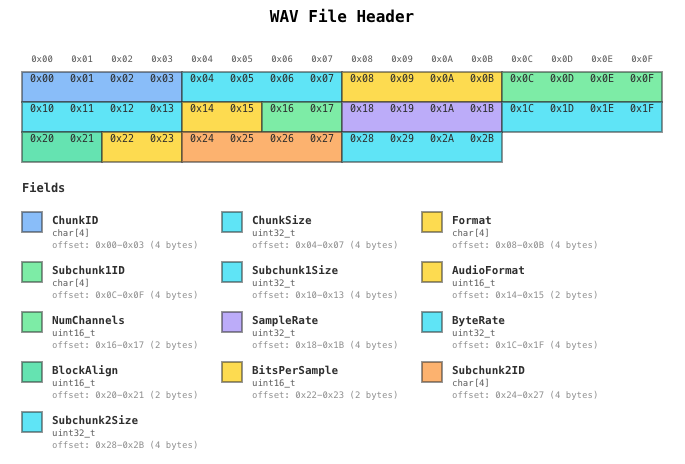
WAV File Header
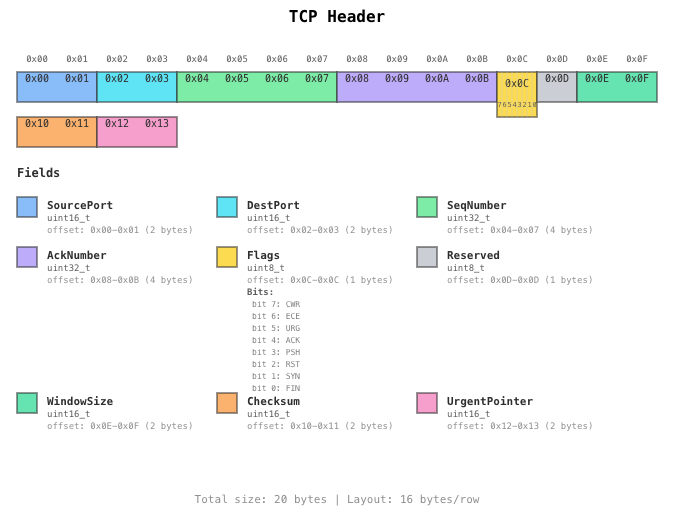
TCP Header with Bitfields
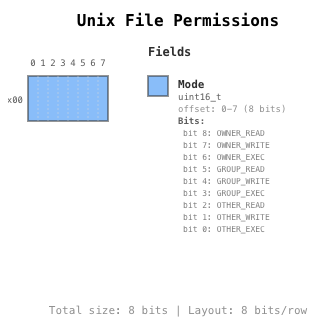
Unix File Permissions with Bitfields
🚀 Installation
From Obsidian Community Plugins (Recommended)
- Open Obsidian Settings
- Go to Community Plugins and disable Safe Mode
- Click Browse and search for "ByteGrid"
- Click Install, then Enable
Manual Installation
- Download the latest release from GitHub Releases
- Extract
main.js,manifest.json, andstyles.cssinto your vault's.obsidian/plugins/bytegrid/folder - Reload Obsidian
- Enable the plugin in Settings → Community Plugins
📖 Usage
Basic Example
Create a code block with the bytegrid language tag:
```bytegrid
name: Simple Structure
size: 16
layout: 16

fields:
  - offset: 0-3
    name: ID
    type: uint32_t
  - offset: 4-7
    name: Timestamp
    type: uint32_t
  - offset: 8-11
    name: Value
    type: float
  - offset: 12-15
    name: Checksum
    type: uint32_t
```
Configuration Options
name: Structure Name        # Required: Name of the structure
size: 16                    # Required: Total size in bytes
layout: 16                  # Optional: Bytes per row (default: 16)
layoutUnit: byte            # Optional: 'byte' or 'bit' (default: byte)

# Color Options
autoColor: true             # Optional: Auto-assign colors (default: true)
colorScheme: default        # Optional: 'default', 'dark', or 'light'

# Legend Options
legendPosition: right       # Optional: 'right', 'left', 'bottom', 'none'
legendColumns: 1            # Optional: Number of columns in legend (default: 1)

# Other Options
showFooter: true            # Optional: Show footer (default: true)

fields:
  - offset: 0-3             # Required: Byte range (SSOT)
    name: FieldName         # Required: Field name
    type: uint32_t          # Required: Data type
    color: blue             # Optional: Explicit color
    description: "..."      # Optional: Description
    endianness: little      # Optional: 'little' or 'big'
    bitfields:              # Optional: Bit-level fields
      - name: Flag1
        bits: "0-3"
        description: "..."
Supported Data Types
Integer Types:
char,int8_t,uint8_tint16_t,uint16_t,shortint32_t,uint32_t,intint64_t,uint64_t,long
Floating Point:
float,double
Arrays:
char[4],uint8_t[16], etc.
Special:
reserved,padding(always gray)
Color Palette
When autoColor: true (default), fields cycle through these colors:
- 🔵 blue
- 🔷 cyan
- 🟡 yellow
- 🟢 green
- 🟠 orange
- 🟣 purple
- 🟢 mint
- 🩷 pink
📚 Examples
Check the examples folder for more:
- WAV audio file headers
- TCP/IP headers with bitfields
- ELF binary formats
- Unix file permissions
- CPU flags registers
🛠️ Development
For Plugin Development
# Install dependencies
npm install

# Build all packages
npm run build

# Run tests
npm run test

# Development mode (watch)
cd packages/obsidian-plugin
npm run dev
Project Structure
bytegrid/
├── packages/
│   ├── core/              # Core rendering engine
│   └── obsidian-plugin/   # Obsidian plugin wrapper
└── examples/              # Example files
🤝 Contributing
Contributions are welcome! Please feel free to submit a Pull Request.
Development Guidelines
- Follow Test-Driven Development (TDD)
- Write tests before implementation
- Use TypeScript strict mode
- Follow existing code style (ESLint + Prettier)
Key Design Principles
- offset is SSOT - Field size calculated from offset ranges
- No magic numbers - Use constants for layout values
- Dynamic sizing - Calculate dimensions from content
- Explicit padding - Use
reservedorpaddingtypes
📝 License
MIT License - see LICENSE for details
🙏 Acknowledgments
Built with:
- Obsidian API
- js-yaml
- TypeScript & esbuild
📮 Support
Made with ❤️ for the Obsidian community