
README file from
GithubBring to Front
Automatically bring the Obsidian window to the front when a popup or notice appears
English · 简体中文



What it does
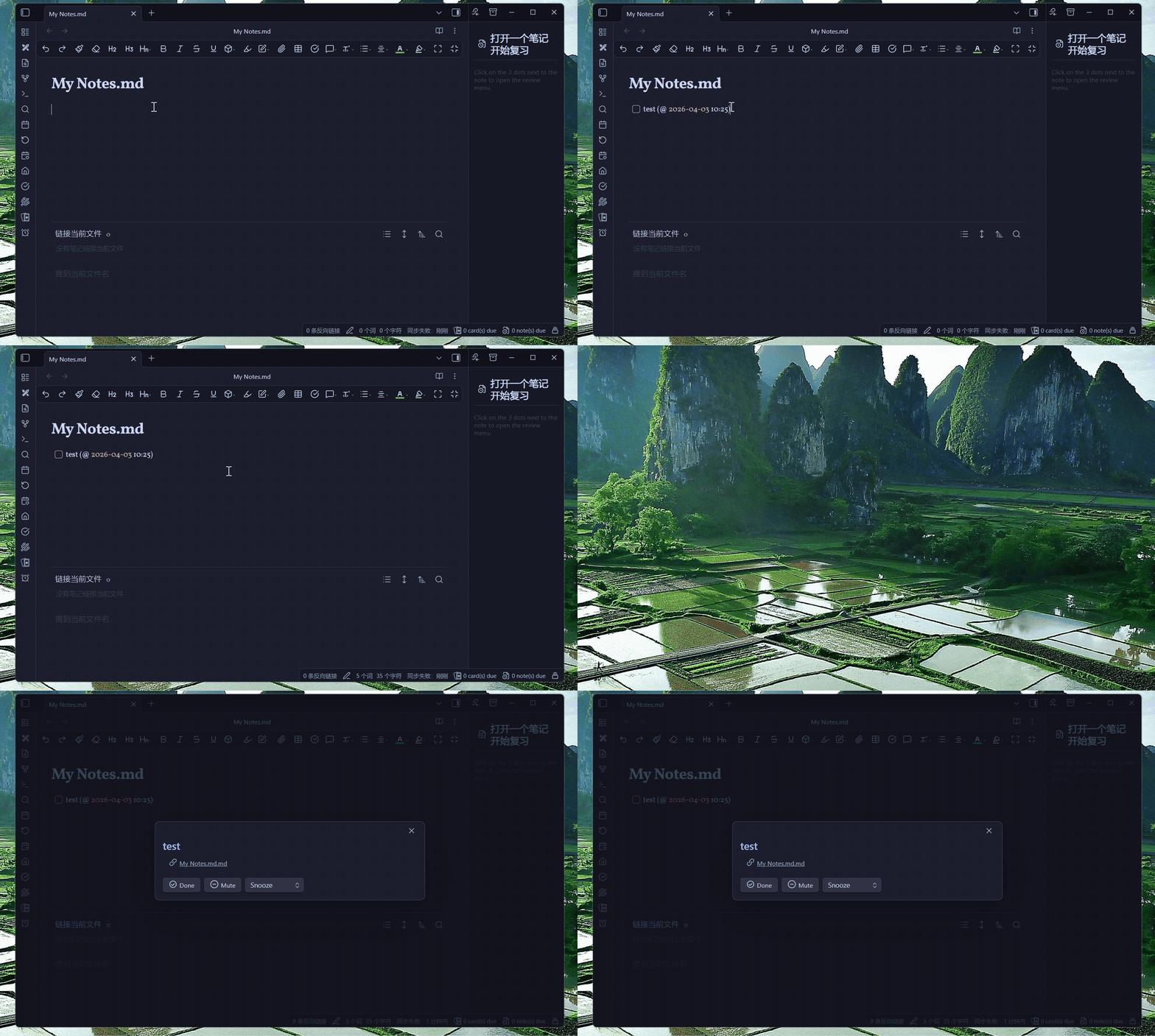
Obsidian's reminders, sync warnings and plugin notices all appear inside its own window. If you're working in a browser or an editor at the time, they come and go without you ever seeing them — Obsidian has no way to get your attention. This plugin gives it one.
It works the moment you enable it — no setup, no keywords, nothing to configure. If you want, you can later filter what triggers it (see Settings).
Desktop only (Windows / macOS / Linux). It uses Electron window APIs and does not run on mobile. Requires Obsidian 1.8.7 or newer.
Installation
From Obsidian (recommended)
- Open Settings → Community plugins.
- Turn off Restricted mode, then click Browse.
- Search for Bring to Front, then Install and Enable.
Or open the community plugin page directly.
Manual
-
From the latest release, download
main.jsandmanifest.json. -
Put both files into this folder (create it if it doesn't exist):
YourVault/.obsidian/plugins/bring-to-front/ -
Reload Obsidian, then enable the plugin in Settings → Community plugins.
Usage
There's nothing to set up — once enabled, it just works. Worth knowing: when the window already has focus it does nothing, so it never steals focus from itself while you're typing.
Example: never miss a reminder
A great pairing is with reminder plugins like Reminder or Tasks, so a reminder never stays hidden while you work in another app:
-
Keep the default settings — no keywords needed.
-
Create a task with a due time, for example using the Reminder plugin syntax:
- [ ] Submit report (@2026-06-09 14:30) -
Switch to another app.
-
When the reminder pops up, Obsidian comes to the front automatically.
Getting pulled forward too often? Use Keywords or Watch scope below to limit it to only the popups you care about.
Settings (all optional)
Open Settings → Community plugins → Bring to Front. The defaults work well for most people; change these only if you want to fine-tune.
| Setting | What it does | Default |
|---|---|---|
| Language | Interface language | Auto-detect |
| Keywords | Only trigger when the popup text contains one of these comma-separated words (case-insensitive). Empty = any popup. | Empty |
| Watch scope | What to watch: Modals (dialogs), Notices (toasts), both, or a custom CSS selector | Modals & notices |
| CSS selector | Your own selector (shown only when Watch scope = Custom) | Empty |
| Focus cooldown | Minimum seconds between two bring-to-front actions, so it doesn't interrupt repeatedly. 0 = no cooldown | 5 seconds |
| Quiet hours | Stay out of the way during a time range you choose. Ranges may span midnight. | Off (22:00–08:00) |
| Debug mode | Print match details to the console (Ctrl+Shift+I) | Off |
Quiet hours
Turn this on and pick a start and end time to stop the window from jumping in front of you at night. Nothing is suppressed except the window raise — modals and notices still appear in Obsidian exactly as usual, so anything that arrives during quiet hours is waiting for you when you switch back.
Ranges that cross midnight work as you'd expect: 22:00–08:00 covers the whole night. The start time counts as inside the range and the end time as outside, so 22:00–08:00 and 08:00–22:00 divide the day with no overlap and no gap.
Filtering examples (optional)
| Goal | Keywords | Watch scope |
|---|---|---|
| Bring to front on anything (default) | (empty) | Modals & notices |
| Only reminder dialogs | snooze, done |
Modals |
| Only error / sync toasts | error, failed |
Notices |
| A specific plugin's popup | (empty) | Custom: [data-type="my-plugin"] |
Tip: use a short cooldown (1–30 s) for things you want to see right away, or a longer one (≥ 120 s) if it feels intrusive.
How it works
Bring to Front watches the Obsidian window for new popups and notices. When one appears while the window is in the background (and matches your optional keywords/scope), it raises the window via Electron's window APIs — restore if minimized, show if hidden, briefly pin on top, then focus. If the window is already focused, it stays out of the way.
Troubleshooting
| Problem | Try this |
|---|---|
| Pops up too often | Increase Focus cooldown, or add Keywords to narrow what triggers it. |
| Interrupts at night | Turn on Quiet hours and set a range such as 22:00–08:00. |
| Doesn't pop up | Make sure Obsidian is actually in the background; clear Keywords and set Watch scope to "Both"; confirm the popup text matches your keywords. |
| Want to see what happens | Enable Debug mode, open the console (Ctrl+Shift+I), and watch for [Bring to Front] messages. |
Development
git clone https://github.com/rockbenben/bring-obsidian-to-front.git
cd bring-obsidian-to-front
npm install
npm run dev    # watch build
npm run lint   # same rules the Obsidian plugin review bot runs
npm run build  # type-check + lint + production build
Contributing
Issues and suggestions are welcome on GitHub.
About the 365 Open Source Plan
Project #005 of the 365 Open Source Plan — one person + AI, 300+ open-source projects in a year. Submit your idea → · Discord · Telegram