
README file from
GithubCollapsing Group Table
A Bases Table view that supports collapsable grouping.
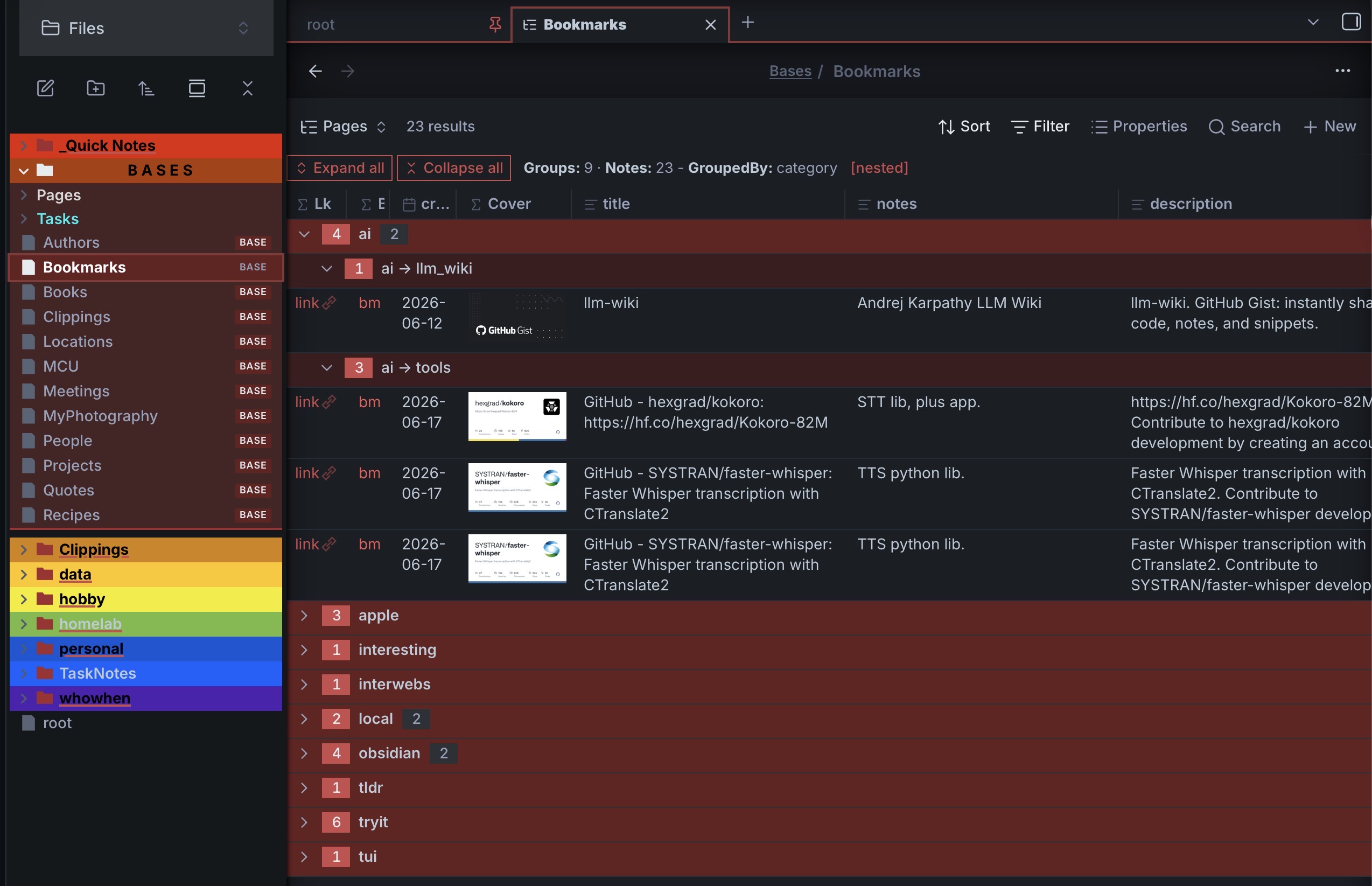
A Bases Table view for Obsidian that turns grouped results into a collapsible tree — fold and unfold groups like branches, optional support for nested hierarchical groups from a single /-delimited property, and edit your notes inline.
It adds a new Bases type that can be use in places of the Obsidian Bases Table view with one that supports collapsable row groups based off GroupBy column set in the Bases configuration. It also supports optional nested categories, for example: ”research/medical” and a number of new useful behaviors (example: accordion) . It tries to be a drop-in replacement for the Obsidian Bases Table view… tries to be (since Obsidian did not provide an extendible BaseTable object, several things had to be code from scratch, so somethings may vary).
Requirements
- Obsidian
(ver >= 1.10.2)— the Bases core plugin must be available.
Installation
Community plugin
Search for Collapsing Group Table in Settings → Community plugins → Browse.
BRAT (beta)
- In Obsidian, install and enable BRAT (Settings → Community plugins → Browse).
- Settings → BRAT → Add beta plugin.
- Enter the repository
ghyatt/bases-collapsing-group-tableand click Add Plugin. - Enable Collapsing Group Table under Settings → Community plugins.
Usage
- Create or open a Base.
- Add a view and choose Collapsing group table.
- Set a Group by property in the Base's view options — this becomes the foldable branch.
- Click a group header (or its chevron) to fold/unfold it.
If no Group by is set, the view renders as a plain table. Which rows appear, the column order, and the sort all come from the Base's own settings.
Collapsing & groups
- Click a group header — collapse or expand that group; closing a group also closes its sub-groups.
- Expand all / Collapse all — buttons in the control bar (which also shows Groups, Notes, the GroupedBy property, and a
[nested]tag). - Accordion mode — expanding one top group collapses the others (only one open at a time).
- Start with groups collapsed — open with everything folded.
- Group headers show an entry-count badge, and a sub-group count badge when a group has more than one sub-group.
Nested groups (hierarchical / values)
Turn on Sub-group repeated values (nested groups) and any group value containing / is split into a nested tree, to arbitrary depth. For example, grouping by a category whose values are ai/llm_wiki, ai/tools, obsidian/plugin produces:
▾ ai
   ▾ ai → llm_wiki
   ▾ ai → tools
▾ obsidian
   ▾ obsidian → plugin
When opening a group controls what the sub-groups do on open (and on initial load): open the first sub-group, all of them, or none.
Inline editing
Click a cell backed by a note property to edit it; changes are written to the note's frontmatter.
- Checkbox — boolean properties render an editable checkbox.
- Text — opens a multi-line editor sized to the row height.
- Number / Date — single-line editors (date uses a date picker).
- Tags / link lists — items render as native tag pills / clickable links, each with a × to remove; click the cell to add more, with autocomplete of existing vault tags or pages.
- File name renders as a clickable link to the note.
Layout
- Row height — Short / Medium / Tall / Extra tall (1 / 3 / 6 / 12 lines) or Dynamic; image cells scale to match.
- Resizable columns — drag a column header's right edge; double-click it to auto-fit. Widths are shared with the built-in Table view (
columnSize). - Headers show a type icon, the column name, and the current sort direction arrow.
- Date format — optionally format date cells with moment tokens (e.g.
YYYY-MM-DD).
Your fold state and column widths are saved into the .base file, so they survive reloads.
Configuration
All options are set from the Base view configuration menu.
| Option | Default | Description |
|---|---|---|
| Row height | Short | Short / Medium / Tall / Extra tall / Dynamic. |
| Accordion mode | off | Expanding a top group collapses the others. |
| Start with groups collapsed | off | Open with all groups folded. |
| Show entry count on group headers | on | Show the entry-count badge. |
| Sub-group repeated values (nested groups) | off | Split /-delimited group values into a nested tree. |
| When opening a group | First sub-group | On open, expand the first / all / no sub-groups. |
| Date format | (Obsidian default) | moment.js tokens applied to date cells. |
License
MIT — provided as is. File bugs or feature requests on GitHub.
Bugs
- Please reports any issues at the GitHub issues for Obsidian Collapsable Table Base