
README file from
GithubAudio Recording Timer
Start Obsidian’s core audio recording with a rounded end time, and stop it automatically when time is up.
Usage
- Click the plugin’s timer icon in the left ribbon.
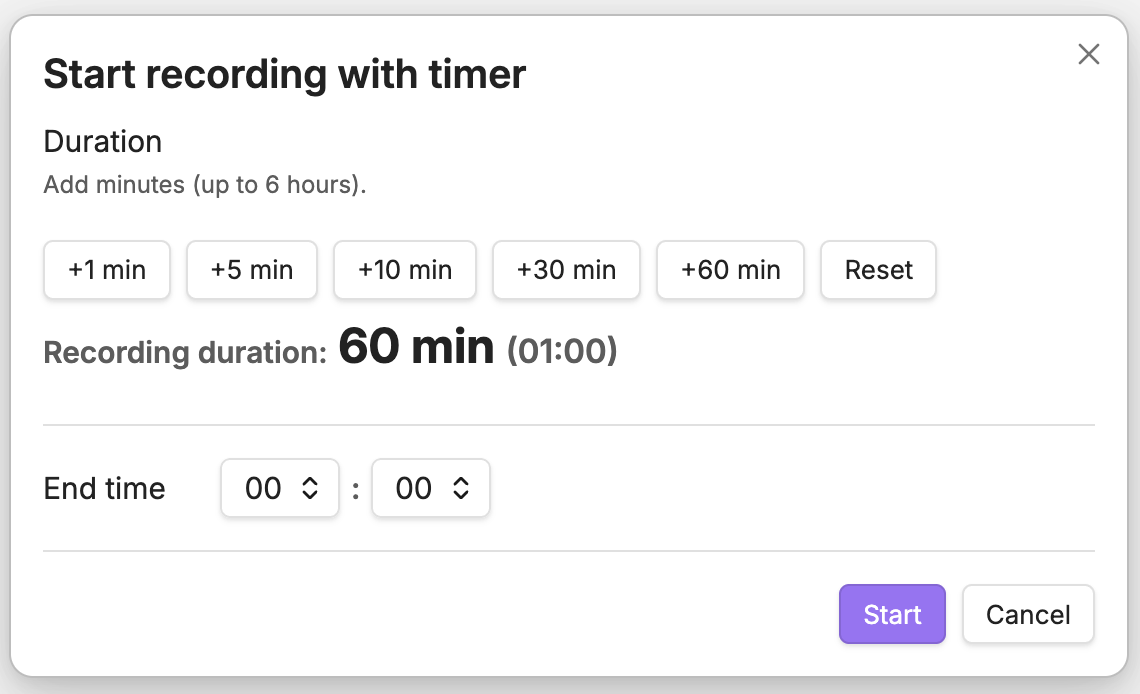
- Choose a Quick end time.
- Optionally use Add time to move the selected end time later.
- Confirm or edit the final End time. Use Reset to clear the selection.
- Click Start.
Quick end-time choices start at the first 15-minute clock boundary at least 15 minutes from now and cover approximately two hours by default. In Settings → Audio Recording Timer, you can extend the range in 30-minute increments up to 5 hours 30 minutes.
While recording:
- Click the plugin’s timer icon again to stop now or extend.
- Remaining time is shown in the status bar (desktop).
Requirements
- Obsidian core plugin Audio recorder must be enabled.
By default, this plugin uses:
- Start:
audio-recorder:start - Stop:
audio-recorder:stop
You can change them in Settings → Audio Recording Timer if needed.
Notes
- To “unify” the UI, you can hide the core recorder’s ribbon icon from Obsidian (right-click the ribbon icon and hide it).
- Auto-stop uses best-effort timing. If the OS suspends Obsidian (e.g., sleep), the stop is executed immediately after the app resumes.
Disclosures
- No payment or account required.
- No network use.
- No ads or telemetry.
- Uses your device microphone via Obsidian’s core Audio recorder plugin. Recorded files are created by Obsidian inside your vault according to your attachment settings.
Development
This repo can auto-deploy the built files into your vault’s plugins folder after each successful build.
- Copy
.env.exampleto.envand setOBSIDIAN_PLUGINS_DIR. - Run
npm run dev(watch) ornpm run build(production).
License
- Source code: MIT (see
LICENSE). - Third-party assets: see
THIRD_PARTY_LICENSES.md.