
README file from
GithubAtomic for Obsidian
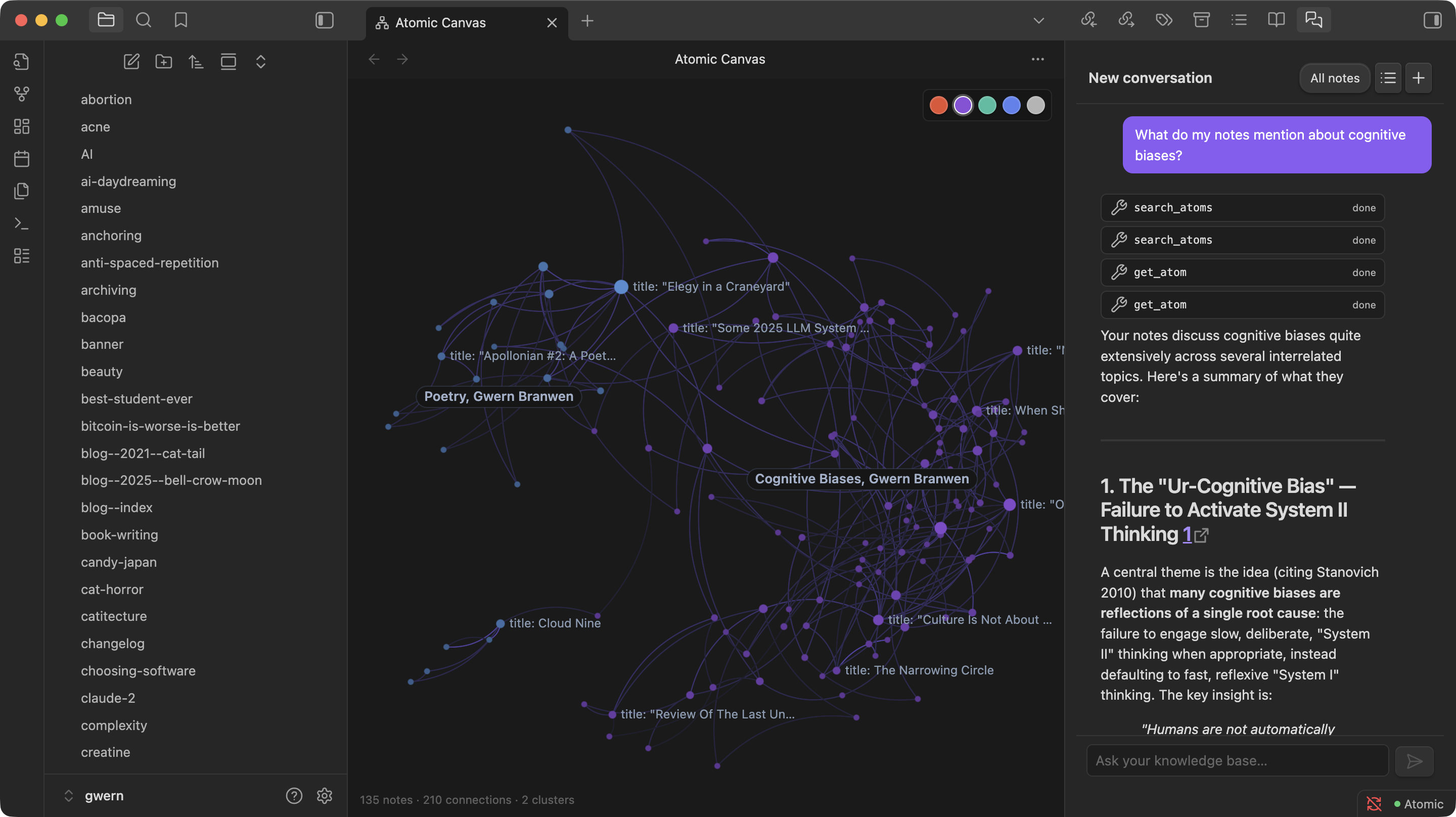
Turn your vault into a semantically-connected, AI-augmented knowledge graph. Atomic syncs your notes to an Atomic server and gives you semantic search, similar-note discovery, AI-generated wiki articles, an agentic chat over your notes, and a spatial knowledge-graph canvas — all from inside Obsidian.
What you get
- Semantic search — find notes by meaning, not keywords. Hybrid keyword + vector search with snippet previews.
- Live sync — notes sync to Atomic in the background as you write, with content hashing to skip unchanged files.
- Similar notes — a sidebar that surfaces the most semantically related notes to whatever you're editing.
- Wiki articles — LLM-synthesized summaries organized by your tag hierarchy, with inline citations back to source notes.
- Chat — an agentic RAG assistant that searches your vault mid-conversation. Scope to a tag or go vault-wide.
- Knowledge-graph canvas — a spatial, force-directed view of your notes and how they connect.
Requirements
You need a running Atomic server that your vault can reach. You have two options:
- Atomic desktop app — install Atomic on the same machine. It runs a local server automatically; copy an API token from its settings.
- Self-hosted server — run
atomic-serveron your machine or a server you control. See the main repo for setup.
Atomic needs an LLM provider (OpenRouter or a local Ollama) configured on the server side for embedding, tagging, wiki generation, and chat.
Install
From Community Plugins (recommended once published):
- Open Obsidian → Settings → Community plugins → Browse
- Search for "Atomic" and install
- Enable the plugin
Manual install:
- Download
manifest.json,main.js, andstyles.cssfrom the latest release - Copy them to
<vault>/.obsidian/plugins/atomic/ - Reload Obsidian and enable Atomic in Community plugins
First-run setup
When you enable the plugin, a setup wizard walks you through three steps:
- Connect — paste your server URL (e.g.
http://localhost:8080) and API token, then press Test Connection. - Index — upload your existing notes. Progress bars show upload, embedding, and auto-tagging. You can continue in the background at any time.
- Done — shortcuts for the main features are shown. Close the wizard and you're ready.
You can re-open the wizard any time via the command palette: Atomic: Setup Wizard.
Commands
| Command | What it does |
|---|---|
| Atomic: Semantic Search | Hybrid semantic + keyword search over your vault |
| Atomic: Sync Current Note | Upload the active note immediately |
| Atomic: Sync Entire Vault | Batch-upload every note, skipping unchanged files |
| Atomic: Toggle Auto Sync | Turn background sync on/off |
| Atomic: Open Similar Notes | Show the similar-notes sidebar |
| Atomic: Open Wiki | Browse AI-generated wiki articles by tag |
| Atomic: Open Chat | Agentic chat grounded in your notes |
| Atomic: Open Knowledge Graph Canvas | Spatial graph of your notes |
| Atomic: Setup Wizard | Re-run first-run onboarding |
Settings
Open Settings → Atomic to configure:
| Setting | Default | Notes |
|---|---|---|
| Server URL | http://localhost:8080 |
Where your Atomic server is reachable |
| API Token | — | Create via the Atomic app or atomic-server token create |
| Database | default |
For multi-database setups; leave empty for the default |
| Vault Name | your vault folder | Used in source URLs (obsidian://VaultName/path.md) |
| Auto Sync | off | Sync on create/modify/delete/rename |
| Sync Debounce | 2000ms |
Delay after the last edit before syncing |
| Folder Tags | off | Convert folder structure into hierarchical tags |
| Delete on Remove | off | Delete remote atoms when files are removed locally |
| Exclude Patterns | .obsidian/**, .trash/**, .git/**, node_modules/** |
Glob patterns to skip |
Privacy & data handling
- Notes you sync leave your vault. They are sent to the Atomic server you configure, which in turn sends them to the LLM/embedding provider configured on that server (OpenRouter or a local Ollama).
- The API token is stored in plaintext in
<vault>/.obsidian/plugins/atomic/data.json, per Obsidian's plugin-data model. Treat the token like a password and avoid committing your.obsidian/folder to public repos. - Your data stays under your control when you self-host Atomic and pair it with a local Ollama — nothing leaves your machine.
- Excluded paths (
.obsidian/,.trash/,.git/,node_modules/, plus anything you add) are never uploaded.
Troubleshooting
- "Connection failed" — confirm the server is running and reachable at the configured URL, and that the token is valid.
- Notes aren't syncing — check that Auto Sync is on, or run Atomic: Sync Current Note manually. Files matching an exclude pattern won't sync.
- Similar notes / wiki is empty — embedding and tagging run asynchronously after upload. Give large vaults a few minutes to finish the pipeline.
- Mobile — the plugin is marked desktop-friendly; mobile support depends on your server being reachable from the device.
Development
cd plugins/obsidian-plugin
npm install
npm run dev      # Watch mode
npm run build    # Type-check + production bundle
For live testing, symlink the plugin into a test vault:
ln -s "$(pwd)" /path/to/vault/.obsidian/plugins/atomic
Source files (all in src/):
main.ts— plugin entry, command registration, view registrationatomic-client.ts— HTTP client foratomic-serverws-client.ts— WebSocket subscriber for pipeline eventssync-engine.ts/sync-state.ts— file-watching, hashing, uploadonboarding-modal.ts— setup wizardsettings.ts— settings tabsearch-modal.ts,similar-view.ts,wiki-view.ts,chat-view.ts,canvas-view.ts— feature UI
Issues & contributions
Report bugs and feature requests at github.com/kenforthewin/atomic/issues. PRs welcome.
License
MIT.