
README file from
GithubOverview
An Obsidian plugin that autonomously scans your vault for untagged image assets and leverages a local Vision-Language Model (VLM) to generate structured markdown sidecar files. Perfect for creative professionals, artists, and researchers looking to weave their visual libraries into their knowledge graphs without relying on cloud APIs.
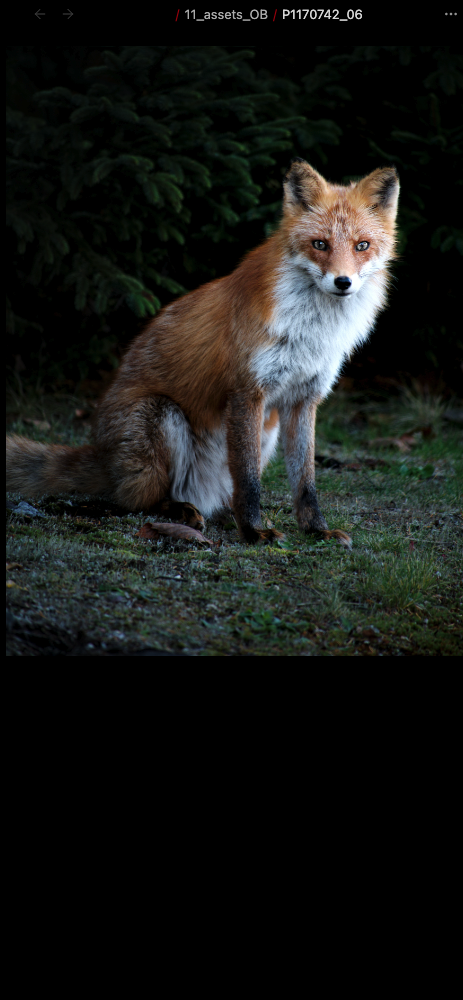
Visual Comparison (Before vs. After)
| Before (Image Only) | After (Weaved Metadata) |
|---|---|
 |
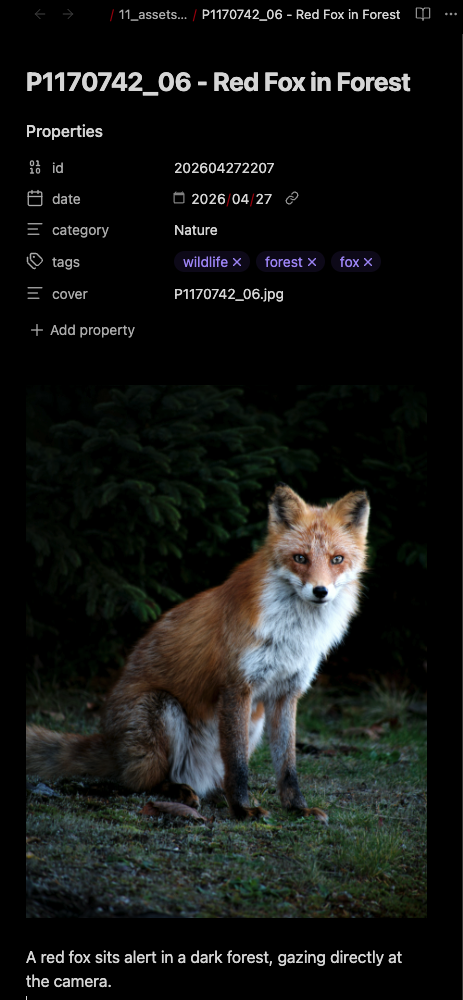 |
📂 See the Library-Scale Transformation guide for before/after directory screenshots.
System Workflow
flowchart TD
    %% Nodes
    Start([Run AssetWeaver])
    GetFiles["Scan target folder in Vault"]
    Skip["Skip files with existing sidecars"]
    FilterImages{"Are there untagged images?"}
    LoopStart["Process Next Image"]

    ReadBinary["Read image file binary"]
    CheckEmpty{"Is file empty (0-byte)?"}
    ErrorNotice["Show corrupted file notice & skip"]

    Resize["HTML5 Canvas: Resize to max 768px & compress to JPEG"]
    ScanBacklinks["Scan Vault markdown files for link/embed references"]

    CallVLM["Call VLM API chat/completions with resized base64 image"]
    CleanJSON["Sanitize unescaped quotes & parse JSON"]

    FormatMD["Format YAML frontmatter & markdown content"]
    CreateFile["Create sidecar markdown file: Basename - Title.md"]

    Delay["Wait 1000ms delay"]
    Finished([Batch processing complete!])

    %% Connections
    Start --> GetFiles
    GetFiles --> Skip
    Skip --> FilterImages
    FilterImages -- "No" --> Finished
    FilterImages -- "Yes" --> LoopStart

    LoopStart --> ReadBinary
    ReadBinary --> CheckEmpty
    CheckEmpty -- "Yes (Corrupted)" --> ErrorNotice
    CheckEmpty -- "No (Valid)" --> Resize

    Resize --> ScanBacklinks
    ScanBacklinks --> CallVLM
    CallVLM --> CleanJSON
    CleanJSON --> FormatMD
    FormatMD --> CreateFile

    CreateFile --> Delay
    Delay --> LoopStart

    ErrorNotice --> LoopStart

    %% Styling and colors
    classDef trigger fill:#e8f4fd,stroke:#2b82c9,stroke-width:2px,color:#0b2e4b;
    classDef process fill:#f3f3f3,stroke:#666666,stroke-width:1px,color:#333333;
    classDef decision fill:#fff9e6,stroke:#d4a017,stroke-width:2px,color:#5c4308;
    classDef external fill:#fbf0f0,stroke:#c0392b,stroke-width:1px,color:#781e1e;
    classDef success fill:#eafaf1,stroke:#27ae60,stroke-width:2px,color:#145a32;

    class Start trigger;
    class GetFiles,Skip,LoopStart,ReadBinary,Resize,ScanBacklinks,CleanJSON,Delay process;
    class FilterImages,CheckEmpty decision;
    class ErrorNotice,CallVLM external;
    class CreateFile,Finished success;
Features
- Automated Metadata Generation: Analyzes images to generate a descriptive title, category, keywords, and a short description.
- Sidecar Markdown Creation: Creates a markdown note alongside your image containing the generated YAML frontmatter, making your images searchable and easily queryable in Obsidian.
- Backlink Extraction: Automatically detects and lists other notes in your vault that embed or link to the image.
- Privacy First (Local AI): Designed to work seamlessly with local LLM/VLM servers like LM Studio or Ollama, ensuring your assets never leave your machine.
- Batch Processing: Scans your designated asset folder and processes all untagged images sequentially to manage server load.
💡 Pro tip: See how to create Dataview galleries from your tagged assets — query by tags, categories, and more.
Prerequisites
This plugin requires an OpenAI-compatible API endpoint that supports Vision capabilities. We highly recommend using a local VLM for privacy and cost-efficiency.
Recommended Local Setup (LM Studio)
- Download and install LM Studio.
- Search and download a Vision-Language Model (e.g.,
qwen2-vl-7b-instructorllava). - Load the model and go to the Local Server tab (
<->). - Click Start Server. Note the port number (default is usually
1234).
Installation
Manual Installation (Current)
- Download the latest release (
main.js,manifest.json,styles.css) from the Releases page. - Create a folder named
asset-weaverin your vault's.obsidian/plugins/directory. - Place the downloaded files into that folder.
- Reload Obsidian and enable the plugin in Settings -> Community plugins.
Configuration
Go to Obsidian Settings -> AssetWeaver Settings to configure the plugin:
- API Base URL: The endpoint of your local server. For LM Studio, use
http://localhost:1234/v1. For Ollama, usehttp://localhost:11434/v1. - Model Name: The exact name of the model you have loaded (e.g.,
qwen2-vl:7b). - API Key: A dummy key (e.g.,
lm-studio) for local servers, or your actual API key if using a remote service. - Target Folder: The path to the folder in your vault where your images are stored (e.g.,
11_assets_OB).
How to Use
- Ensure your local VLM server is running.
- Place your image files (
.jpg,.png,.webp, etc.) into your designated Target Folder. - Click the "Run AssetWeaver" ribbon icon on the left sidebar, or open the Command Palette (
Ctrl/Cmd + P) and run "Scan and weave new assets". - The plugin will scan the folder for images that do not have a corresponding markdown sidecar file.
- It will process the new images sequentially, generating detailed markdown files with YAML metadata right next to your images.
Troubleshooting & Technical Details
During the development of this plugin, several edge cases were identified and resolved to ensure enterprise-grade stability:
1. VLM Memory Overload & Connection Timeouts
Issue: Sending raw, high-resolution images (e.g., 4K photos or large screenshots) converted to Base64 resulted in massive payload sizes (7MB+). This frequently caused the local VLM server (LM Studio) to crash due to out-of-memory (OOM) errors or connection timeouts.
Solution: Implemented an internal HTML5 <canvas> API resizer. Before sending any request, the plugin automatically scales images down to a maximum of 768px and compresses them to JPEG. This reduces the payload size to mere kilobytes, ensuring rapid, stable inference without freezing the user's machine.
2. Malformed JSON from VLMs (Unescaped Quotes)
Issue: When analyzing screenshots containing text, VLMs often attempt to quote the extracted text directly in the JSON response (e.g., "description": "A screenshot of a "text" prompt."). This results in unescaped double quotes, causing JSON.parse to fail and the batch process to halt.
Solution: Applied strict prompt engineering explicitly forbidding unescaped double quotes, combined with a custom Regular Expression (jsonString.replace(...)) cleanup step that catches and sanitizes common escaping mistakes before parsing the JSON object.
3. Invisible Corrupted Files (0-Byte Files)
Issue: Synchronization engines (like Syncthing) or clipboard failures sometimes leave invisible 0-byte .png placeholder files in the vault. Attempting to draw an empty blob to the HTML5 Canvas causes the img.onerror event to fire with a non-standard Event object, leading to confusing undefined error logs.
Solution: Added a strict pre-flight check (binary.byteLength === 0). The plugin gracefully catches 0-byte files, skips them safely, and notifies the user directly in the Obsidian UI exactly which file is corrupted.
4. Obsidian API Backlink Limitations for Images
Issue: Using Obsidian's standard app.metadataCache.resolvedLinks API failed to detect links pointing to images, as resolvedLinks only tracks Markdown-to-Markdown links.
Solution: Engineered a custom vault-wide scanner that iterates through all markdown files (app.vault.getMarkdownFiles()) and reads their individual metadata caches (cache.links and cache.embeds). This ensures that every single [[image.jpg]] or ![[image.jpg]] reference is accurately mapped and included in the sidecar's YAML linked_notes array.
License
Origins
AssetWeaver originated from an experimental Python-based image archival workflow initially developed to manage large-scale creative image collections inside Obsidian. That prototype informed the design and architecture of this Obsidian plugin.
AssetWeaver (日本語)
開発の背景
AssetWeaverは、もともとObsidian内の大規模なクリエイティブ画像コレクションを管理するために開発された、実験的なPythonベースの画像アーカイブ・ワークフローに端を発します。そのプロトタイプでの知見が、本Obsidianプラグインの設計とアーキテクチャに活かされています。
特徴
- メタデータの自動生成: 画像を分析し、説明的なタイトル、カテゴリ、キーワード、および一文の説明を生成します。
- サイドカーMarkdownの作成: 画像の隣にYAMLフロントマターを含むMarkdownノートを作成し、Obsidian内での検索やDataviewによるクエリを容易にします。
- バックリンクの自動抽出: Vault内の他のノートからその画像が参照(埋め込み・リンク)されている箇所を自動検出し、リスト化します。
- プライバシー重視(ローカルAI): LM StudioやOllamaなどのローカルサーバーとシームレスに連携。データが外部へ送信されることはありません。
- 一括バッチ処理: 指定したフォルダ内の未処理画像を自動的に検出し、サーバーの負荷を抑えながら順次処理します。
トラブルシューティングと技術的詳細
...
本プラグインの開発過程で、安定性を高めるために解決したいくつかの技術的課題を紹介します:
1. VLMのメモリ負荷とタイムアウト
課題: 高解像度の画像をそのままBase64変換して送信すると、ペイロードが巨大(7MB以上)になり、ローカルサーバーがクラッシュしたりタイムアウトしたりすることがありました。
解決策: HTML5 <canvas> APIを用いた内蔵リサイズ機能を実装。送信前に画像を最大 768px にリサイズ・JPEG圧縮することで、ペイロードを数百KBまで削減し、高速かつ安定した推論を実現しました。
2. AIによるJSON出力の破損(クォーテーション問題)
課題: スクリーンショット内のテキストを読み取る際、AIがJSON文字列内でダブルクォーテーションをそのまま使ってしまい、パースエラーが発生することがありました。 解決策: プロンプトエンジニアリングによってクォーテーションの厳格な使用を指示。さらに、パース直前に正規表現によるクリーンアップ処理を挟むことで、AIの出力ミスを柔軟に吸収します。
3. 0バイトの破損ファイルの処理
課題: 同期エラー等で発生した中身が空(0バイト)の画像ファイルを読み込もうとすると、エラーが発生して処理が止まってしまうことがありました。 解決策: ファイル読み込み時にバイト数チェックを導入。破損ファイルを検知した場合は、ユーザーに通知を出した上で安全にスキップし、他の画像の処理を継続させます。
4. 画像に対するバックリンクの取得制限
課題: Obsidian標準の resolvedLinks APIはMarkdown間のリンクしか保持しておらず、画像へのリンクを検出できませんでした。
解決策: Vault内の全Markdownファイルを走査し、メタデータキャッシュから直接画像への参照を抽出するカスタムスキャナーを構築。正確な linked_notes のリストアップを実現しました。
ライセンス
MIT License