
README file from
GithubObsidian AI Selection Toolbar
中文
一个强大的 Obsidian 插件,为选中的文本提供悬浮 AI 工具栏,集成 AI 驱动的翻译、解释、总结和识词功能,同时支持浏览器内置和 API 双模式的文本朗读。
🚀 快速上手
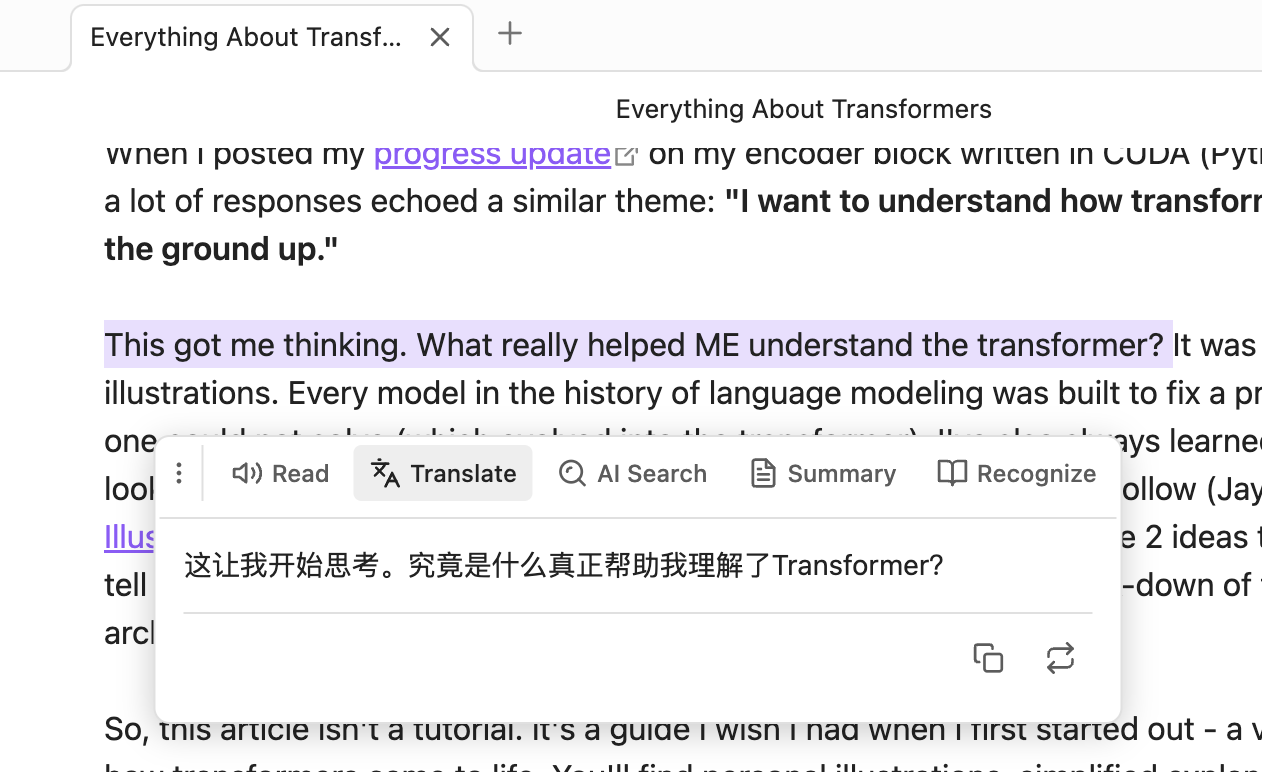
- 选中文本:在编辑器中高亮选择需要处理的文本
- 自动弹出菜单:悬浮菜单会在选中后自动出现(300ms 防抖)
- 点击功能按钮:
- 🔊 朗读:播放文本语音
- 🌐 翻译:获取翻译结果
- 💡 AI 搜索:获取智能解释
- 📄 总结:提取文本要点
- 📖 识词:查看单词音标和例句(仅限单词/短语)
- 拖动菜单:点击手柄图标可自由拖动菜单位置
✨ 核心功能
🔊 智能朗读(TTS)
- 双模式支持
- 🌐 浏览器内置 TTS:无需 API,开箱即用
- ☁️ API 服务:支持 OpenAI TTS 或兼容 API,音质更佳
- 选中文本一键朗读
- 支持语速和音调调节
- 播放/暂停控制
- 自动检测系统可用语音
🌐 AI 翻译
- 流式输出翻译结果,实时查看
- 支持自定义目标语言
- 一键复制或替换原文
- 自定义提示词模板,适配不同翻译风格
💡 AI 搜索(解释)
- 流式输出智能解释
- 快速理解概念、词汇或术语
- 支持自定义输出语言
- 可追加解释到笔记末尾
📄 智能总结
- 流式输出总结内容
- 长文本快速提取要点
- 支持自定义输出语言
- 特色功能:
- 🔄 刷新:重新生成总结
- ⬇️ 插入:将总结插入到选中文本下方
- 📋 复制:复制总结内容
📖 识词(Word Recognition)
- 智能判断:自动识别单词、短语或成语
- 英文:支持单个单词或不超过 5 个单词的短语
- 中文:支持词语或成语(不超过 10 个字)
- 自动过滤句子(包含标点符号的长句)
- 功能展示:
- 📢 发音按钮:点击朗读单词/词组(使用浏览器 TTS)
- 🔤 音标显示:IPA 音标(英文)或拼音(中文)
- 📚 例句展示:AI 生成 2 个实用例句
- 适合语言学习和词汇积累
⚙️ 详细配置
功能开关
所有功能都可以独立开启或关闭:
- ✅ 启用语音朗读
- ✅ 启用翻译
- ✅ 启用 AI 搜索
- ✅ 启用总结
- ✅ 启用识词
TTS 朗读设置
提供商选择
- 🌐 浏览器内置:免费、无需配置、离线可用
- ☁️ API 服务:需要配置 API,音质更好(开发中)
浏览器 TTS 设置(选择浏览器内置时)
- 语音选择:自动检测系统可用语音
- 语速:0.25 - 4.0(默认 1.0)
- 音调:0.5 - 2.0(默认 1.0)
API TTS 设置(选择 API 服务时)
- API URL:TTS API 端点(支持 OpenAI 格式)
- API Key:你的 API 密钥(可选)
- 语音参数:自定义参数,如
voice=alloy&model=tts-1 - 语速:0.25 - 4.0
AI 设置
- API URL: AI API 端点(支持 OpenAI/Ollama 格式)
- API Key: 你的 API 密钥(本地模型可留空)
- Model: 模型名称(如
gpt-3.5-turbo、gpt-4)
翻译设置
- 目标语言: 选择或输入自定义语言(默认:English)
- 提示词模板: 自定义翻译风格,使用
{{targetLanguage}}占位符
解释设置
- 输出语言: 选择或输入自定义语言(默认:中文)
- 提示词模板: 自定义解释风格,使用
{{outputLanguage}}占位符
总结设置
- 输出语言: 选择或输入自定义语言(默认:中文)
- 提示词模板: 自定义总结风格,使用
{{outputLanguage}}占位符
识词设置
- 提示词模板: 自定义识词提示,使用
{{word}}占位符 - 默认返回 JSON 格式:
{ "phonetic": "...", "examples": ["...", "..."] }
📦 安装方法
通过 Obsidian 社区插件(推荐)
- 打开 Obsidian 设置
- 进入「第三方插件」→「浏览」
- 搜索 "AI Selection Toolbar"
- 点击安装并启用
手动安装
- 从 Releases 下载最新版本
- 解压到 vault 的
.obsidian/plugins/ai-selection-toolbar/目录 - 重启 Obsidian
- 在设置中启用插件
📝 API 兼容性
支持的 TTS 提供商(可选,浏览器模式无需配置):
- OpenAI TTS API
- 其他兼容 OpenAI 格式的 TTS 服务
支持的 AI 提供商(必需):
- ✅ OpenAI(GPT-3.5、GPT-4 等)
- ✅ Ollama(本地运行,免费)
- ✅ 其他兼容 OpenAI 格式的 API(如 Azure OpenAI、LiteLLM 等)
推荐配置:
- 零成本方案:浏览器 TTS + Ollama 本地模型(如
llama3) - 高质量方案:OpenAI TTS + GPT-4
🐛 常见问题
- 确保在 Live Preview 或 Source 模式下(阅读模式不支持)
- 检查是否正确选中了文本
- 等待 300ms 防抖时间
- 检查插件是否已启用,至少开启一个功能
- 检查 API URL 是否正确(格式:
https://api.openai.com/v1/chat/completions) - 验证 API Key 是否有效且有足够额度
- 打开开发者控制台(Ctrl/Cmd + Shift + I)查看详细错误信息
- 确保网络连接正常,能访问 API 服务器
- 如果使用 Ollama,确保本地服务已启动(
ollama serve)
- 确认浏览器支持 Web Speech API(Chrome、Edge、Safari 支持)
- 检查系统音量是否开启
- 尝试选择不同的语音(部分语音可能不可用)
- 在设置中测试不同的语音选项
- 检查浏览器是否支持 Web Audio API
- 确认 TTS API 返回的是有效的音频数据(应为 MP3 格式)
- 查看控制台是否有解码错误
- 尝试使用浏览器 TTS 模式作为备选
- 识词功能仅支持单词、短语或成语
- 英文:不超过 5 个单词,不包含句子标点(. ! ? ;)
- 中文:不超过 10 个字,不包含句子标点(,。!?;:等)
- 如果需要解释整句话,请使用「AI 搜索」功能
- 安装 Ollama:https://ollama.ai/
- 下载模型:
ollama pull llama3 - 启动服务:
ollama serve - 插件设置:
- AI API URL:
http://localhost:11434/v1/chat/completions - API Key: 留空(本地模型无需)
- Model:
llama3(或其他已下载的模型)
- AI API URL:
- 某些 API 提供商可能不完全兼容 OpenAI 流式格式
- 尝试更换 AI 模型或 API 提供商
- 检查 API URL 是否正确
- 查看控制台错误日志
🎯 使用场景
- 📖 阅读学习:快速翻译和理解外文文献
- ✍️ 写作辅助:润色翻译、获取同义词解释
- 🌍 语言学习:识词功能查看音标和例句
- 📝 笔记整理:总结长文本、提取关键信息
- 🔊 听力训练:文本朗读,多语言发音练习
🛣️ 开发计划
- 支持更多 TTS 提供商
- 添加历史记录功能
- 支持批量处理
- 自定义快捷键
- 更多语言的 UI 本地化
📄 许可证
MIT License - 详见 LICENSE 文件
💖 支持项目
如果这个插件对你有帮助,欢迎:
- ⭐ 给项目点个 Star
- 🐛 报告 Bug 和建议
- 📢 分享给其他 Obsidian 用户
📮 反馈与建议
English
A powerful Obsidian plugin that provides a floating AI toolbar for selected text, featuring AI-powered translation, explanation, summarization, and word recognition, with dual-mode text-to-speech support (browser-based and API-based).
🚀 Quick Start
- Select Text: Highlight the text you want to process in the editor
- Auto-popup Menu: The floating menu appears automatically after selection (300ms debounce)
- Click Function Buttons:
- 🔊 Read: Play text-to-speech
- 🌐 Translate: Get translation result
- 💡 AI Search: Get intelligent explanation
- 📄 Summary: Extract key points
- 📖 Recognize: View word phonetics and examples (words/phrases only)
- Drag Menu: Click and drag the handle icon to reposition the menu
✨ Key Features
🔊 Smart Text-to-Speech
- Dual Mode Support
- 🌐 Browser Built-in TTS: No API required, works out of the box
- ☁️ API Service: Supports OpenAI TTS or compatible APIs for better quality
- One-click text reading
- Adjustable speed and pitch
- Play/Pause control
- Auto-detect available system voices
🌐 AI Translation
- Streaming translation output with real-time display
- Customizable target language
- One-click copy or replace original text
- Custom prompt templates for different translation styles
💡 AI Search (Explanation)
- Streaming intelligent explanations
- Quick understanding of concepts, terms, or vocabulary
- Customizable output language
- Append explanations to note
📄 Smart Summarization
- Streaming summary output
- Quick extraction of key points from long texts
- Customizable output language
- Special features:
- 🔄 Refresh: Regenerate summary
- ⬇️ Insert: Insert summary below selected text
- 📋 Copy: Copy summary content
📖 Word Recognition
- Smart Detection: Automatically identifies words, phrases, or idioms
- English: Single words or phrases up to 5 words
- Chinese: Words or idioms (up to 10 characters)
- Auto-filter sentences (long texts with punctuation)
- Features:
- 📢 Pronunciation Button: Click to read word/phrase (using browser TTS)
- 🔤 Phonetic Display: IPA notation (English) or Pinyin (Chinese)
- 📚 Example Sentences: AI-generated 2 practical examples
- Perfect for language learning and vocabulary building
⚙️ Configuration
Feature Toggles
All features can be independently enabled or disabled:
- ✅ Enable Text-to-Speech
- ✅ Enable Translation
- ✅ Enable AI Search
- ✅ Enable Summary
- ✅ Enable Word Recognition
TTS Settings
Provider Selection
- 🌐 Browser Built-in: Free, no configuration, works offline
- ☁️ API Service: Requires API configuration, better quality
Browser TTS Settings (When browser built-in is selected)
- Voice Selection: Auto-detect available system voices
- Speed: 0.25 - 4.0 (default 1.0)
- Pitch: 0.5 - 2.0 (default 1.0)
API TTS Settings (When API service is selected)
- API URL: TTS API endpoint (OpenAI format supported)
- API Key: Your API key (optional)
- Voice Parameters: Custom parameters, e.g.,
voice=alloy&model=tts-1 - Speed: 0.25 - 4.0
AI Settings
- API URL: AI API endpoint (OpenAI/Ollama format supported)
- API Key: Your API key (leave empty for local models)
- Model: Model name (e.g.,
gpt-3.5-turbo,gpt-4)
Translation Settings
- Target Language: Select or enter custom language (default: English)
- Prompt Template: Customize translation style using
{{targetLanguage}}placeholder
Explanation Settings
- Output Language: Select or enter custom language (default: Chinese)
- Prompt Template: Customize explanation style using
{{outputLanguage}}placeholder
Summary Settings
- Output Language: Select or enter custom language (default: Chinese)
- Prompt Template: Customize summary style using
{{outputLanguage}}placeholder
Word Recognition Settings
- Prompt Template: Customize word recognition prompt using
{{word}}placeholder - Default returns JSON format:
{ "phonetic": "...", "examples": ["...", "..."] }
📦 Installation
Via Obsidian Community Plugins (Recommended)
- Open Obsidian Settings
- Go to "Community Plugins" → "Browse"
- Search for "AI Selection Toolbar"
- Click Install and Enable
Manual Installation
- Download the latest release from Releases
- Extract to
.obsidian/plugins/ai-selection-toolbar/in your vault - Restart Obsidian
- Enable the plugin in Settings
📝 API Compatibility
Supported TTS Providers (Optional, not needed for browser mode):
- OpenAI TTS API
- Other OpenAI-compatible TTS services
Supported AI Providers (Required):
- ✅ OpenAI (GPT-3.5, GPT-4, etc.)
- ✅ Ollama (local deployment, free)
- ✅ Other OpenAI-compatible APIs (e.g., Azure OpenAI, LiteLLM)
Recommended Configurations:
- Zero-cost: Browser TTS + Ollama local models (e.g.,
llama3) - High-quality: OpenAI TTS + GPT-4
🐛 FAQ
- Ensure you're in Live Preview or Source mode (Reading mode not supported)
- Check if text is properly selected
- Wait for 300ms debounce time
- Check if plugin is enabled and at least one feature is turned on
- Verify API URL is correct (format:
https://api.openai.com/v1/chat/completions) - Ensure API Key is valid and has sufficient quota
- Open developer console (Ctrl/Cmd + Shift + I) to view detailed error messages
- Check network connection and API server accessibility
- If using Ollama, ensure local service is running (
ollama serve)
- Confirm browser supports Web Speech API (Chrome, Edge, Safari supported)
- Check system volume is on
- Try selecting different voices (some voices may be unavailable)
- Test different voice options in settings
- Check if browser supports Web Audio API
- Confirm TTS API returns valid audio data (should be MP3 format)
- Check console for decoding errors
- Try using browser TTS mode as an alternative
- Word recognition only supports words, phrases, or idioms
- English: Up to 5 words, no sentence punctuation (. ! ? ;)
- Chinese: Up to 10 characters, no sentence punctuation (,。!?;:etc.)
- For full sentences, use "AI Search" feature instead
- Install Ollama: https://ollama.ai/
- Download model:
ollama pull llama3 - Start service:
ollama serve - Plugin settings:
- AI API URL:
http://localhost:11434/v1/chat/completions - API Key: Leave empty (not needed for local models)
- Model:
llama3(or other downloaded models)
- AI API URL:
- Some API providers may not be fully compatible with OpenAI streaming format
- Try switching AI model or API provider
- Check if API URL is correct
- Review console error logs
🎯 Use Cases
- 📖 Reading & Learning: Quickly translate and understand foreign literature
- ✍️ Writing Assistance: Polish translations, get synonym explanations
- 🌍 Language Learning: Word recognition for phonetics and examples
- 📝 Note Organization: Summarize long texts, extract key information
- 🔊 Listening Practice: Text reading for multi-language pronunciation practice
🛣️ Roadmap
- Support for more TTS providers
- Add history feature
- Support batch processing
- Custom keyboard shortcuts
- More UI localizations
📄 License
MIT License - See LICENSE file for details
💖 Support the Project
If this plugin helps you:
- ⭐ Star the project
- 🐛 Report bugs and suggestions
- 📢 Share with other Obsidian users