
README file from
GithubAI Organiser for Obsidian
Your notes deserve more than storage. AI Organiser turns Obsidian into a thinking partner — summarize anything, research the web, build presentations, record meetings, sync Kindle highlights, and let AI tag and connect your knowledge. One plugin, 14 providers, works locally or in the cloud.
What does it actually do?
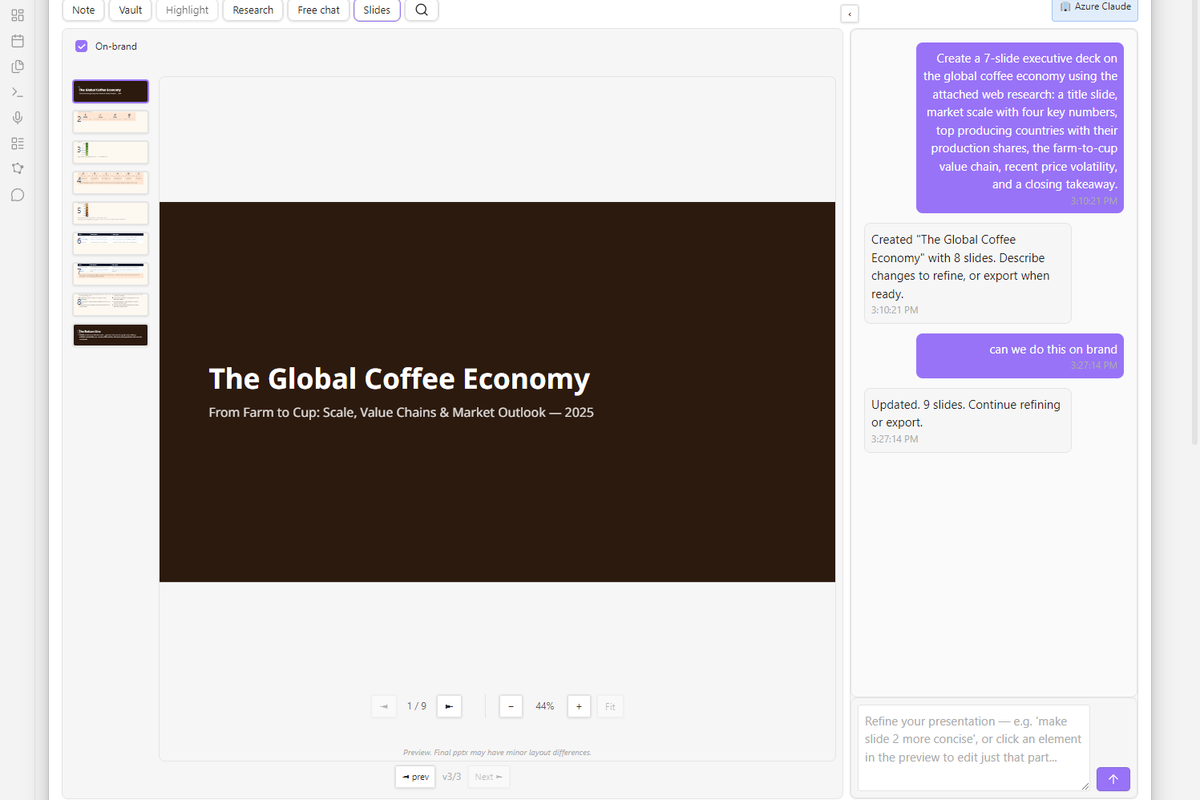
Drop in a URL and get a structured summary with tags — or paste five URLs and get a single synthesized note. Record a meeting and walk away with structured minutes, action items in GTD format, and a Word document ready to send. Ask "what do I know about X?" and get answers grounded in your own vault, with citations. Say "make me a deck about Q3 results" and watch slides appear in a live preview, then export to PowerPoint.
Everything works from a single Command Picker — press one hotkey, browse by category, search by keyword. No menus to memorize.
Highlights
AI Chat — 6 modes, one modal
Chat about your active note, search your vault with semantic RAG, research the web with source scoring and citations, build slide decks in conversation, or just talk. Conversations persist across sessions, support file attachments, and remember context through projects and global memory.
Summarize anything
URLs, PDFs, YouTube videos, audio recordings, Office documents — individually or in bulk. Choose from 5 built-in personas (Student, Executive, Technical, Researcher, Casual) or write your own. Every write shows an inline diff preview so you approve changes before they land.
Web Research
Ask a question and the plugin decomposes it into sub-queries, searches multiple providers, scores source quality, extracts findings, and synthesizes an answer with numbered citations. Academic mode adds DOI extraction and author-year formatting. Budget guardrails stop you from accidentally burning through your API credits.
Presentation Builder
Describe what you want in plain language and watch slides appear in a live, sandboxed preview with a side-rail workspace and thumbnail filmstrip. Chat to refine the whole deck or polish individual slides. Export to editable PowerPoint — native shapes, tables, and charts (2×2 matrices, Harvey balls, waterfalls, line charts, pyramids), not flat images — or to self-contained HTML.
Turn on consultant-quality mode to get a McKinsey/BCG-style workflow: the plugin first drafts a grounded, MECE storyline (action titles, evidence-bound visuals) that you review and sign off on before any slide is designed. Optional brand fidelity reads a brand pack from your vault (colours, fonts, logos, icons) so both PPTX and Word exports come out on-brand and template-ready.
Meeting Minutes
Record audio in-plugin or paste a transcript. Get structured minutes with agenda items, decisions, and action items — optionally classified by GTD context (@office, @call, @errand). Terminology dictionaries keep names and acronyms consistent. Export to Word with one click.
Newsletter Digest
Connect your Gmail via a simple Apps Script. The plugin fetches unread newsletters, triages each one with AI, writes individual notes with key links, and synthesizes a thematic daily brief that groups stories across sources. Optional audio podcast generation reads you the brief.
Audio Narration
Turn any note into a spoken-audio MP3 — "read this note to me" — with an optional LLM pre-pass that summarises diagrams and large tables and expands acronyms for natural listening. A built-in player offers speed and skip controls. Cost is shown and confirmed before any API call.
Intelligent Tagging
Auto-tag notes using your own taxonomy with 3-tier hierarchical tags. Match existing tags, generate new ones, or use a hybrid. Batch-tag entire folders. Visualize your tag network as an interactive D3.js graph.
Semantic Search & RAG
7 embedding providers including a zero-setup local option (no API key needed). Find related notes in a persistent sidebar. Export search results as new notes. Every AI response can be grounded in your vault context.
More features
- 5 modes: auto, handwriting, diagram, whiteboard, mixed
- Built-in sketch pad with pressure-sensitive drawing (perfect-freehand)
- Image compression with backlink-safe vault replacement
- Differential sync (only new highlights)
- 4 highlight styles: blockquote, callout, bullet, plain
- Color grouping and cover images
- AI auto-tagging after import
- Version history and line-level diff view
- Template library (built-in + custom)
- Multi-format export (SVG, PNG, .mermaid, canvas)
- Staleness detection when note content changes
- Convert between 12 diagram types
- Investigation Board — RAG-based related note visualization
- Context Board — map embedded content (YouTube, PDF, web, audio)
- Cluster Board — tag-based grouping with LLM clustering
- 5 color scheme presets + custom colors
- Configurable font family and size
- Flashcard export for Anki and Brainscape
- 20+ target languages
- Smart dispatch: selection > multi-source > full note
- Translate URLs, YouTube, PDFs, documents, and audio
- Quick Peek — fast 1-paragraph triage of any embedded source
- Web Reader — batch URL triage and note creation
- Find Embeds — vault hygiene scan for orphaned assets
- Pending Integration — auto-resolve embedded content
- Obsidian Bases — structured metadata and dashboard generation
Supported Providers
Works with 14 cloud providers and 5+ local options — pick what fits your budget and privacy needs.
| Provider | Example Models |
|---|---|
| Anthropic | Claude Opus 4.6, Sonnet 4.6, Haiku 4.5 |
| OpenAI | GPT-5.4, GPT-4o, o3, o4-mini |
| Google Gemini | Gemini 2.5 Pro, 2.5 Flash |
| DeepSeek | R1, V3 |
| Groq | Llama, Mixtral (fast inference) |
| Mistral | Large, Codestral |
| Cohere | Command R+ |
| Grok | Grok-2 |
| OpenRouter | 200+ models |
| Requesty | Multi-provider routing |
| Amazon Bedrock | Claude, Llama, Titan |
| Google Vertex AI | Gemini models |
| Alibaba (Aliyun) | Qwen models |
| SiliconFlow | Open-source models |
Local: Ollama, LM Studio, LocalAI, Jan, KoboldCpp
Enterprise: Azure AI Foundry — Claude + GPT + embeddings + Whisper under one resource, with flexible per-capability routing (use an Azure deployment, bring your own provider, or off) so any corporate Foundry works without silent fallbacks.
Embeddings: OpenAI, Gemini, Ollama, Cohere, Voyage AI, OpenRouter, Local ONNX (zero-setup, no API key)
Mobile
Works on iOS and Android — cloud providers, touch-optimized modals, audio recording with automatic codec negotiation, RAM-aware indexing.
Languages
English interface. Output language is configurable independently — generated content (summaries, tags, minutes, translations) can target 20+ languages.
Getting Started
- Install — Community Plugins > Browse > search AI Organiser > Install > Enable
- Configure — Settings > AI Organiser > select a provider and enter your API key
- Go — Open the Command Picker (set a hotkey) and explore
- Download
main.js,manifest.json, andstyles.cssfrom the latest release - Create
<vault>/.obsidian/plugins/ai-organiser/ - Copy the three files into the folder
- Reload Obsidian and enable in Settings > Community Plugins
Architecture
See docs/architecture-map.md — a generated
index of every symbol in this repo, grouped by domain, with Mermaid
diagrams. Regenerated on /ship or via npm run arch:render.
Contributing
git clone https://github.com/Lbstrydom/ai-organiser.git
npm install
npm run dev    # watch mode
npm test       # 5700+ unit tests
npm run build  # production
See AGENTS.md for architecture documentation.
License
GPL-3.0 — see LICENSE.
Support & feedback
- 🐛 Found a bug or want a feature? Open an issue — the best way to reach me. Issues are tracked and searchable, so others benefit from the answer too.
- ☕ Enjoying it? Buy me a coffee