
README file from
GithubQuest Journal Theme
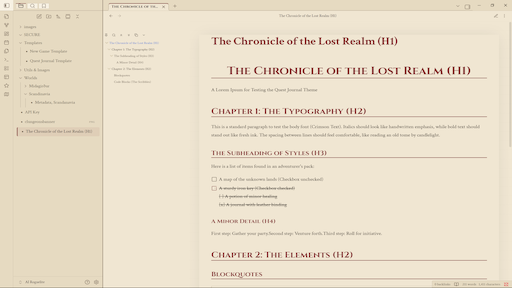
A simple, lightweight theme for Obsidian inspired by quest journals. Whether you're doing a D&D campaign or recording your life's adventures, Quest Journal Theme immerses you in that adventurous spirit.
Overview
Quest Journal transforms your Obsidian vault into an artifact from a fantasy world. It abandons the sterile look of modern note-taking apps in favor of warm parchment, aged leather, and typography that evokes the feeling of hand-written chronicles.Designed for Dungeon Masters, players, world-builders, and anyone who wants their notes to feel like part of a greater story.
Key Features
- Atmospheric Design
- Dual Aesthetics:
- Light Mode (Parchment): Warm, beige tones with rust-red accents, simulating ink on aged paper.
- Dark Mode (Ancient Leather): Deep browns and muted golds, evoking a leather-bound tome read by candlelight.
- Tactile Texture: Subtle paper grain texture overlay adds depth to the reading experience (customizable).
- Immersive Typography: Uses Cinzel for majestic, small-caps headers and Crimson Text for highly readable, serif body text.
- RPG-Focused UIJournal-Style Layout: Content is centered with a comfortable reading width, mimicking the pages of a book.
- Ornamental Elements: Tabs styled as bookmarks. Checkboxes resemble ink-crossed squares. Code blocks appear as hastily scribbled notes with dashed borders, but your code still doesn't look like trash!
- Clean & Focused: Minimalist scrollbars and interface elements ensure the focus remains on your lore and storytelling.
- Customization (Style Settings): This theme supports the Style Settings plugin, allowing you to tweak the adventure to your liking:
- Typography: Switch between the immersive fantasy fonts and standard system fonts for readability.
- Texture: Toggle the paper grain texture on or off.Header Styles: Choose between Solid, Double, Dotted, or No underlines for your headers.
- Colors: Fully customize the background, ink, and accent colors for both light and dark modes.
Installation
Method 1: Obsidian Community Store
- Open Settings > Appearance
- Click Manage next to Themes.
- Search for "Quest Journal".
- Click Install and then Use.
Method 2: Manual Installation
- Download theme.css and manifest.json.
- Navigate to your vault folder: .obsidian/themes/.
- Create a folder named QuestJournal.
- Paste the downloaded files into that folder.
- Select Quest Journal in Obsidian Settings > Appearance.
Created by Jack Lockwood
Utilized code as inspiration for this theme from Tech001 (by Roman Volodin, Github under GNUv2, thus this is licensed under GNUv2 to comply) and ITS Theme (by SlRvb, Github under MIT license)