
README file from
GithubPomme Notes
Latest release: 2.1.1 Updated: 2026-07-02
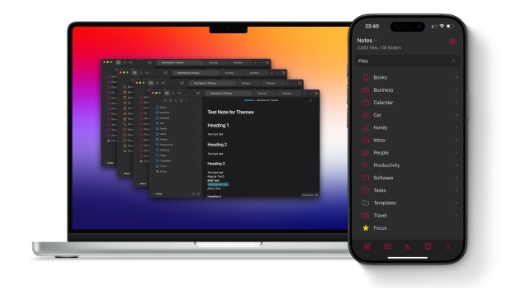
Pomme Notes is a lightweight, subtle theme designed to harmonize with macOS and iOS environments. It strictly adheres to a "Native+" philosophy: keeping the familiar structure of the default Obsidian interface while introducing organic textures, smoother animations, and a modern "Liquid Glass" aesthetic.
If you enjoy the original Obsidian experience but want it to feel more like a native app—with softer contrast and tactile depth—this theme is for you.
Features
- Liquid Glass UI – Flat overlays replaced with translucent, frosted elements that blur the content behind them, adding depth without clutter.
- Quick Switcher and Settings modals float with a native look & feel. All the input prompts feel at home.
- The status bar is transformed into a centered, floating glass capsule.
- Subtle glass highlights and shadows distinguish your active workspace.
- Engineered for long-term readability by avoiding harsh extremes.
- Softened Contrast: Avoids pure white (#ffffff) backgrounds and pure black text. Dark mode uses a deep grey (#191919) with soft silver text (#cccccc) to reduce eye strain.
- Harmonized Accents: Blockquotes, highlights, and checkboxes automatically calculate their colors based on your primary accent hue.
- Smooth Fade-ins for Embedded content (PDFs, images, Canvas minimaps) fades in gently upon loading.
- Updated typography (test mode) – should be easier to read and closer to how Bear Notes works with markdown
The interface feels alive with subtle, non-intrusive animations.
Mobile Optimized Extensive work has been done to ensure the theme feels native on iOS and iPadOS.
- Touch Targets: Larger, friendlier tap targets for file explorers and menus.
- Mobile Glass: The liquid glass effect is optimized for mobile performance, appearing on navigation bars and floating menus.
- Clean Layout: Simplified sidebars and reduced noise on smaller screens.
Plugin Support
Pomme Notes includes dedicated styling for popular plugins:
- Dataview: Optimized tables and lists + unnecessary hover animations removed.
- Calendar: Custom grid styling and indicator dots.
- Ink: Improved integration for handwriting and drawing tools.
- Iconize & Iconic: Native sizing and spacing for custom icons.
Installation
Open Settings > Appearance. Click Manage under Themes. Search for Pomme Notes. Click Install and Use.