
README file from
GithubPhosphor CRT
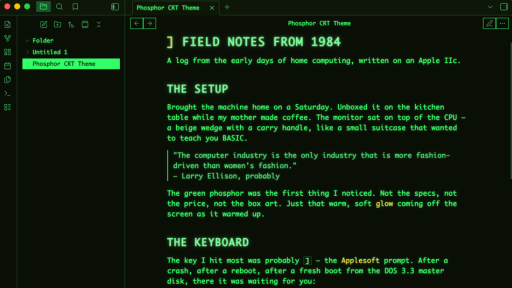
A vintage monochrome theme for Obsidian, inspired by the green phosphor monitors of the early 1980s — the kind that sat on desks connected to Apple IIs, glowing softly in dim rooms.
Full monospace type, chunky UPPERCASE headings with a ] BASIC-prompt prefix, blinking block cursor tuned to the Apple II's ~1.06s refresh, and a soft CRT phosphor glow on text. A paper-terminal light mode, for when you want to pretend you're reading a dot-matrix printout.
Screenshots
(Add screenshots of dark mode and light mode here — recommended 512×288, 16:9)
Installation
From Obsidian (once accepted into the community themes)
- Open Settings → Appearance
- Scroll to Themes, click Manage
- Search for Phosphor CRT
- Click Install and then Use
Manual installation
- Download
manifest.jsonandtheme.cssfrom this repo - Create a folder named
phosphor-crt-themeinside your vault's.obsidian/themes/directory - Place both files in that folder
- In Obsidian, go to Settings → Appearance → Themes and select Phosphor CRT
Features
- Dark mode — green phosphor (#33ff66) on deep near-black, with layered text-shadow glow
- Light mode — "paper terminal" — dark forest green ink on warm cream, no glow, flat and printed-looking
- Monospace everywhere — falls through a stack starting with Monaco, then Menlo, with Print Char 21 (a free Apple II system-font recreation) supported if installed
- UPPERCASE headings with an amber
]prefix on H1, echoing the Applesoft BASIC prompt - Blinking block cursor timed to the Apple II's roughly-1.06-second blink
- Terminal-style selected file — inverted phosphor background with black text, like highlighted text in a BASIC listing
- Flat, zero-radius UI — no rounded corners, because 1984 didn't have them
Recommended fonts
The theme uses your system's monospace fonts out of the box. For the most period-accurate feel, install Print Char 21 — a free pixel-perfect recreation of the Apple II's built-in font. The theme will pick it up automatically.
Compatibility
Tested on Obsidian 1.4+. Works with:
- Core plugins (file explorer, search, outline, bookmarks, command palette, etc.)
- Most community plugins (though some plugins with heavily-styled UI may need adjustment)
Not yet optimized for:
- Canvas view
- Graph view node colors (they work, but may not match the palette)
How this theme was made
This theme was built collaboratively between a human developer and Claude (Anthropic's AI assistant) over the course of an afternoon. The human brought the reference — their first computer was an Apple IIc — along with the taste, quality calls, and direction ("fix the contrast in the left nav," "the selected file text is invisible," "kill the pink panels in settings"). Claude translated those calls into CSS and iterated based on screenshots.
I'm publishing this openly because transparent collaboration with AI tools is worth modeling. The creative decisions here were human. The implementation was a partnership. Both parts matter, and neither alone would have produced this.
Credits
- Inspired by the Apple IIc's Monitor //c (1984) and the broader era of green-phosphor CRT displays
- Apple II, Apple IIc, and Monitor //c are trademarks of Apple Inc. This theme is a tribute, not affiliated with or endorsed by Apple
- The
]prompt prefix is a nod to Applesoft BASIC, Apple II's built-in programming language - Built on the excellent foundation of Obsidian and its customizable CSS variable system
License
MIT — use it, fork it, remix it.
Contributing
Bug reports, screenshots, and PRs welcome. If you find something broken in a core feature or popular plugin, open an issue.