
README file from
GithubMonokai Ristretto Theme for Obsidian
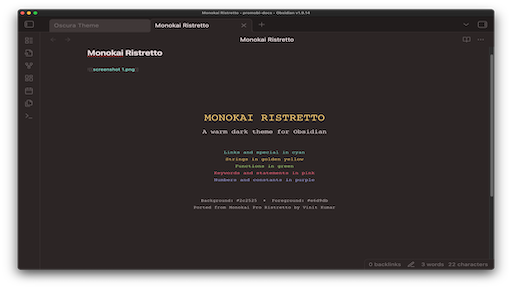
A warm, dark theme for Obsidian, ported from the Monokai Pro Ristretto vim colorscheme.
Features
- Warm Dark Mode: Rich, coffee-inspired color palette with warm tones
- Syntax Highlighting: Vibrant colors optimized for code blocks and inline code
- Clean UI: Minimal, distraction-free interface
- Consistent Colors: Based on the beloved Monokai Pro color scheme
Color Palette
- Background:
#2c2525 - Foreground:
#e6d9db - Comments:
#72696a - Keywords:
#fd6883 - Functions:
#adda78 - Strings:
#f9cc6c - Numbers:
#a8a9eb - Links:
#85dacc - Tags:
#fd6883
Installation
From Obsidian
- Open Obsidian Settings
- Go to Appearance → Themes → Manage
- Search for "Monokai Ristretto"
- Click Install and use
Manual Installation
- Download this repository
- Copy the
theme.cssfile to your vault's.obsidian/themes/folder - Open Obsidian Settings → Appearance
- Select "Monokai Ristretto" from the theme dropdown
Screenshots
Credits
Ported from Monokai Pro Ristretto vim theme by Vinit Kumar.
Original Monokai Pro by gthelding.
License
MIT License - See LICENSE file for details