
README file from
GithubObsidian transparent
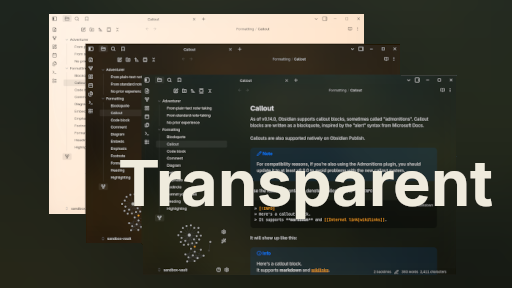
This theme is designed to be light, simple, aesthetic, and minimalistic. It provides a clean and unobtrusive user interface that allows you to focus on your notes without distraction, with excellent mobile support.
The theme is fully responsive and supports both Light and Dark modes, adapting perfectly to your system settings for a comfortable reading experience at any time.
Accent color from screenshots:
#FFA200
Beautiful on Any Device
Features
- Light Color Palette: The theme uses a soft color scheme that is easy on the eyes, perfect for long writing sessions.
- Minimalistic Design: Clean lines and ample white space create a serene workspace, focusing on your content.
- Customizable Background: You can easily
change the background imageto any custom URL directly from the Style Settings plugin, or stick with the default green aesthetic. - Integration with plugins: Some plugins just look better with this theme due to seamless integration, taking them into account in the code.
- Integration with snippets: The theme includes built-in custom snippets, for example: Accent everywhere. You can enable them via Style Settings:)
- Style Settings: You can fully customize the look of this theme via Style Settings plugin.
- Fluid Animations: Subtle, smooth UI transitions that make navigating your workspace feel natural and responsive.
Enjoy a beautiful and functional writing experience with this theme!
This is a complete, plug-and-play theme that is regularly updated. To stay up to date, I recommend installing it through the Obsidian theme browser. While inspired by transparency snippets, it has been carefully refined to provide a cohesive and polished experience.
Plugin Styling
Some plugins don't always look great by default, so this theme includes small tweaks to make them blend perfectly with the main design. These plugins are styled to match the theme's transparency and blur effects.
Works especially well with:
- Style Settings
- Make.md
- MySnippets
- Day Planner
- Remotely Save
- Enchanted Animations
You don't need to change anything – everything works out of the box.
Roadmap
you can find the roadmap and some info for devs etc
How to Install
-
In Obsidian, navigate to Settings -> Appearance -> Themes.
-
Click Manage and search for Transparent (by Oczko24).
-
Select Install and Use.
-
⚠️ Important: To unlock all customization options, theme presets, and the "100% True Glass" (OS transparency) effect, you must install the Style Settings community plugin.
Support
If you like this theme, you can give a star to this repo on GitHub :)

If you find any bugs or have ideas for new features, feel free to open an issue or submit a pull request. Your feedback and contributions mean a lot; they genuinely motivate me to keep improving and developing this project :))