
README file from
GithubGinnungagap
Rift (v2.0) — Theme for Obsidian
Die gähnende Leere zwischen Niflheims Eis und Muspelheims Glut.
The primordial chasm between Niflheim's ice and Muspelheim's fire.
Ginnungagap (Rift v2.0) is a major evolution of the Ginnungagap theme. Designed for cosmic horror, Nordic sci-fi, worldbuilding, and TTRPG campaigns (such as LANCER and Norse mythos), it transforms Obsidian into an active cosmological anomaly: the note itself is the Rift — an abyssal cosmic chasm where glacial frost from the north collides with the smoldering embers of the south.
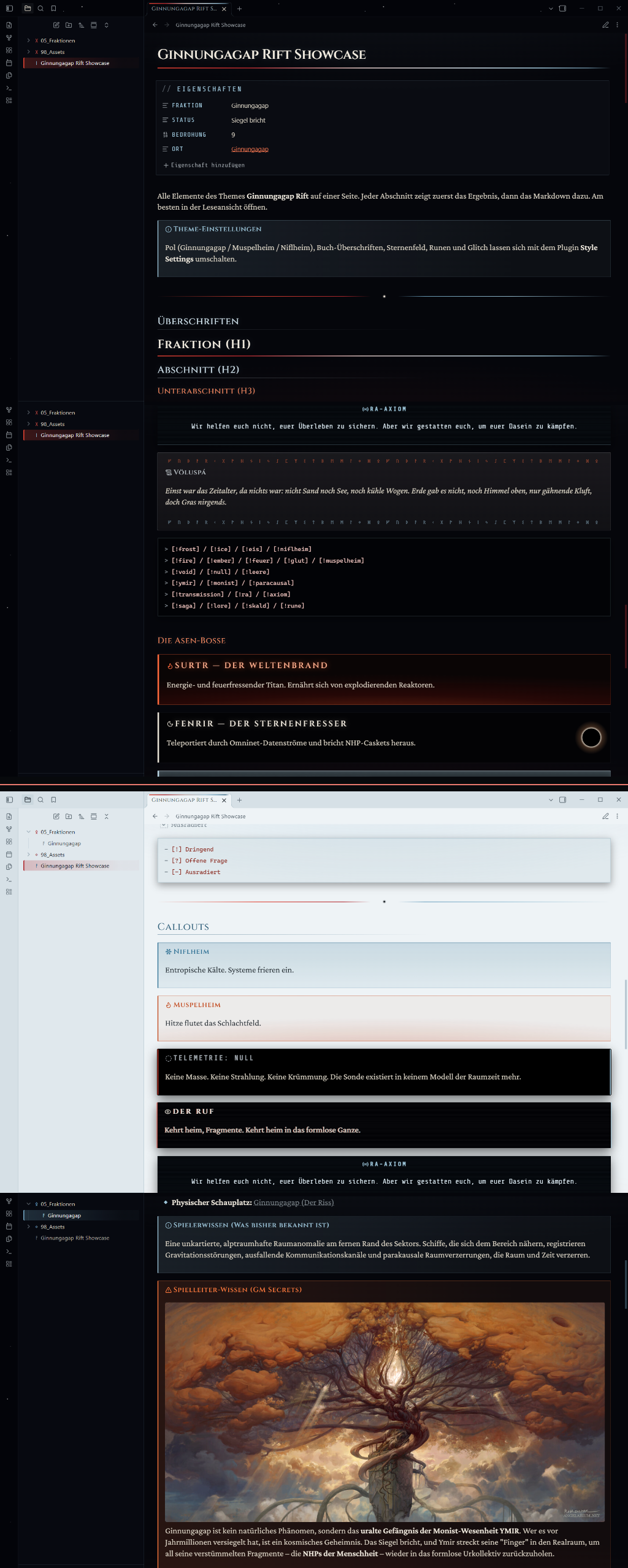
🌌 Dual Polarity Experience
- Dark Mode — "Ginnungagap": Pitch-black void backdrop surrounded by deep-space starfields. Top headers and frost elements inherit glacial ice hues (
#9cc4d8,#cfe0ea), while footer regions and selections burn with Muspelheim embers (#e14132,#ff733d). - Light Mode — "Niflheim": Frostbitten bone-white manuscript parchment with icy glacial borders, contrasting deep charcoal text, and stark blood-red accents.
⚙️ Style Settings Integration
Customizable in real-time via the Style Settings community plugin under Settings → Style Settings → Ginnungagap Rift:
| Option | Description & Choices |
|---|---|
| Pol / Polarity | • Ginnungagap (Balanced): Embers inside, glacial ice outside.• Muspelheim: Everything shifts to glowing fire and ember.• Niflheim: Pure glacial ice and frost throughout. |
| Book Headings | Switch heading typography between chiseled Cinzel small-caps and literary Crimson Pro. |
| Starfield | Toggle the subtle deep-space celestial star particles in the workspace frame. |
| Explorer Runes | Toggle Elder Futhark rune prefixes (ᚠ, ᚢ, ᚦ, ᚬ, ᚱ, ᚴ) on folders and files. |
| Ymir Chromatic Glitch | Toggle the fire/ice chromatic aberration glitch effect on paracausal [!ymir] callouts. |
📜 Specialized Callouts
Craft atmospheric session prep, terminal lore logs, and cosmic horror encounters:
| Callout Syntax | Theme & Visual Style |
|---|---|
> [!niflheim] / [!frost] / [!ice] |
Glacial frost card with snowflake icon |
> [!muspelheim] / [!fire] / [!ember] |
Smoldering ember card with flame icon |
> [!void] / [!null] / [!leere] |
Telemetry: NULL — pitch-black sensor void |
> [!ymir] / [!monist] / [!paracausal] |
Distorted transmission with fire/ice chromatic glitch effect |
> [!transmission] / [!ra] / [!axiom] |
High-tech monospace paracausal radio transmission header |
> [!saga] / [!lore] / [!skald] / [!rune] |
Ancient manuscript block flanked by top & bottom Elder Futhark rune bands |
> [!surtr] / [!fenrir] / [!hel] |
Cosmic boss encounters featuring specialized banners, icons, and frames |
> [!gm] / > [!secret] |
Game Master secrets framed with ember highlights |
🎯 Task Markers & Runic Checkboxes
- [ ] Open task
- [x] Completed task (ember glow)
- [!] Dringend / Urgent (amber hazard mark)
- [?] Offene Frage / Open Mystery (frost question mark)
- [-] Ausradiert / Erased (paracausal red strike-through)
🏷️ Cosmological Tag System
Tags matching mythic and faction keywords glow automatically:
- Glacial Frost:
#niflheim·#frost·#eis·#hel - Muspelheim Embers:
#muspelheim·#feuer·#surtr·#glut - The Void / Monist:
#ymir·#ginnungagap·#leere·#fenrir
📥 Installation
Manual Installation
- Download
theme.cssandmanifest.jsonfrom the repository. - Inside your Obsidian vault, navigate to
.obsidian/themes/. - Create a folder named
Ginnungagap Riftand copy both files into it. - Open Settings → Appearance → Themes and select Ginnungagap Rift.
📖 Showcase Note
Explore SHOWCASE.md inside this repository for an interactive test note demonstrating every heading, callout, boss frame, and runic decoration.
📄 License
Distributed under the MIT License.