
README file from
GithubZiBase
Markdown tables as living databases — for Obsidian.

ZiBase turns an ordinary markdown table into a rich, interactive database view: sortable/filterable columns, Kanban/Gallery/Calendar layouts, drag-and-drop, formula columns, and inline editing — all while your data stays as plain, portable markdown. No extra files, no proprietary format, no lock-in.
Built from scratch under ZIYAL (ழியல்).
Screenshots
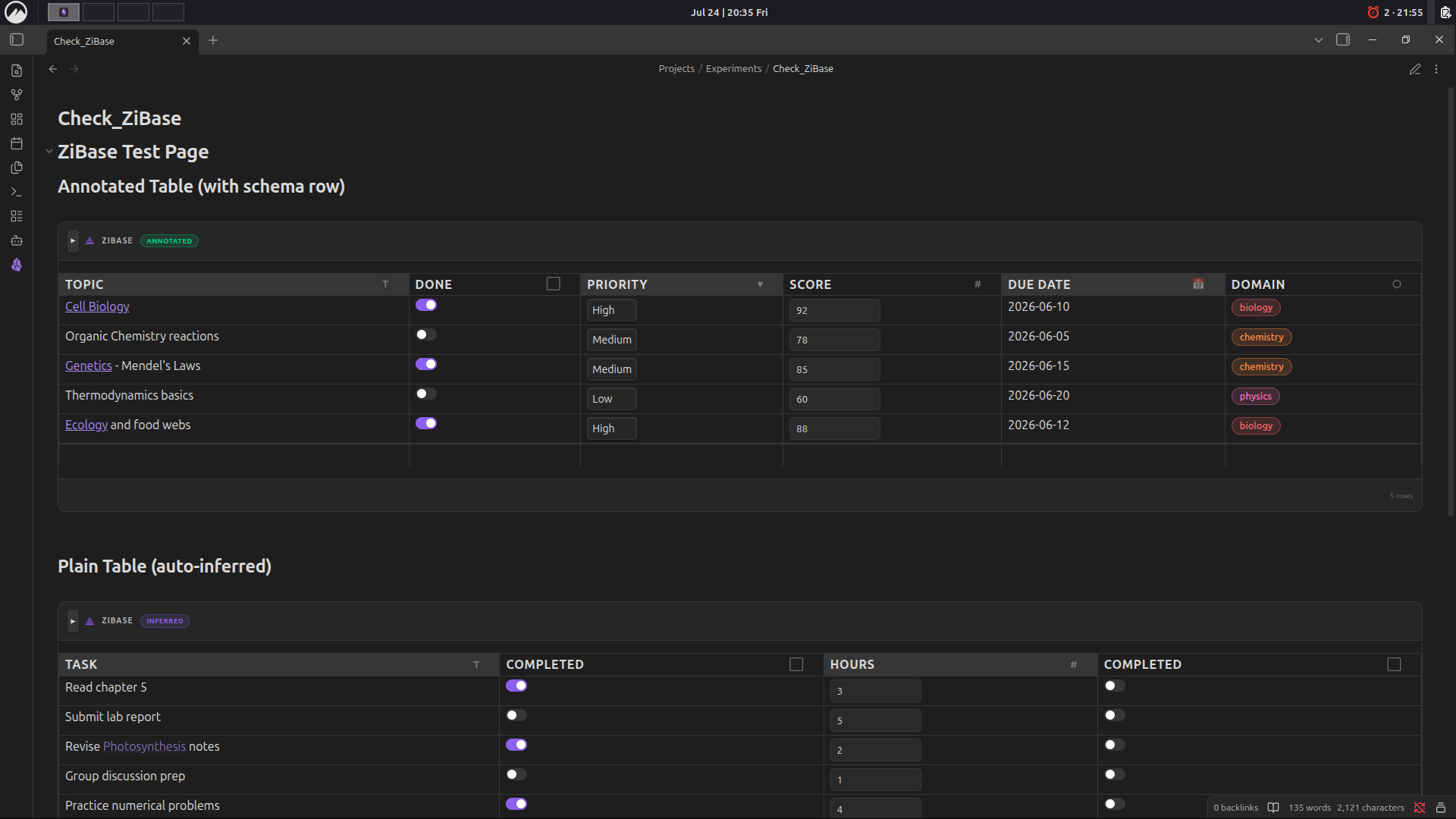 Annotated table with custom column types (Toggle, Select, Number, Date, Label) and auto-inferred plain table.
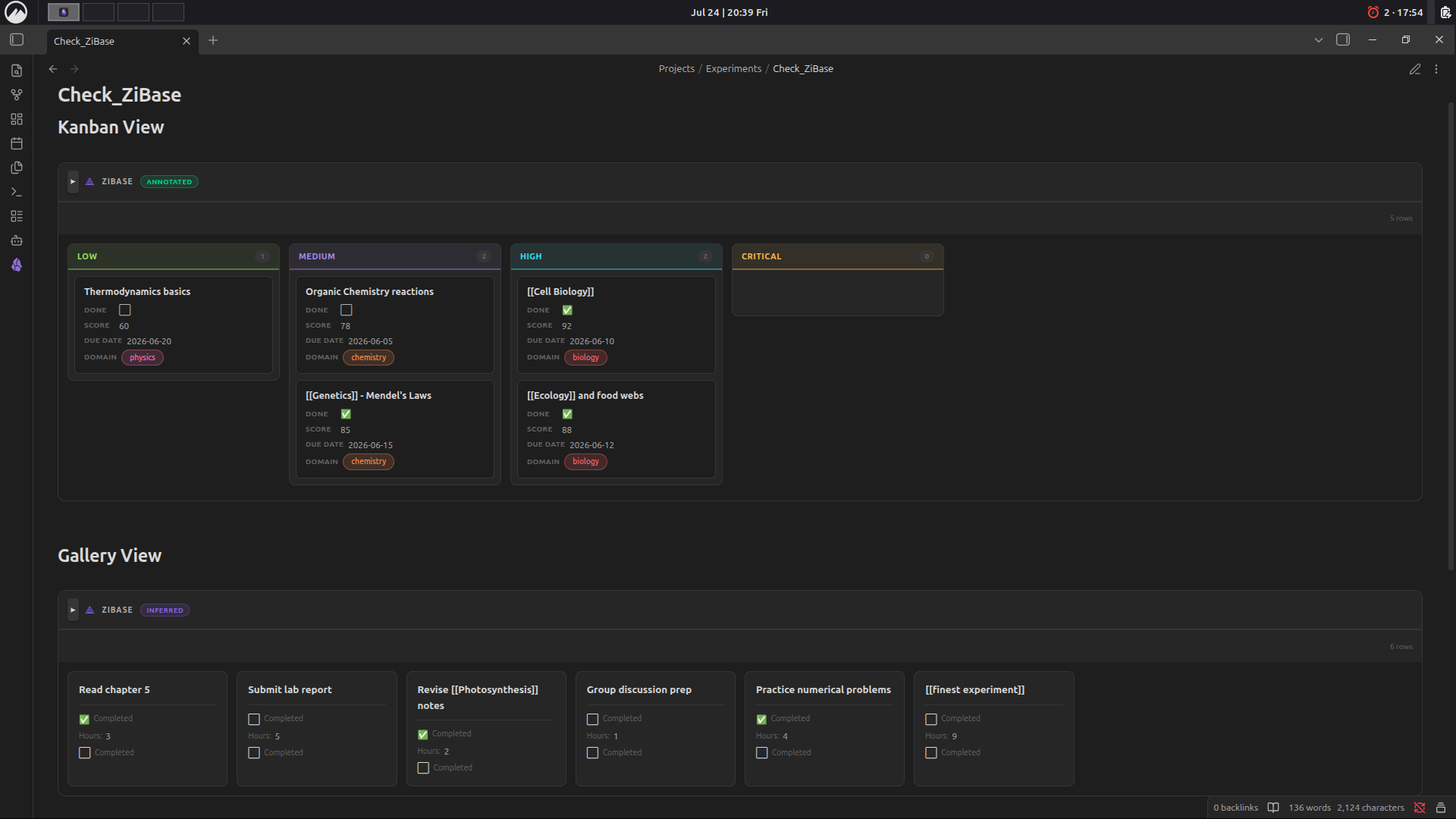 Kanban view grouped by priority, and Gallery view for quick card-based browsing.
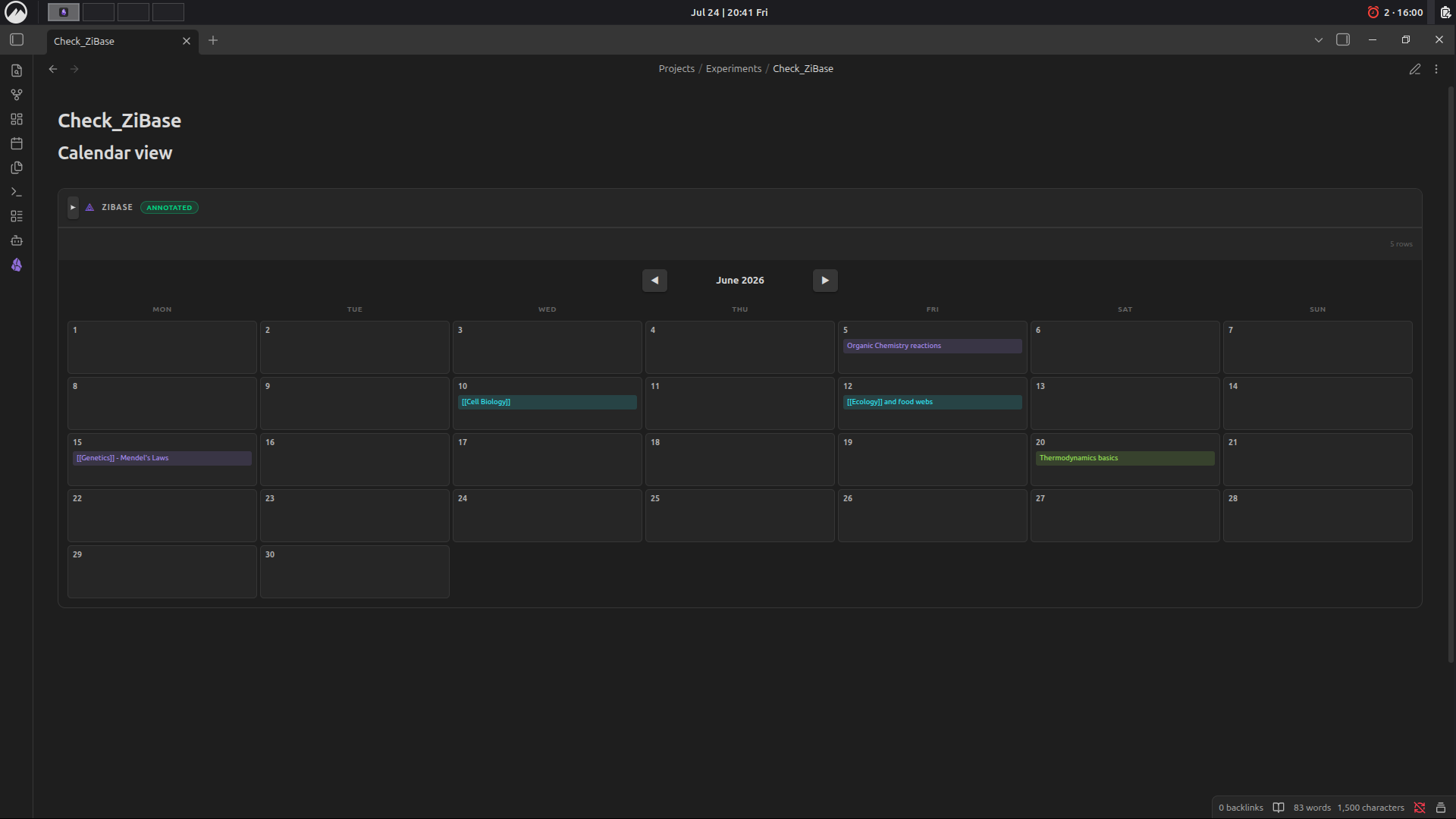 Calendar view automatically generated from a Date column.
Features
- 📊 Multiple views — Table (default), Kanban, Gallery, and Calendar, switchable per-table
- 🖊️ Inline editing — Alt+Click any cell to edit in place, even rendered links/wikilinks
- 🧮 Formula columns — reference other columns by name (e.g.
Price * Qty), noeval(), powered by a safe recursive-descent expression parser - 🏷️ Typed columns — Text, Toggle, Select, Label, Number, Date, Formula
- 🔍 Schema inference — works on plain tables with zero setup; auto-detects column types from content
- 🗂️ Kanban view — group by any Select/Label column, drag cards between lanes
- 📌 Zero extra files — everything lives in the markdown table itself, using HTML-comment annotations Obsidian already ignores in Reading View
Installation
- Open Settings → Community Plugins in Obsidian
- Disable Safe Mode (if prompted) and click Browse
- Search for ZiBase and click Install, then Enable
(Manual install: copy manifest.json, main.js, and styles.css into <vault>/.obsidian/plugins/zibase/, then enable it from Community Plugins.)
Usage Guide
1. Start with any markdown table
ZiBase renders any table in Reading View — even a plain one with no annotations. Column types are auto-inferred from the header name and content (e.g. a column named status becomes a Select column; done/completed become a Toggle; tag/tags/category/label become Label columns).
| Task                  | Completed | Hours | Category   |
| ---------------------- | --------- | ----- | ---------- |
| Read chapter 5         | true      | 3     | Study      |
| Submit lab report      | false     | 5     | Assignment |
2. Add an explicit schema row for full control
For precise typing, add a schema row as the 3rd line of the table (right after the header separator), with one annotation comment per column:
| Topic          | Done                        | Priority                               | Score                       | Due Date                  | Domain               |
| -------------- | --------------------------- | --------------------------------------- | ---------------------------- | -------------------------- | --------------------- |
| <!-- zibase: text --> | <!-- zibase: toggle --> | <!-- zibase: select:Low,Medium,High,Critical --> | <!-- zibase: number --> | <!-- zibase: date --> | <!-- zibase: label --> |
| Cell Biology   | true                         | High                                     | 92                            | 2026-06-10                  | biology                |
Available column types:
| Type | Annotation | Notes |
|---|---|---|
| Text | <!-- zibase: text --> |
Renders markdown, wikilinks included |
| Toggle | <!-- zibase: toggle --> |
true / false → checkbox |
| Select | <!-- zibase: select:Opt1,Opt2,Opt3 --> |
Dropdown with fixed options |
| Label | <!-- zibase: label --> |
Colored chip, auto-colored per value |
| Number | <!-- zibase: number --> |
Right-aligned, sortable numerically |
| Date | <!-- zibase: date --> |
YYYY-MM-DD, used for Calendar view |
| Formula | <!-- zibase: formula:Price * Qty --> |
Reference other column names directly |
3. Switch views
Add a view annotation on its own line, right before the table (or use the view-switcher icons in the table's toolbar — this writes the annotation for you):
<!-- zibase-view: kanban:Status -->
| Task | Status | Priority |
...
<!-- zibase-view: kanban:ColumnName -->— Kanban board grouped by a Select/Label column<!-- zibase-view: gallery -->— card gallery<!-- zibase-view: calendar -->— calendar grouped by a Date column- No annotation — default Table view
4. Editing
- Alt+Click any cell to edit it in place — works even on rendered links/wikilinks
- Kanban: drag a card between lanes to update its grouping column
- Add row: use the "+ Add row" button at the bottom of the table
- All edits write straight back to the markdown table — your file stays the single source of truth
5. Formula columns
Formula columns reference other column names directly (case-insensitive), no cell syntax like =A1*B2:
<!-- zibase: formula:Price * Qty -->
Notes & Limitations
- Reading View only (Live Preview support not yet available)
- Desktop and mobile compatible (
isDesktopOnly: false)
Feedback / Issues
Please open an issue on the GitHub repo with a minimal example table if you hit a bug — screenshots of Reading View + the raw markdown source are the fastest way to get it fixed.
Support
ZiBase is built solo as a passion project. If it saves you time or makes your Obsidian vault feel a little more alive, consider sponsoring — it genuinely helps with university expenses and keeps the motivation going! 🙏
Completely optional — even a ⭐ star on the repo means a lot!
License
MIT — see LICENSE