
README file from
Github小记 · xiaoji
在 Obsidian 中快速记录灵感、日常和待办,内容保存在笔记库的 Markdown 文件里。
Capture ideas, everyday notes and tasks in Obsidian. Your memos stay in your vault as plain Markdown.
安装 · Installation
需要 Obsidian 1.8.7+。从同一版本的 Release 下载 main.js、manifest.json 和 styles.css,放入笔记库的 .obsidian/plugins/xiaoji/。重新加载 Obsidian 后,在「第三方插件」中启用小记。升级时只替换这三个文件,保留 data.json、笔记和附件。
Requires Obsidian 1.8.7+. Put main.js, manifest.json and styles.css from the same release in your vault’s .obsidian/plugins/xiaoji/ folder. Reload Obsidian and enable xiaoji under Community plugins. When updating, keep data.json, your notes and attachments.
使用 · Usage
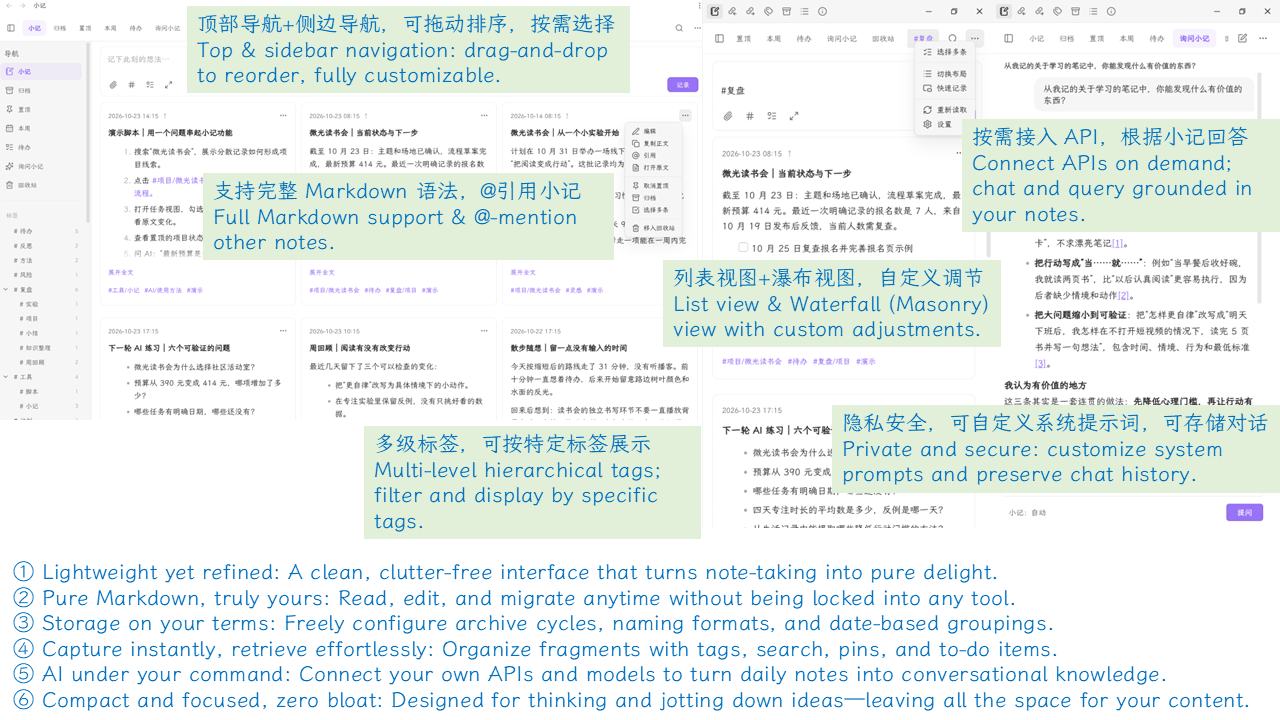
- 记录 / Capture — 从侧栏图标或命令面板打开。默认 Enter 换行、Shift+Enter 记录。桌面端可在「通用 → 快速记录」设置全局快捷键。
Open from the ribbon or command palette. Enter starts a new line and Shift+Enter saves by default. Set a desktop global shortcut in General → Quick capture. - 整理 / Organize — 搜索、层级标签、置顶、归档和批量操作。双击卡片编辑,从插件回收站恢复小记。
Search, use nested tags, pin, archive and manage memos in batches. Double-click a card to edit it. Restore deleted memos from the plugin Trash. - 存储 / Storage — 支持自定义目录、文件名和月/季/年分卷。查看存储与界面示例
Choose your folder, filename format and monthly, quarterly or yearly files. See storage and interface examples. - 可选 AI / Optional AI — 在「增强功能」中选择兼容 API 或桌面端本机 Codex。AI 默认关闭。启用后,问题和按设置选取的小记内容会发给所选服务商。
Choose a compatible API or local Codex on desktop under Enhancements. AI is off by default. When enabled, questions and any memo context selected under your settings go to your chosen provider.

0.16.5
- 支持 Text Reference(文字引用)联动。 安装并启用 Text Reference 0.14.0 或更新版本后,在「小记设置 → 增强功能」打开联动开关。然后在小记卡片的「···」菜单中选择「复制为 Text Reference」,粘贴到同一笔记库的另一篇笔记中,即可显示带完整正文和来源链接的引用。
- 调整卡片菜单顺序。 打开原文、复制为 Text Reference、复制正文、在小记中引用、编辑,依次排列。联动开关默认关闭,开启后才显示对应的复制选项。
- Added Text Reference integration. Install and enable Text Reference 0.14.0 or later, then turn on the integration under xiaoji Settings → Enhancements. Choose Copy as Text Reference from a memo’s ⋯ menu and paste it into another note in the same vault. The reference includes the full memo text and a link to its source.
- Reordered the memo menu. The top actions are now Open source → Copy as Text Reference → Copy Markdown → Reference in xiaoji → Edit. The Text Reference action appears when the integration is enabled, which is off by default.
开发 · Development
Node.js 22.13+ · 兼容性说明 / Compatibility notes
npm ci
npm run verify
npm run package
安装包输出到 dist/。 Packages are written to dist/.