
README file from
GithubWireloom for Obsidian(中文)
在 Obsidian 中把文本直接渲染成 UI 线框图 —— 一键可视化 AI 生成的界面原型。
目录
简介
Wireloom for Obsidian 是一个 Obsidian 社区插件,它将 Wireloom —— 一种专为 AI 智能体设计的文本线框图语言 —— 无缝集成到 Obsidian 的 Markdown 渲染管线中。
在你的 Obsidian 笔记中写一个 ```wireloom 代码块,插件就会自动将其渲染为自包含的 SVG 线框图。无需切换工具、无需粘贴截图、无需维护外部文件 —— 线框图与文档同源,真正做到「文档即设计」。
为什么做这个插件?
在 AI 时代,LLM 可以直接从自然语言描述生成 Wireloom 代码。这意味着:
- 产品经理可以让 AI 根据 PRD 生成界面线框图,并直接嵌入需求文档
- 开发者可以在技术文档中维护实时更新的系统界面原型
- 设计师可以以文本形式快速迭代低保真概念,并与团队分享
- AI 工作流可以将「自然语言 → Wireloom → SVG」嵌入自动化文档生成管线
快速预览效果
下面是一个用 Wireloom 勾勒的本地任务看板(cc-task)示例:
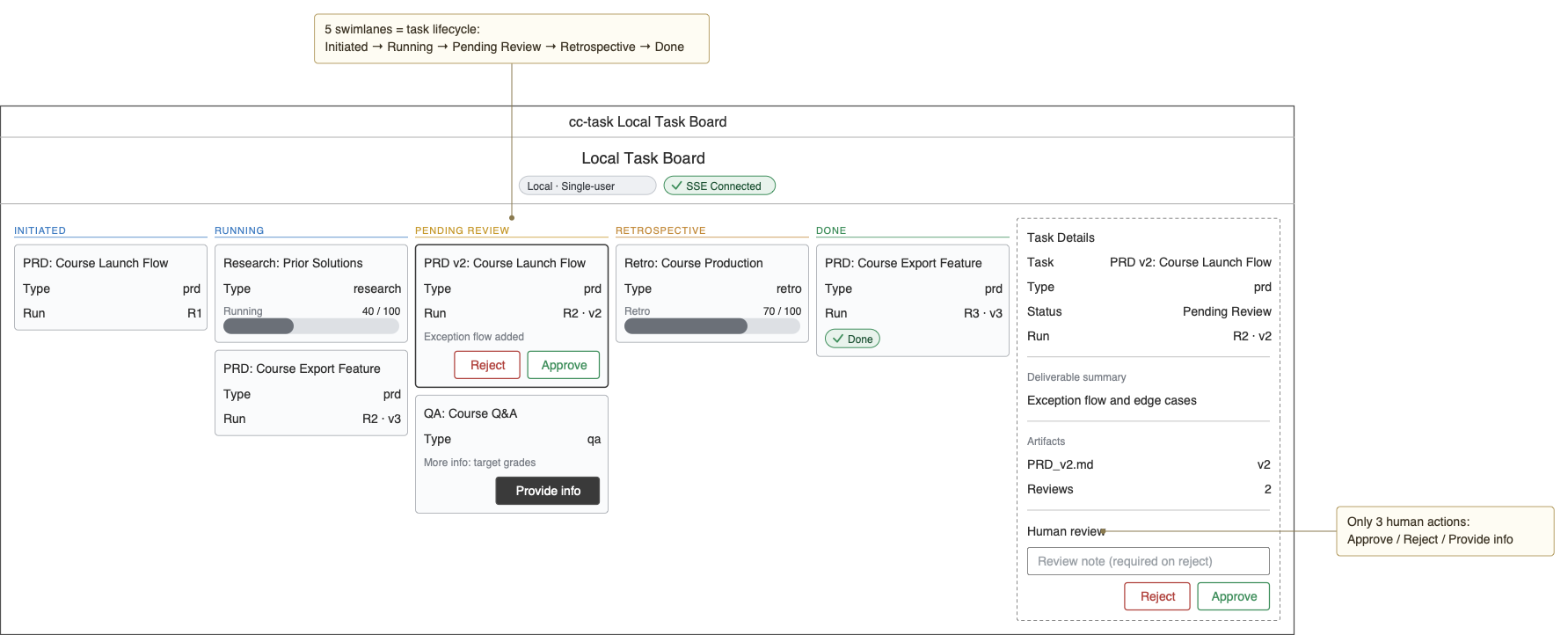
五个以渐进色区分的泳道区域(section)承载任务卡片(slot),卡片内是右对齐的键值对(kv)标签/值行,并可挂上进度条(progress)、状态胶囊(status)和页脚操作按钮(footer)。页头用徽标(chip)与状态胶囊(status)标识连接状态,右侧再用一个固定宽度的面板(panel)装任务详情。在此基础上叠加分隔线(divider)、输入框(input)与带引线的标注(annotation)等元素,就能勾勒出一个完整的任务看板应用界面。
设计目标
本项目遵循以下核心设计原则:
| 原则 | 描述 |
|---|---|
| AI 原生 | 插件架构允许 LLM 直接生成和修改线框图代码,无需手动 GUI 操作 |
| 文本优先 | 所有线框图信息以纯文本存储,原生支持 Git 版本控制和差异审查 |
| 零运行时依赖 | 渲染出的 SVG 完全自包含 —— 无外部字体、脚本或网络请求 |
| 原生 Obsidian 体验 | 与 Obsidian 的主题系统、设置面板和 Markdown 渲染管线深度集成 |
| 懒加载性能 | Wireloom 引擎按需加载,不影响 Obsidian 启动时间 |
| 错误友好 | 语法错误精确定位到行列,并给出智能修正提示 |
功能特性
- ✅ Markdown 代码块渲染:自动识别
```wireloom围栏代码块并渲染为 SVG - ✅ 主题自适应:支持浅色/深色主题,可自动跟随 Obsidian 当前主题
- ✅ 标注:支持
annotation节点,沿 SVG 边缘绘制引导线标注 - ✅ 精确定位错误:解析失败时显示行号、列号和可读的错误信息
- ✅ 设置面板:在 Obsidian 设置中配置主题模式和最大显示宽度
- ✅ 安全输出:Wireloom 生成的 SVG 无脚本、无外部引用,可安全注入 DOM
- ✅ 跨平台:兼容 Windows、macOS、Linux 和 Obsidian 移动端
- ✅ SSR 友好:支持构建时预渲染,适用于静态站点生成
系统要求
| 项目 | 最低版本 | 说明 |
|---|---|---|
| Obsidian | v0.15.0+ | 需要 registerMarkdownCodeBlockProcessor API |
| Node.js | v18.0+ | 仅构建时需要 |
| npm | v8.0+ | 仅构建时需要 |
| Wireloom | v0.4.1+ | 运行时依赖,通过 npm 安装 |
构建
1. 获取源码
cd /path/to/your/vault/.obsidian/plugins/
git clone https://github.com/weakingwang/Wireloom-for-Obsidian.git wireloom
cd wireloom
或下载本项目的 ZIP 压缩包并解压到 wireloom 目录。
2. 安装依赖
npm install
如果安装缓慢,可以使用镜像源:
npm install --registry=https://registry.npmmirror.com
3. 运行构建
生产构建(推荐):
npm run build
构建成功后,目录中会生成一个 main.js 文件(约 120KB+,包含 Wireloom 引擎)。
开发构建(带文件监听,源码变更时自动重新构建):
npm run dev
4. 验证构建产物
ls -la main.js manifest.json styles.css
确认这三个文件都存在,且 main.js 大于 50KB(这表示 Wireloom 引擎已正确打包)。
安装
方式一:手动安装(推荐)
- 按照上述步骤完成构建,确保生成了
main.js、manifest.json和styles.css - 将这三个文件复制到 Obsidian 库的插件目录:
.obsidian/plugins/wireloom/ ├── main.js ├── manifest.json └── styles.css - 重启 Obsidian
- 前往 设置 → 第三方插件 → 已安装插件
- 找到 Wireloom,打开右侧开关启用它
- (首次启用时,可能需要关闭并重新打开安全模式确认框)
方式二:BRAT 安装(测试版)
如果你使用 BRAT 插件来管理测试版插件:
- 安装并启用 BRAT 插件
- 打开命令面板,运行 BRAT: Add a beta plugin for testing
- 输入本项目的 GitHub 仓库地址
- BRAT 会自动下载最新构建并安装
方式三:Obsidian 社区插件市场(未来)
本项目通过 Obsidian 社区插件审核后,你可以在 设置 → 第三方插件 → 浏览 中搜索 "Wireloom" 一键安装。
使用
基本语法
在 Obsidian 笔记中插入一个 ```wireloom 代码块:
## 登录页线框图

```wireloom
window "User Login":
  header:
    text "Welcome back" bold id="title"
  panel:
    input placeholder="Enter email" id="email"
    input placeholder="Enter password" type=password id="password"
    row:
      checkbox "Remember me" id="remember"
      text "Forgot password?" id="forgot"
    button "Sign in" primary id="submit"
  footer:
    text "No account? Sign up"

annotation "Page title" target="title" position=top
annotation "Primary action button" target="submit" position=right
```
切换到 预览模式 或 阅读模式 即可看到渲染出的 SVG 线框图。
支持的组件
| 分类 | 组件 |
|---|---|
| 容器 | window、header、footer、panel、section、tabs、row、col、list、grid、navbar、tabbar |
| 输入 | input、combo、slider、checkbox、radio、toggle |
| 按钮 | button |
| 内容 | text、kv、image、icon、chip、avatar、spinner |
| 其他 | tree、breadcrumb、divider |
| 标注 | annotation |
完整语法参考
请参阅 Wireloom 官方文档:design/grammar.md
配置
在 Obsidian 设置 → 第三方插件 → Wireloom 下,可以配置以下选项:
| 设置项 | 可选值 | 默认值 | 说明 |
|---|---|---|---|
| 渲染主题 | 自动 / 浅色 / 深色 | 自动 | "自动" 会实时跟随 Obsidian 当前主题 |
| 最大宽度 | 任意 CSS 宽度值 | 100% | 控制 SVG 在预览中的最大显示宽度 |
主题切换行为
- 当 Obsidian 从浅色主题切换到深色主题时,插件会检测
body.theme-dark类变化 - 受 Obsidian 限制,已渲染的线框图不会自动刷新;插件会提示建议重新打开文件或切换编辑/预览模式
- 新打开的文件会自动应用当前主题
故障排查
插件显示但启动失败,报错 ENOENT: main.js
原因:缺少构建产物。ZIP 源码包不包含 main.js,需要先运行 npm run build。
解决方案:
cd .obsidian/plugins/wireloom
npm install
npm run build
构建报错 Cannot find package 'builtin-modules'
原因:esbuild.config.mjs 依赖 builtin-modules 包,但它未在 package.json 中声明。
解决方案:
npm install builtin-modules
npm run build
代码块渲染为纯文本,而不是线框图
原因:你当前处于 编辑模式,或处于 实时预览(Live Preview) 的编辑状态。
解决方案:切换到 阅读模式 或 预览模式。Obsidian 的 registerMarkdownCodeBlockProcessor 只在非编辑状态生效。
报错 "Wireloom engine failed to load"
原因:wireloom npm 包未正确安装,或在构建时未打包进 main.js。
解决方案:
- 确认
node_modules/wireloom存在 - 重新运行
npm install && npm run build - 检查
main.js文件大小是否大于 50KB
中文文本渲染不正确或显示乱码
原因:Wireloom 使用内联 SVG 渲染,默认字体依赖系统字体栈。
解决方案:在 Obsidian 自定义 CSS 中为 .wireloom-block svg 添加 font-family 覆盖,或确保系统安装了支持中文的字体。
部分组件或语法无法正常渲染
原因:插件依赖 Wireloom 的 JS 库(package.json 中的 wireloom 依赖),而 JS 库版本可能落后于 Wireloom 协议本身,导致某些较新的组件或语法在生成 UI 文本时无法正常显示。
解决方案:当 Wireloom JS 库有更新时,及时更新 package.json 中的 wireloom 依赖版本,然后重新运行 npm install && npm run build。
技术架构
┌─────────────────────────────────────────────────────────────┐
│                     Obsidian editor                         │
│  ┌─────────────┐    ┌─────────────┐    ┌─────────────────┐  │
│  │ Markdown    │───→│ Wireloom    │───→│ SVG wireframe   │  │
│  │ source      │    │ code block  │    │ (self-contained,│  │
│  │             │    │ processor   │    │  no scripts)    │  │
│  └─────────────┘    └──────┬──────┘    └─────────────────┘  │
│                            │                                │
│                     ┌──────┴──────┐                         │
│                     │ Lazy-loaded │                         │
│                     │ engine      │                         │
│                     │ wireloom    │                         │
│                     │ (ESM/CJS)   │                         │
│                     └─────────────┘                         │
└─────────────────────────────────────────────────────────────┘
关键设计决策
| 决策 | 理由 |
|---|---|
| 懒加载 | import("wireloom") 延迟到遇到第一个代码块时才执行,避免拖慢 Obsidian 启动 |
| 动态 import 桥接 | Wireloom 是 ESM 包,而 Obsidian 插件是 CJS;await import() 提供兼容性 |
| innerHTML 注入 | Wireloom 官方保证返回的 SVG 无 <script> 且无外部引用,因此可以直接安全注入 |
| 防抖刷新 | 主题变化时 300ms 防抖,避免频繁重新渲染 |
| 错误降级 | 引擎加载失败或语法错误时显示友好提示,不会阻塞整个文档渲染 |
资源
- Wireloom 官方仓库:https://github.com/stardock/wireloom
- Wireloom 在线编辑器:https://wireloom.dev (如果可用)
- Obsidian 插件开发文档:https://docs.obsidian.md/Plugins/Getting+started
- Mermaid(类似的文本图表工具):https://mermaid.js.org
- json-render(用于 AI 生成真实 UI 的框架):https://github.com/vercel-labs/json-render
许可证
本项目基于 MIT License 开源,完整条款见仓库根目录的 LICENSE 文件。
注意:本项目由社区驱动,并非 Wireloom 官方产品。Wireloom 商标及核心引擎版权归 Stardock 所有。
Wireloom for Obsidian
Render text directly into UI wireframes inside Obsidian — visualize AI-generated interface prototypes in one click.
Table of Contents
- Introduction
- A quick preview
- Design Goals
- Features
- System Requirements
- Build
- Installation
- Usage
- Configuration
- Troubleshooting
- Technical Architecture
- Resources
- License
Introduction
Wireloom for Obsidian is an Obsidian community plugin that seamlessly integrates Wireloom — a text-based wireframe language designed for AI agents — into Obsidian's Markdown rendering pipeline.
Write a ```wireloom code block in your Obsidian note, and the plugin automatically renders it as a self-contained SVG wireframe. No tool switching, no screenshot pasting, no external file maintenance — the wireframe lives in the same source as the document, achieving true "document as design".
Why this plugin?
In the age of AI, LLMs can generate Wireloom code directly from natural-language descriptions. This means:
- Product managers can have AI generate interface wireframes from a PRD and embed them directly into requirement documents
- Developers can maintain live, up-to-date system interface prototypes within technical documentation
- Designers can rapidly iterate low-fidelity concepts as text and share them with the team
- AI workflows can embed "natural language → Wireloom → SVG" into automated documentation generation pipelines
A quick preview
Here is a local task board (cc-task) sketched with Wireloom:
Five color-graded swimlane sections hold task-card slots, each carrying right-aligned kv label/value rows plus optional progress bars, status pills, and a footer of action buttons. A header marks connection state with a chip and a status pill, while a fixed-width panel on the right holds the task details. Layer dividers, an input, and leader-lined annotations on top, and you can sketch a complete task-board application screen.
Design Goals
This project follows these core design principles:
| Principle | Description |
|---|---|
| AI-native | The plugin architecture lets LLMs generate and modify wireframe code directly, without manual GUI interaction |
| Text-first | All wireframe information is stored as plain text, with native support for Git version control and diff review |
| Zero runtime dependencies | Rendered SVGs are self-contained — no external fonts, scripts, or network requests |
| Native Obsidian experience | Deeply integrated with Obsidian's theme system, settings panel, and Markdown rendering pipeline |
| Lazy-loading performance | The Wireloom engine loads on demand, without affecting Obsidian's startup time |
| Error-friendly | Syntax errors pinpoint exact line and column, with smart correction hints |
Features
- ✅ Markdown code block rendering: automatically recognizes
```wireloomfenced code blocks and renders them as SVG - ✅ Theme adaptive: supports light/dark themes and can follow Obsidian's current theme automatically
- ✅ Annotations: supports the
annotationnode, drawing leader-line callout labels along the SVG edges - ✅ Precise error location: shows line number, column number, and a human-readable error message on parse failure
- ✅ Settings panel: configure theme mode and maximum display width in Obsidian settings
- ✅ Safe output: Wireloom-generated SVG has no scripts and no external references, and can be safely injected into the DOM
- ✅ Cross-platform: compatible with Windows, macOS, Linux, and Obsidian mobile
- ✅ SSR-friendly: supports pre-rendering at build time, suitable for static site generation
System Requirements
| Item | Minimum version | Notes |
|---|---|---|
| Obsidian | v0.15.0+ | Requires the registerMarkdownCodeBlockProcessor API |
| Node.js | v18.0+ | Build-time only |
| npm | v8.0+ | Build-time only |
| Wireloom | v0.4.1+ | Runtime dependency, installed via npm |
Build
1. Get the source code
cd /path/to/your/vault/.obsidian/plugins/
git clone https://github.com/weakingwang/Wireloom-for-Obsidian.git wireloom
cd wireloom
Or download this project's ZIP archive and extract it into the wireloom directory.
2. Install dependencies
npm install
If installation is slow, you can use a mirror registry:
npm install --registry=https://registry.npmmirror.com
3. Run the build
Production build (recommended):
npm run build
After a successful build, a main.js file (about 120KB+, including the Wireloom engine) is generated in the directory.
Development build (with file watching, auto-rebuilds on source changes):
npm run dev
4. Verify the build artifacts
ls -la main.js manifest.json styles.css
Confirm that all three files exist and that main.js is larger than 50KB (which indicates the Wireloom engine was bundled correctly).
Installation
Method 1: Manual install (recommended)
- Complete the build following the steps above, ensuring
main.js,manifest.json, andstyles.cssare generated - Copy these three files into your Obsidian Vault's plugin directory:
.obsidian/plugins/wireloom/ ├── main.js ├── manifest.json └── styles.css - Restart Obsidian
- Go to Settings → Community plugins → Installed plugins
- Find Wireloom and toggle the switch on the right to enable it
- (On first enable, you may need to close and reopen the safe-mode confirmation)
Method 2: BRAT install (beta)
If you use the BRAT plugin to manage beta plugins:
- Install and enable the BRAT plugin
- Open the command palette and run BRAT: Add a beta plugin for testing
- Enter this project's GitHub repository URL
- BRAT automatically downloads the latest build and installs it
Method 3: Obsidian community plugin marketplace (future)
Once this project passes Obsidian community plugin review, you can search for "Wireloom" in Settings → Community plugins → Browse and install it in one click.
Usage
Basic syntax
Insert a ```wireloom code block into an Obsidian note:
## Login page wireframe

```wireloom
window "User Login":
  header:
    text "Welcome back" bold id="title"
  panel:
    input placeholder="Enter email" id="email"
    input placeholder="Enter password" type=password id="password"
    row:
      checkbox "Remember me" id="remember"
      text "Forgot password?" id="forgot"
    button "Sign in" primary id="submit"
  footer:
    text "No account? Sign up"

annotation "Page title" target="title" position=top
annotation "Primary action button" target="submit" position=right
```
Switch to Preview mode or Reading mode to see the rendered SVG wireframe.
Supported components
| Category | Components |
|---|---|
| Containers | window, header, footer, panel, section, tabs, row, col, list, grid, navbar, tabbar |
| Inputs | input, combo, slider, checkbox, radio, toggle |
| Buttons | button |
| Content | text, kv, image, icon, chip, avatar, spinner |
| Other | tree, breadcrumb, divider |
| Annotations | annotation |
Full grammar reference
See the official Wireloom documentation: design/grammar.md
Configuration
Under Obsidian Settings → Community plugins → Wireloom, you can configure the following options:
| Setting | Options | Default | Description |
|---|---|---|---|
| Render theme | Auto / Light / Dark | Auto | "Auto" follows Obsidian's current theme in real time |
| Max width | Any CSS width value | 100% | Controls the maximum display width of the SVG in preview |
Theme switching behavior
- When Obsidian switches from a light to a dark theme, the plugin detects the
body.theme-darkclass change - Due to Obsidian's limitations, already-rendered wireframes are not automatically refreshed; the plugin shows a prompt suggesting reopening the file or toggling edit/preview mode
- Newly opened files automatically apply the current theme
Troubleshooting
Plugin shows but fails to start, with error ENOENT: main.js
Cause: missing build artifacts. The ZIP source package does not include main.js; you must run npm run build first.
Solution:
cd .obsidian/plugins/wireloom
npm install
npm run build
Build error Cannot find package 'builtin-modules'
Cause: esbuild.config.mjs depends on the builtin-modules package, but it is not declared in package.json.
Solution:
npm install builtin-modules
npm run build
Code block renders as plain text, not a wireframe
Cause: you are currently in Edit Mode, or in the editing state of Live Preview.
Solution: switch to Reading Mode or Preview Mode. Obsidian's registerMarkdownCodeBlockProcessor only takes effect outside editing state.
Error "Wireloom engine failed to load"
Cause: the wireloom npm package is not installed correctly, or was not bundled into main.js at build time.
Solution:
- Confirm that
node_modules/wireloomexists - Re-run
npm install && npm run build - Check that the
main.jsfile size is greater than 50KB
Chinese text renders incorrectly or shows garbled characters
Cause: Wireloom renders using inline SVG, and the default font relies on the system font stack.
Solution: add a font-family override for .wireloom-block svg in Obsidian's custom CSS, or ensure a font that supports Chinese is installed on the system.
Some components or syntax fail to render
Cause: the plugin relies on the Wireloom JS library (the wireloom dependency in package.json), and the JS library version may lag behind the Wireloom protocol itself, so some newer components or syntax may not display correctly when generating UI text.
Solution: when the Wireloom JS library has an update, update the wireloom dependency version in package.json, then re-run npm install && npm run build.
Technical Architecture
┌─────────────────────────────────────────────────────────────┐
│                     Obsidian editor                         │
│  ┌─────────────┐    ┌─────────────┐    ┌─────────────────┐  │
│  │ Markdown    │───→│ Wireloom    │───→│ SVG wireframe   │  │
│  │ source      │    │ code block  │    │ (self-contained,│  │
│  │             │    │ processor   │    │  no scripts)    │  │
│  └─────────────┘    └──────┬──────┘    └─────────────────┘  │
│                            │                                │
│                     ┌──────┴──────┐                         │
│                     │ Lazy-loaded │                         │
│                     │ engine      │                         │
│                     │ wireloom    │                         │
│                     │ (ESM/CJS)   │                         │
│                     └─────────────┘                         │
└─────────────────────────────────────────────────────────────┘
Key design decisions
| Decision | Rationale |
|---|---|
| Lazy loading | import("wireloom") is deferred until the first code block is encountered, avoiding slowdown of Obsidian startup |
| Dynamic import bridging | Wireloom is an ESM package while Obsidian plugins are CJS; await import() provides compatibility |
| innerHTML injection | Wireloom officially guarantees the returned SVG has no <script> and no external references, so it can be safely injected directly |
| Debounced refresh | A 300ms debounce on theme changes avoids frequent re-rendering |
| Error degradation | Engine load failure or syntax errors show a friendly message without blocking the whole document from rendering |
Resources
- Wireloom official repository: https://github.com/stardock/wireloom
- Wireloom online editor: https://wireloom.dev (if available)
- Obsidian plugin development docs: https://docs.obsidian.md/Plugins/Getting+started
- Mermaid (similar text-based diagramming tool): https://mermaid.js.org
- json-render (framework for AI-generated real UI): https://github.com/vercel-labs/json-render
License
This project is open source under the MIT License. See the LICENSE file in the repository root for the full terms.
Note: This project is community-driven and not an official Wireloom product. The Wireloom trademark and core engine are copyright of Stardock.