
README file from
GithubWindy is an experimental Obsidian agent that treats the page—not the chat tab—as the primary unit of work.
Open a note and the agent follows it. Reopen the agent and the most relevant conversation for that page returns. Mention other notes when needed, while the current page remains the stable primary context.
Why Windy
Most Obsidian agent plugins are chat-centric:
- the agent lives in a persistent sidebar;
- conversations are organized as tabs;
- switching notes does not switch the active conversation;
- users must manually keep note navigation and chat navigation in sync.
This creates friction precisely where an embedded agent should feel effortless.
Windy starts from a different interaction model:
The page is the workspace. The agent is a contextual companion to that page.
Mission
Make agent-assisted work in Obsidian feel native, contextual, and nearly invisible.
Windy should reduce the interaction cost of using an agent to one natural action: open the page you want to work on.
Product goals
- Provide a floating agent entry point in the bottom-right corner of Obsidian.
- Automatically associate the current page with its most recently used conversation.
- Restore page-specific conversations when users return to a page.
- Allow multiple conversations per page without exposing chat-tab management as the primary workflow.
- Treat the current page as the primary context and
@mentions as additional context. - Keep background agent tasks running when users navigate to another page.
- Preserve drafts, streaming state, approvals, and notifications across page switches.
- Support Markdown notes first, then expand to Bases, Canvas, PDF, splits, and pop-out windows.
- Remain local-first and preserve Obsidian's file-based ownership model.
Design principles
- Page-first — pages are primary; conversations belong to pages.
- Context follows focus — navigation should update the agent automatically.
- Progressive disclosure — page conversations appear first; global history remains available but secondary.
- No forced tab management — users should not manage a working set of chat tabs.
- Background-safe — switching pages must not cancel active work.
- Local-first — mappings, metadata, and user content stay under the user's control.
- Provider-neutral — the interaction model should work across Claude, Codex, and other supported runtimes.
Intended experience
- Open an Obsidian page.
- Click the floating Windy button.
- Windy restores the latest conversation associated with that page, or presents a page-scoped new conversation.
- Switch to another page; the agent follows automatically.
- Use
@to add other notes without changing the primary page. - Return later and continue from where that page's work stopped.
Interface
Windy's interface uses a calm page-first shell, keeps execution detail available without dominating the transcript, and adapts to Obsidian's light and dark themes.
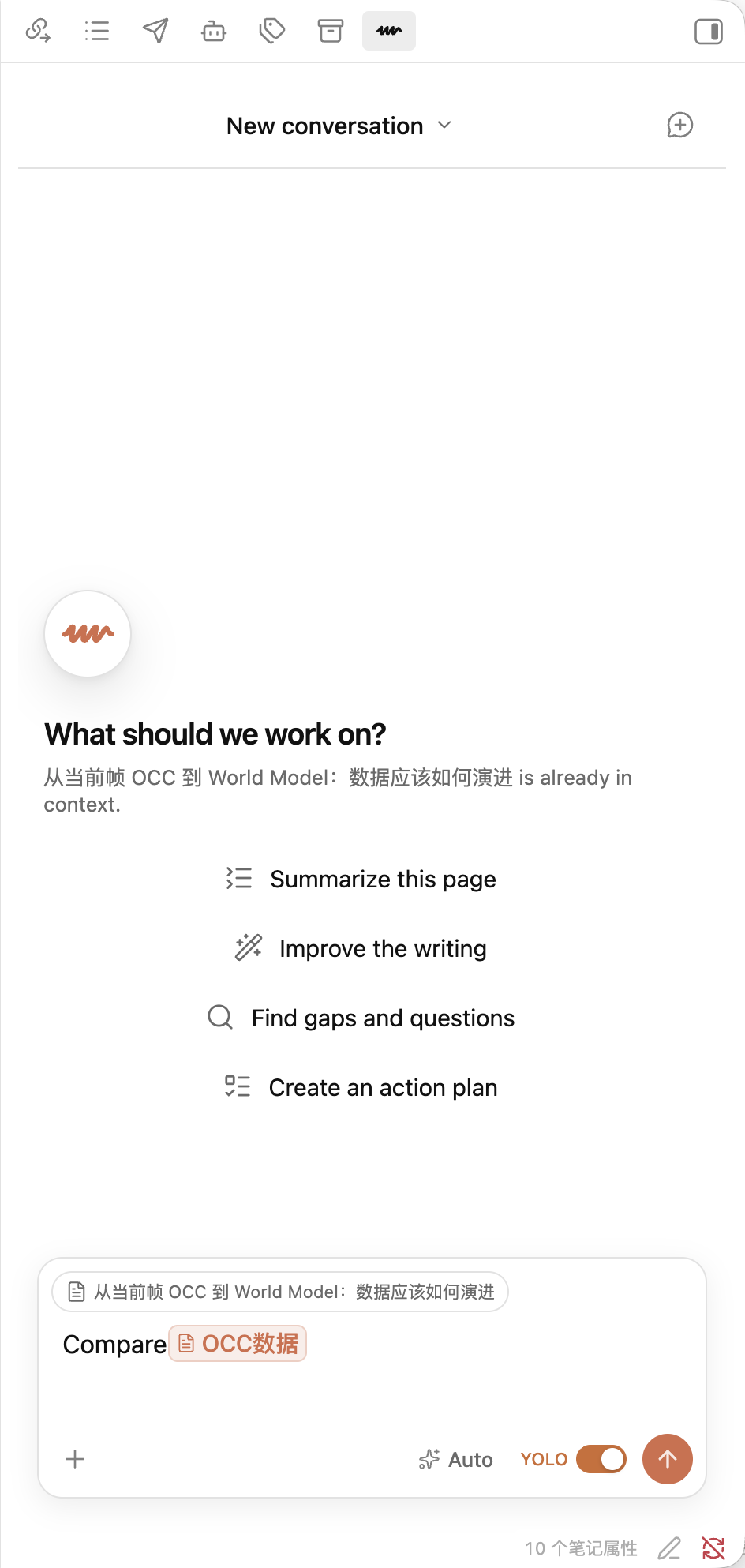
The interaction hierarchy, visual tokens, responsive requirements, and state model are documented in UI design.
Technical direction
Windy is an independent plugin. Its first implementation imports a selected snapshot of Claudian's provider-neutral runtime contracts and Codex adapter, then reorganizes that code behind Windy's page-native architecture.
It does not use Claudian as a dependency, preserve Claudian's application structure, or read Claudian settings and sessions. The exact source boundary is documented in Upstream Source Boundary.
See Project Vision for the product boundary and architectural direction. A Chinese version is available at 项目愿景.
Installation
Windy is available in Obsidian's official Community Plugins directory. Install it there to receive normal plugin updates. BRAT and manual installation remain available for testing GitHub releases directly.
Requirements
- Obsidian 1.7.2 or newer on desktop;
- Codex CLI installed and available as
codexon the local machine; - an authenticated Codex session.
Run codex --version to confirm the CLI installation. Run
codex login to sign in with ChatGPT, then use codex login status to verify
the active session. API-key authentication supported by Codex CLI also works.
Install from Community Plugins (recommended)
- In Obsidian, open Settings → Community plugins → Browse.
- Search for Windy.
- Select Windy, then choose Install and Enable.
Future stable releases appear in Obsidian's normal Community plugin update flow.
Install with BRAT (beta releases)
- In Obsidian, open Settings → Community plugins → Browse.
- Install and enable BRAT.
- Open the command palette and run BRAT: Plugins: Add a beta plugin for testing (with or without version).
- Enter
windzu/windyas the GitHub repository. - Select Latest version and add the plugin.
- Open Settings → Community plugins and enable Windy if BRAT did not enable it automatically.
BRAT tracks GitHub Releases directly and may receive a new Windy release before it reaches the Community directory. Use it when testing release candidates or when you specifically want the GitHub release channel.
Install manually
- Open the latest Windy release.
- Download
main.js,manifest.json, andstyles.cssfrom Assets. - Create
<vault>/.obsidian/plugins/windy/inside the target Vault. - Copy all three files into that directory.
- Restart Obsidian, then enable Windy under Settings → Community plugins.
To update a manual installation, download the three assets from the new release, replace the existing files, and restart Obsidian.
First use
- Open a Markdown or Bases page in Obsidian.
- Click the floating Windy button in the lower-right corner. Windy opens in the configured sidebar or tab and uses the active page as primary context.
- Check the concrete model and reasoning effort shown below the composer. Set defaults for future conversations under Settings → Windy.
- Enter a request and send it. Use
@to reference another page, or use the plus button or drag and drop to attach local files. - Switch pages normally. Windy restores each page's active conversation and keeps background work running. Use the conversation menu to start or return to another conversation for the same page.
The YOLO composer control disables approval prompts and gives Codex full local execution access. Leave it off unless the task and environment are trusted.
Data, permissions, and privacy
Windy makes the following disclosures for informed installation:
- Account requirement: Windy requires Codex CLI authentication through a ChatGPT account or an OpenAI API key. The plugin has no separate Windy account.
- Network use: Windy launches
codex app-serveras a local child process. Codex connects to OpenAI services to run conversations, discover available models, and execute enabled online tools. - File-system access: Windy reads and writes conversation data inside the active Vault. Files outside the Vault are accessed only when the user explicitly attaches them or authorizes an agent tool to access them.
- Local command execution: Depending on the selected permission mode and approved tool calls, Codex can run local commands and read or modify files. The YOLO mode grants unrestricted local execution and should only be enabled in trusted environments.
- Telemetry: Windy has no separate hosted service, advertising, or telemetry. OpenAI services process Codex requests according to the terms and privacy policy of the user's chosen Codex authentication method.
Windy stores page mappings and conversations in .windy inside the Vault.
Settings are stored in Obsidian's plugin data. Attached files remain in their
original locations; Windy stores path references and metadata rather than
copying them into the Vault.
Status
The latest Windy public beta is published through GitHub Releases.
Implemented:
- independent Obsidian plugin shell and
.windystorage; - floating page-level entry and native right-side Agent view;
- cohesive page-first interface with the Windy visual identity;
- Markdown and Bases page detection;
- unlimited page-conversation mappings and last-conversation restoration;
- mapping migration after file or folder renames;
- page-scoped conversation history and lazy first-send creation;
- conversation-level model discovery and selection;
- global new-conversation model and reasoning defaults in Windy settings;
- rich inline page mentions that preserve exact Codex context paths;
- unrestricted local-file attachments with native image input;
- native Markdown, code, reasoning, and tool-status rendering;
- Codex app-server conversations, streaming, tool status, cancellation, and approvals;
- optional YOLO execution mode with an explicit in-composer control;
- one shared Codex app-server process with per-conversation thread routing;
- background-safe runtimes that are not cancelled by page navigation;
- independent scroll restoration for each conversation;
- interrupted-turn recovery and durable partial output;
- reconciliation for repeated and stale tool events;
- inline user-question forms that pause and resume the owning task.
Still in progress:
- specialized file diff and command output rendering;
- richer approval choices;
- split-pane, pop-out-window, and failure-recovery hardening.
The first public beta focuses on macOS desktop and a single Obsidian Vault.
See Architecture for runtime ownership and lifecycle invariants.
Naming
Windy is short, easy to say, and intentionally personal: it carries the
creator's name, wind, while fitting an agent that moves naturally with the
page in focus.
License
Windy is licensed under the MIT License. Selected code derived from Claudian retains its required MIT notice in Third-party notices.
Contributing
All changes, including features and bug fixes, must be developed on a branch and merged through a pull request. See Contributing for the required workflow and validation rules.