
README file from
GithubWeChat Workbench
English | 简体中文
Write, style, preview, copy, and sync WeChat Official Account drafts without leaving Obsidian.
WeChat Workbench is a desktop-only Obsidian community plugin. You keep writing in the Markdown editor while a dedicated workbench provides live preview, composable styles, article metadata, cover management, and draft synchronization.
The plugin only creates or updates drafts. It does not publish, broadcast, or delete WeChat content.
Features
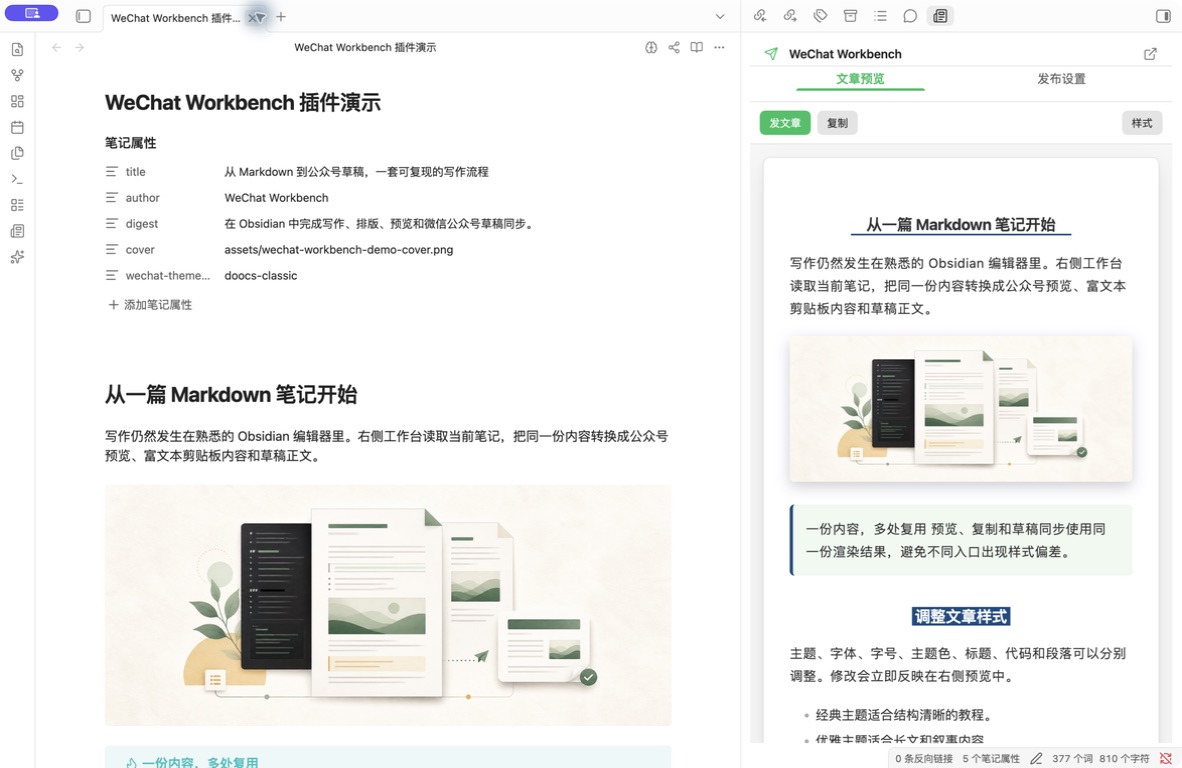
- Live preview of the active Markdown note with automatic refresh after edits.
- Seven built-in article themes plus security-validated custom themes stored in the Vault.
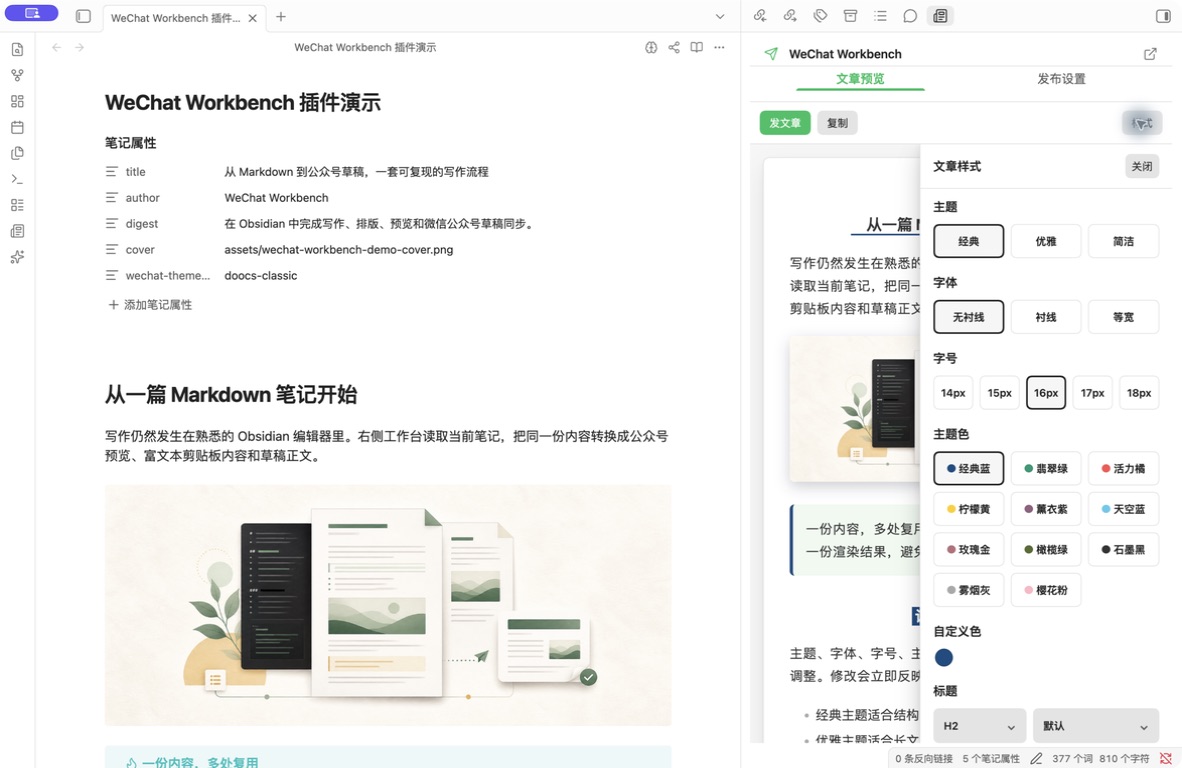
- A Doocs-inspired composable style workbench for fonts, sizes, colors, headings, code blocks, captions, and paragraphs.
- GFM tables, callouts, syntax highlighting, KaTeX, Mermaid, and local images.
- One-click rich-text copy for the WeChat editor with a plain-text fallback.
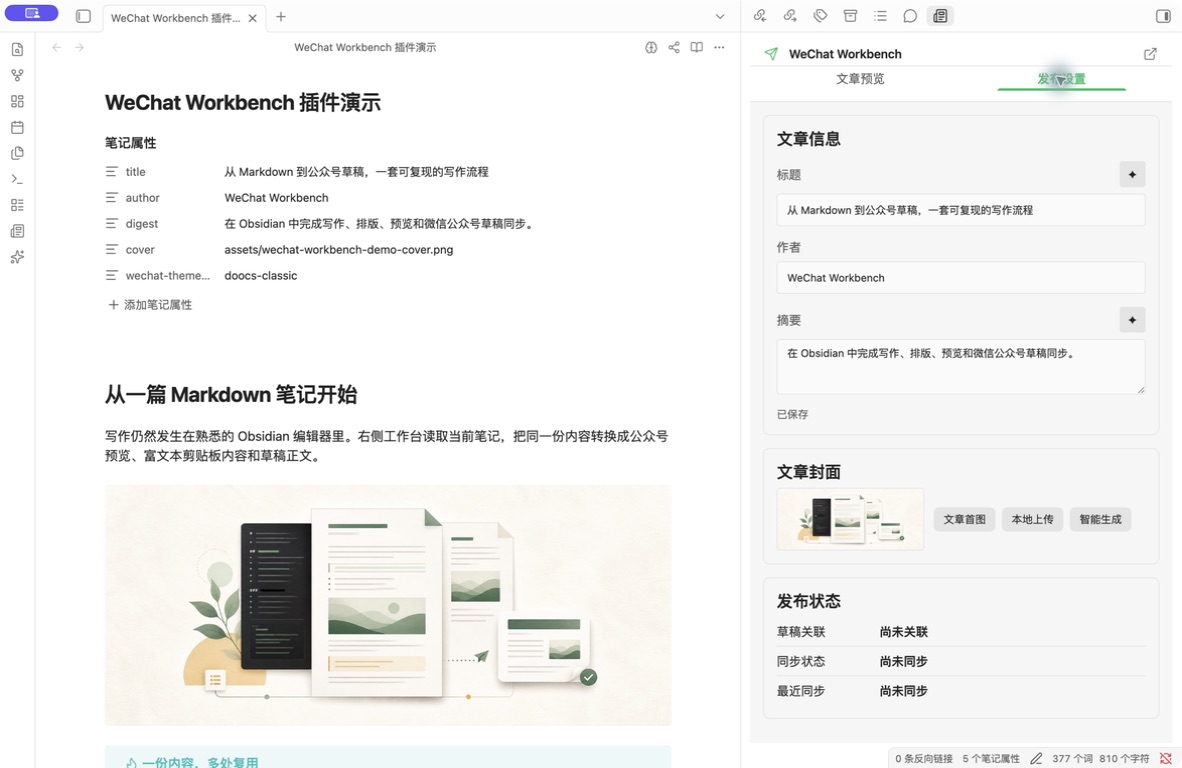
- Cover selection from the article's first image, a local upload, or an optional AI-generated image.
- Optional AI generation of three title candidates and one digest candidate. Nothing is saved until you adopt a candidate.
- Automatic upload of local article images to WeChat during draft synchronization, with the final HTML referencing WeChat CDN URLs.
- Direct local access to the WeChat Official Account API for draft creation, linked-draft updates, unchanged-content skipping, and safe recovery from ambiguous results.
- Optional self-hosted relay: you can point the plugin at your own relay server for WeChat API calls. The distribution bundles no relay address or credentials; relay traffic (including your AppID/AppSecret and API requests) passes through the server you configure.
- AppSecret, Access Token, and AI provider API keys stored only in Obsidian
SecretStorage.
No separate image host required
When you explicitly synchronize a draft, the plugin reads local article images, uploads them through the WeChat Official Account image API, and replaces local paths with the returned HTTPS CDN URLs. The submitted HTML therefore depends on neither local file paths nor a separate object-storage service or third-party image host.
Image uploads are part of the user-confirmed draft synchronization flow. Passive preview never uploads article images.
Screenshots
Markdown editing and WeChat preview
Article styles
Article metadata, cover, and draft status
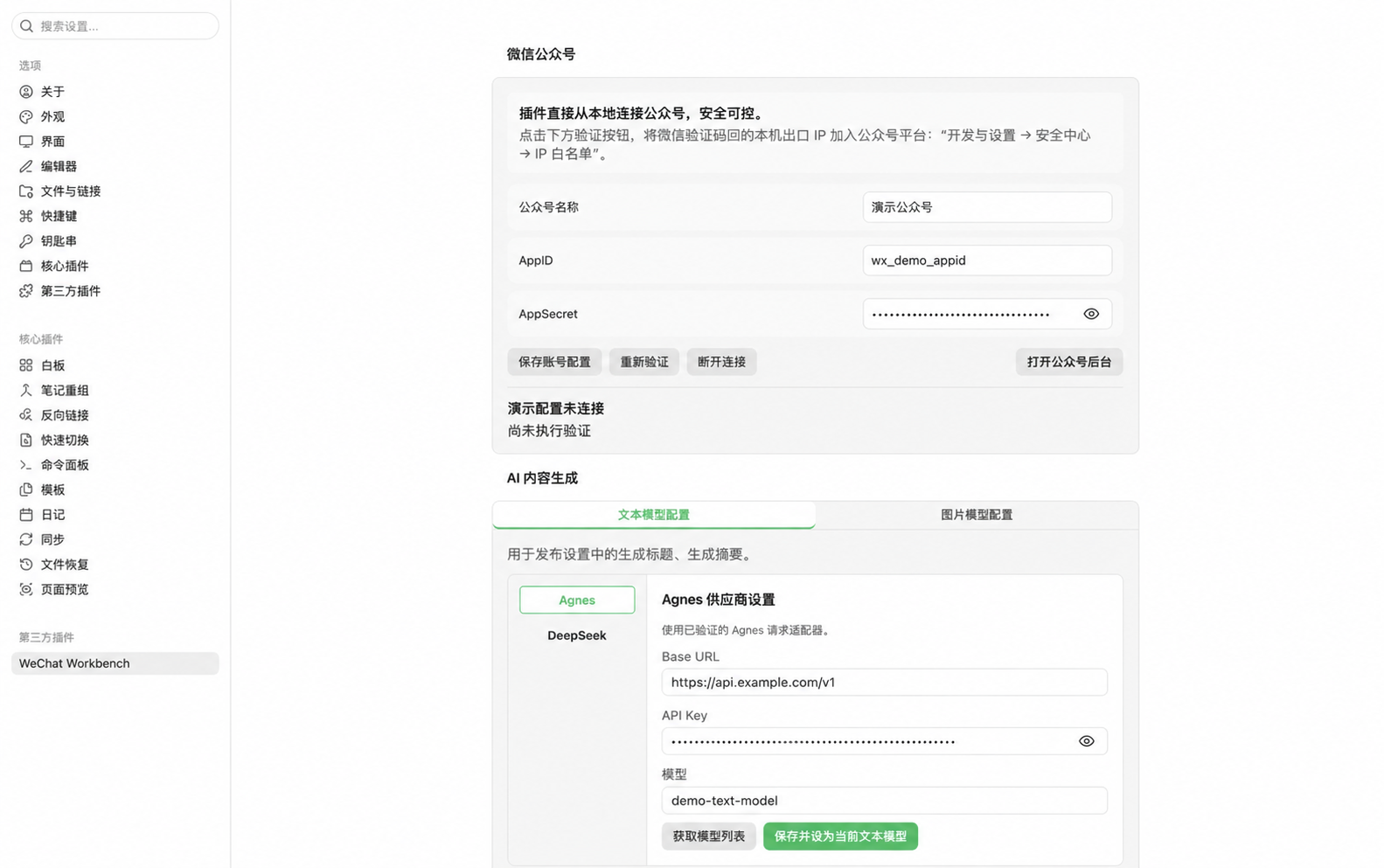
Plugin settings
Scope and limitations
- Desktop only. Minimum supported Obsidian version:
1.11.4. - The current interface supports one WeChat Official Account. The UI and user guides are primarily in Simplified Chinese.
- No telemetry, analytics, or advertising. The plugin ships with no built-in relay: direct connection (default) talks only to
api.weixin.qq.com; if you configure a self-hosted relay, that server sees your WeChat API traffic and credentials — evaluate its transport security yourself. - Passive preview is local and does not automatically fetch remote images.
- AI generation is explicit. You can use a configured provider API or an authenticated local Codex CLI.
- Draft synchronization requires the relevant WeChat API permissions and a public egress IP added to the account's IP allowlist.
Installation
Obsidian Community Plugins
After the plugin is accepted into the community directory, open Settings → Community plugins → Browse, search for WeChat Workbench, and install it.
GitHub Release
Download these files from the matching GitHub Release:
main.js
manifest.json
styles.css
Place them in the plugin directory of your Vault:
<VAULT>/.obsidian/plugins/wechat-workbench/
Reload Obsidian, then enable WeChat Workbench under Settings → Community plugins.
Build from source
Building from source requires Node.js 22.13 or later.
npm ci
npm test
npm run build
Use a separate test Vault for development and live-account testing. See the getting started guide for details.
Quick start
- Open a Markdown note.
- Select the newspaper icon in the left ribbon, or run
Open workbenchfrom the command palette. - Open Styles to choose a theme and adjust typography, colors, and heading styles.
- Select Copy and paste the generated rich text into the WeChat editor.
- To synchronize drafts, enter the AppID in plugin settings or the workbench account entry, then save the AppSecret to
SecretStorage. - Complete the article metadata and cover under Publish settings, then confirm the draft synchronization action.
The synchronization action only creates or updates a draft in the WeChat backend. It never broadcasts the article.
AI features
AI support is optional. Each title, digest, and cover request can use either a configured provider API or Local Codex. The settings page stores independent defaults for text and image generation; choosing another source in the workbench changes only that request and never silently falls back to the other source.
Provider API mode currently supports Agnes and DeepSeek for text generation and Agnes for image generation. You provide those API keys and are responsible for provider charges. Local Codex mode starts the Codex CLI already installed and authenticated on your computer. It does not use the plugin's provider API-key fields, but the content is still processed by the Codex service and may consume your Codex account quota; it is not an offline model.
- Fetching a model list sends the API key to the selected provider but does not send article content.
- Generating titles or a digest sends the current title, digest, heading hierarchy, and a sanitized body excerpt.
- Generating a cover sends the selected model, any title or digest fields you chose to include, the cover-style template, and your supplemental visual instructions.
- Every request requires an explicit user action. The plugin does not generate content in the background.
- The plugin locates the Codex executable without reading Codex authentication files. The child process receives a restricted environment, and shell, browser, app, and computer-control tools are disabled for generation.
See the privacy policy for the complete data-handling description.
Network access
| User action | Destination | Purpose |
|---|---|---|
| Connect a WeChat account | api.weixin.qq.com |
Obtain an Access Token |
| Copy and process remote images | HTTPS image URLs referenced by the article | Fetch and validate images |
| Synchronize a WeChat draft | api.weixin.qq.com |
Upload body images and covers; create, read, or update drafts |
| Fetch AI models | User-selected AI provider | Retrieve available models |
| Generate titles, a digest, or a cover | User-selected AI provider | Complete the explicitly requested generation task |
| Generate through Local Codex | The service used by the locally authenticated Codex CLI | Complete the explicitly requested generation task using Codex account quota |
| Download an AI-generated image | HTTPS URL returned by the provider | Fetch and validate the generated image |
Remote-image requests restrict protocols, redirects, timeouts, response sizes, and detected file types. Loopback, private, and link-local destinations are blocked.
Article frontmatter
The plugin reads common article metadata and stores draft associations in dedicated wechat-* fields. Unknown fields are preserved when frontmatter is updated.
---
title: Article title
author: Author name
digest: Article digest
cover: .wechat-workbench/covers/example/cover.png
content_source_url: https://example.com/source
wechat-theme-id: native
---
Troubleshooting
The plugin cannot connect to WeChat
Check the AppID, AppSecret, account API permissions, and IP allowlist. Your public egress IP may change when you switch networks.
The result of draft synchronization is ambiguous
Do not repeatedly create another draft. Read the recovery guide, then check recent drafts in the WeChat backend.
A remote image cannot be processed
Confirm that the image uses a public HTTPS URL, returns a supported image type, and does not redirect to a local or private address.
AI generation fails
For provider API mode, check the selected provider's Base URL, model, API key, balance, rate limits, and network connectivity. For Local Codex mode, confirm that codex --version works and that Codex is authenticated. Saved provider API keys are never copied back into input fields.
Documentation
The current user guides are written in Simplified Chinese.
- Getting started and local installation
- Themes and custom styles
- Article covers
- Draft recovery
- WeChat Official Account IP allowlist
- Privacy policy
- Security policy
- Third-party notices
Support
Use GitHub Issues for normal bug reports and feature requests. Report security vulnerabilities privately as described in the security policy. Never include credentials, unpublished articles, or exploit details in a public issue.
License
Released under the MIT License. See THIRD_PARTY_NOTICES.md for third-party licenses.