
README file from
GithubObsidian Webhooks Server
Turn any external event into notes in your Obsidian vault — self-hosted, real-time, encrypted.
Receive webhooks from Zapier, Make, n8n, AI agents, or any HTTP client. Events are delivered to the Obsidian plugin instantly via SSE (with polling fallback) and guaranteed exactly-once via ACK system.
Features
- Real-time delivery — Server-Sent Events (SSE) with polling fallback
- Exactly-once guarantee — ACK system prevents duplicates
- Encryption at rest — AES-256-GCM for all event data
- Passwordless auth — email magic links, no passwords
- Self-hosted — full control over your data, no third parties
- Production-ready — rate limiting, auto-cleanup, health checks, CI/CD
Quick Start
git clone https://github.com/khabaroff-studio/obsidian-webhooks-server.git
cd obsidian-webhooks-server

cp .env.example .env
# Edit .env: DATABASE_URL, JWT_SECRET, MAILGUN credentials

docker compose up -d
Verify: curl http://localhost:8081/health
Register & Connect
- Open
http://localhost:8081— enter your email - Click the magic link in your inbox
- Install the Obsidian plugin from your dashboard (or build:
cd plugin && bun install && bun run build) - Enter Client Key and Server URL in plugin settings
Send Your First Webhook
curl -X POST "http://localhost:8081/webhook/wh_YOUR_KEY?path=inbox/test.md" \
  -H "Content-Type: application/json" \
  -d '{"title": "Hello!", "content": "It works.", "tags": ["test"]}'
Check your vault — inbox/test.md should appear.
How It Works
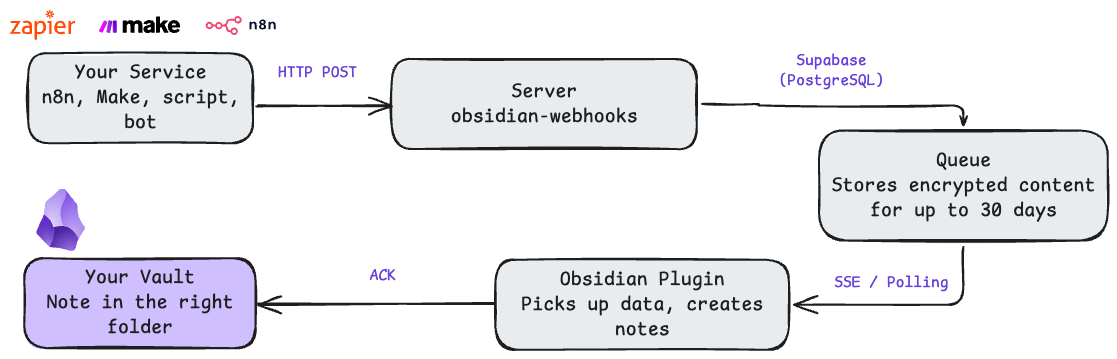
API
| Method | Path | Description |
|---|---|---|
POST |
/webhook/{key}?path=file.md |
Send event (body: JSON or plain text) |
GET |
/events/{client_key} |
SSE event stream |
POST |
/ack/{client_key}/{event_id} |
Acknowledge event |
POST |
/auth/register |
Register (sends magic link) |
GET |
/auth/verify?token=xxx |
Verify magic link |
GET |
/dashboard |
User dashboard |
GET |
/health |
Health check |
Webhook Body Format
JSON fields are converted to Markdown with YAML frontmatter:
{"title": "Meeting", "tags": ["work"], "source": "n8n", "content": "# Notes\n\n- Item 1"}
---
title: Meeting
tags: ["work"]
source: n8n
---

# Notes

- Item 1
Non-JSON body is written as-is. Max payload: 10 MB.
Use Cases
Email to Notes (Zapier/Make):
POST /webhook/wh_xxx?path=inbox/emails/{{date}}.md
{"title": "{{subject}}", "content": "From: {{sender}}\n\n{{body}}"}
GitHub Issues:
POST /webhook/wh_xxx?path=projects/github-issues.md
{"title": "{{issue.title}}", "content": "{{issue.body}}", "tags": ["github"]}
Custom API:
requests.post(
    "https://your-server/webhook/wh_xxx?path=logs/api.md",
    json={"content": f"Result: {data}", "source": "api"}
)
Tech Stack
| Layer | Technology |
|---|---|
| Server | Go 1.24, Gin |
| Database | PostgreSQL (Supabase) |
| Plugin | TypeScript, Obsidian API |
| Auth | Mailgun (magic links), JWT |
| Encryption | AES-256-GCM |
| Frontend | Tailwind CSS (pre-built) |
| Deploy | Docker, Nginx |
| CI/CD | GitHub Actions |
Configuration
Required
DATABASE_URL=postgres://user:pass@host:5432/db
JWT_SECRET=your-random-secret           # openssl rand -base64 32
ENCRYPTION_KEY=64-char-hex-string       # openssl rand -hex 32
MAILGUN_DOMAIN=mail.yourdomain.com
MAILGUN_API_KEY=your-mailgun-key
[email protected]
Admin (first run only)
ADMIN_USERNAME=admin
ADMIN_PASSWORD=your-secure-password
Admin is auto-created on first start. Password can be removed from .env after.
Optional
EVENT_TTL_DAYS=30              # Event retention (default: 30)
ENABLE_AUTO_CLEANUP=true       # Auto-delete expired events
POSTHOG_ENABLED=false          # Analytics (disabled by default)
MAILERLITE_API_KEY=            # Marketing automation (optional)
See .env.example for full reference.
Development
# Run locally
go run main.go

# Tests (72 tests)
make test

# Lint
make lint

# Rebuild Tailwind CSS (after changing HTML templates)
npm install        # first time only
make css

# Test database
docker compose -f docker-compose.test.yml up -d   # port 5433

# Build
make build
Project Structure
main.go                      # Entry point & routes
schema.sql                   # Database schema
tailwind.config.js           # Tailwind CSS config
package.json                 # Node.js deps (Tailwind build only)
src/
├── handlers/                # HTTP handlers (webhook, SSE, ACK, auth, admin)
├── services/                # Business logic (keys, events, auth, email, crypto)
├── middleware/               # Auth, rate limiting, validation, logging
├── models/                  # Data models & constants
├── database/                # Connection pool & test helpers
├── repositories/            # Interfaces & mocks
└── templates/               # HTML pages & email templates
    └── assets/              # CSS, fonts, images
plugin/                      # Obsidian plugin (TypeScript)
├── main.ts                  # Plugin entry point
├── handlers/                # SSE, polling, ACK, file handlers
└── settings_tab.ts          # Settings UI
Security
- Passwordless auth — crypto-secure magic links (32 bytes, one-time, 60-min expiry)
- AES-256-GCM encryption for event data at rest
- Rate limiting — per IP (auth: 3/min) and per webhook key
- JWT sessions with
crypto/randsecret generation - Request body limits via
io.LimitReader(10 MB) - Mutex protection for SSE client map
Acknowledgments
Inspired by obsidian-webhooks by @trashhalo — the original proof of concept for webhook-driven Obsidian workflows.
License
MIT