
README file from
GithubWeb Task Dashboard
Web Task Dashboard lists tasks in Obsidian, enabling effortless task management without any context switching.
This is a plugin for Obsidian to show tasks from third-party services within your current environment. The official documentation can be found here: https://mbedded.github.io/obsidian-web-task-dashboard/
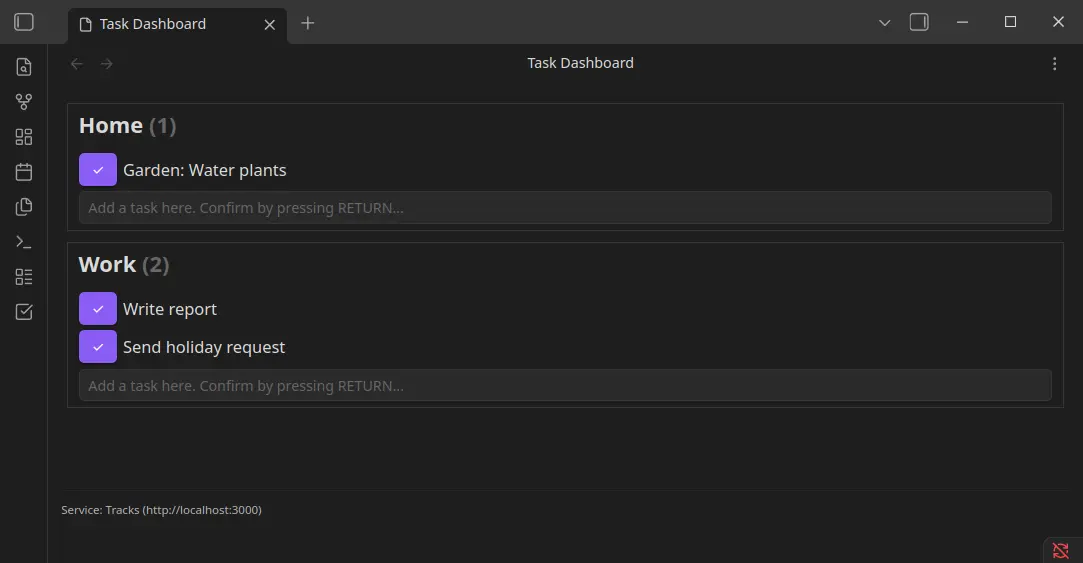
The dashboard looks like this:
Supported services
To use one of these services, you may need to create an account or set up the service independently. Authentication data is required for this plugin to interact with the service.
Currently, the following services are supported:
- Tracks (https://github.com/TracksApp/tracks)
Installation
Installation via Community Plugins
This plugin is listed in the official plugin respository: Web Task Dashboard
- Open Obsidian > Settings > Community Plugins
- Enable the community plugins if needed.
- Search for Web Task Dashboard and install it.
Manual installation
- Open the latest release of this plugin.
- Download the files (
main.js,manifest.json). - Open your vault via file-explorer.
- Create a plugin folder in like
.obsidian/plugins/web-task-dashboard. - Copy the downloaded files into the plugin folder (
web-task-dashboard). - Open the community plugins in Obsidian using
Settings > Community plugins. - Enable the community plugins if needed. Refresh the plugins and activate Web Task Dashboard.
Have an issue or feature request?
If you encounter an issue, please check the existing issues in this project or create a new one. The same applies if you’re missing a feature. Please review the project and consider contributing to it. Take a look into the contribution guide.
Support this project
If you appreciate my work on this project and want to support its continued development, I would love to hear your contributions or feedback! You can also support me through Ko-fi. Your help makes a difference!
Thank you for considering it!