
README file from
GithubWayfinder Maps for Obsidian
Visualizes wayfinder maps from a GitHub repo's issues inside Obsidian: each wayfinder:map issue renders as a head card with its tickets arranged in a dependency-layered tree below it, drawn from GitHub's native issue-dependency (blocked-by) edges.
The wayfinder skill and methodology this plugin visualizes — maps, tickets, frontier, AFK/HITL delegation — come from Matt Pocock's skills repo; this plugin just draws what that workflow puts in your issues. Plugin 1.x is aligned to the v1.1.0 skills release.
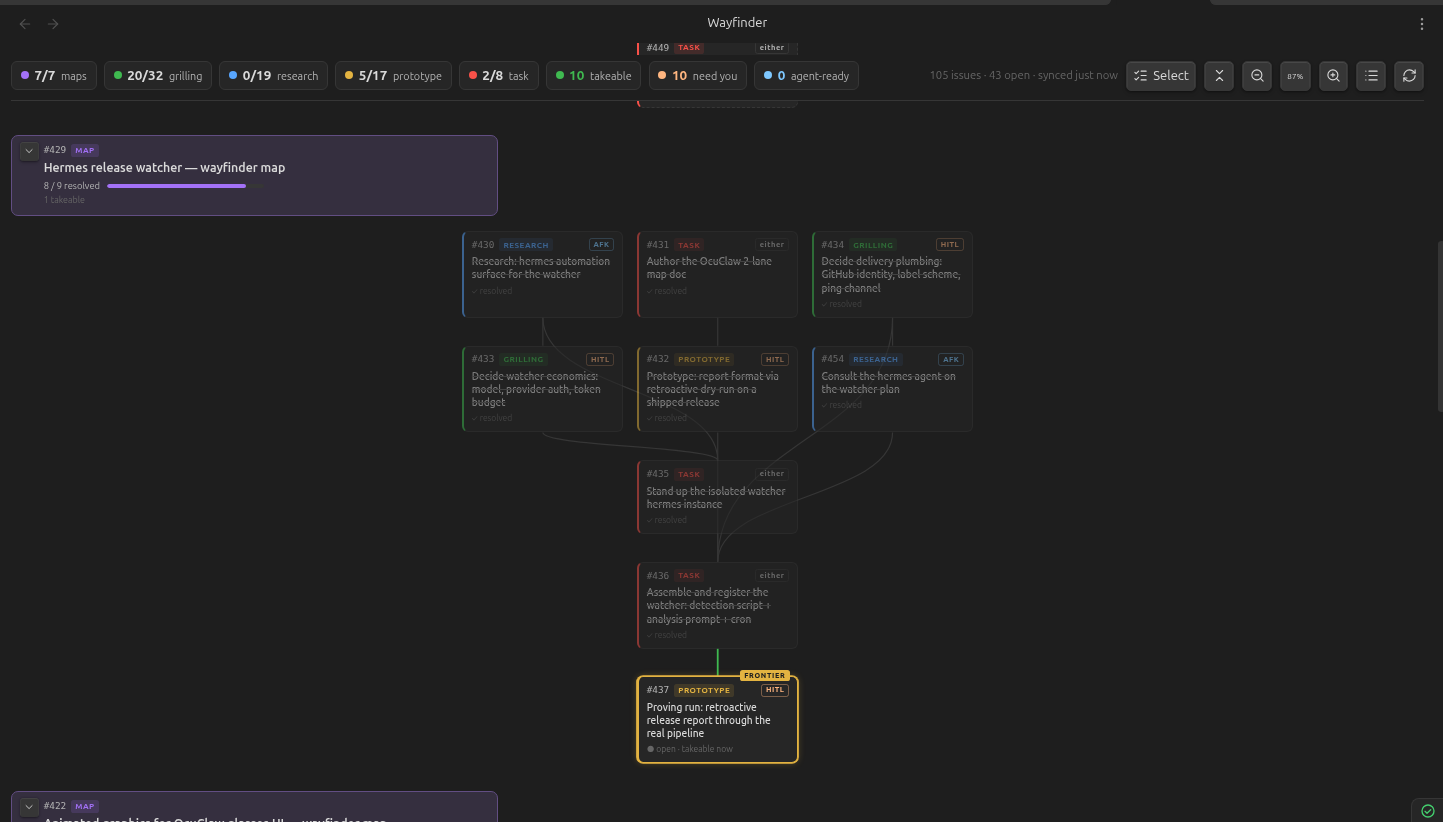
What it shows
- Global tally bar — open/total chips per
wayfinder:*type, plus takeable, need-you, agent-ready, and either delegation chips, last-sync time, refresh, view-mode, fold, and zoom controls. Tallies always cover the shown repositories, independent of map focus and display filters. - Map navigation + filters — choose All maps or one repository-qualified map, include or hide completed maps, and optionally show only incomplete tickets. Open maps are expanded newest first; completed maps are collapsed with a final progress bar. Click/tap a map header to expand or collapse it; ⓘ opens its details.
- Tree, list + hybrid modes — dependency-layered trees draw the actual blocker routes; compact lists group tickets by actionability; hybrid combines both views side by side in wide panes and stacks them in narrow panes. List is the mobile default.
- Ticket state — the frontier (open + verified unblocked + unassigned) glows with a FRONTIER flag; blocked tickets are dashed with a 🔒 naming open blockers; resolved tickets are dimmed with strikethrough.
- Type + mode badges — the
wayfinder:*label colors each card; AFK/HITL is derived per the wayfinder skill (research→AFK, prototype/grilling→HITL, task→ready-for-agent/ready-for-humanlabels, else "either"). - Orphan warnings —
wayfinder:*tickets whose "Part of #N" parent is missing or isn't a map get flagged instead of silently vanishing. - Ticket details + actions — click/tap a ticket for a modal with its rendered Markdown description, linked blockers, assignee, live-fetched comments, and Copy
/wayfinder/ Open-on-GitHub buttons. The ⧉ on every card copies immediately; on takeable tickets it first checks for a new claim or resolution and replaces the action with a warning when necessary. ↗ opens GitHub. - Per-device view state — map focus, display filters, view mode, and zoom are stored locally on each device. Use the toolbar, Ctrl/Cmd+wheel, or pinch to adjust zoom.
Setup
- Install Wayfinder Maps from Settings → Community plugins and enable it.
- Create a fine-grained personal access token (github.com → Settings → Developer settings → Fine-grained tokens) scoped to your repo with read-only Issues permission — the plugin only ever reads issues.
- In Settings → Wayfinder Maps, set the repo (
owner/name) and paste the token, then open the view via the compass ribbon icon or the "Open Wayfinder view" command.
The view syncs when opened, re-polls every 2 minutes (configurable) while open, and syncs on window focus when stale. Commands cover Open Wayfinder view, Sync now, and Copy /wayfinder for the next takeable ticket. The manual refresh button forces a full relationship re-fetch. Note: the token is stored in plain text in the vault's plugin data.json, so treat that file (and anything that syncs it) accordingly.
Development
npm install
npm run dev      # watch build
npm run build    # typecheck + production build
npm run deploy   # build + copy into the vault (set VAULT via env or deploy.env)
GH_TOKEN=$(gh auth token) SMOKE_REPO=owner/name npm run smoke   # run the data pipeline against a live repo
Manual install (without the community directory): copy main.js, manifest.json, styles.css into <vault>/.obsidian/plugins/wayfinder-maps/, then enable the plugin in Settings → Community plugins.