
README file from
GithubWakaTime Box for LifeOS
Writes your WakaTime stats into your LifeOS daily note — automatically.
Usage
- Put an empty
wakatimecode block into your LifeOS daily note template:
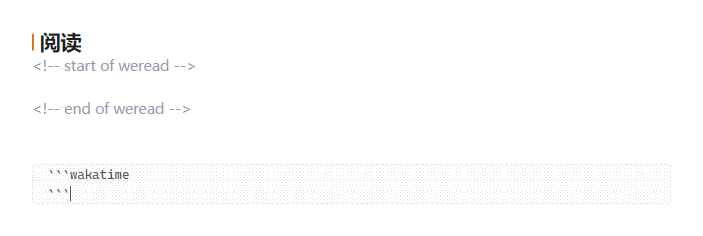
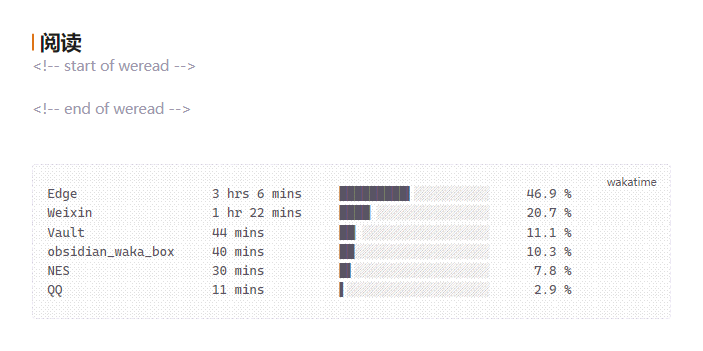
- That's all. Whenever LifeOS creates a daily note, the box is filled and kept up to date (on note creation, once per hour, or on demand):
Requirements
- Obsidian 1.13.0 or newer (older Obsidian versions keep the last compatible release automatically)
- LifeOS enabled, with Periodic Notes turned on (the plugin reads LifeOS settings to find the daily note, and never creates notes itself)
- A WakaTime account; paste your API key into the plugin settings
Install
- Obsidian community plugins (once published): Settings → Community plugins → search for WakaTime Box for LifeOS → Install; updates then come from the GitHub releases automatically.
- BRAT (before publication / beta channel): add
Luke-Evan/obsidian-wakatime-box-lifeosin the BRAT settings, then enable WakaTime Box for LifeOS. BRAT installs and updates the plugin straight from the GitHub releases. - Manual: download
main.jsandmanifest.jsonfrom the latest release into<vault>/.obsidian/plugins/wakatime-box-lifeos/, then enable the plugin.
Settings & commands
- Display data: projects, languages, editors or categories — the six biggest entries of the day.
- Sync now: buttons for today and yesterday; the same actions exist as commands, so you can bind hotkeys to them in Settings → Hotkeys (search for WakaTime).
- Copy the stats of any date to the clipboard command, for weekly notes or reports.
Credits & license
Fork of simonla/obsidian_waka_box (MIT); the daily note layout follows LifeOS. Licensed under MIT.