
README file from
GithubVisual Math for Obsidian
Install in Obsidian · Official Website · YouTube Tutorials · Download 1.1.0 ZIP · Release Notes
Overview
I built Visual Math so you can write math, chemistry, and physics notes in Obsidian without typing raw LaTeX by hand every time.
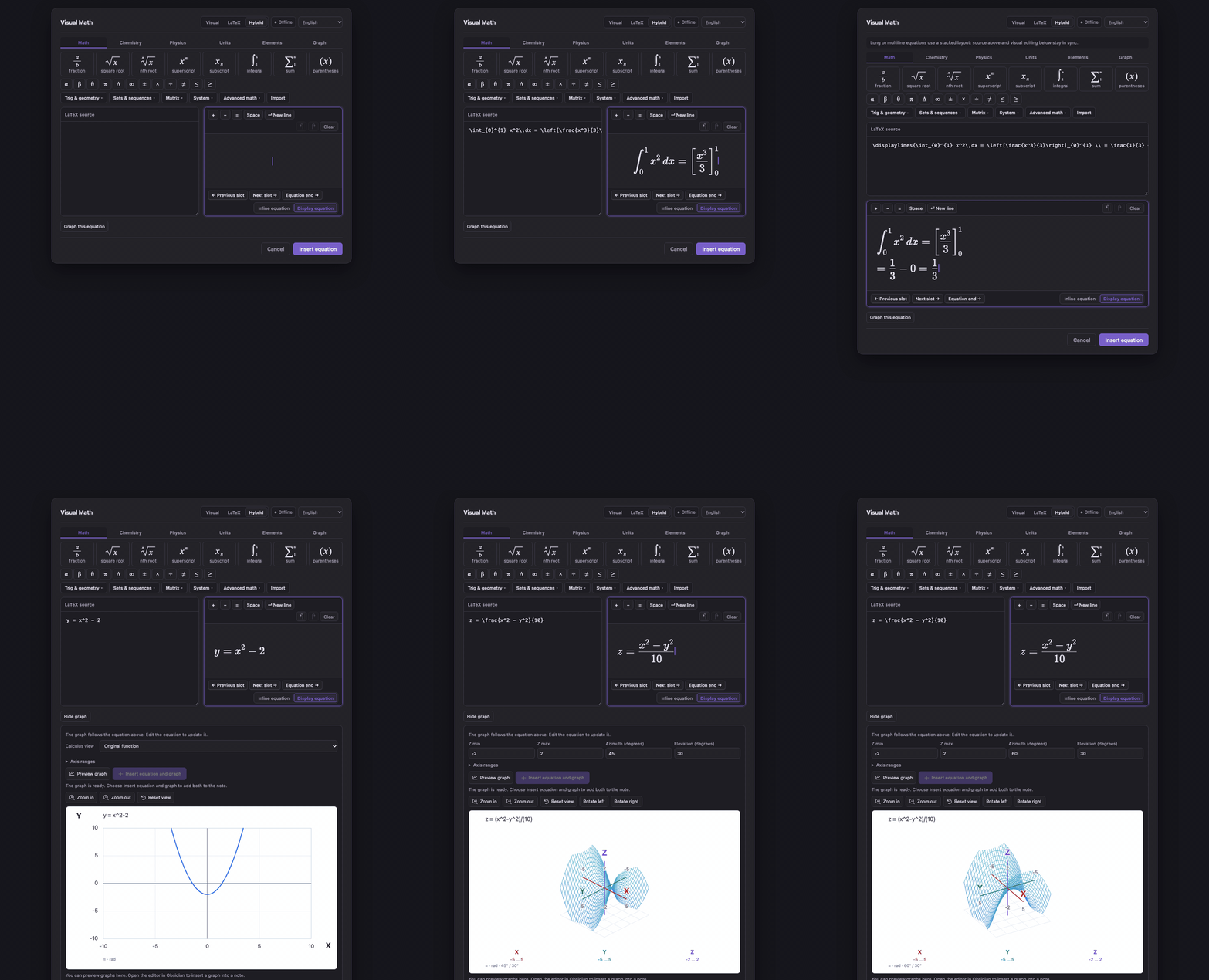
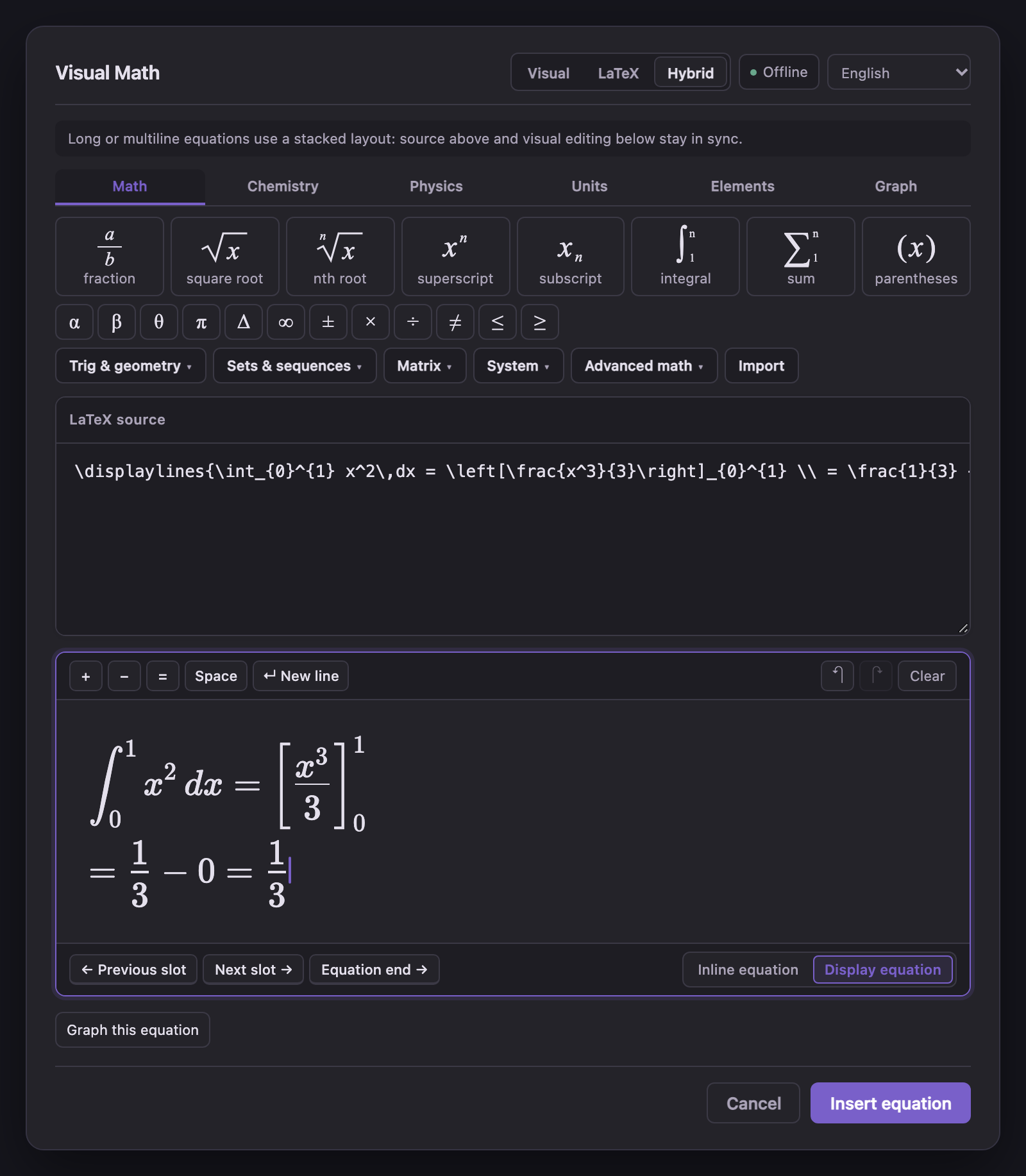
When you open the editor inside a note, you can click fractions, roots, integrals, sums, matrices, or equation systems and fill in the boxes directly. If you already know LaTeX, switch to LaTeX or Hybrid mode to edit the code and the rendered formula side by side. Press ↵ New line (Shift+Enter) whenever you want multiple lines inside the same equation block.
Everything saves as standard $…$ or $$…$$ Markdown in your note, and all fonts, unit tables, and graphing tools run locally offline.
- Website & Feature Guide: oranipost.github.io/visual-math
- Video Walkthroughs: @VisualMathForObsidian on YouTube
What's Inside
- Visual, LaTeX, and Hybrid editing: Edit with visual placeholders, raw TeX source, or both at once. Includes multi-line equations (
↵ New line), undo/redo history, and single-formula LaTeX import. - Matrices, systems, sets, and calculus notation: Build
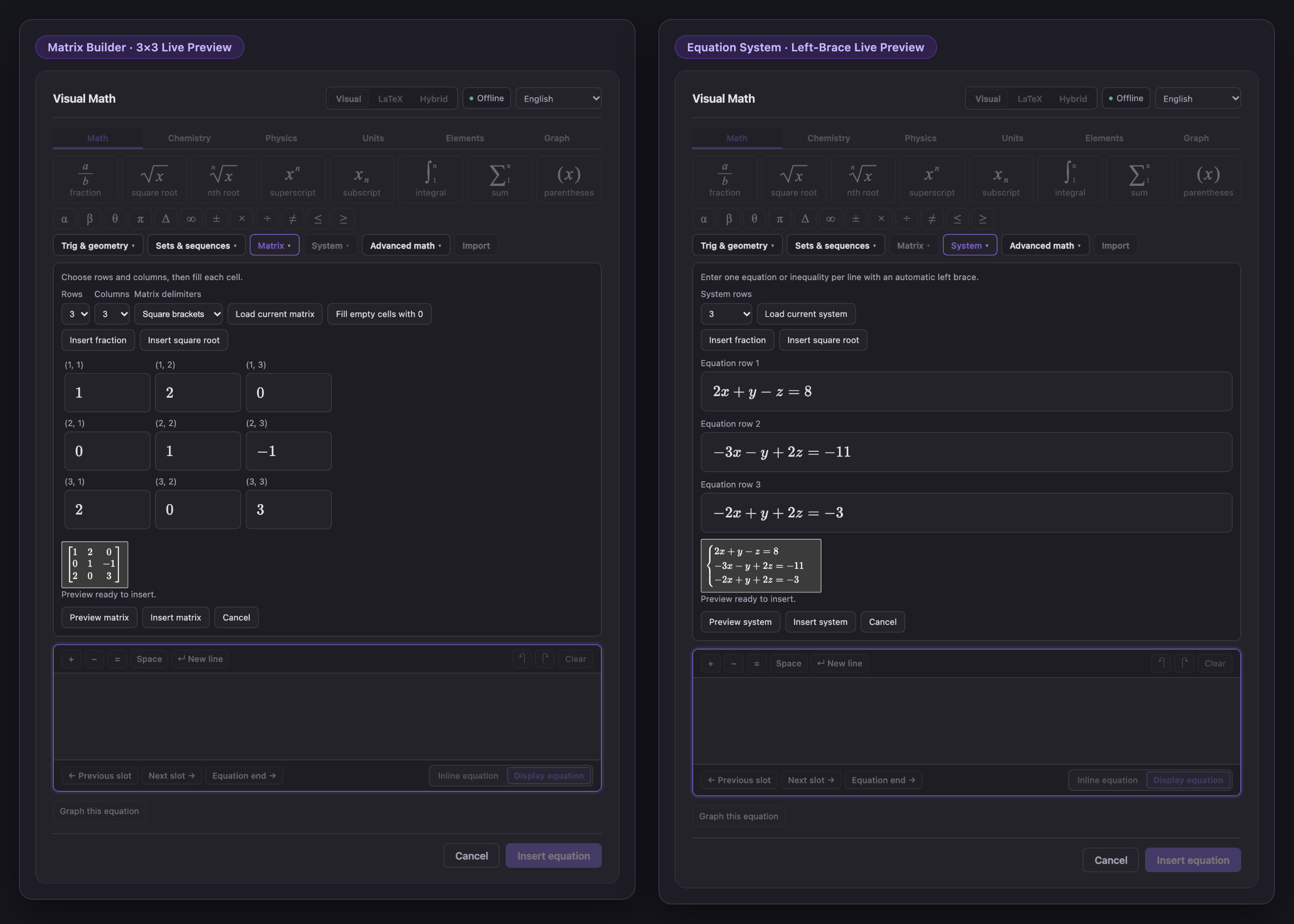
1×1to6×6matrices,2–6row equation systems with a left brace, 19 set/sequence symbols, trig/geometry notation, and 9 calculus/vector templates. - Function, polar, 3D surface, and complex graphs: Plot
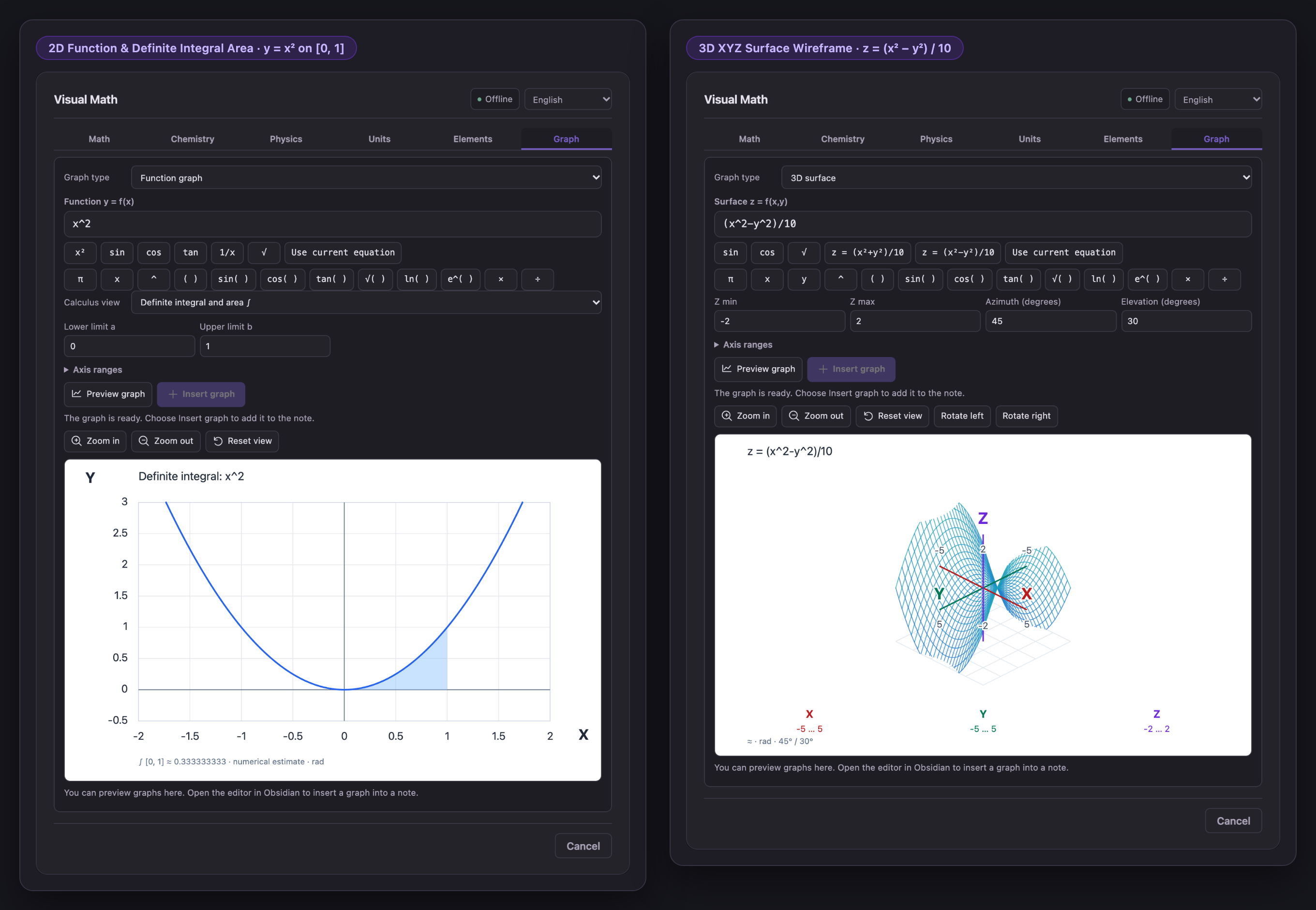
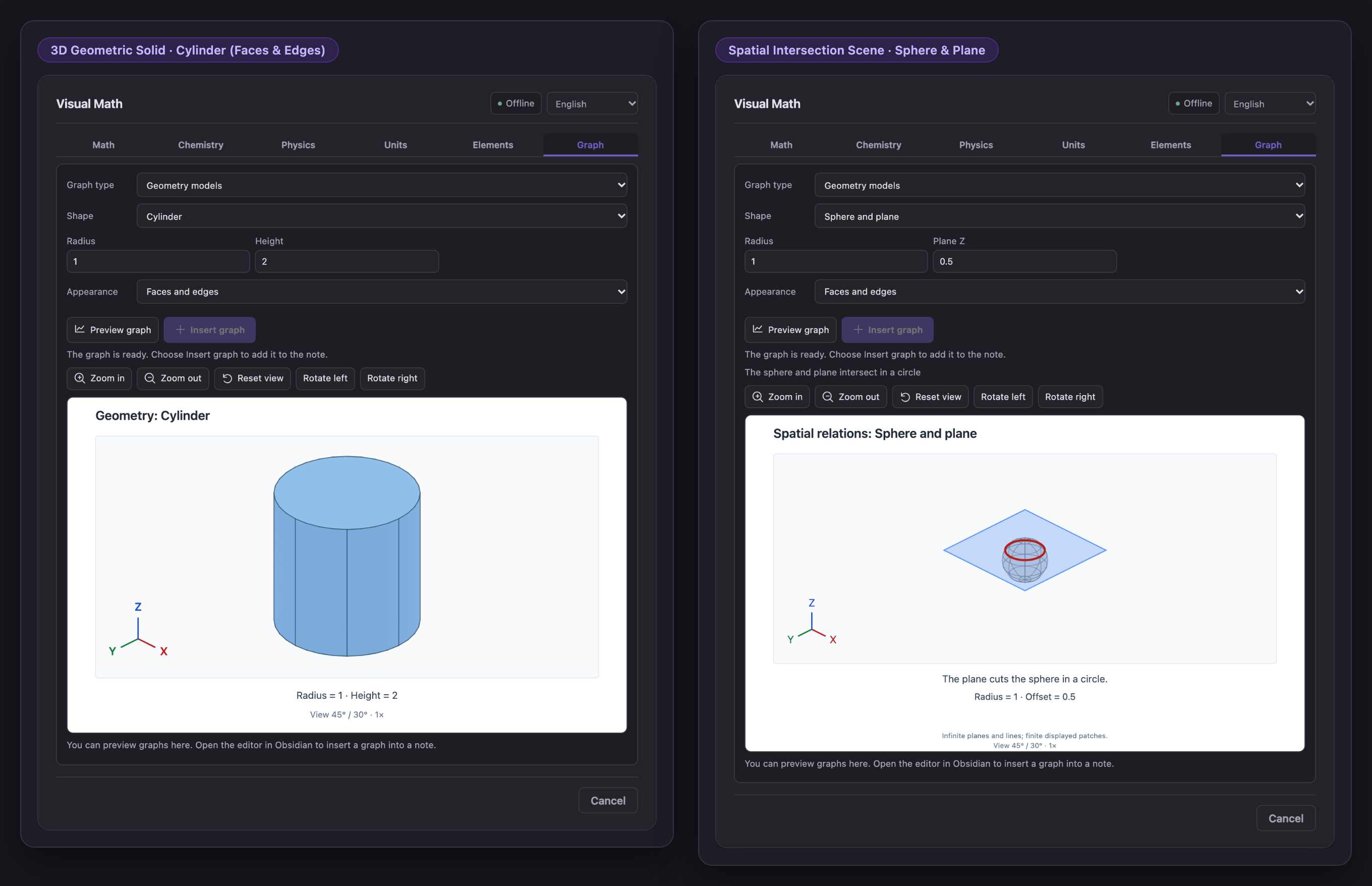
y = f(x)(with numerical 1st/2nd derivatives and definite integrals), polar curvesr = f(θ), 3D surfacesz = f(x, y), andRe / Imcomplex points right below your equation. - 3D geometry models: Rotate and zoom 7 geometric solids (sphere, cylinder, cone, pyramid, prism, cuboid, plane) and 3 spatial intersection scenes (two planes, line–plane, sphere–plane).
- Chemistry, physics, units, and periodic table: Write chemical reactions (
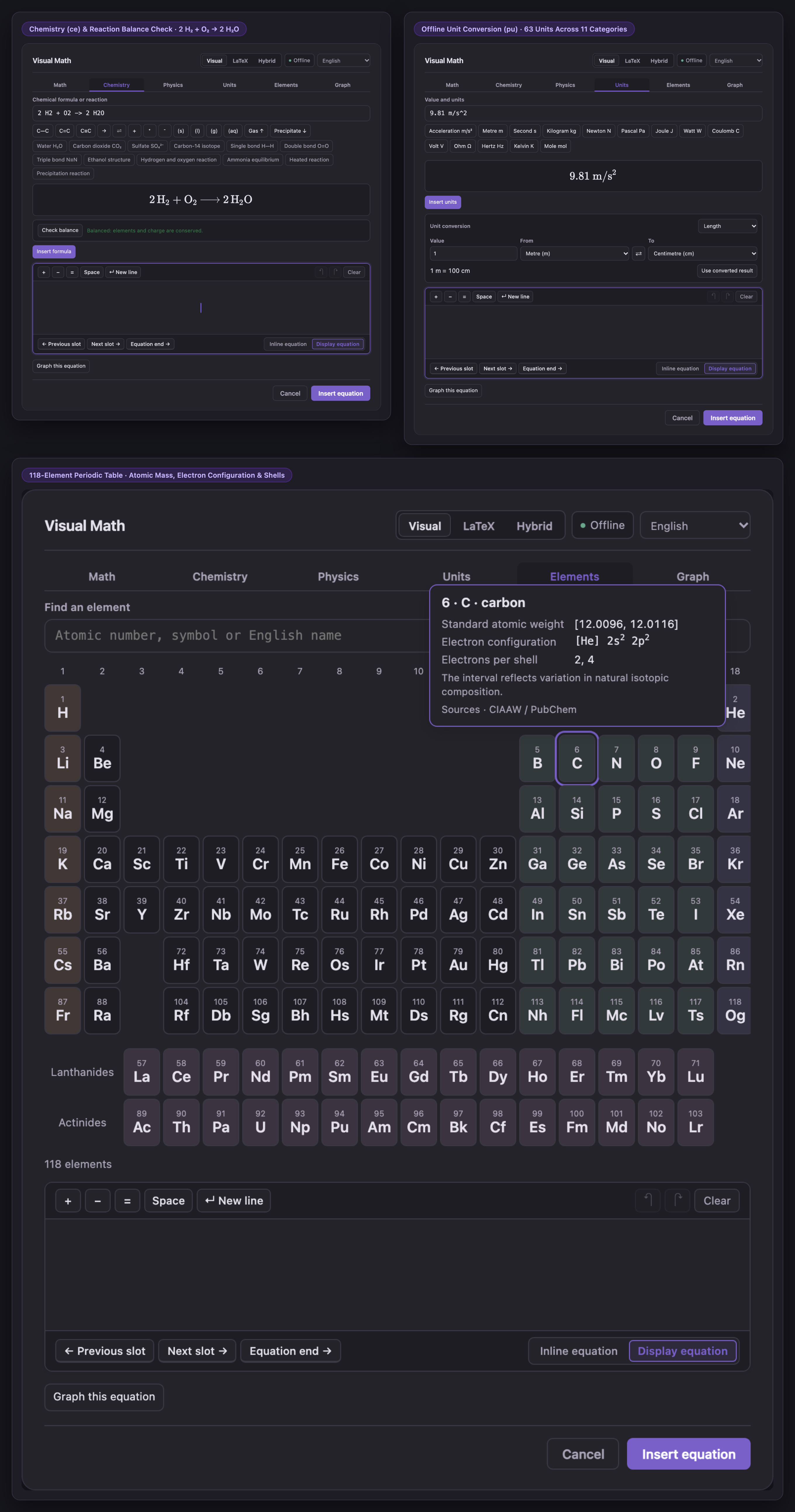
\ce) with balance checks, insert physics formulas, convert across 63 units in 11 categories (\pu), and look up all 118 elements. - Offline and trilingual: Works without internet or external accounts. Available in English, 简体中文, and Español.
Quick Start
- Open the editor: Place your cursor in a note and click ∑ in the note header or left ribbon (or run
Visual Math: Insert or edit equationfrom the command palette). - Fill in a structure: In Visual mode, click fraction, type
3, pressTab, and type4. Use the secondary tool bar (Trig & geometry,Sets & sequences,Matrix,System,Advanced math,Import) whenever you need larger structures. - Save or plot: Pick Inline equation (
$…$) or Display equation ($$…$$) at the bottom right of the card and click Insert equation (Ctrl/Cmd + Enter), or click Graph this equation to plot the formula right below the editor.
Installation
From Obsidian Community Plugins
- Open Visual Math in the Obsidian Plugin Directory and click Add to Obsidian.
- Click Install, then Enable inside Obsidian.
- Open any Markdown note and click ∑.
Manual ZIP Installation (1.1.0 Desktop Release)
Download visual-math-editor-1.1.0.zip (compiled release archive; do not download GitHub's Source code archive):
- Extract the
visual-math-editorfolder into<your-vault>/.obsidian/plugins/. - Check that
main.js,manifest.json,styles.css, and the license files sit directly inside.obsidian/plugins/visual-math-editor/. - Restart Obsidian and enable Visual Math under Settings → Community plugins.
See the Installation & Updating Guide for full instructions.
Screenshots (v1.1.0)
Hybrid Mode, Multi-Line Equations & Compact Tool Bar
Visual Matrices & Equation Systems
2D Function Calculus & 3D XYZ Surfaces
3D Geometry Solids & Spatial Scenes
Chemistry Balance, Unit Converter & Periodic Table
Scope & Limits
- Notation and bounded plotting: Visual Math formats mathematical and scientific notation and renders numerical graphs and teaching geometry scenes. It does not symbolically solve equations, evaluate matrix operations, sort sets, or prove theorems.
- Single-formula import: Accepts bare LaTeX or one matching outer delimiter pair (
$…$,$$…$$,\(...\),\[...\]) up to 8,192 characters. Formulas up to 4,096 characters render a live visual preview; valid formulas between 4,097 and 8,192 characters keep their exact source for editing in LaTeX or Hybrid mode without truncation. - Matrices and equation systems:
1–6rows/columns for matrices and2–6single-column rows for equation systems (cases). Empty matrix cells can be filled with0explicitly; resizing keeps hidden cells during the current session. - Graphs and geometry:
- Explicit functions
y = f(x)(up to 500 characters), polar curvesr = f(θ)(θspan up to100π), numerical 1st/2nd derivatives and definite integrals on finite continuous intervals, 3D wireframe surfacesz = f(x, y), and up to 20 rectangular complex points (a + bi, up to 1,000 characters). - Saved equation blocks (
$…$/$$…$$) and graph blocks (vme-plot) are separate blocks in the note after saving; use Edit graph or Save view on a graph block to update its stored view.
- Explicit functions
- Science tools: Chemistry (
\ce{…}) and units (\pu{…}) require hostmhchemsupport when exported outside Obsidian. Offline unit conversion covers 63 preset units across 11 categories using pinned Convert 8.0.2 constants. Element details follow CIAAW and NIST reference data. - Compatibility: Requires Obsidian 1.14.4+ on desktop. Verification records are maintained in TEST-REPORT.md and CHANGELOG.md.
Build From Source
Requires Node.js 22 or 24:
npm ci
npm run check
npm run package
Local component preview for development (binds to 127.0.0.1:8471 only):
npm run preview
See CONTRIBUTING.md, RELEASING.md, LANGUAGE-SUPPORT.md, and third-party-sources/README.md.
Privacy, Support & License
- Offline & private: No telemetry, no remote fonts or CDNs, and no background clipboard monitoring. Clipboard access is used only when you explicitly copy, cut, or paste inside the editor. See SECURITY.md.
- Author & contact: Built by Oliver / oranipost ([email protected]). Report bugs or suggestions on GitHub Issues.
- License: Starting with 0.7.0, project code is licensed under GNU GPL v3.0 only with the Obsidian linking exception (Copyright © 2026 Dongfang Wang; earlier
≤ 0.6.5code retains its historical MIT grant). Bundled MathLive, Convert, KaTeX fonts (MIT), and mhchem (Apache 2.0) notices are in THIRD-PARTY-NOTICES.md. Your own notes and formulas are never covered by GPL.