
README file from
GithubVisit History
See which notes you actually spend time in. Visit History records how long you focus on each note, canvas, and Excalidraw drawing, and shows your whole vault as an activity heatmap. Fully offline: no network calls, no accounts, no telemetry.
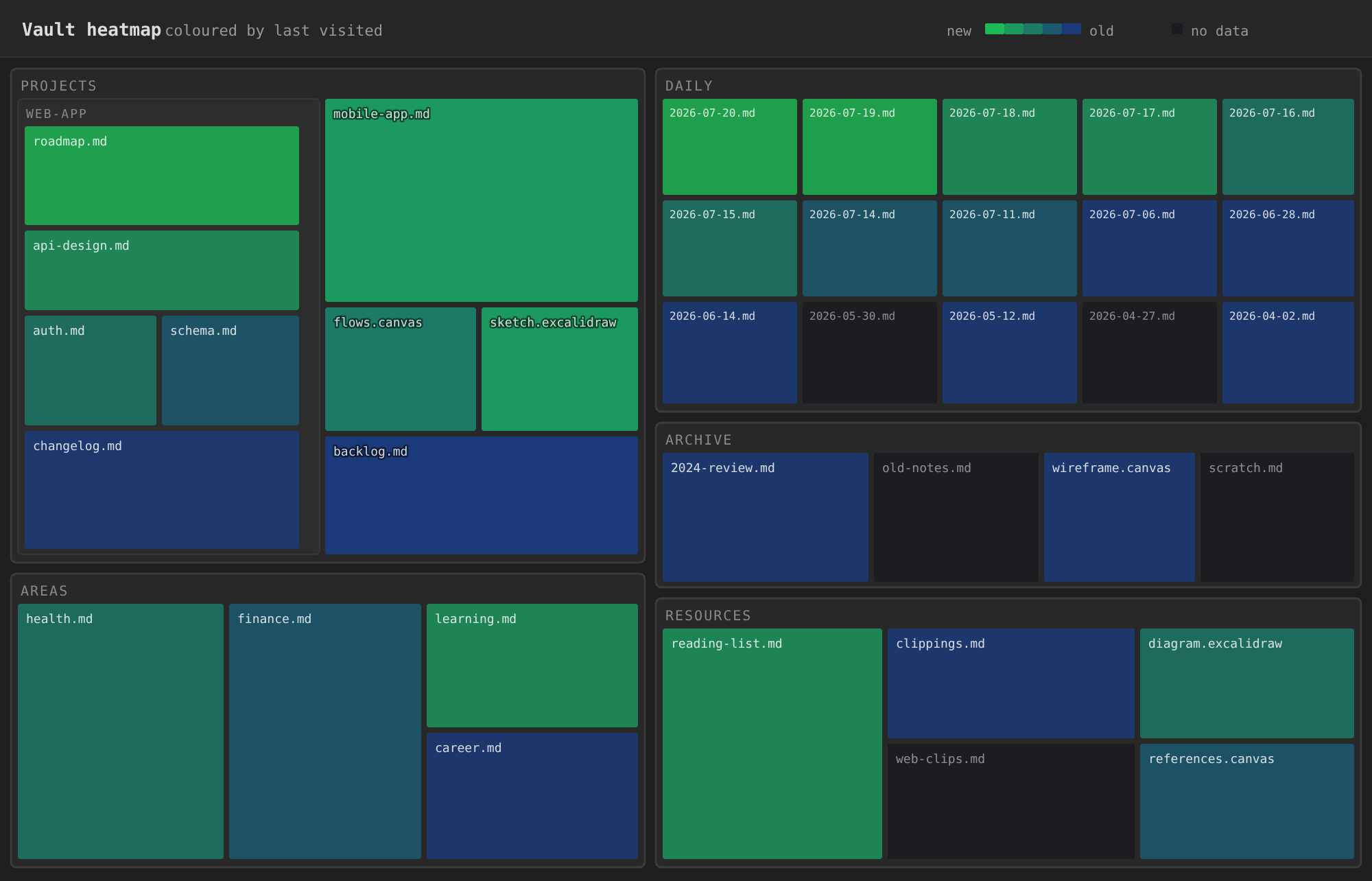
Brighter green = visited recently, deep blue = long ago, dim = no data yet.
Key features
- Vault heatmap — a zoomable treemap of every file, coloured by when it was last visited, modified, or created.
- Size by visit time — make the files you spend the most time in the biggest on the map (or size by file size).
- Automatic visit recording — focus time per document, with idle detection. No manual tracking.
- History survives renames — moving or renaming a note keeps all of its history.
- Inline a note — merge a small note into the one note that links to it, content and visit history, in one step.
- Plain-text, local data — one readable text file per document, inside your vault.
Quick start
- Install from Settings → Community plugins → Browse: search for Visit History and enable it.
- Confirm a short user name when asked. It only keeps histories apart when several people share a vault.
- Run Open vault heatmap from the command palette or the ribbon. Colour by modified to get a useful view right away; visit-based colouring fills in as you use your vault.
The heatmap
Every file is a rectangle nested inside its folders.
- Colour by when a file was last visited, modified, or created, or by type (note / canvas / Excalidraw). Tune the gradient and hot/cold thresholds to fit your vault.
- Size by content size or visit time (total time spent in the file; never-visited files are hidden). A Linear / Sqrt / Log curve keeps a few huge files from crowding out the rest.
- Navigate: click a folder to drill in, click a file to open it, pan and zoom with the mouse.
- Filter by path or by text content; a file shows if it matches any term.
_archivefolders are hidden. Open one from its folder menu to look inside.- Open for a single folder from its menu in the file explorer:
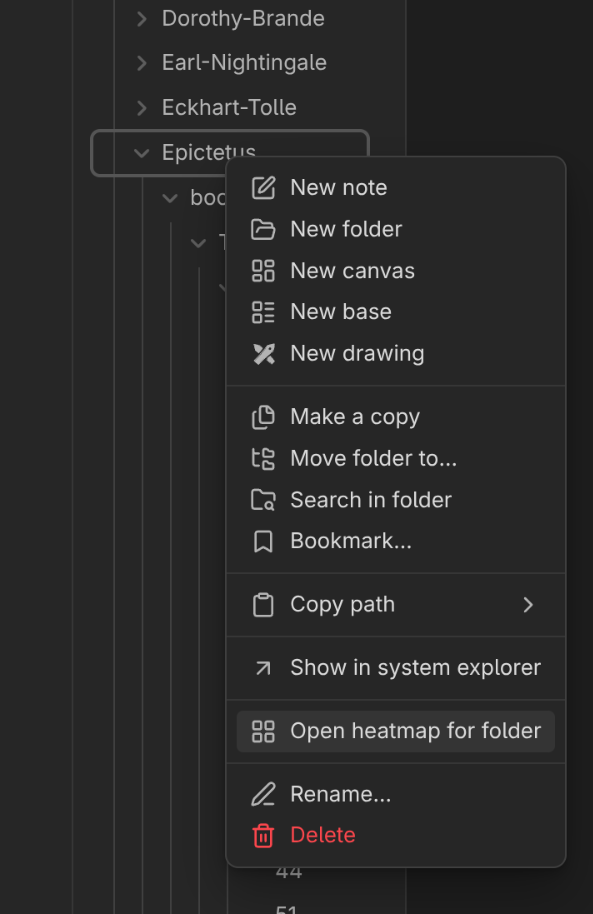
All heatmap options are saved automatically.
Inline a note
Have a small note that only one other note links to? From the small note's file
menu or the command palette, run Inline note (visit history aware). You can
also click the inline icon shown when you hover a ![[note]] embed of it.
- Its content goes right after the link, with headings shifted to fit. Its properties are added to the receiving note; existing ones are kept as they are.
- Its visit history now counts toward the receiving note.
- The small note then goes to the trash.
It only runs when the whole vault (canvases included) has exactly one link to the note; otherwise a dialog explains why. You confirm before anything changes, and if any step fails, the original note is kept.
How recording works
While a note, canvas, or Excalidraw drawing is in focus, the plugin times it. When you navigate away, switch windows, open Settings, or go idle, it saves that session (start time + duration). Visits under 2 seconds are not recorded.
The first time a visit to a document is saved, the document gets a small permanent id (stored in the note's frontmatter or the canvas's metadata). Just opening a document never changes it, and a visit too short to record leaves it untouched. History is saved under that id, not the path, so renames and moves keep it.
Where it's saved: the hidden .plugin_data/visit_history/ folder in your
vault, organised per user and per device. Because the folder is hidden, it stays
out of the file explorer and search. Obsidian Sync skips hidden folders, so
with Obsidian Sync, each device keeps its own history. History from older
versions (.visit_history/, __visit_history/) is moved there automatically.
Settings
Under Settings → Visit History:
- Idle timeout (seconds) — no interaction for this long ends the current session (default 180).
- Minimum focus time (seconds) — shorter visits are not recorded (default 2; 0 records everything).
- Add ids to all eligible files — assigns the permanent id to every note and canvas now, instead of on first open. Modifies files, so it asks for confirmation first.
On the roadmap
Not built yet:
- Journey visualization — replay the path you took through your notes over a session or a day.
- Nearby search — find notes you visited around the same time as a given note, even when they aren't linked.
Data format
Your history is plain text:
.plugin_data/visit_history/
  user/
    <your-name>/
      v3/
        README__generated__vh_v3_format.md   # this format, written by the plugin
        focus_duration_per_device/
          <device-name>/                     # each device writes only its own folder
            <doc-id>.vh_v3                   # one file per document
        merged_in_focus_duration_per_device/ # history of inlined notes
The file name is the document's permanent id. Each line is one completed focus session: start time (ISO 8601 UTC) plus the time spent in focus, in milliseconds. For example, a 5.6-second visit:
2026-07-09T22:02:15.745Z D:5600
Appendix: file times after a git clone
Created and modified colouring use your files' timestamps. Git doesn't
keep them, so after a clone or pull the whole vault looks freshly modified. Run
git restore-mtime in your vault to
reset each file's modified time to its last commit. Visit-based colouring is
unaffected.
For plugin developers
To use visit history data (visit stats, heatmap colors) from your own plugin, see API.md.
License
Released under the Kondratyev Source Available License (KSAL-3.0). See LICENSE.md.
In short:
- Use it anywhere. Personal vaults, work vaults, client work, companies of any size. No restrictions on what you do with the notes and data you produce.
- Free features are free. Some features may be gated behind a license key in the future and require a payment. You may not remove, disable, or bypass those checks.
- Source is available, not strictly open. You may read, study, and modify the code for noncommercial purposes. You may not sell it, distribute it commercially, ship it inside a product, or run it as a hosted service.
For commercial licensing, reach out.