Vault Orrery

by Elliott Park
5
4
3
2
1
Score: 50/100

Description

Claude lover

Reviews

No reviews yet.

Stats

1
stars
30
downloads
0
forks
4
days
3
days
3
days
0
total PRs
0
open PRs
0
closed PRs
0
merged PRs
0
total issues
0
open issues
0
closed issues
14
commits

Latest Version

4 days ago

Changelog

The star at the centre gets a face, the bodies around it get a size you choose, and the spaceship stops being a camera with a crosshair and becomes something you fly from a cockpit.

  • A star with a face. The hub's photosphere was limb darkening and one scale of convection, and the granulation was coarse enough to read as a motif rather than as the material the star is made of. It now has two scales of convection an order apart, a domain warp so the cells are uneven rather than tiled, sunspots in the two active latitude bands with fibrous penumbrae and a floor at a fifth of the disc's brightness, faculae brightening the lanes near the limb against the darkening, a spicule fringe on the chromosphere instead of a pencil line, and prominences standing a fifth of a radius clear of the limb on a shell of their own. The whole face turns, slowly, which is the only thing on screen that says the star rotates.
  • Sun, planet and moon sizes. Three controls in the drawer, 0.30× to 3.00×, scaling a whole class of body at once so the ratios between notes — which are citation counts, and mean something — never move. Moon orbits are re-derived when planets grow, so a doubled planet does not swallow its satellites.
  • Arriving is a capture, not a stop. The autopilot used to run out of bezier and leave the ship hanging motionless a few radii off a planet. It now inserts into orbit, in the plane it arrived on, at three and a half body radii, and stays there — so flying in from below leaves you in a polar orbit. The trip also tracks the body while it flies: the endpoint was fixed when the trip was booked and a note is a planet in orbit, so the ship had been arriving at where the planet used to be.
  • A cockpit rather than a HUD. A canopy frame with rounded corners, corner struts, a wrapping dash and two reflections drifting on periods that do not divide into each other. H takes it down with the rest of the instruments.
  • The deck answers "am I getting there". Closing rate on the locked body, differentiated from the range so that the target's own orbital motion is already in it, and a time to arrival measured to the orbit you would end up in rather than to the collision. Plus the star system you are currently inside, announced across the frame when you cross into it.
  • Contacts, not a contact. The aiming cone usually holds four or five bodies and which one the reticle settled on was decided by fractions of a degree. All of them are listed now, 16 holds one against the cone's own opinion, B turns the cone round to ask what you just passed, and T filters it to one folder at a time.
  • A radar with a third dimension. Tilted thirty-eight degrees, so the ship's plane is an ellipse you can see and height off it is a genuinely vertical offset with a stalk and a shadow rather than a tick of unknown sign. The locked body's links are drawn between blips.
  • Speed you can feel. Radial motion blur trailing to the edges with the centre of the frame left sharp, and a camera shake on three incommensurable periods — on the mount, not on the ship, so the reticle never loses its target. One control, SPEED FEEL, and it goes to zero.
  • The engine is somewhere. The thruster pans to whichever one is firing, a low shelf opens under it with the boost, and a note sounded while you are closing on it is Doppler shifted — capped at a minor third, so it still belongs to the scale the rest of the vault is tuned to.
  • The star will kill you. Inside six stellar radii the exposure goes, the frame warms, a strip names it and an alarm pulses faster the closer it gets. Bounded by the cosmos as well as by the star, so on a small vault it is not lit for an ordinary flight past the hub.
  • A tour that runs itself. X walks the graph to notes you have not visited, one hop at a time, dwelling in orbit long enough to read the name before moving on — and jumping to the nearest unvisited note when the component runs out, rather than reporting a fraction of a vault as the whole of it.
  • First flight. The HUD is an instrument panel, and an instrument panel says nothing to someone who has not been told what it flies. The first time a vault loads, a card names the four moves that are enough to get going — drag and wheel to look, / to find a note, F to fly it yourself, O to open what you are looking at — over the cosmos it has just built, rather than as a splash in front of nothing. It is shown once and remembered, any key dismisses it, and ? or the new [ ? ] in the SHORTCUTS title bar brings it back. Also a command, Show the first-flight guide, so it can be bound to a key or found by name.

README file from

Github

Vault Orrery

Fly through your vault as a star system.

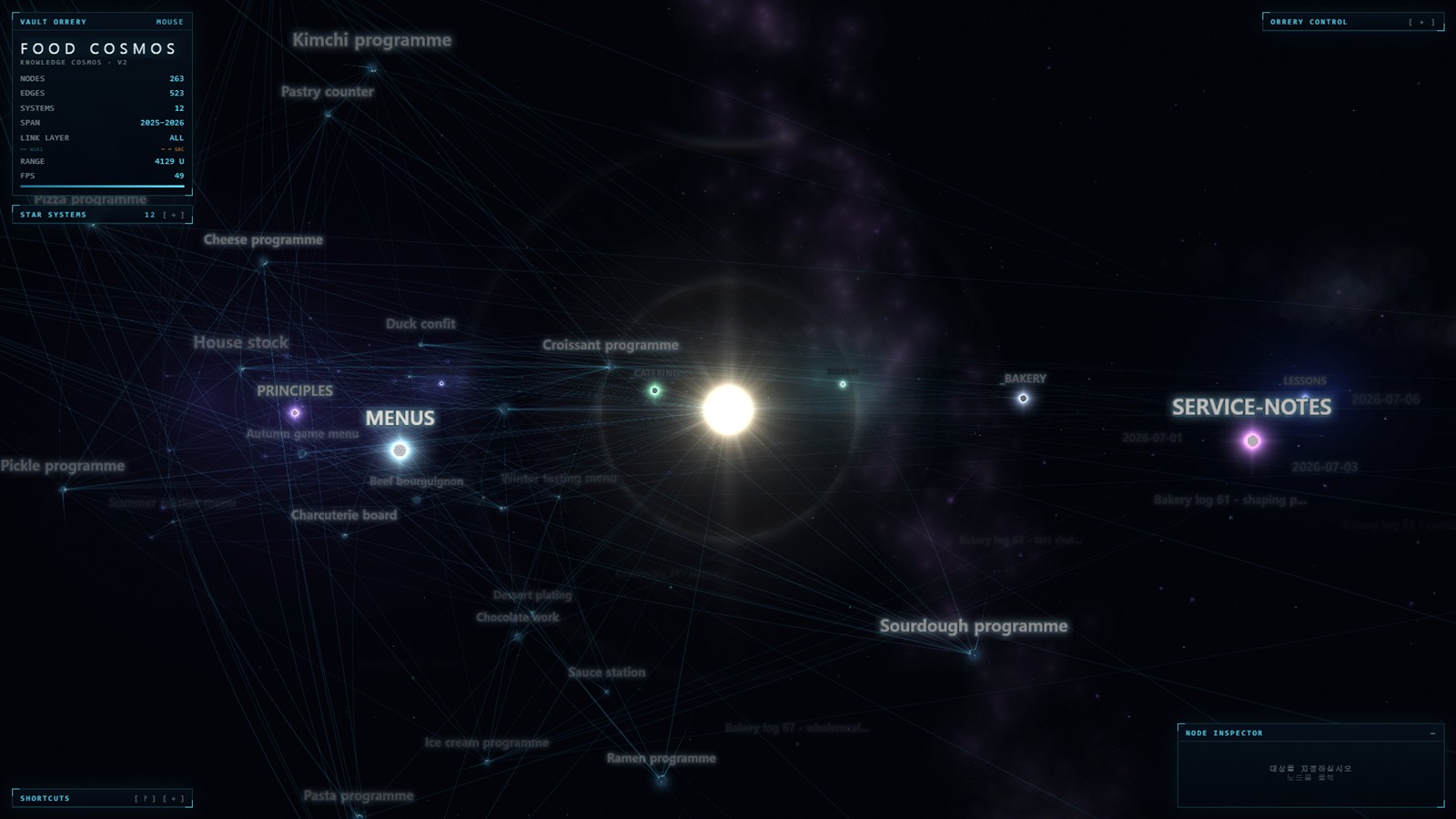
Vault Orrery renders your notes as an orbiting cosmos you can pilot: folders become stars, notes become planets, and the sources they cite become moons.

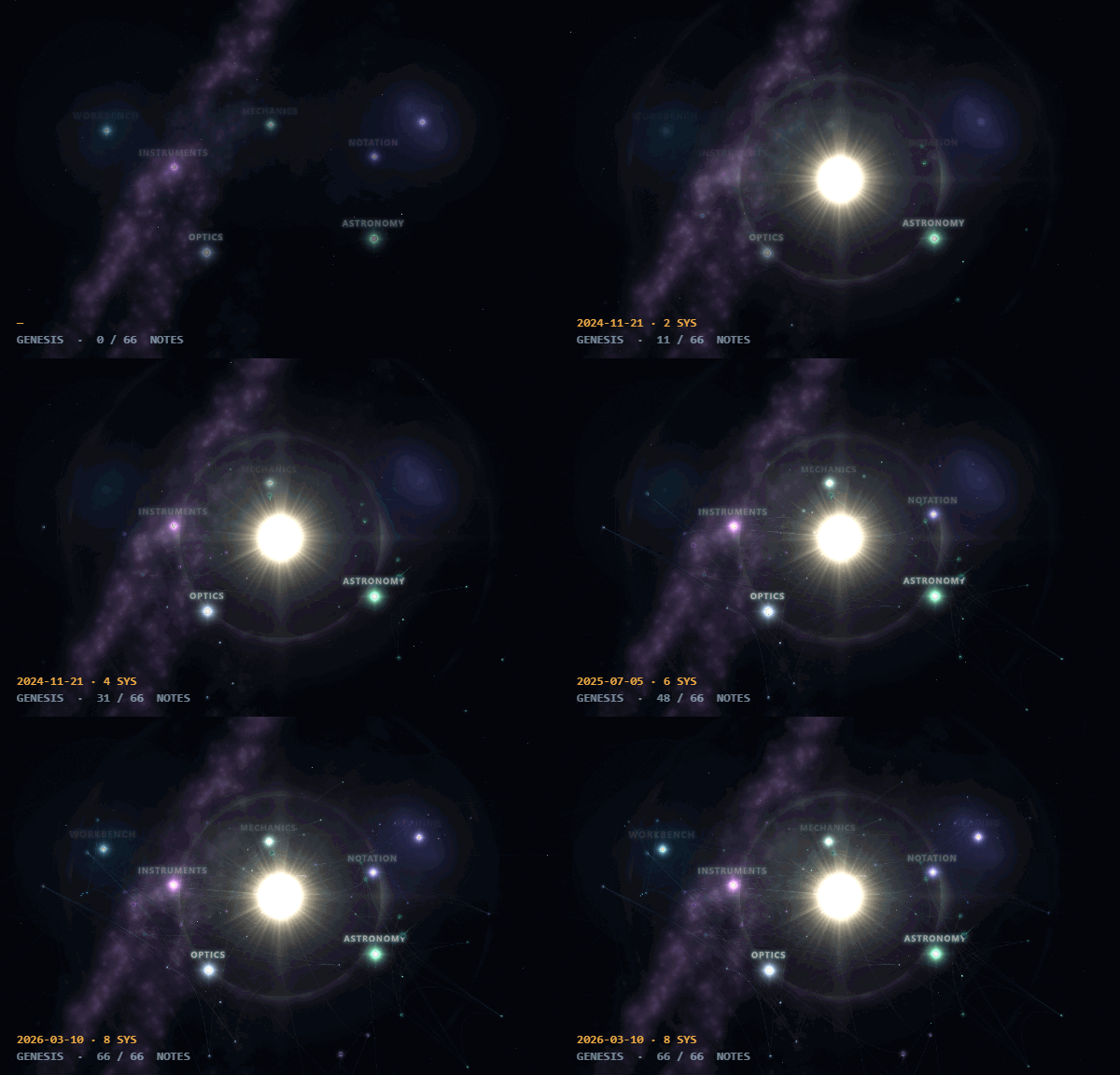
Not another galaxy graph. Several plugins draw your vault as a starfield. This one is a flight simulator for it: a WASD spaceship with a scanner and radar, a surface mode where you stand on a note and watch its neighbours rise over the horizon, and a Genesis timeline that plays the vault's formation from void to present. If you only want a prettier graph, the other plugins are lighter and you should use one of those.


It is wired into the editor

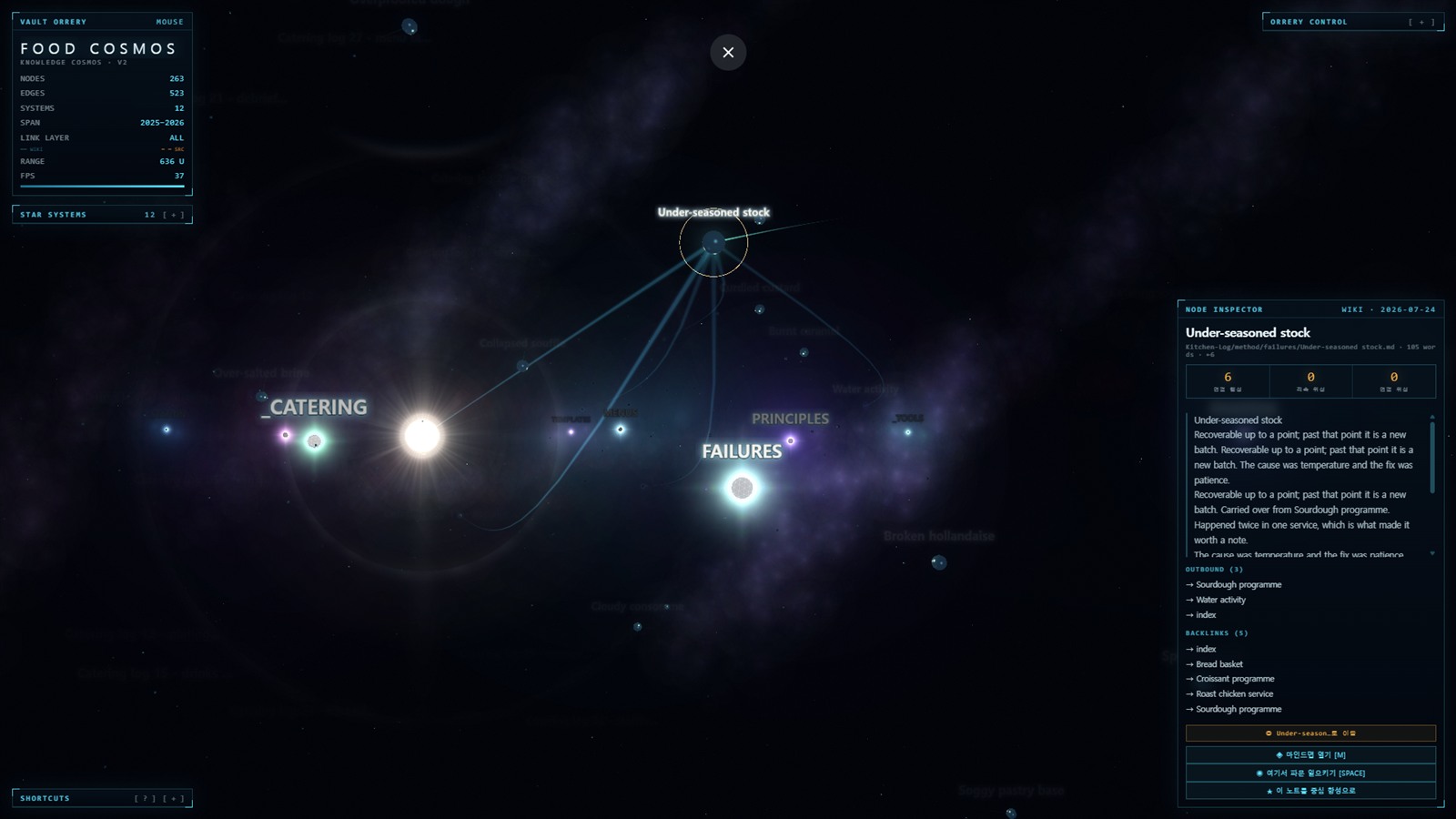
A cosmos you cannot leave is an ornament, so every body on screen is a note you can be reading a second later.

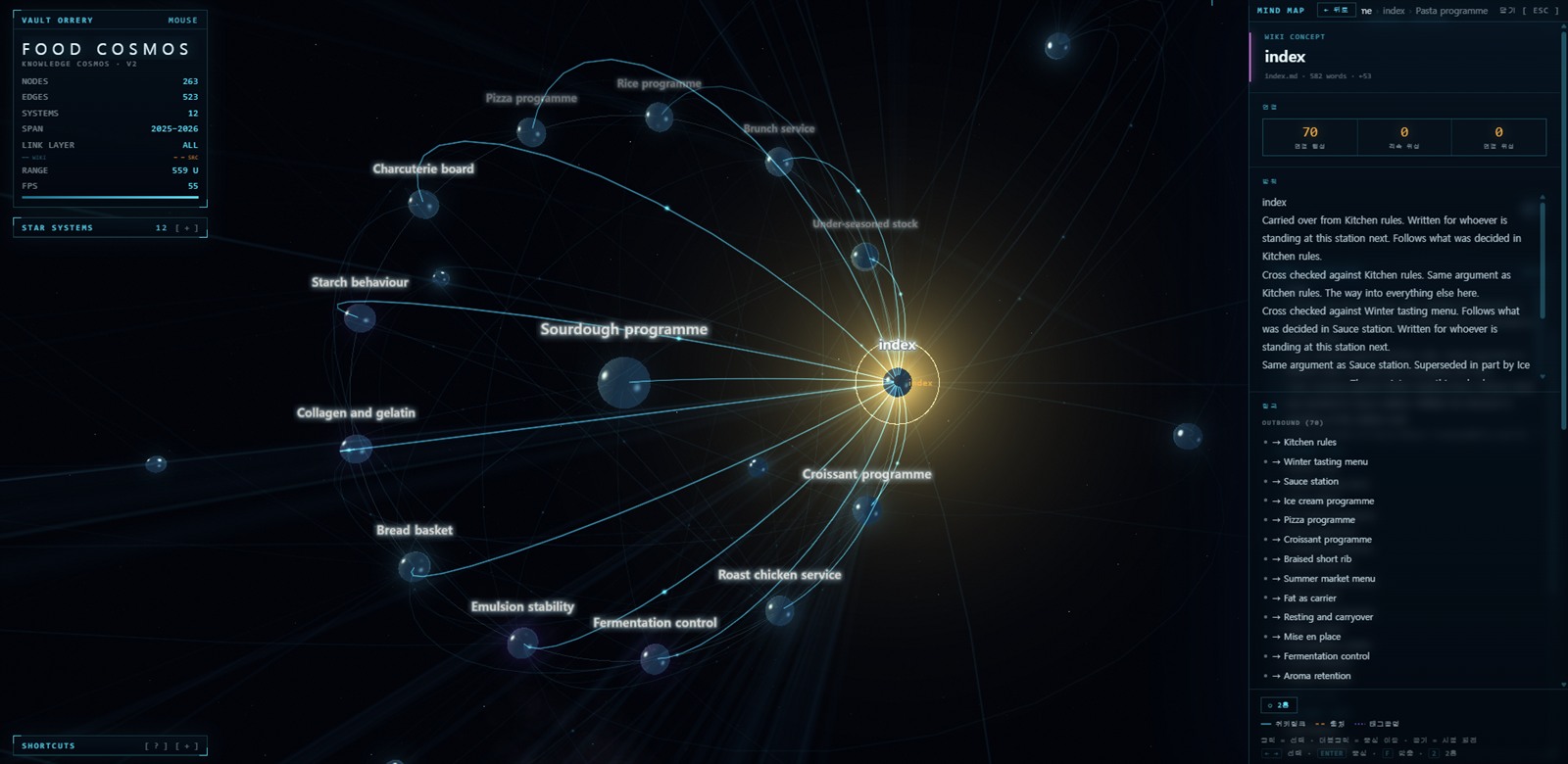
  • Open the note with O, with the inspector's button, from the mind map, or by Ctrl/Cmd-clicking a planet — the same gesture that opens a link anywhere else in Obsidian. Ctrl/Cmd opens it beside the orrery rather than on top of it, so the view you clicked from is still there when you come back.
  • Find where you are. The note you are editing carries its own violet beacon, separate from the selection: where you are working and where you are looking are usually different notes, and both are worth keeping on screen.
  • Get there from anywhere. Reveal the active note in the orrery is a command, Show in Vault Orrery is on every note's context menu, and the camera will follow the editor if you turn that on in settings.
  • Every mode is a command, so the spaceship, Genesis, the mind map, the surface, the poster and the rest can be bound to whatever keys you like. None is bound by default.
  • You are told how to fly it once. The first time a vault loads, a card names the four moves that are enough to get going, over the cosmos it has just built. Any key dismisses it and it is not shown again; ? brings it back when you want it.
  • The vault stays current. Notes written, created, renamed or deleted while the view is open re-derive the cosmos — with the camera and the selection left where they were, and no loading curtain over a view you are using.

The graph is Obsidian's own. Links, backlinks and tags come from the index Obsidian already keeps, so a link written through an alias resolves rather than counting as broken, an embed counts as a link, and a #tag written in a paragraph counts alongside the ones in the front matter.


Privacy

This plugin reads your notes. That deserves a straight answer, so here it is.

  • No network access at runtime. At all. There is no server, no telemetry, no analytics, no update check, no remote font, no CDN. The plugin makes zero outbound requests.
  • Nothing leaves the view. Parsing, layout and rendering all happen locally, and nothing derived from your notes is written anywhere outside the vault.
  • No camera, no microphone, no other device permission is requested — the plugin has no code that could ask for one.

Why it reads the whole vault. The plugin calls vault.getMarkdownFiles() and reads each note it is left with. That breadth is the feature rather than an excess of it: what is being drawn is the shape of the vault — every note as a body, every link between them as an orbit — and a graph of a subset is a different vault's picture, silently wrong in a way the user cannot see. Reading is done with cachedRead, so it goes through Obsidian's own cache rather than touching disk again, and the exclusion rules below are applied first, so notes you have hidden are never opened at all.

You can verify all of this. The engine is a single readable HTML/JS file, and grep -rn "fetch\|XMLHttpRequest\|WebSocket\|https://" over it will show you what it does and does not reach for. npm run check is the same test, automated and run over the built bundle.


Respecting your excluded files

Notes you have hidden from Obsidian's own graph are hidden here too.

The plugin reads your Settings → Files & Links → Excluded files patterns (userIgnoreFilters) and applies them with the same semantics Obsidian uses: an entry wrapped in slashes is a regular expression, anything else is a path prefix. Excluded folders are pruned during the vault walk, so a hidden note is never read, never parsed, and never drawn.

After loading, the plugin tells you how many notes your filters removed, so a too-broad pattern is visible rather than silent.

.obsidian, .git, .trash, and node_modules are always skipped regardless of your settings.


Performance on large vaults

A spring simulation over several thousand instanced bodies is not free. The plugin ships a MAX NODES ceiling, default 3000, adjustable on the control panel from 500 up to 10 000 or off entirely.

When the ceiling truncates a vault, it says so — "Loaded 3000 of 7412 notes" — rather than presenting a partial cosmos as if it were the whole thing.

Rendering stops when you are not looking at it. The render loop, the physics clock and the audio context are all suspended when the view's leaf is hidden or the window is in the background, and resume where they left off. An orrery in a background tab costs nothing.

If a large vault still runs slowly, the cheapest wins are lowering LINK GLOW, turning STARFIELD down, and reducing MAX NODES.

Keeping up with the vault re-reads every note each time it rebuilds, debounced so that writing a note costs one rebuild rather than one per save. On a vault large enough for that to be felt, turn Keep up with the vault off in settings; the Reload vault command then does it when you ask.


Giving the vault room

Two knobs on the control panel decide how tightly the cosmos is packed, and they are not the same question.

  • ORBIT GAP is how much room one orbit ring gets. It is the measurement the whole layout is built out of, so widening it also pushes the star systems apart to keep their clearance — the vault opens up rather than growing into itself. It moves while you drag: the whole cosmos widens and settles under a camera that stays where you left it, so you are watching the space open rather than watching a new layout appear.
  • ORBIT SPREAD scales the orbits within each system, leaving the systems themselves where they are. Turn it up to pull a crowded system's planets away from their star without moving the vault around them.

A dense folder — a few hundred notes in one place — is the case worth reaching for these on. Start with ORBIT GAP.

SUN SIZE, PLANET SIZE and MOON SIZE scale a whole class of body at once, from 0.30× to 3.00×. They never change the ratios between notes — a body's radius is its citation count and that is worth reading — so what moves is how big the whole class is drawn. Three controls rather than one because the complaint is never "everything is too small": it is a hub that swallows its inner ring on a vault with one enormous folder, or moons that are specks from the deck of the ship. Moon orbits widen when planets do, so a planet turned up does not end up with its satellites inside it.


Flying it

F puts you in the cockpit. WASD moves, QE goes up and down, the mouse looks, SHIFT is the throttle.

  • Arriving is a capture. Travel to a note — from the inspector, from the mind map, from search — and the ship falls into orbit around it and stays there, in the plane it arrived on. Come in from below and you end up in a polar orbit. Any key on the stick hands control back, with the speed the orbit had.
  • The deck says whether you are getting there. Closing rate on whatever is locked, and a time to arrival measured to the orbit you would end up in rather than to the surface. Both account for the target's own motion: a note is a planet, and it is going somewhere too.
  • You are told which system you are in. Crossing into a folder's territory announces it, and the deck names it the whole time you are inside.
  • The scanner reports everything it found. The aiming cone usually holds four or five bodies; the CONTACTS panel lists them, 16 holds one against the cone's own opinion, B turns the cone round to see what you just passed, and T filters it to one folder at a time.
  • The radar has a third dimension. It is a bowl, not a plan: the ship's plane is an ellipse and height off it is a real vertical offset with a stalk and a shadow, so above and below are told apart at a glance. The locked note's links are drawn between blips.
  • Do not fly into the star. Inside six stellar radii the exposure goes, the frame warms and an alarm pulses faster the closer you get.
  • X flies it for you. An ambient tour that walks the graph to notes you have not visited, dwelling in orbit at each long enough to read its name.

SPEED FEEL on the control panel scales the camera shake and the radial motion blur together, and goes to zero.


Controls

O · ctrl/cmd-click open the note in Obsidian
/ search
M · double-click mind map
F spaceship (WASD to fly, SPACE to scan links)
in the cockpit 16 hold a contact · B rear scan · T filter · X patrol · [ ] radar size
V stand on the selected planet
G Genesis — play the vault's formation
N find twins (notes alike but not yet linked)
SPACE ripple from the selected note
P save a poster (high-resolution PNG, no HUD)
L cycle the link layer
U ambient sound
R · H reset view · hide HUD
? first-flight guide (also [ ? ] in the SHORTCUTS pane)
drag / wheel orbit · zoom
right-drag · shift-drag pan · move a node

Languages

The interface is available in 한국어 · English · 日本語 · 中文, switchable from the control panel without reloading, or set in Settings → Vault Orrery. Your vault's own folder and note names are never translated. (The settings tab itself is English, as Obsidian's settings are.)


Installation

From the community plugin browser

Settings → Community plugins → Browse → "Vault Orrery" → Install.

Manual

Copy main.js, manifest.json and styles.css from the release into <vault>/.obsidian/plugins/vault-orrery/, then enable it in Settings. Those three files are the whole plugin — three.js is bundled into main.js, so nothing is fetched at runtime and vendor/ is only needed to develop against the standalone engine page.


Development

The engine is vault-orrery-v2.html, in this directory — a real page you can open by double-clicking it. That is where the renderer is developed and demoed, and it is the single source of truth. scripts/build-engine.mjs turns the page into the module the plugin imports: it scopes the stylesheet under .vo-root, redirects the page-level APIs at the view's container, makes every window listener removable, and routes the page's localStorage calls at a store the host supplies — inside Obsidian that is the plugin's own data file, so nothing is left in web storage.

Two files are build output and must not be edited by hand: src/engine.generated.js, and styles.css — the latter is src/styles.src.css (the seam between Obsidian's leaf and the engine's root) concatenated with the scoped engine stylesheet. Both are overwritten on every build.

npm install
npm run vendor    # copy three.js into vendor/
npm run build     # engine -> typecheck -> bundle to main.js
npm test          # build, then verify no remote code and run the smoke test
npm run dev       # rebuild on change
npm run harness   # serve harness.html — mount the engine and actually draw

npm test never renders anything: it checks the generated module and loads the bundle against a stubbed Obsidian. Both of those have passed while the engine threw on every frame, so the harness is the only thing here that can tell you the renderer works. It mounts src/engine.generated.js — the exact module the plugin loads — inside a sized container and runs the same calls the view makes. Add ?shim=1 to drive the loop from timers and report what a frame threw; without it a window that is not compositing never delivers a frame at all.

A fresh clone builds with nothing else present — the engine source, the build scripts, and the tests are all in this repository. vendor/ is the one thing not committed: three.js is a multi-megabyte build shipped verbatim under its own licence, so npm run vendor copies it out of node_modules at a pinned exact version and verifies the result. See THIRD-PARTY-NOTICES.md.

npm run check is the policy gate: it greps the built bundle for anything that could execute from a remote host and fails if it finds one.

Third-party software

This plugin bundles three.js (MIT) and nothing else. Full notice, licence text, and instructions for populating vendor/ are in THIRD-PARTY-NOTICES.md.

It is not fetched from a network at runtime.


License

MIT — see LICENSE.

This software bundles third-party components under their own licences; see THIRD-PARTY-NOTICES.md.