
README file from
GithubVault Linker Auto
English · 中文
Keeps your Obsidian vault linked — in plain Markdown, without ever touching what you wrote.
Vault Linker builds a link layer on top of your notes: an index page for every area of your vault, and a short "Related notes" list at the end of each note, ranked by the topics the notes share. It runs on its own as your vault changes, and everything it writes lives in clearly marked blocks that it can update or remove at any time.
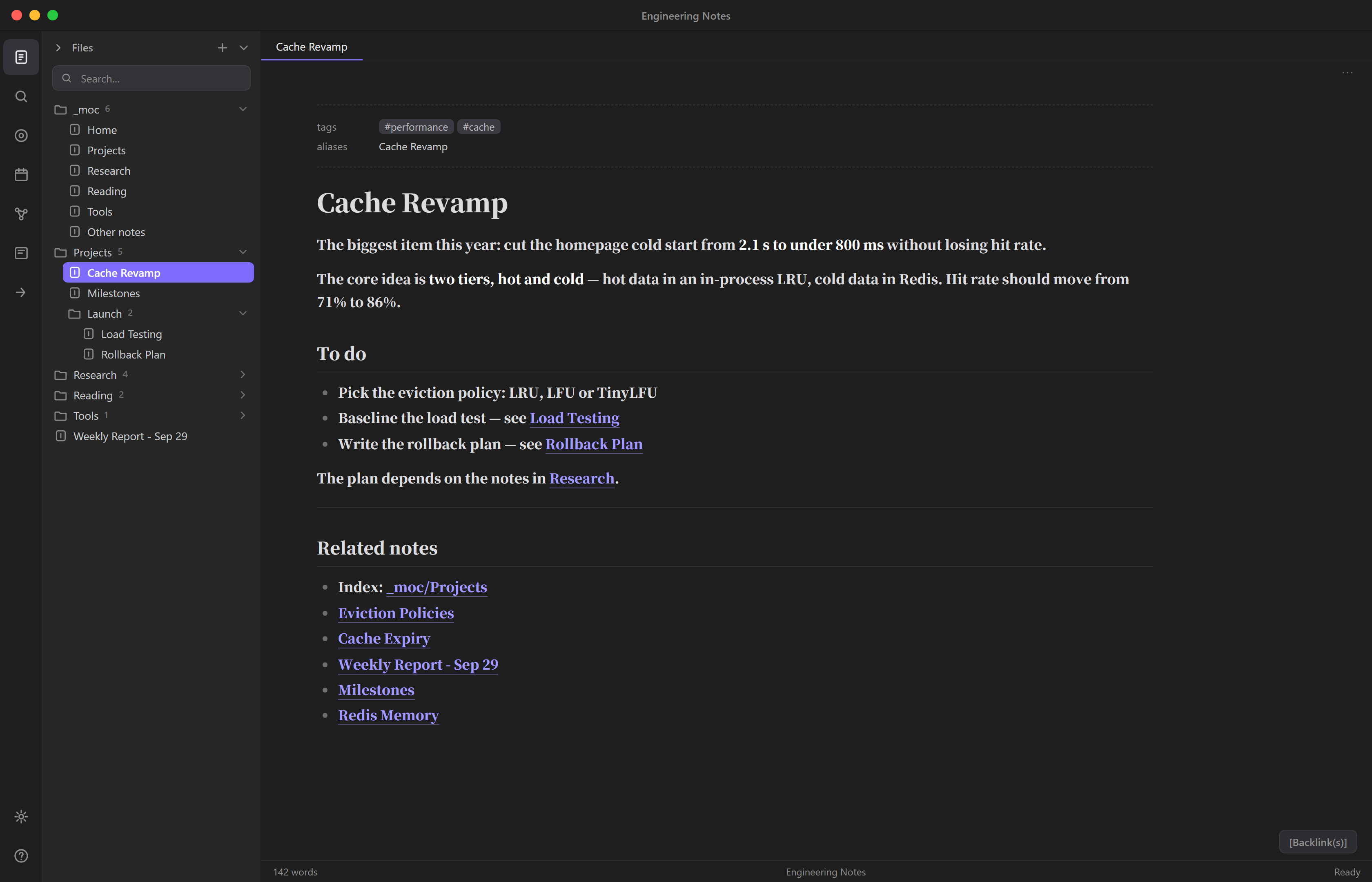
Highlights
- Your text is never modified. The plugin writes only inside its own managed blocks. After every write it checks, byte for byte, that everything outside those blocks is unchanged, and restores the note if not.
- Links are plain Markdown. The links live in the files, not in a plugin database, so
grep,git, scripts, AI agents and other apps see them too. Uninstall the plugin and the links stay. - Works with zero configuration. Top-level folders become areas; note titles, aliases and tags become the
topics used to find related notes. Names that say nothing about a note's topic (
README,index, dates) are ignored automatically. - Finds your own vocabulary. Find in my notes mines candidate terms from your vault, English or Chinese, without a dictionary, and you pick the ones to use.
- Catches changes Obsidian misses. Files written by scripts, sync tools or AI agents don't always raise Obsidian's file events, so changes are also detected by polling.
- Fast and quiet. Around 1 second for 800 notes and 6 seconds for 3,000, done in chunks so Obsidian stays responsive. Runs are deterministic: a second run changes nothing, and index pages aren't rewritten just because the date changed, so your git history stays clean.
- Careful with your vault. Off until you turn it on. Never overwrites a file it didn't create, skips templates, Excalidraw drawings, Kanban boards and the note you're editing, and keeps Windows line endings.
- Private and portable. No network access, no telemetry, no runtime dependencies. Works on mobile. The interface follows Obsidian's language (English or Chinese).
- Reorganize folders freely. Links are recomputed from current paths on every run, so moves and renames heal themselves. If you customized area mappings, the run report detects mappings that no longer match your folders and offers confirmed updates; renames done inside Obsidian make those suggestions exact, while changes made outside (scripts, AI agents) are still caught by the full scan.
- Folder structure as a topic source (optional). Notes in the same folder become related, and a note that mentions a folder's name relates to the notes filed in it — how you organize your folders itself tells the plugin what belongs together.
What it writes
At the end of a note:
---
<!-- AUTO-LINKS:START -->
## Related notes

- Index: [[_moc/Projects]]
- [[Projects/Cache redesign|Cache redesign]]
- [[Research/Eviction policies|Eviction policies]]
<!-- AUTO-LINKS:END -->
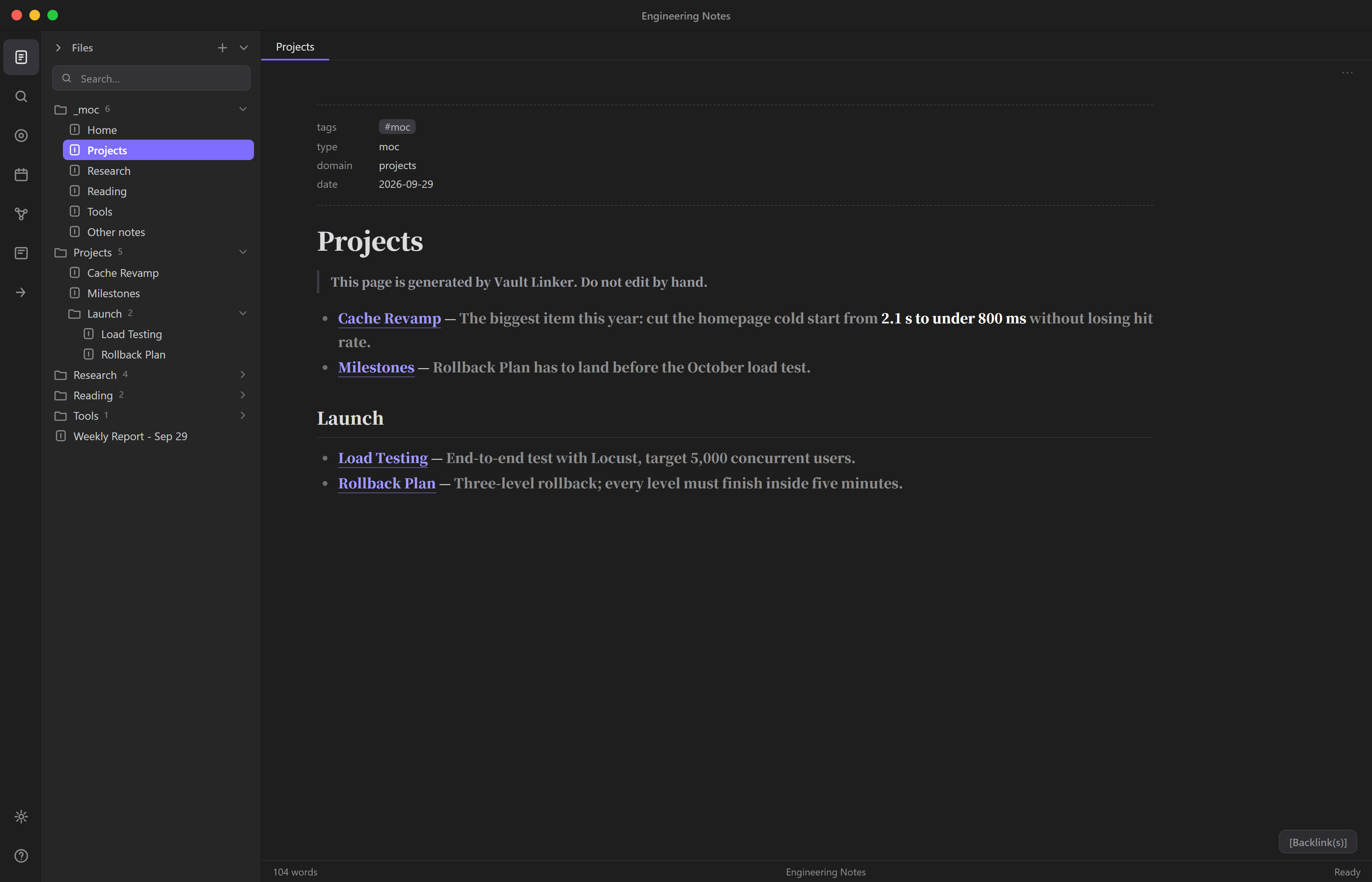
And one index page per top-level folder in _moc/, with subfolders as sections, plus a home page (Home).
Notes in the vault root are listed on Other notes:
# Projects

> This page is generated by Vault Linker. Do not edit by hand.

- [[Projects/Roadmap|Roadmap]] — What we plan to ship this year…

## Search

- [[Projects/Search/v2|Search v2]] — Goals for the second version of search…
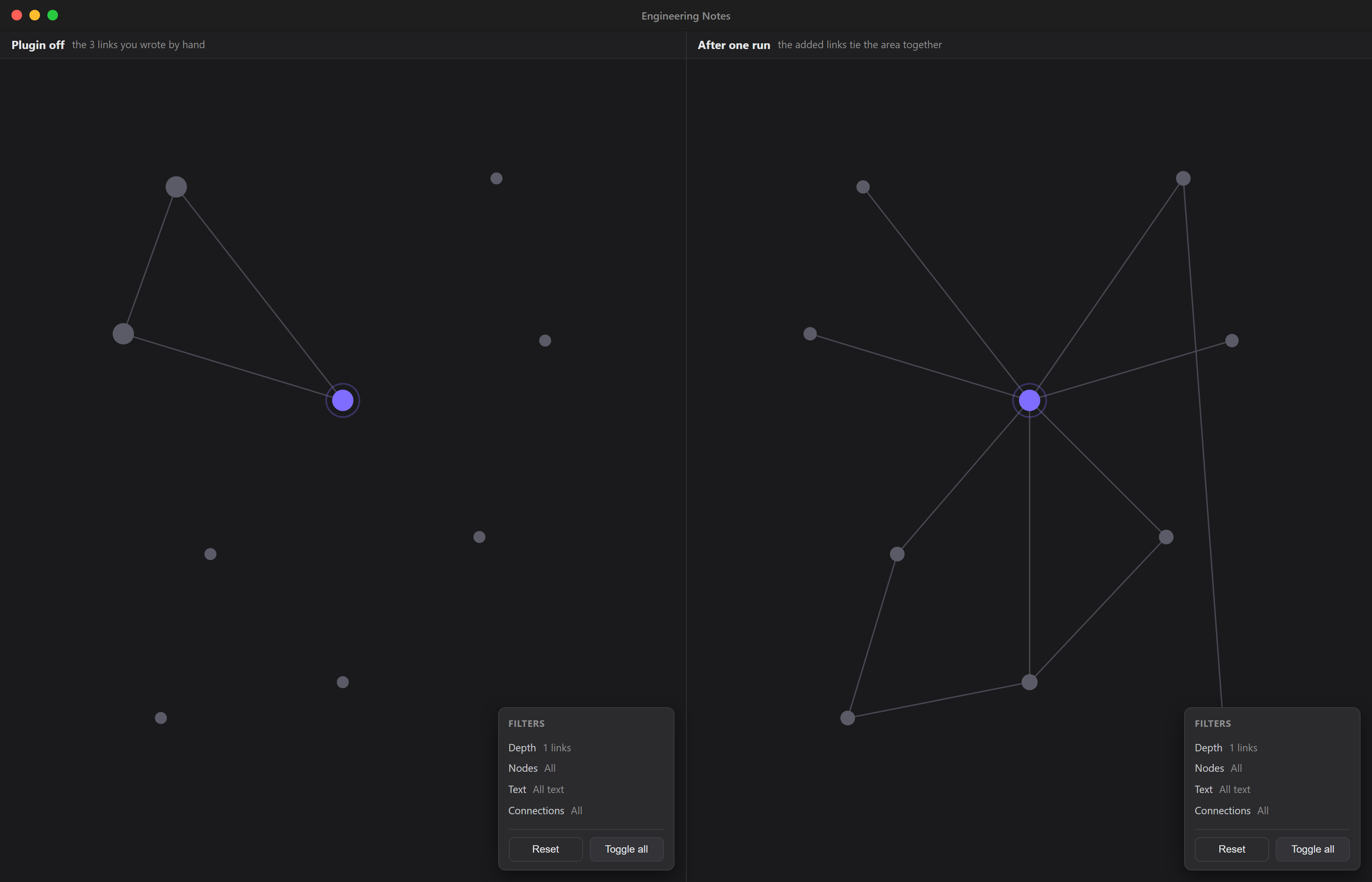
The same note in Obsidian's local graph — with the plugin off, and after one run:
When a folder is renamed or deleted, its old index page is moved to the trash on the next run. Only pages the plugin generated are ever removed.
How it compares
| Typical auto-link plugins | Vault Linker | |
|---|---|---|
| What makes two notes related | One note mentions the other's title | The topics they share, weighted by how rare each topic is |
| Where links go | Inline, into your text | A managed block at the end; your text is untouched |
| Ranking | None | Rarer shared topics count more; notes in the same area get a boost; top N kept |
| Index pages | One per folder, if any | One per area; several folders can form one area, with a one-line summary per note |
| Running it twice | Usually "skip existing links" | Fully idempotent: blocks are rebuilt, and a second run changes nothing |
| Files changed outside Obsidian | Missed when no file event fires | Picked up by polling |
Install
From the community plugin list (Obsidian 1.13+): Settings → Community plugins → Browse, search for "Vault Linker Auto", then install and enable it. Obsidian 1.13.0 or later is required — the settings page uses the declarative settings API; older Obsidian versions stay on the last compatible release (0.2.2).
Manually from a release
- Download
main.js,manifest.jsonandstyles.cssfrom the latest release. - Put the three files in
<your vault>/.obsidian/plugins/vault-linker-auto/. (.obsidianis a hidden folder; in the macOS Finder press⌘ ⇧ .to show it.) - In Obsidian: Settings → Community plugins → Installed plugins → enable Vault Linker Auto.
With BRAT (updates automatically): install the BRAT plugin,
choose Add beta plugin, and enter goldenxingxing/obsidian-vault-linker.
From source: npm install && npm run build, then copy main.js, manifest.json and styles.css as above.
Getting started
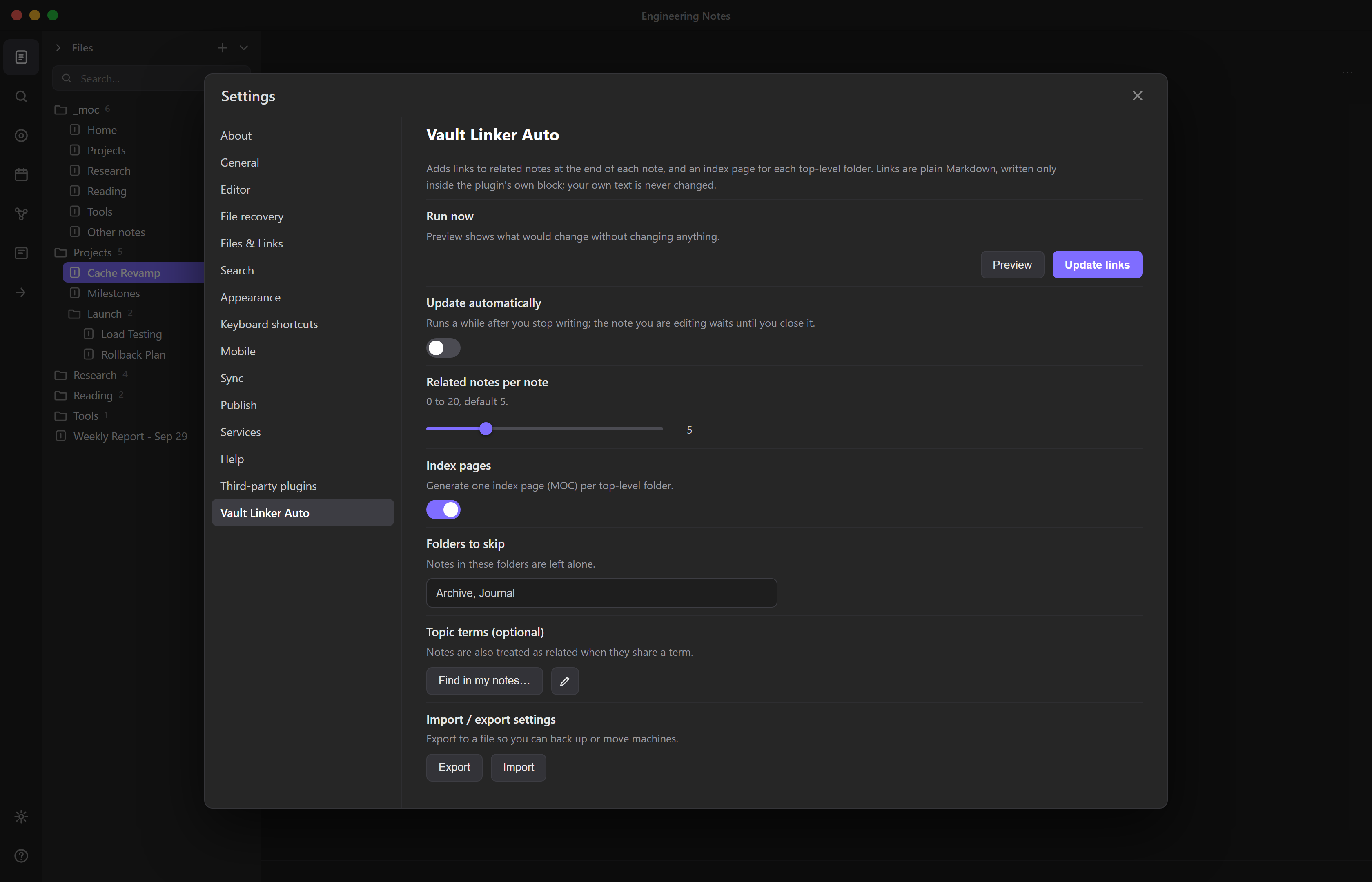
After you enable it, the plugin changes nothing on its own.
- Open Settings → Vault Linker Auto.
- Click Preview to see what it would change; nothing is written.
- If you like the result, click Update links.
- To keep links up to date as you write, turn on Update automatically, and choose how long to wait after your last change (30 seconds to 1 hour).
That is all the setup there is. The settings page has seven items: run now, update automatically, how long to wait, related links per note, index pages, folders to skip, and optional topic terms. Each top-level folder gets its own index page, including folders you create later. Finer options (scoring, generated text, timing) have sensible defaults and live in the settings JSON: Export, edit, Import.
The report after each run lists what changed, what was skipped and why. Every run is also appended to
.obsidian/plugins/vault-linker-auto/vault-linker.log.
After you reorganize folders
- Links take care of themselves. Every run recomputes links from current paths, so moved, renamed and deleted notes heal on the next run.
- If you never customized areas (the default): areas are re-derived from top-level folders on every run, so renamed, new and deleted folders are followed automatically.
- If you did customize area mappings: the run report lists mappings that no longer match (e.g. "Area X: path A/ no longer exists; it is now B/") and you can apply the update right from the report. Renames done inside Obsidian make the suggestion exact; changes made outside (scripts, AI agents) are still detected by the full scan, they just need your eyes on the new path.
Safety
Every write goes through these checks:
- Preview first. Nothing is written until you click Update links or turn on Update automatically.
- Skip if changed. A note that changed after the preview is left alone.
- Verify, then roll back. After writing, the note with its blocks removed must match the original byte for byte; if not, the original bytes are restored.
- Never overwrite your files. If an index page would replace a file the plugin didn't create (say, your own
_moc/Home.md), or a file whose name differs only in case, that page is skipped and reported. - Leave special files alone. Templates (the folders set in Templates and Templater, and the daily note template), Excalidraw drawings, Kanban boards and the index folder itself are never written to. The note open in the editor is skipped during automatic runs and updated later.
- Skips machine folders. Anything inside a dot-folder or
node_modules/is ignored, along with the top-level folders_moc/,_tmp/and_archive/. If your notes live in one of those, change or clear the list underscan.excludeTopDirs/scan.excludeAnyDirsin the settings JSON (Export, edit, Import). - Opt out per note. Add
vault-linker: ignoreto a note's frontmatter. - Keep formatting. Windows (CRLF) line endings are kept. A note that begins with a
---rule gets a***separator instead, so the plugin never turns your text into frontmatter by accident.
Privacy and file access
No network access, no telemetry, no accounts, no runtime dependencies, nothing to sign up for. Everything the plugin touches lives inside your vault folder:
- Your notes — read and written, but only inside its own managed blocks.
- Its own folder — each run appends a report to
<configDir>/plugins/vault-linker-auto/vault-linker.log, so you can check afterwards what a run did. Nothing else is written there, and deleting the file is harmless. - Your Obsidian settings, read-only — to learn which folders hold your templates (so it can leave them
alone), it reads
templates.json,plugins/templater-obsidian/data.jsonanddaily-notes.jsonfrom your Obsidian config folder. These are never modified. If you'd rather it didn't read them at all, turn offscan.excludeTemplatesin the settings JSON.
Topics
Topics are what the plugin uses to find related notes. No vocabulary is built in; these sources are combined:
| Source | What it is | Default |
|---|---|---|
| Note titles and aliases | Each note's title and aliases |
Always |
| Tags | Tags you already use | Always |
| Topic terms | Your own list, one per line, with optional aliases | Empty |
| Find in my notes | Terms mined from your vault; the ones you tick are added to your topic terms | On demand |
| Folder structure | Notes in the same folder share the folder name as a topic | Off |
| Folder names | Folder names become topic terms; a note that mentions one relates to the notes filed there | Off |
Find in my notes splits long identifiers into words and, for Chinese text, scores 2–4 character sequences by how tightly they stick together and how varied their neighbors are, so it finds real terms without a dictionary. On a 762-note Chinese vault, 39 of 41 hand-picked domain terms appeared among the candidates. It shows a searchable list rather than a top-N, because rare terms rank low but still matter.
Performance
Measured with titles and tags as entities (every run recomputes the whole vault):
| Notes | Time per run |
|---|---|
| 790 | ~1 s |
| 3,160 | ~6 s |
| 6,320 | ~25 s |
Topic matching scans each note once for all entities (Aho-Corasick), and ranking compares only notes that share a topic. On large vaults with automatic runs, a longer quiet period in the settings keeps runs infrequent.
Commands
| Command | What it does |
|---|---|
| Preview (changes nothing) | Report only |
| Update links now | Writes, verifies, rolls back on failure |
| Show last run report | The last report in a dialog, copyable |
| Find terms in your notes | Finds candidate terms in your vault |
A command-line version runs the same engine without Obsidian:
node tools/cli/cli.ts --vault <vault> --config <vault>/.obsidian/plugins/vault-linker-auto/data.json          # preview
node tools/cli/cli.ts --vault <vault> --config <vault>/.obsidian/plugins/vault-linker-auto/data.json --apply  # write
Settings you can share
Settings → Import / export settings turns your whole configuration, including areas and term lists, into JSON that someone else can import.
Limits
- Runs only while Obsidian is open (or from the command line).
- Links go in the block at the end of a note; it does not rewrite your text into inline links, and does no semantic embedding.
- A note that doesn't end with a newline gets one the first time it is written.
- If you change the "generated by Vault Linker" line in the texts settings, index pages made with the old line are treated as someone else's files and skipped; delete them to have them regenerated.
Development
npm install
npm run typecheck
npm test            # run directly by Node (22.18+)
npm run build       # main.js
src/core/is the engine: pure functions with no Obsidian dependency, so it runs in Node for tests and the CLI.src/obsidian/is the thin Obsidian layer (reading, writing, settings, watching).runner.tsandwatch.tsdepend only on a small duck-typed subset of the API, sotests/adapter.test.tsruns the full read → plan → write → verify → roll back path against an in-memory vault.- Modules imported directly by
node --testuse only erasable TypeScript syntax (noenum,namespaceor parameter properties).
Releasing
npm version patch   # bumps package.json, manifest.json and versions.json, and tags the commit
git push && git push --tags
The tag triggers .github/workflows/release.yml, which tests, builds, signs the provenance of
main.js, manifest.json and styles.css (GitHub artifact attestations), and publishes the GitHub
release automatically — no manual step. The tag must equal the version, with no v prefix (.npmrc
sets tag-version-prefix="").
License
MIT