
README file from
GithubUpdate Radar
Checks your installed community plugins for updates in the background, shows what changed, and tells you which plugins look abandoned. A successor to Plugin Update Tracker, which has not had a release in over a year.
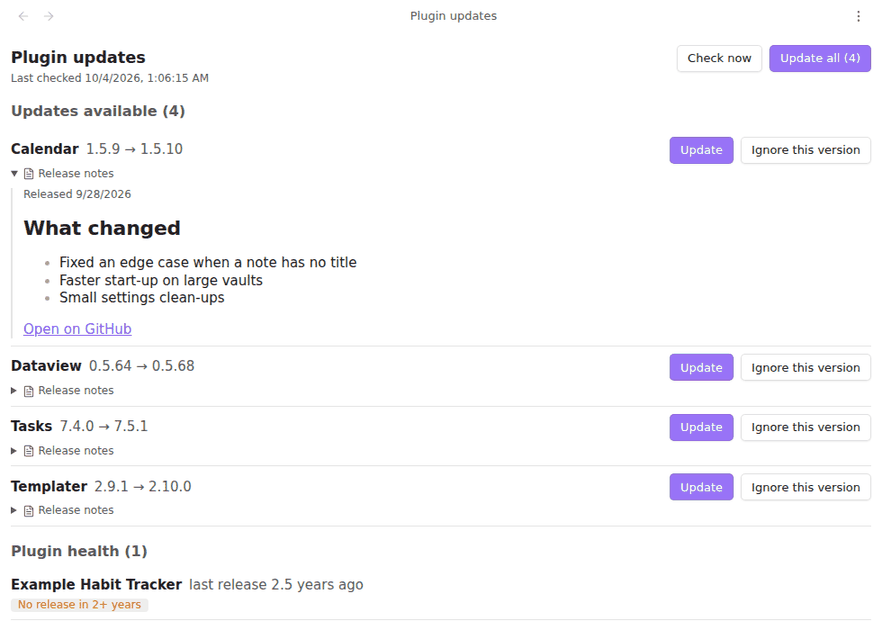
Formerly "Plugin Update Checker" and, briefly, "Community Update Checker"; renamed because the directory does not allow the word "plugin" in a name and the second name was already taken by an earlier submission.
Obsidian only looks for plugin updates when you open Settings → Community plugins → Check for updates. This plugin does it for you, every few hours, and puts the answer in the status bar.
What you get
- Updates in the status bar. "3 plugin updates", hidden when there are none. Click it to open the list.
- A list of what changed. Each row shows the installed version, the new one, and, when you open Release notes, the notes from the plugin's GitHub release, rendered as Markdown.
- Update one or all. The same installer Obsidian uses; enabled plugins are reloaded afterwards.
- Ignore this version. Skips exactly that version; the next release shows up again. Stop ignoring brings it back.
- Compatibility. An update that needs a newer Obsidian than yours is listed apart, with the version it needs, and is never offered.
- Plugin health. Flags plugins that were removed from the directory (with the reason), have had no release in two or more years, or are not from the directory (installed by hand or with BRAT).
Network use
This plugin sends web requests, to GitHub only. There is no analytics and no other service.
- Once a day it reads three public files from
obsidianmd/obsidian-releases(the plugin list, the removed list and the stats), the same ones Obsidian itself uses. - For each installed plugin from the directory, it reads that plugin's latest
manifest.jsonfrom its GitHub releases, like Obsidian's own update check. - When you open Release notes on a row, it reads that release from the GitHub API.
Nothing about your vault, notes or settings is sent. The requests do reveal your IP address to GitHub, as any download would. Turn off Check shortly after Obsidian starts and set Check every to Never to check only when you ask.
Commands
| Command | What it does |
|---|---|
| Show plugin updates | Opens the list. Also on the ribbon. |
| Check for plugin updates now | Checks immediately and says how many updates there are. |
| Update all plugins | Installs every update that is available and compatible. |
Settings
| Setting | Default | What it does |
|---|---|---|
| Check shortly after Obsidian starts | on | One check about 15 seconds after startup. |
| Check every | 6 hours | While Obsidian stays open. 1, 3, 6, 12 or 24 hours, or never. |
| Show the update count in the status bar | on | Hidden at zero. Not shown on mobile. |
Notes
- Updating uses Obsidian's internal plugin installer, which is not part of the public API. If a future Obsidian changes it, the plugin says so instead of failing silently; updating from Settings → Community plugins keeps working either way.
- Release notes are shown with code-block languages removed and
[[links]]escaped, so nothing in them runs and nothing in them touches your vault. - Plugins with updates are installed one at a time; this plugin's own update is installed last.
- "No release in 2+ years" uses the directory's last-release date. Plenty of finished plugins are stable rather than abandoned; the flag is a prompt to look, not a verdict.
- Versions are compared as semantic versions, so
1.10.0is newer than1.9.0and a pre-release such as2.0.0-beta.1is older than2.0.0. A version that is not semver (four parts, a date) counts as an update whenever it differs, like Obsidian's own check. - Plugins that are not in the directory cannot be checked for updates and appear only under health.
Installation
In Obsidian, open Settings → Community plugins → Browse and search for "Update Radar".
More plugins by Siulved54
| Plugin | What it does | Source |
|---|---|---|
| Shared Blocks | Write a block of text once and reuse it in any note. Edit the source and every reference re-renders live. | shared-blocks |
| Text Case and Cleanup | Change case, make camelCase or slugs, sort lines and remove duplicates, and repair text pasted out of a PDF, without touching code or URLs. | text-format |
| Typography as You Type | Curly quotes, dashes and ellipses as you type, kept out of code and maths, with Backspace to take one back. | smart-typography-plugin |
| Section Numbering | Number headings as an outline (1, 1.1, 1.2) and keep every link to them working when they renumber. | section-numbering |
| Spreadsheet to Table | Paste cells from Excel or Google Sheets as a Markdown table with a real header, insert CSV files, and copy tables back out. | spreadsheet-to-table |
| Hybrid Line Numbers | Relative and hybrid line numbers for Vim-style jumps, where a folded section counts as one line. | hybrid-line-numbers |
| List Item Callouts | Colour a single list item as a callout by starting it with a character such as &, ! or ?. |
list-item-callouts |
| Folder Counts | See how many notes or files each folder holds, right in the file explorer, with a vault total and folder exclusions. | folder-counts |
| Note Reading Time | Reading time of the current note or your selection in the status bar, optionally saved to a property. | note-reading-time |
| Task Rollover | Roll unfinished tasks from your last daily note into today's when it is created, with a real undo. | task-rollover |
| Zoom Into Section | Zoom into a heading or list item to see only it and its contents, with a breadcrumb bar to climb back out. | zoom-into-section |
| Link Title on Paste | Paste a web address and get a Markdown link with the page's title, fetched in the background and undone in one step. | link-title-on-paste |
| Dataview to Bases | Convert Dataview queries into Bases blocks, and see which queries in your vault can be converted. | dataview-to-bases |
All of them are in the community directory: Settings -> Community plugins -> Browse, then search for the name.