
README file from
GithubUniverse Builder
A fiction world-building toolkit for Obsidian: characters, locations, groups, lore entries, and timeline events. This plugin is a fork of World Builder originally authored by wesswart77. It has been adapted to work well outside of a fantasy setting and instead puts an emphasis on sci-fi.
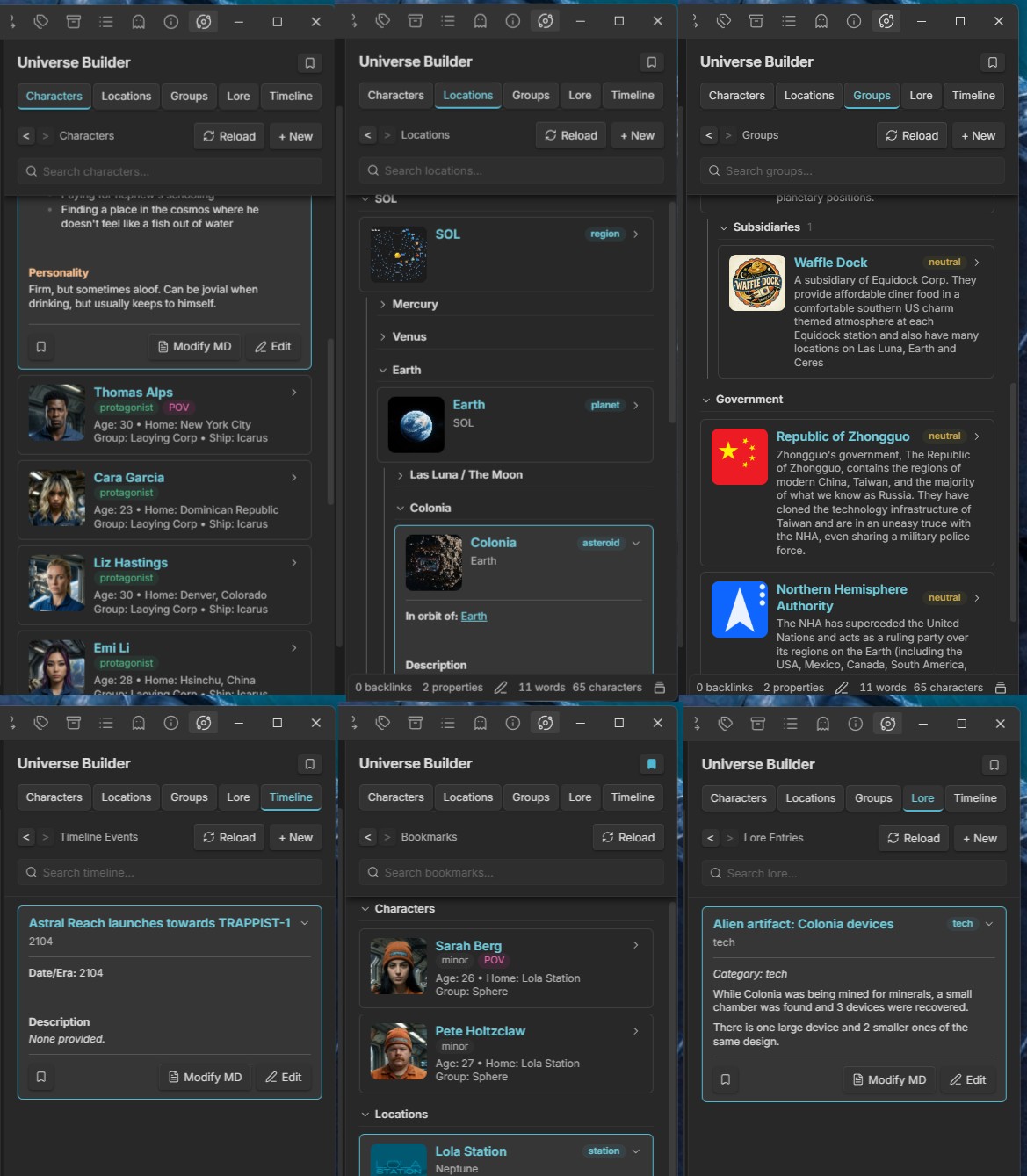
Features
- Characters — name, role, age, group, ship, home, physical description, personality, goals
- Locations — name, type, parent location, description, inhabitants, secrets
- Groups — name, type, subsidiary of, alignment, goals, enemies, allies, description
- Lore Entries — title, category (history/tech/religion/culture/other), content
- Timeline Events — date/era, title, description, linked characters/locations
- World Sidebar — tabbed view across all five entry types
- Bookmarks — bookmark any entry from its expanded view, and open them all from the Bookmarks button beside the sidebar's title
- 10 languages — English, Español, Português, Português (Brasil), Français, Deutsch, Русский, Українська, 简体中文 and 日本語. The sidebar, forms, messages, commands and settings follow Obsidian's language, or the Language setting
- Search — a search bar pinned under the section header on every tab (each tab keeps its own text); type to hide whatever doesn't match, all words must match. Characters are matched on name, group, ship and home; the other tabs on the name and the text of the note
- Novel scene editor — notes in the main editor with both
novelr-typeandnovelr-statusproperties open in Live Preview with a toolbar above the text: a Scene Metadata toggle on the left, which slides open a section under the toolbar with a row each for Characters, Locations, Groups, Lore and Timeline (each row's + opens a menu of that sidebar section's entries to add to the scene; you can also drag any card from the sidebar, or the header of an expanded card, anywhere onto the scene to add it; the chosen ones show as labels, with their portraits, under the toolbar that open their entry in the sidebar when clicked, and are saved as links in theuniverse-builder-scene-characterlist,-locationlist,-grouplist,-lorelistand-timelinelistproperties), an optional Properties button (a floating panel to edit, add and remove properties, instead of the properties block at the top of the note), bold / italic / underline / strikethrough and align left / center / right in the middle, and the word count on the right. With nothing selected, formatting applies to the word the cursor is in or touching. Alignment is stored as a hidden comment at the end of the line (%%align:center%%), so other apps just show the paragraph left-aligned
Settings
Requires Obsidian 1.13.0 or later. Settings are declared with Obsidian's declarative settings API, so all of them appear in the Settings search box.
- Language — the language the plugin is shown in: Automatic (the default) follows Obsidian's own language (Settings › General › Language), or pick one of the plugin's languages to override it. Falls back to English when Obsidian is set to a language the plugin hasn't been translated into
- Universe folder — where all Universe Builder notes are stored (default:
UniverseBuilder). Changing it doesn't move existing notes - Sidebar editor — what the Edit button on an expanded entry opens: Live Preview (Obsidian's own editor, the default) or Raw markdown (a plain text box holding the whole file, frontmatter included). See Undocumented Obsidian API
- Novel scene editor — turns the novel scene editor on or off (on by default). While it's on: Required properties (the properties a note must all have, default
novelr-type, novelr-status), Open in Live Preview, Show Properties button (off by default), Hide inline properties, Lock scene title (on by default: the bold title above a scene, its file name, can't be edited - and the scene renamed - from the scene editor) and Show word count
Privacy
- Clipboard — the plugin only writes to the clipboard, and only when you right-click selected text in an expanded card's preview and choose Copy. It never reads the clipboard
- Network — the plugin makes no network requests
- Files outside the vault — read only when you drop or choose an image for a portrait; the image is copied into the vault and nothing outside it is changed
More documentation
- Moving notes out of the World folder — the one-time prompt that moves notes from
World/toUniverseBuilder/for users of earlier versions - Changes from upstream — everything this fork adds or changes compared to the original World Builder
- Undocumented Obsidian API — where the sidebar's Live Preview editor relies on Obsidian internals, and what to do if an update breaks it
- Translations — one file per language holding every piece of text the plugin shows;
src/i18n.tsexplains how to add another