
README file from
GithubToken Usage
Token Usage is an Obsidian plugin that tracks Claude Code token consumption from locally stored session files.
Instead of relying on API access or external dashboards, Token Usage reads Claude Code's local JSONL files and displays real-time token statistics directly inside Obsidian — broken down by type, time range, and model.
Features
- Live sidebar panel with token breakdown across five time ranges
- Separate display of all four token types: Input, Output, Cache Write (C.Write), Cache Read (C.Read)
- Rolling 5-hour session window matching Claude Code's internal rate-limit window
- Context sub-labels under each section title — shows scope at a glance ("Rolling window · counts toward rate limit", "Started yesterday · spans multiple days", "Calendar day · since midnight")
- Logarithmic scale for minibar widths — keeps all four token types visually proportional even across large magnitude differences
- 7-day bar chart with model distribution — stacked by Haiku, Sonnet, Opus, Fable
- HTML dashboard with 30-day charts, model donut, top sessions table, and cache efficiency analysis — with direct link to the help page
- Markdown report export directly into your vault
- Built-in Help panel with full glossary and cost reference, including "The three time views" entry
- "← Back" button in the header returns from the glossary to the data view
- Command Palette integration for all major actions
- No API key required — reads local files only
- Local-first and privacy-friendly
Why Token Usage?
As Claude Code usage grows, understanding where tokens actually go becomes important for both cost awareness and workflow optimization.
Most existing solutions require organization-level API access or live in separate dashboards outside your daily workflow.
Claude Code already stores detailed usage information locally in JSONL session files. Those files contain all token data, timestamps, session identifiers, and model information.
Token Usage brings those insights directly into Obsidian, where many users already manage their projects, notes, and knowledge base.
How It Works
Token Usage scans Claude Code session files stored at ~/.claude/projects/ and extracts token data from every recorded interaction.
Example JSONL entry:
{
  "input_tokens": 3,
  "cache_creation_input_tokens": 16926,
  "cache_read_input_tokens": 0,
  "output_tokens": 252
}
The plugin aggregates all four token fields across sessions and time ranges. All calculations run locally on your device.
A live file watcher detects new activity the moment Claude Code writes a response. A configurable fallback polling interval runs in parallel.
Screenshot
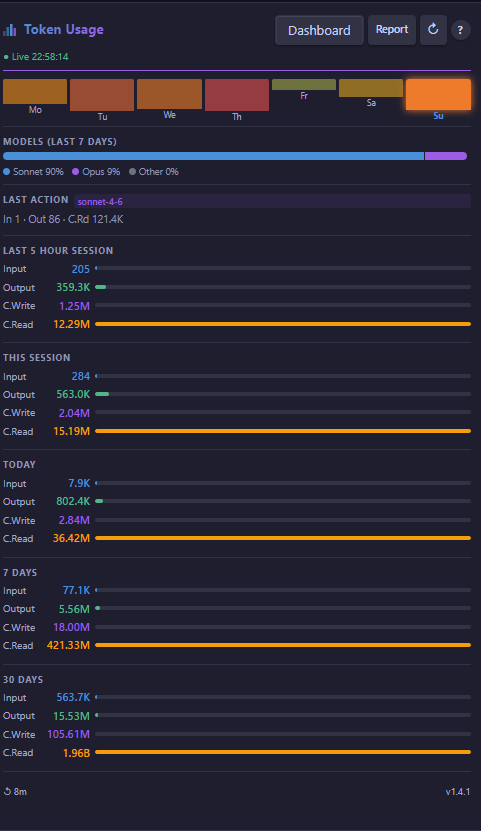
Real-time Claude Code token usage in the Obsidian sidebar.
What You See in the Sidebar
Last 5 Hour Session
A rolling window covering the past 5 hours — matching Claude Code's own rate-limit period. Shows Input, Output, C.Write, and C.Read as separate rows. Sub-label: "Rolling window · counts toward rate limit".
This Session / Today / 7 Days / 30 Days
Four time-range sections, each showing the same four token rows. A small logarithmic bar next to each value keeps all token types visually readable even when magnitudes differ by orders of magnitude (e.g. Input at a few hundred vs C.Read in the millions).
This Session and Today carry a dynamic sub-label explaining their scope:
- This Session — shows the session start time ("Started today at 09:27" or "Started yesterday · spans multiple days"). A session in Claude Code can span multiple calendar days — so "This Session" may be larger than "Today". This is expected.
- Today — always shows "Calendar day · since midnight".
These three views — Last 5 Hour Session, This Session, and Today — are independent cuts through the same data. They do not automatically nest inside each other. See the help page for a full explanation.
Models (last 7 days)
A stacked percentage bar showing the model distribution across the past 7 days, colored by model family:
| Model | Color |
|---|---|
| Haiku | Cyan |
| Sonnet | Blue |
| Opus | Purple |
| Fable | Amber |
| Other | Gray |
C.Write and C.Read
Cache Write (C.Write) and Cache Read (C.Read) are shown as separate rows throughout the sidebar because they have very different cost implications:
- C.Write (purple) — approximately 1.25× standard input price. A one-time cost to establish the cache.
- C.Read (amber) — approximately 0.10× standard input price. Ten times cheaper than regular input.
The ratio C.Read ÷ C.Write is the Reuse Factor. A high value means the same context is being reused efficiently across many requests.
Dashboard
The dashboard button in the sidebar header generates a self-contained HTML report and opens it in your default browser.
The dashboard includes:
- Summary cards — total tokens, requests, active days, and average tokens per request over 30 days
- Daily stacked bar chart — 30 days of input, output, and cache tokens by day
- Model distribution donut — share of each model family over 30 days
- Request size histogram — distribution of tokens per individual request
- Top sessions table — the 10 most token-intensive sessions by date and identifier
- Cache efficiency section — 30-day line chart with C.Write and C.Read, Reuse Factor card, and a dynamic interpretation of your usage pattern
The dashboard uses Chart.js (loaded once from CDN) and works offline after the first load.
Help Panel
The "?" button in the sidebar header toggles between the data view and a built-in glossary. A "← Back" button appears in the header while the glossary is open — click it to return to the data view without hunting for the "?" button again.
The glossary explains:
- What a token is
- The difference between Input and Output
- What C.Write and C.Read mean and why they matter
- How to read the Reuse Factor
- What the 5-hour session window represents and why the countdown shows a tilde (~)
- How the three time views (Last 5 Hour Session, This Session, Today) relate to each other
- How the model colors map to model families
- How sessions are counted
- Approximate API cost reference per model
A link at the bottom of the glossary opens the full help page at langeatn.de/docs/token-usage/ in your browser. The page is available in English and German.
Report
The "Create Token Usage report" command (also available via the document icon in the sidebar header) writes a Markdown report file to your vault. The report covers:
- Last action with all four token types
- Current session and today
- 7-day and 30-day summaries
- Cache efficiency ratio over 30 days
The report path is configurable in Settings.
Installation
Community Plugin Directory (recommended)
- Open Obsidian Settings → Community Plugins
- Search for Token Usage
- Install and enable
Manual Installation
- Download the latest release assets:
main.js,manifest.json,styles.css - Create the folder
<vault>/.obsidian/plugins/token-usage/ - Copy the three files into that folder
- Restart Obsidian
- Enable Token Usage under Settings → Community Plugins
Usage
After enabling the plugin:
- Click the activity icon in the left sidebar to open the Token Usage panel.
- Use Claude Code normally — the panel updates automatically whenever a new response is recorded.
- Click the chart icon in the panel header to open the HTML dashboard.
- Click ? to toggle the built-in glossary.
No additional setup, API keys, or cloud services required.
Command Palette
| Command | Action |
|---|---|
| Open Token Usage | Opens the sidebar panel |
| Create Token Usage report | Writes a Markdown report to your vault |
| Open Token Usage dashboard | Generates and opens the HTML dashboard |
Settings
| Setting | Default | Description |
|---|---|---|
| Auto-Refresh (seconds) | 30 | Fallback polling interval in addition to the live file watcher |
| Report path | Token Usage Report.md | Vault-relative path for the generated Markdown report |
| Dashboard path | Token Usage Dashboard.html | Vault-relative path for the generated HTML dashboard |
Privacy
Token Usage is built with a local-first philosophy.
- No data is sent to external services
- No telemetry
- No API keys required
- No cloud processing
- All calculations are performed locally on your device
Your Claude Code usage data stays on your machine.
Known Behavior
Claude Code updates may briefly affect historical data.
Token Usage reads the JSONL files that Claude Code writes locally. When Anthropic ships a Claude Code update that changes how session data is recorded or how internal telemetry is counted, historical values in the 30-day view may temporarily show anomalies.
We review Anthropic's release notes with each Claude Code update and adapt the plugin where needed. Significant compatibility changes are documented in the changelog.
Note for Claude Code v2.1.196 (August 2026): This update fixed a bug where parallel requests were double-counted in telemetry output. Sessions recorded before the fix may show slightly elevated values in the 30-day view. This resolves automatically as those sessions age out of the 30-day window — expected by approximately end of August 2026.
Version number in the sidebar footer shows an outdated version after an update.
This is not a code bug. Obsidian caches the loaded plugin manifest in memory. Toggling the plugin off and on may not fully reinitialize the manifest object. Fix: perform a full Obsidian restart after updating the plugin files. The correct version will display after restart.
The 5-hour reset countdown may differ from Claude's own display.
The footer shows "Claude 5h resets in: Xh Ym". The tilde () is intentional — it signals an approximation. Claude Code writes session data to local files after each response completes, not at the moment you send your first message. A long first response (context loading, file reading) can take 10 to 25 minutes before anything is written to the log. The plugin's countdown therefore starts from the first recorded timestamp, which may lag behind the actual session start. For the precise reset time, check the plan usage section in Claude Code or on claude.ai.
Contributing
Contributions, bug reports, feature requests, and suggestions are welcome.
- Fork the repository
- Create a feature branch
- Commit your changes
- Open a pull request
Support
If you encounter a problem or have an idea for improvement, please open an issue in the GitHub repository.
Full documentation and glossary: langeatn.de/docs/token-usage/
License
MIT License — see the LICENSE file for details.
Acknowledgments
- Obsidian
- Anthropic Claude Code
- The Obsidian Plugin Community
Built to answer a simple question:
"Where did all my tokens actually go?"