
README file from
GithubThe Librarium
A local LLM chat orchestrator for Obsidian powered by Ollama
The Librarium is a local-LLM chat orchestrator for Obsidian, backed by Ollama. It keeps topic-separated memory as a fixed stack of progressively more detailed layers — from a quick Overview down to a Comprehensive Summary, plus the raw Original — routes each chat query to only the relevant topics, and searches that layer stack starting from the least detail, loading more only when it's actually needed.
Everything runs locally against your own Ollama models: no cloud API, no data leaving your machine — with one opt-out exception, basic internet crawling (off with one toggle if you want a fully offline setup; see Grep search & basic web crawling).
Contents
- Screenshots
- Installation
- Tested Configuration
- Recommended Configuration
- How it works
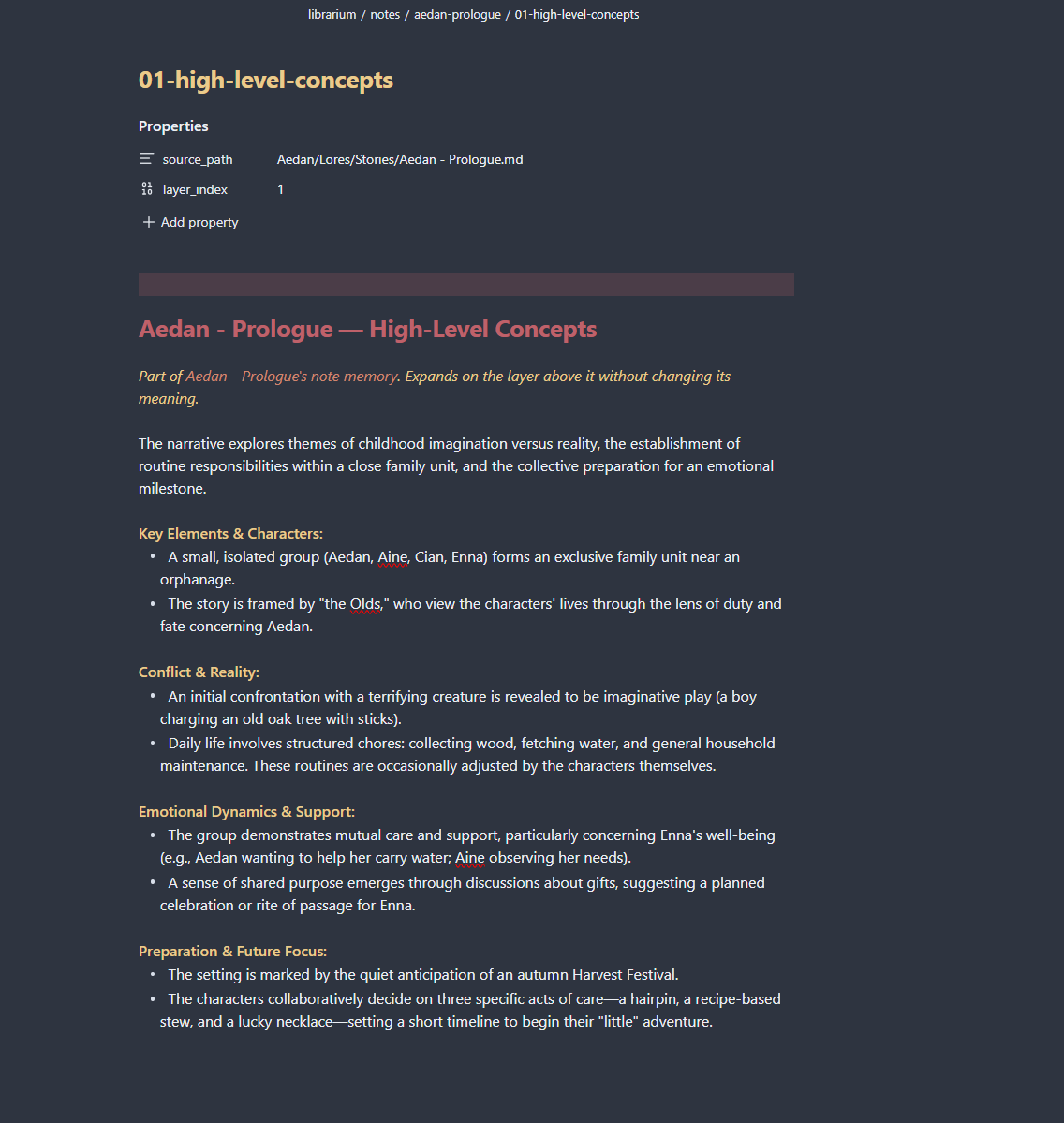
- Memory layers
- Routing: how a query finds the right memories
- Note-memory
- Chat history digest
- Multilingual replies
- Document commands
- Grep search & basic web crawling
- Skills: reusable how-tos built from web research
- Research: multi-site research written up as document(s)
- Knowledge base: accumulated entities, facts & relationships
- Chat interface
- Live status while a turn is running
- Cancellation: what it actually does
- Known limitations
- Support The Librarium
- License
Screenshots
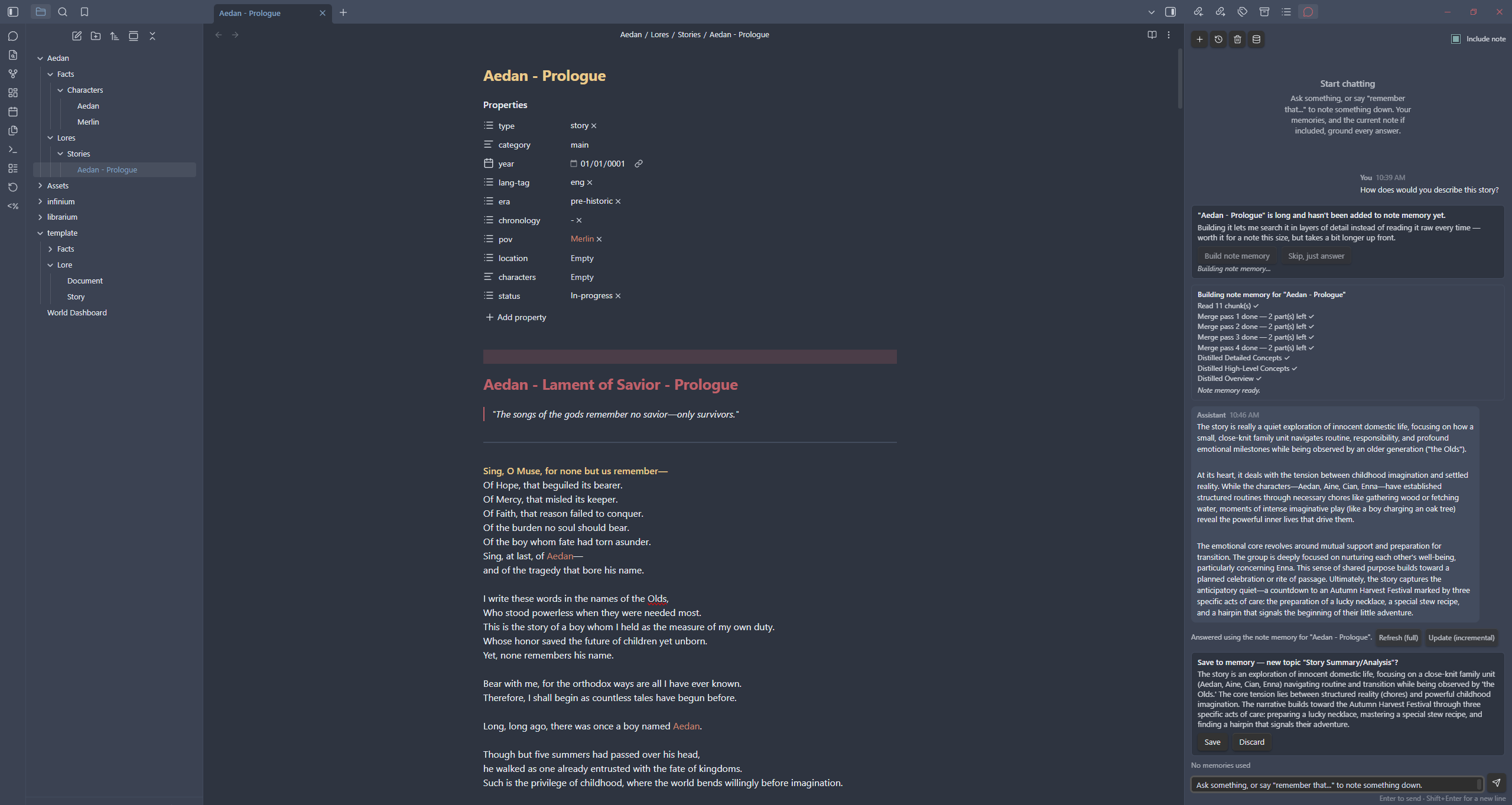
Chat Interface
Memory Management
Installation
1. Install Obsidian
The Librarium is an Obsidian plugin, so you need Obsidian installed first:
- Download Obsidian for your OS from obsidian.md/download and install it.
- Open Obsidian and either create a new vault or open an existing one.
2. Install Ollama and pull your models
The Librarium doesn't call any model itself — it talks to a local Ollama server for chat, summarization, and embeddings.
-
Download and install Ollama from ollama.com (macOS, Windows, and Linux are all supported).
-
Confirm it's running — by default it serves at
http://localhost:11434. -
Pull the models you plan to use, for example:
ollama pull gemma4:e4b          # chat model
ollama pull nomic-embed-text  # embedding model
The chat and summary models must support
chat/generate. The embedding model must be an embeddings-only model (e.g.nomic-embed-text) — it cannot be used for chat, and a chat model can't be used for embeddings. Mixing these up is the most common source of 404/500 errors (see Known limitations).
3. Manual Installation
In case, it haven't been it haven't been in the community plugin or for developments
Copy manifest.json, main.js, and styles.css into:
<vault>/.obsidian/plugins/the-librarium/
Then enable it from Settings → Community plugins in Obsidian, open the plugin's settings tab, point it at your Ollama models, and use the "Test connection" button to confirm all three models are reachable and correctly configured.
npm run dev runs esbuild in watch mode while you iterate on the source.
Tested Configuration
The Librarium has been primarily developed and tested using the following environment. Other configurations should work, but performance and throughput may vary depending on the selected models and hardware.
Hardware
| Component | Specification |
|---|---|
| CPU | AMD Ryzen 7 7800X3D |
| GPU | NVIDIA GeForce RTX 5060 Ti 16 GB |
| RAM | 32 GB |
| Operating System | Windows 11 Pro |
Ollama Models
| Purpose | Model |
|---|---|
| Chat | gemma4:e4b |
| Summarization | gemma4:e4b |
| Embeddings | nomic-embed-text |
Plugin Configuration
The default configuration were used for development and testing:
	ollamaBaseUrl: "http://localhost:11434",
	chatModel: "gemma4:e4b",
	summaryModel: "gemma4:e4b",
	embeddingModel: "nomic-embed-text",

	memoriesFolder: "librarium/brains/memories",
	tempMemoryFolder: "librarium/brains/temp-memory",
	noteMemoryFolder: "librarium/brains/notes",
	autoInitNoteMemory: true,
	maxMemoriesPerQuery: 3,
	routingMethod: "hybrid",
	suggestMemoryUpdates: true,
	enableClarification: true,
	similarityThreshold: 0.55,
	enableEmbeddingCache: true,
	embeddingCacheSize: 200,

	maxChunkMergePasses: 4,
	maxConcurrentSummaries: 4,
	mergeGroupMaxChars: 20000,
	mergeOverlapUnits: 1,

	numAbstractionLayers: 3,

	enableIntentExtraction: true,

	responseLanguage: "auto",

	documentsFolder: "librarium/documents",
	enableFileCommands: true,

	enableGrepSearch: true,
	enableWebCrawling: true,

	enableSkillCreation: true,
	skillsFolder: "librarium/brains/skills",
	skillResearchMaxPages: 4,

	enableResearch: true,
	researchMaxSites: 12,
	researchMaxSubtopicDepth: 2,
	researchMaxSubtopicFiles: 12,

	enableKnowledgeBase: true,
	knowledgeMaxEntitiesPerQuery: 5,

	trackChatSummary: true,
	recentRawTurns: 12,

	debugLogging: false,
Notes
These settings are intended as a balanced default for local inference. Users with more powerful hardware may benefit from increasing maxConcurrentSummaries, while lower-memory systems may prefer reducing concurrency or selecting a smaller chat model.
Recommended Configuration
The tested defaults above are a reasonable starting point for a mid-range single-GPU machine running a small-to-mid chat model. Beyond that baseline, a few settings are worth tuning deliberately depending on your hardware and how you actually use the plugin — each adds cost (an extra LLM call, a bigger context window, or more concurrent requests) in exchange for a specific benefit, so there's no single "best" value for everyone.
| Setting | Trade-off | Recommendation |
|---|---|---|
maxConcurrentSummaries |
More parallel requests to Ollama = faster builds, but higher peak VRAM/CPU load | Keep the default (4) on the tested hardware class above. Drop to 1–2 on integrated GPUs or CPU-only inference; raise to 6–8 only if you have a larger/multiple GPU(s) and see Ollama comfortably keeping up. |
numAbstractionLayers |
More layers = finer-grained control over how much detail gets pulled in, but a longer build/extend chain per topic | 3 (default) is a good general middle ground. Drop to 1–2 for mostly short, simple notes where an Overview vs. Comprehensive Summary split is already enough. Raise it only for large, dense source documents where you actually want a mid-tier "just enough detail" layer. |
routingMethod |
llm is most accurate but doesn't scale; embedding scales but is a blunter match; hybrid balances both at the cost of needing a working embedding model |
Use hybrid (default) once you have more than a handful of topics. llm is fine and slightly more accurate below ~20 topics. Fall back to embedding only if your embedding model is unreliable or you want to skip the LLM re-rank call entirely. |
enableIntentExtraction / enableClarification |
Each is one extra small-model call per query, in exchange for sharper retrieval and fewer wrong-context answers | Leave both on with a fast summaryModel (they're cheap relative to the main chat call). If you're on CPU-only inference and every round trip is expensive, turn enableClarification off first — it matters most for ambiguous, personal-context questions, less for self-contained ones. |
suggestMemoryUpdates |
Surfaces candidate facts to confirm/discard — change-aware, so it only re-surfaces a topic when something's actually new or different | Leave on. It only stages something when it's judged genuinely new or changed relative to what's already remembered or already pending, so it shouldn't get noisy even in long chats. |
trackChatSummary |
One extra small-model call per turn, in exchange for the model staying aware of earlier turns without re-sending the whole transcript | Leave on for any chat you expect to run more than a few turns — it's what keeps later replies grounded once recentRawTurns starts trimming the raw transcript. Turn it off only for short, one-off Q&A sessions where the extra call isn't worth it. |
recentRawTurns |
Smaller = cheaper/faster per-turn context, larger = more exact verbatim recall of recent wording | 12 (default) suits a typical 8K–32K-context chat model. Lower it to 6–8 for smaller-context or slower models once trackChatSummary is on, since the summary picks up the slack. Raise it if your chat model has a large context window and you'd rather over-provide raw context than rely on the summary's compression. |
Three other things worth calling out explicitly:
- Raw-text chunking is no longer a tunable setting. Earlier versions split source text mechanically on a character/sentence ceiling (
chunkMaxChars/chunkMaxSentences). That's gone —src/chunker.tsnow asks the LLM to mark natural break points (topic shifts, scene/section boundaries) instead, so there's nothing to configure here. The only ceiling left is an internal, non-configurable input-size limit that exists purely to keep a single chunking call within the model's context window. - Model split matters more than any single setting above. Using the same model for
chatModelandsummaryModel(as in the tested config) is simplest and works well if that model is fast enough; if it isn't, pointingsummaryModelat a smaller/faster model thanchatModelis usually the single highest-leverage change, sincesummaryModelis what pays for routing, intent extraction, ambiguity checks, memory-command detection, the chat-history digest, and every layer build/extend. - Hardware headroom, not just VRAM size, should drive concurrency.
maxConcurrentSummariesis the one setting most directly tied to your specific machine rather than to how you use the plugin — when in doubt, start low, watch Ollama's own load, and raise it incrementally rather than guessing from GPU memory alone.
How it works
The Librarium maps onto these building blocks:
1. Layered memory — src/memoryStore.ts. Each topic is a main note (Overview + links) plus a companion folder with one file per deeper layer and the raw Original. Everything is always derived from the topic's LayeredMemory — never written by hand — whether the topic came from an ingested file or purely from chat-derived facts. The LayeredMemory itself lives in the plugin's data.json; the vault files are always regenerated from it.
2. Routing — src/memoryRouter.ts. On every chat query, routeMemories() looks at all topic overviews and picks the relevant ones, capped by the adjustable Max memories per query setting. See Routing below.
3. File reading/writing/deleting/moving — src/fileSkills.ts. A thin wrapper around the vault API (read/write/append/delete/move/create-folder/list) used by the orchestrator, note-memory, and the file-management command flow below.
4. Progressive abstraction — src/summarizer.ts. Every memory is a fixed, named stack of layers, built bottom-up so each one is a faithful, non-hallucinated abstraction of the layer below it. See Memory layers.
5. Chat history digest — src/chatHistoryStore.ts. Each chat session keeps a rolling summary of the conversation plus the model's current best read of what the user is trying to accomplish, updated with one small-model call per turn instead of re-reading the whole transcript. See Chat history digest below.
6. Document commands — src/fileCommands.ts. Natural-language requests — in any language, phrased any number of ways, not just a fixed set of English keywords — to write, update, delete, move, or reorganize documents/notes/folders are turned into a concrete plan. Explicit requests ("write this into a file", "create a document for this") are carried out immediately and reported in chat; ambiguous ones, and anything destructive (delete/move), are staged as a confirm-before-applying plan instead. See Document commands below.
7. Grep search & basic web crawling — src/grepSearch.ts and src/webFetch.ts. Keyword/quoted-phrase search across vault notes, and fetching URLs or running a lightweight web search, both folded in as extra context when relevant. See Grep search & basic web crawling below.
8. Skills — src/skillStore.ts and src/skillCommands.ts. Reusable how-to notes built from real fetched web pages, created via an explicit command (natural language or a direct /skill <url> command) or an opportunistic, confirm-first suggestion. See Skills below.
9. Research — src/researchCommands.ts. Explicit multi-site research (natural language or a direct /research <topic> command) that groups sites by topic, asks the user to disambiguate genuinely different topics found along the way, and writes findings up as document(s). See Research below.
10. Knowledge base — src/knowledgeBase.ts, src/knowledgeIndex.ts, src/knowledgeExtraction.ts, src/knowledgeTypes.ts. Entities/facts/relationships/evidence extracted and accumulated from every document/research write, resolved incrementally against existing entities, and retrieved via a bounded, indexed lookup rather than a full scan — so query time stays roughly flat as the KB grows. See Knowledge base below.
Librarium keeps two separate top-level vault folders, both under librarium/ by default (each piece changeable in settings):
librarium/brains/ — Librarium's own internal space: memory, context, and every other system-managed store. Not meant to be hand-edited.
librarium/brains/memories/— confirmed, permanent memory-topic files: a main note per topic plus a same-named companion folder.librarium/brains/temp-memory/— pending, unconfirmed candidates, shown as Save/Discard cards in chat before anything is written to permanent memory.librarium/brains/notes/— per-note layered mirrors (note-memory).librarium/brains/skills/— saved skill notes, built from web research.
librarium/documents/ — the user-facing space. Anything created or edited via a document command (see above) lives here, organized into topic subfolders as it's created; Librarium prefers updating an existing document over creating a near-duplicate one whenever a good match exists.
The chat-history digest is the one exception to "everything lives in the vault": it's pure scratch context for the model, never shown to the user and never written as a note, so it lives only in the plugin's data.json alongside the LayeredMemory data.
Memory layers
| Layer | Name | Contains |
|---|---|---|
| 0 (top) | Overview | a few sentences giving a quick understanding |
| 1 | High-Level Concepts | main ideas, themes, and relationships |
| 2 | Detailed Concepts | specific explanations, important details, supporting context |
| 3 (base) | Comprehensive Summary | near-complete, preserves most of the original information |
| — | Original | the complete, unmodified source text |
The number of layers is configurable (numAbstractionLayers, default 3). Build order runs bottom-up: the Comprehensive Summary is built directly from the source (chunked, then read carefully and merged if it doesn't fit in one chunk); every layer above it is produced by compressing the layer directly below, and is explicitly forbidden from introducing information that isn't already there. At query time, resolution starts at the Overview and only descends into more detail if the current layer is judged insufficient, falling through to the raw Original only as an absolute last resort.
When a topic grows (a new fact from chat, or another file merged in), extendLayeredMemory() builds a summary of just the new text, merges it into the existing Comprehensive Summary, and recascades every layer above it — so growth cost stays proportional to the (much smaller) Comprehensive Summary rather than the full raw history.
Before creating a new topic, the orchestrator also checks (via a cheap embedding pass, with an LLM tiebreaker for borderline matches) whether the new content actually belongs under an existing topic, so near-duplicate topics don't fragment your memory.
Routing: how a query finds the right memories
A query is first routed to a shortlist of topics (routeMemories()), using one of three strategies (set in the settings tab):
llm— shows the model every topic overview and asks it to pick ids. Most flexible; costs one generation call; doesn't scale well past ~50–100 topics.embedding— cosine similarity between the query and each topic's overview embedding. Scales to many topics, cheap, no LLM round trip.hybrid(default) — embeddings shortlist ~2x the cap, then the LLM re-ranks/filters that shortlist. Good balance once your topic count grows.
Every topic-overview embedding computed for embedding/hybrid routing (and for the file-ingestion topic-match check) is kept in an in-memory LRU cache for the session, so a topic already embedded once isn't re-sent to Ollama on the next query — controlled by Cache topic embeddings (enableEmbeddingCache, on by default) and Embedding cache size (embeddingCacheSize, default 200 vectors, oldest evicted first once full). Turning the toggle off makes every lookup hit Ollama fresh, same as before this cache existed.
Resolving how much detail to pull from the routed topics is then done as one joint, layer-by-layer search across all of them together (resolveAcrossSources() in src/hierarchicalQuery.ts), not by resolving each topic independently:
- Every routed topic starts at layer 0 (its Overview).
- One batched LLM call looks at all of them together for the current tier and gives each a verdict:
irrelevant(dropped, deeper layers never fetched),sufficient(this cheap layer is kept as-is), ordescend(relevant, but needs the next, more detailed layer of that topic). - Only topics marked
descendcontinue into the next layer, together, in the same kind of batched call — down to the Comprehensive Summary and, only if still insufficient, the raw Original.
This means total LLM calls scale with layer depth (numAbstractionLayers), not with how many topics were routed — irrelevant topics never cost more than the price of their Overview.
How the current note is resolved
The currently open note (when "Include current note" is on, or the query says "this note"/"the current note") is not folded into the batched search above — it's resolved on its own via resolveFromLayers(). This is deliberate: the user explicitly asked for that note, so it shouldn't be silently dropped by a relevance verdict the way a routed topic can be.
resolveFromLayers() makes one LLM call regardless of numAbstractionLayers: the model is shown every layer of the note at once (Overview through Comprehensive Summary, each with its full text) plus the query and its distilled intent, and picks the lowest-detail layer that's sufficient — or answers need_original if none of the named layers are enough, which pulls in the raw Original text. Only that one selected layer (or the Original) is then loaded into the chat context; the others were only ever shown as summaries for the model to choose from. This keeps a query that includes the current note to one extra round trip on top of intent extraction, topic routing, the topic search, and the final chat call — not one round trip per layer.
Note-memory: a third memory type, one per note
src/noteMemoryStore.ts is distinct from both permanent topics and temp-memory: a 1:1 layered mirror of a single note, stored the same way as a topic (a main mirror note plus a companion folder of layer files). The first time a note is referenced in chat, its mirror is built automatically (autoInitNoteMemory, on by default), and a query resolves against that layered memory instead of dumping the note's full raw text every time.
A mirror is never refreshed automatically after that first build — you do it explicitly: the toolbar's build/rebuild note-memory button (see Chat interface) handles whatever note is open; "Refresh (full)" / "Update (incremental)" appear under an answer that used one; the same two actions are also available from the command palette. Incremental update diffs the note against what was last synced: a clean append only summarizes and merges the new suffix; an edit in the middle falls back to a full rebuild.
Chat history digest: keeping long chats grounded without resending everything
Every chat session (src/chatHistoryStore.ts) keeps a SessionSummary — a compact narrative of the conversation so far, plus the model's current best read of what the user is overall trying to accomplish in that chat — updated with one merge call per turn (previous digest + this turn → new digest), the same incremental pattern extendLayeredMemory() uses for topic memories. It's pure scratch context: never shown in the chat UI, never written to the vault, and cleared automatically when a session is deleted or pruned.
This digest does two things once a session has more than a couple of turns:
- Feeds earlier-turn awareness into the small supporting calls — memory-command detection (
detectMemoryCommand), query-intent extraction (extractQueryIntent), and the ambiguity check (checkAmbiguity) all see it, not just the last handful of raw messages, so pronoun resolution and "is this ambiguous?" judgments stay grounded even deep into a long chat. - Caps the raw transcript sent to the chat model — once a digest exists, only the most recent
recentRawTurnsmessages are sent verbatim; older turns are represented only by the summary. This keeps per-turn cost roughly flat as a chat grows instead of paying for the entire transcript on every single message.
Both behaviors are controlled from the settings tab: Track chat summary (on by default) toggles the whole feature, and Recent raw turns to include verbatim (default 12) controls the cap. Turning the toggle off falls back to sending the full raw transcript every time, same as before this feature existed.
Multilingual replies
The Response language setting (responseLanguage, default "auto") controls what language the model replies in, independent of what language your memory notes or vault content happen to be written in.
auto(default) — every reply matches whatever language your latest message is written in, and follows along if you switch languages mid-conversation. This is a plain instruction appended to the system prompt (src/language.ts) on every chat answer, clarifying question, and generated file-write content — it doesn't run a separate detection pass, so it's free.- A fixed value (e.g.
Spanish,日本語,Français) — pins every reply to that language regardless of what language you write in, until you change the setting back.
Session titles (generateShortTitle) also follow this setting.
Document commands (write, update, delete, move, reorganize)
Chat recognizes natural-language requests to change what's actually in your documents — not just answer questions about them — and turns them into a concrete, ordered plan (src/fileCommands.ts for detection, Orchestrator.executeFileActionPlan for applying it). Recognition is semantic, not a fixed keyword list: it works across natural phrasings and languages, not just literal English words like "file" or "document". All of these are recognized as the same underlying intent:
- "write this into a file"
- "make this a document"
- "save this"
- "create a note"
- "document this"
- "put this in my documents"
- "turn this into a markdown file"
- "Write an overview table for the Projects folder, then delete the old Drafts folder."
- "Rename
todo.mdtoarchive/todo-2025.md." - the same requests phrased in Spanish, French, German, Portuguese, Italian, Russian, Hindi, Chinese, Japanese, Korean, or Arabic
Detection is two-stage. A cheap, deliberately broad multilingual regex (FILE_COMMAND_HINT) first checks whether the message is even plausibly related to documents/files — it exists purely to avoid an LLM call on ordinary chat, and errs heavily toward over-matching. The actual yes/no decision, and whether the request is explicit ("create a document for this" — a direct, unambiguous command) or ambiguous (softer phrasing, uncertain intent), is made by one LLM call grounded in the vault's real file/folder listing, so it can't invent paths — it breaks the request into an ordered list of steps (write, delete, deleteFolder, move, createFolder). Before creating a brand-new document, a second small check looks for an existing document under documentsFolder that's clearly the right place for the content instead, so documents/ doesn't accumulate near-duplicates — you'll see this happen in chat (e.g. "Librarium: Found documents/game-design/combat.md. Updating it instead of creating a new document.").
Explicit requests are carried out directly. If the request was explicit and only involves writing or creating folders (never anything destructive), it's applied immediately — the user's own phrasing already counted as consent — and the result is reported as its own chat message ("Librarium: ✓ Write documents/... (1,204 chars)"), not just a flash in the status line. Anything ambiguous, or that deletes or moves something, is still rendered as a confirm card in the chat panel with "Do it" and "Cancel" buttons; nothing happens until you tap "Do it" (deletes go through Obsidian's trash, so they're recoverable either way).
New documents always live under documentsFolder (librarium/documents by default), organized into topic subfolders — kept separate from Librarium's own internal librarium/brains/ data, which document commands can never see or touch. Existing files anywhere else in the vault can still be read, updated, moved, or deleted using their real path.
Tidy up the whole documents folder on demand — ask "tidy up my documents", "organize my documents folder" (or run /tidy-documents, a direct command, no LLM call) and Librarium rereads every document currently in documentsFolder (src/documentsTidy.ts) and proposes a folder/subfolder reorganization by topic — reusing an existing subfolder where one fits, proposing a new one for a real cluster of related documents, and deliberately leaving anything that doesn't clearly belong with others exactly where it is rather than dumping it in a catch-all. This is expressed as ordinary move steps, so it goes through the exact same confirm card as any other file plan — nothing actually moves until you tap "Do it".
Toggle: Enable file management commands (enableFileCommands, on by default) — also gates the tidy-up command. Folder: Documents folder (documentsFolder, default librarium/documents).
Grep search & basic web crawling
Two independent, on-by-default extras, each with its own settings-tab toggle, both following the same "cheap regex pre-filter, only pay for the real thing if it hits" shape as memory-command detection.
Grep search (src/grepSearch.ts, enableGrepSearch) does two things:
- An explicit "search/find/where is…" request, or a quoted exact phrase, triggers a keyword search across every markdown note in the vault (
grepVault) — matching lines, with a couple lines of surrounding context, are folded into the chat context alongside whatever routed memories were found. - For the currently open note when it's long and doesn't have a note-memory mirror yet, the old behavior was a blind, truncated-from-the-top raw read. Now it greps the note itself for the parts that actually match what you're asking (
grepText) — genuine "read just the relevant part" instead of "read the first N characters" — falling back to the old truncated read only if grep finds nothing (e.g. "summarize this note", which has no distinctive search term of its own).
Basic internet crawling (src/webFetch.ts, enableWebCrawling):
- Any URL pasted directly into a chat message is fetched (via Obsidian's
requestUrl, so no CORS issues) and stripped down to plain text as context. - Phrases like "search the web for…", "look this up online", "latest version of…" trigger a lightweight search against DuckDuckGo's no-JS HTML endpoint (no API key needed) and fetch the top couple of results.
- This is deliberately basic — a couple of pages fetched and read, not a real search API or a multi-page crawl — and it's the one place the plugin makes outbound internet requests at all (everything else only talks to your local Ollama server and the vault). Turn the toggle off for a fully offline setup; a failed fetch (no internet, blocked host, timeout) is swallowed quietly and the turn just answers without that context rather than erroring out.
Skills: reusable how-tos built from web research
A skill (src/skillStore.ts, enableSkillCreation, on by default) is a saved, reusable "how-to" note, written from actual fetched web pages rather than the model's own memory — its own note under the Skills folder (skillsFolder, default librarium/brains/skills), distinct from memory topics, temp-memory, and note-memory. There are two ways one gets created, and only one of them asks first:
1. Explicit commands — researched and saved right away, no confirmation needed (src/skillCommands.ts, same "asking is consent" logic as the "remember this" memory command):
- Natural language — e.g. "research how to set up a Postgres replica and save it as a skill". One LLM call (grounded in whatever URLs actually appear in your message, so it can't invent a source) confirms this is really a skill-creation request and pulls out a topic name.
- A direct command —
/skill <url> [optional topic], e.g./skill https://www.postgresql.org/docs/current/warm-standby.html Postgres replication. Parsed with a plain regex, no LLM call at all, so it's instant and unambiguous — the direct way to point a skill at a specific source.
Either way, if URL(s) were given (explicitly, or via /skill), those pages are fetched directly; otherwise a basic web search (the same webSearch()/fetchUrl() from basic internet crawling above) runs on the topic and the top results are fetched — capped by Max pages per skill (skillResearchMaxPages, default 4). The fetched pages are then synthesized into a practical write-up (concrete steps, key facts, gotchas — never inventing anything the sources don't support) and saved. Re-researching a topic that matches an existing skill's name updates that skill (merging in any newly-found sources) instead of creating a near-duplicate.
2. Opportunistic suggestion — always asks first, nothing researched until you say yes: after answering a normal query, one LLM call (detectSkillOpportunity, shown the names/descriptions of skills already saved, so it doesn't re-suggest something already covered) judges whether the exchange represents a durable, reusable "how do I do X" capability genuinely worth having as a skill. If so, chat shows a confirm card — "Research & save" or "No thanks" — and only tapping the former actually runs any research or writes anything.
Research: multi-site research written up as document(s)
Research (src/researchCommands.ts for detection/grouping, Orchestrator.researchTopic/writeResearchDocuments for the rest, enableResearch, on by default) is a separate feature from skills above: instead of one durable how-to guide, it searches a topic across several sites, works out whether they're really all about the same thing, and writes the findings up as document(s) in the documents folder — while pausing to ask if the sites turn out to be about genuinely different things.
Trigger it explicitly, same "asking is consent" logic as skills/memory commands:
- Natural language — e.g. "research the James Webb telescope's recent discoveries and write it up".
- A direct command —
/research <topic>or/research <url> [url...] [topic], parsed with a plain regex, no LLM call, instant and unambiguous.
The procedure (Orchestrator.researchTopic):
- Search more sites than a skill lookup — capped by Max sites per research run (
researchMaxSites, default 12, vs. 4 for skills), since telling distinct topics apart needs enough material to actually separate into groups. - Pull out what each site is actually about and group sites that share the same underlying topic — one LLM call (
groupPagesByTopic), grounded in each page's real URL/title/excerpt so it can't invent a source. Sites are only split into separate groups when they reflect genuinely different interpretations of the topic (e.g. "Apple" the technology company vs. the fruit) — not just different angles or sub-aspects of the same subject. Any site that doesn't clearly fit a real interpretation at all is dropped rather than forced into a group. - If everything found is really one topic (0 or 1 group left after dropping), it goes straight to writing — no ambiguity to ask about.
- If sites split into more than one genuinely different topic, nothing is written yet: chat shows a card listing each interpretation (with a short description and its sources) as a checklist, plus "Write it up" (whichever you've ticked), "All of them", and "Cancel" — exactly the "Apple the company vs. the fruit — which did you mean, or both?" case.
- Deciding document vs. folder, once a topic is resolved: one LLM call (
planTopicStructure,src/researchPlan.ts) looks at the topic and what's already been found and decides whether it's narrow enough for a single document, or broad enough to deserve a structured breakdown — e.g. "research and construct a pandas documentation folder" producesdocuments/pandas/with its owndataframes.md,series.md,io.md, etc., each individually researched with its own targeted search (not just reusing the original topic-level sources), plus a generated overview file linking them. For a genuinely broad subtopic, the model can go one level deeper still (a sub-subtopic folder) — how many layers actually get used is the model's call, not a fixed setting; Max subtopic depth (researchMaxSubtopicDepth, default 2) and Max subtopic files (researchMaxSubtopicFiles, default 12) only set the hard ceiling it has to plan within. A narrow topic ("my cat's breed") still gets exactly one flat document, same as before. - Writing up each resulting document: sources are synthesized into factual prose — using only what they actually state, calling out disagreement/uncertainty rather than silently picking a side, ending with a Sources list — and written into
documentsFolder/the planned subfolder, checking first (same matching used by document commands) whether an existing document is clearly the right place for it instead of creating a near-duplicate. Every write is reported as its own "Librarium: ..." chat message.
Knowledge base: accumulated entities, facts & relationships
Memory topics and research documents above are still whole-document summaries. The knowledge base (src/knowledgeTypes.ts, src/knowledgeIndex.ts, src/knowledgeExtraction.ts, src/knowledgeBase.ts; enableKnowledgeBase, on by default) sits underneath them as a second, finer-grained layer: entities, atomic facts, typed relationships, and attributes, accumulated persistently across every document ever written — turning
Documents → Embeddings → Vector Search → LLM
into
Documents
   ↓
Facts + Entities + Relationships + Evidence
   ↓
Persistent Accumulated Knowledge
   ↓
Indexed Retrieval
   ↓
Relevant Chunks
   ↓
LLM
The point of this layer is that query cost stays bounded as the KB grows, not that it grows more accurate — it's specifically the piece that keeps the plugin from getting slower to query the more documents it accumulates.
Rebuilding is always manual — never triggered by writing a document. Run "Knowledge base: rebuild from documents folder" from the command palette, or the /rebuild-knowledge chat command (instant, no LLM call to trigger it), and Librarium rereads every document currently under documentsFolder. A content hash is kept per document (KnowledgeBaseData.sourceHashes), so a document whose text hasn't changed since the last rebuild is skipped entirely — the very first rebuild after adding a lot of documents processes all of them, but every rebuild after that only pays for what's actually new or edited, even though it scans the whole folder each time. This is deliberate: extraction quality benefits from seeing a document's final, settled content rather than reacting to every intermediate edit, and it keeps rebuild cost something you control rather than something that happens on every keystroke-adjacent write.
Ingestion (KnowledgeBase.ingestDocument, called once per document by a rebuild):
- The document is chunked (reusing
chunkTextWithLLM, same as memory topics). - Each chunk goes through one grounded LLM call (
extractKnowledge) that pulls out entities (each tagged with a coarsetype— "technology company" vs. "fruit" — so same-named-but-different things never get conflated later), atomic single-sentence facts (each with a confidence and, where applicable, a structuredattribute/valuepair), and typed relationships between entities. Nothing is invented outside what the chunk actually says. - Every mentioned entity is resolved against the existing KB — never a full scan. A token index (
KnowledgeIndex, over names/aliases/types/attributes/relationship-types) narrows the whole KB down to a small shortlist first; an exact name/alias match with a matching type merges immediately; otherwise the shortlist is ranked by embedding similarity, with a strong match auto-merging, a borderline one getting one bounded LLM disambiguation call against just that shortlist, and nothing close enough creating a new entity. This is what keeps "Apple Inc." (type: technology company) and "apple" (type: fruit) as two separate entities even though the name overlaps — their types differ, so an exact match is rejected and their embeddings score far apart. - Facts merge into whichever entities they're about: an exact repeat of an already-known fact just adds another evidence pointer (another source making the same claim); a fact that states a different value for the same entity+attribute is kept as a new fact, and the previous one is marked
supersededByrather than deleted — conflicting or outdated facts stay inspectable instead of being silently overwritten. - Only the entities this document actually touched get their compact profile (
entity.summary, 2–4 sentences derived from that entity's own facts) regenerated and re-embedded — an unrelated entity elsewhere in the KB is never re-derived, so rebuilding costs roughly the same per new/changed document regardless of how much knowledge already exists.
Query (KnowledgeBase.query), run alongside memory-topic routing on every turn, against whatever the KB held as of the last rebuild:
- Entity/concept lookup — the query's own tokens are looked up in the same index, returning a small candidate shortlist (bounded by a fixed cap), never iterating every entity in the KB.
- Ranking — the shortlist (not the whole KB) is ranked by embedding similarity to the query, and the top few (Max entities per query,
knowledgeMaxEntitiesPerQuery, default 5) are kept. - Relevant facts/relationships — each kept entity's own facts (highest-confidence first, capped) and relationships are pulled in by direct id lookup.
- Evidence — every fact carries the source document/URL and a short supporting quote, cited inline in the context block handed to the model, so nothing is presented ungrounded — and the source document itself is never replaced by what was extracted from it; the KB is additive, the document stays the source of truth.
Because both rebuilding and query only ever touch a bounded candidate set (an index shortlist, plus the specific entities/facts that set points at, plus — for rebuilds — only documents whose hash actually changed) rather than the whole entity/fact/relationship graph, the plugin gets more knowledgeable as documents accumulate without query latency growing with total KB size — the design goal for this layer.
Chat interface
The chat panel (src/chatView.ts) has:
- New chat — a draft session, invisible in history and never persisted unless you actually send a message in it.
- History — a list of saved chats (title, relative time, delete), auto-titled from your first message.
- Clear temp-memory — resets the current session's pending notes without starting over.
- Build/Rebuild note memory — one toolbar button that builds the hierarchical mirror for the note currently open, or rebuilds it if a mirror already exists; its icon and label ("Build note memory for…" vs. "Rebuild note memory for… (already built)") update on hover to reflect which. Runs with a live step-by-step trace in the chat log.
- Include current note (on by default) — also auto-triggers if your question says "this note"/"the current note" even with the toggle off.
- A send button that turns into Cancel while a request is in flight, plus a Retry button if a send fails outright.
Answers render through Obsidian's own markdown renderer (headings, lists, code blocks, links), have a hover-to-reveal copy button, and the panel auto-scrolls to new messages only when you're already near the bottom.
Live status while a turn is running
While a chat turn is in flight, the status line under the input box updates in real time with what the orchestrator is actually doing right now, instead of sitting on one static "thinking" message for the whole round trip — e.g. "Checking for a file-management request..." → "Routing to relevant memories..." → "Searching the vault for..." → "Fetching https://..." → "Writing the answer...".
This is purely cosmetic (an optional onStage callback passed into Orchestrator.handleQuery/provideClarification/executeFileActionPlan, wired up in src/chatView.ts) — it never changes what's retrieved or how the turn is answered, it just narrates each major step as it starts, including the vault search and web-fetch steps above, and the individual steps of an applied file-action plan.
Cancellation: what it actually does
Obsidian's requestUrl (what src/ollamaClient.ts uses to talk to Ollama) has no abort/signal support, so Cancel here is cooperative, not a true abort: a CancellationToken is checked between discrete steps of a multi-step operation, and everywhere a chat turn, a memory build, or a search touches a checkpoint, it stops before starting the next step.
Concretely, clicking Cancel stops queuing new work immediately and discards whatever single call was already in flight the moment it returns, rather than showing or recording it. This feels close to instant for anything with many small steps (a Comprehensive Summary built from a dozen chunks, a multi-round memory search). Cancelling right as the final chat response is being generated is the one case where you still wait roughly as long as that call would have taken anyway, since there's nothing to interrupt it with — only somewhere to discard it once it lands.
Known limitations
- Cancellation is cooperative, not a true abort — see above; a single already-in-flight call can only be discarded once it returns, not interrupted.
- Command-palette-triggered ingestion/note-memory syncs aren't cancellable — only the same actions triggered from the chat panel are.
- No streaming — Ollama's
/api/chatsupports it, but responses currently only render once complete. - Two extra LLM calls per query by default —
checkAmbiguity()andextractQueryIntent()each run one small call on every query; turn either off in settings if you want fewer round trips and mostly ask self-contained questions. - The chat-history digest adds one more small-model call per turn when
trackChatSummaryis on (the default) — it's a merge call against the previous digest, not a re-read of the whole transcript, but it's still a round trip you didn't pay before this feature existed. The digest itself isn't shown or editable in the UI; if it ever drifts from the actual conversation, clearing/restarting the chat session is currently the only reset. extendLayeredMemory()recascades every layer above the Comprehensive Summary on each growth — cheap per call, but a frequently-extended topic still pays a full recascade every time rather than batching.ChatSessionStorecaps history at 30 sessions, auto-pruning the oldest (and their temp-memory) beyond that.- "Active note" is tracked, not just read live from Obsidian —
workspace.getActiveFile()goes null the instant focus moves into the chat panel itself (it isn't a file-view), which would otherwise silently break "reading page" mode and note-memory auto-init on almost every real turn.src/activeFileTracker.tsworks around this by remembering the last note that was genuinely focused before that. Edge case: if you close that note's tab entirely (rather than just click away from it) before asking about it, there's nothing left to remember and the active-note context is skipped. - The "Test connection" model-mismatch check is a name-equality heuristic — it can't verify a model is actually embeddings-capable vs. chat-capable without making a real call.
maxConcurrentSummarieshas no awareness of what your Ollama instance can actually handle concurrently — the default (4) is a reasonable middle ground, not a measured optimum for your hardware.- Basic web crawling is the one non-local network call the plugin makes — it depends on Obsidian's
requestUrlreaching the public internet and on DuckDuckGo's HTML endpoint keeping its current markup; if DuckDuckGo changes its page structure,webSearch()'s result-parsing regex may stop matching until it's updated. TurnenableWebCrawlingoff for a fully offline setup. - Grep search is literal keyword/quoted-phrase matching, not semantic search — it won't find a note that discusses the same idea in different words the way routed memory does; it's meant to complement memory routing for exact-string lookups, not replace it.
- File-management commands only see and act on markdown files —
detectFileCommand's vault listing (and therefore what it can propose write/delete/move steps for) islistMarkdownFiles(); non-markdown vault files (images, PDFs, etc.) aren't part of the planning context, thoughdeleteFolder/createFoldersteps still affect whatever a folder contains. - The document-command language hint is a recall net, not the classifier —
FILE_COMMAND_HINTis intentionally broad (covers common phrasing in ~10 languages) so it rarely produces a false negative, but it can still miss an unusual paraphrase in a language/script it doesn't have vocabulary for; the actual explicit-vs-ambiguous and yes/no decision is always made by the LLM call behind it, not the regex itself. - The one-time brains/documents migration only runs for installs still on the exact old default folder paths — if you'd already customized
memoriesFolder/tempMemoryFolder/noteMemoryFolder/skillsFolderaway from their pre-update defaults, nothing is moved automatically; update the folder settings by hand if you want the new layout. - Skill quality depends entirely on the same basic web search/fetch as basic internet crawling — no real search API, a handful of pages read as plain text, so a skill researched purely from a topic (no explicit URL) is only as good as whatever DuckDuckGo's no-JS results surface; pointing
/skillat a specific URL sidesteps that. - Skills aren't automatically pulled into chat context —
routeMemories()only routes memory topics; a saved skill is a note you (or "this note" mode) can reference directly, but it isn't yet folded into ordinary query answering the way memory topics are. - Research quality depends on the same basic web search as skills/basic crawling — no real search API, DuckDuckGo's no-JS HTML results; explicit source URLs (
/research <url> ...) sidestep that. The topic-grouping step is a single LLM call over short excerpts of each page, not the full fetched text, so a genuinely ambiguous topic with very similar-reading excerpts across interpretations could still end up in one group rather than being split out for you to choose. - The knowledge base only ever reflects the last rebuild, and only covers
documentsFolder— since it's manual by design (see "Rebuilding is always manual" above), a document written or edited after the last "Knowledge base: rebuild from documents folder" run//rebuild-knowledgesimply isn't in the KB yet until you run it again; a memory topic or skill note created through those separate features also isn't covered, since a rebuild only readsdocumentsFolder. - Entity resolution's index shortlist trades a little recall for bounded cost —
resolveEntity/querynever look beyond the token index's candidate list (CANDIDATE_LIMIT, currently 30), so a mention using vocabulary that shares no token at all with an existing entity's name/aliases/type/attributes (e.g. referring to "the Cupertino company" with no other overlapping wording) can miss a real match and create a duplicate entity rather than merging — this is the explicit trade-off that keeps both a rebuild and query cost independent of total KB size, per the design goal, rather than an oversight; a stray duplicate is still evidence-linked and inspectable in the accumulated data, not silently wrong. - Conflicting facts are kept, not resolved — if two sources disagree on an attribute, both facts persist (one marked
supersededBythe other) and both surface in an entity's profile/context rather than the plugin silently deciding which is right; that's intentional (see "Handle uncertainty/conflicts" in the KB design), but it does mean the model is the one that has to reason about the disagreement at answer time, same as it would with two conflicting documents. - No UI yet for browsing the knowledge base directly — entities/facts/relationships live in plugin data and surface only through query-time context blocks in chat; there's no settings-tab or command-palette view to inspect, edit, or manually merge/split entities.
- A structured research task's subtopic searches are independent, not deduplicated against each other — if two subtopics happen to pull the same source page, that page gets fetched and synthesized twice (once per file); this keeps each subtopic file's write-up simple/independent rather than needing a shared source pool, at the cost of a little redundant fetching on overlapping subtopics.
- Tidy-up moves are proposed from a short excerpt of each document, not the full text — reasonable for a summary-level "which topic is this" judgment, but a document whose real subject only becomes clear well past the excerpt could be grouped by its opening paragraph instead. Review the move plan in the confirm card before accepting it, same as any other file-management plan.
❤️ Support The Librarium
The Librarium is completely free and open source. If it has helped improve your workflow, consider supporting its continued development.
Your support helps maintain the project, improve features, and continue building better local-first AI tools.
License
MIT © natthapolmnc