
README file from
GithubTasks View for Obsidian
Starnote's tasks feature as an Obsidian plugin. It collects every checkbox task in your vault into one panel, with due dates, priorities, repeats, filters, reminders and a query language, and writes changes back to the notes as plain Markdown. Works on desktop and mobile.
Features
-
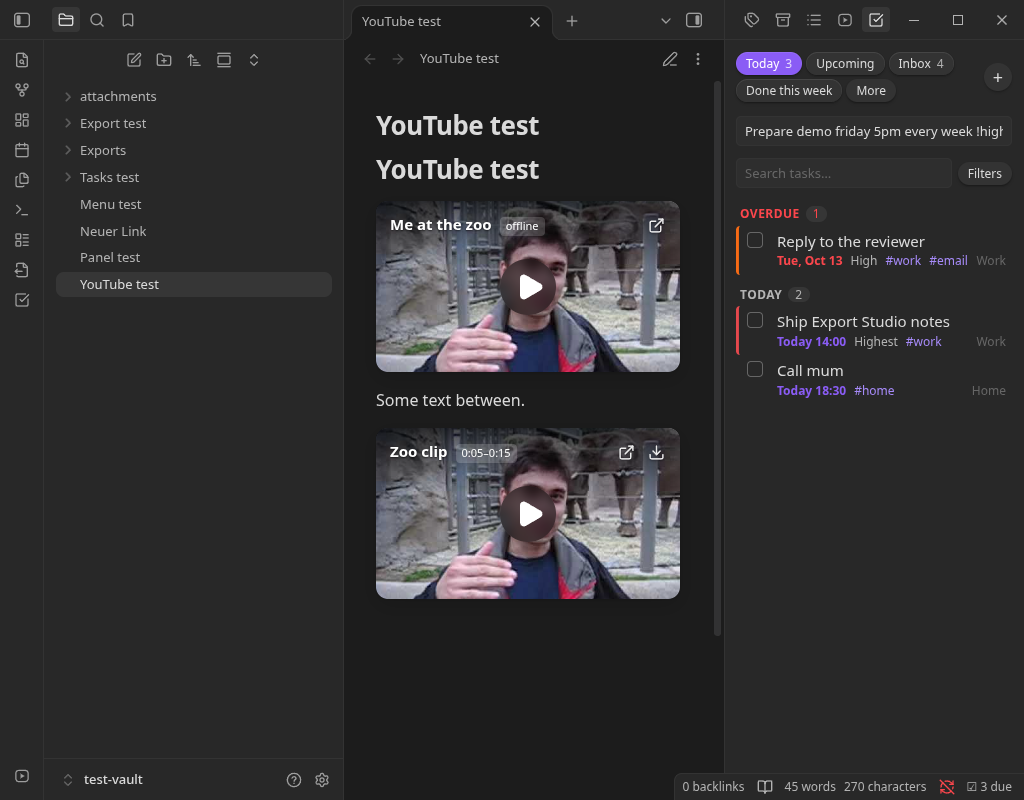
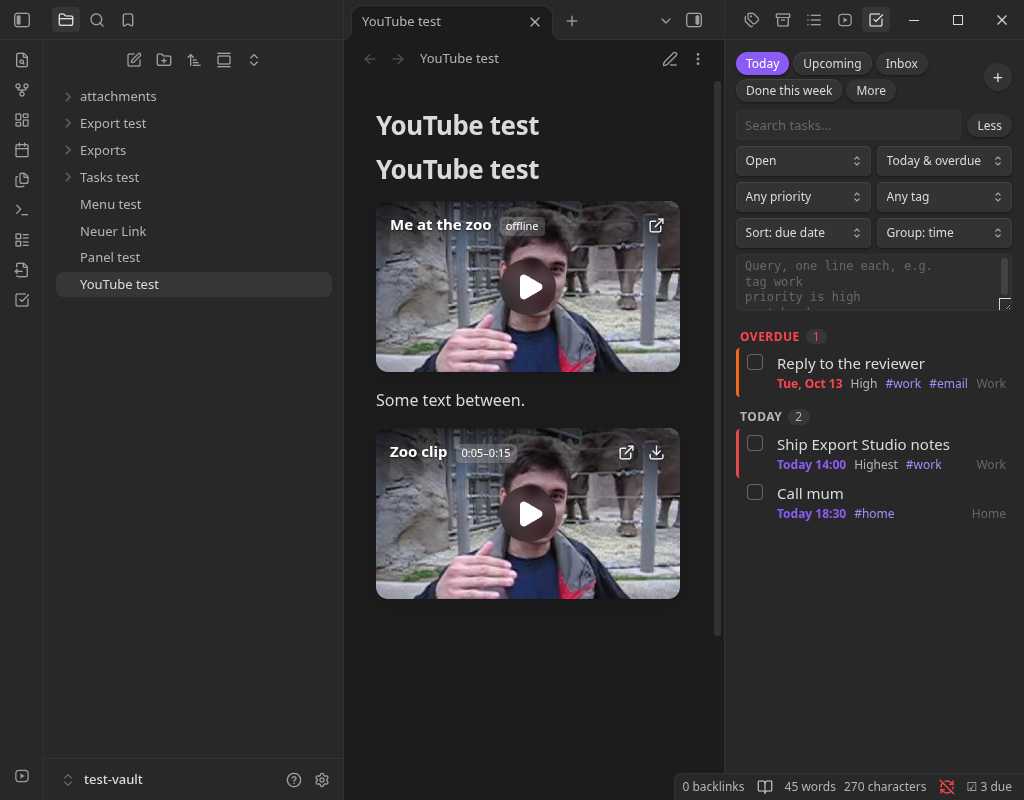
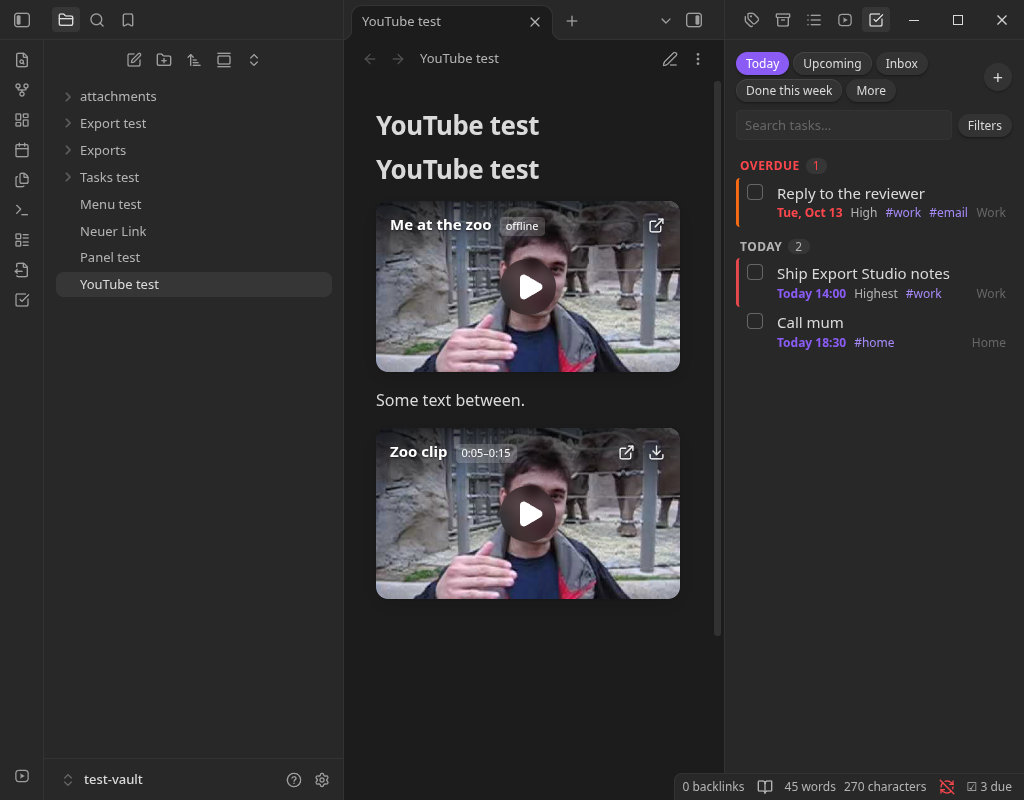
Task panel with presets: Today, Upcoming, Inbox, Done this week, All open, Everything. Search, filter by status, due range, priority and tag, sort, and group by time, note, due date, priority, status, tag or heading.
-
Plain Markdown. Tasks are normal
- [ ]lines. Checking one in the panel edits the note atomically. -
Dates and priority using the common emoji marks:
📅due,⏳scheduled,🛫start,➕created,✅done,🔁repeat;🔺 ⏫ 🔼 🔽 ⏬priority. Keyword formsdue:: 2026-10-20and@due(2026-10-20)work too. Add a time after a due or scheduled date (📅 2026-10-20 14:00). -
Repeats:
every day,every 2 weeks,every other month,every weekday,every monday,every year. Completing a repeating task adds the next copy, dated from the task's own date. -
Reminders for timed tasks: a notice and a system notification, plus a due count in the status bar.
-
Quick add from the box at the top of the panel, in plain words:
call mum tomorrow 6pm every week !high #home. Understandstoday,tomorrow,next week,in 3 days, weekday names, ISO dates,5pm/17:30,every …repeats,!highpriorities and#tags. -
Reschedule from the right-click menu: due today, tomorrow, next week, push back a day, or remove the date. The Today and Inbox chips show how many tasks they hold.
-
Create and edit tasks in a dialog (title, due, scheduled, start, repeat, priority, tags, note).
-
Query language, one condition per line, in the panel's filter box:
not done
due before 2026-11-01
tag work
priority is high
path includes Projects
sort by due
group by tag
limit 20
Also:
done,no due date,due today,due after,due on,done after,description includes,heading includes,happens,recurring. -
Command Toggle task on this line completes a task in the editor, stamping the done date and creating the next repeat.
Install
Obsidian directory
Tasks View is listed in the official Obsidian plugin directory: community.obsidian.md/plugins/tasks-view. Install it from there, or from Settings → Community plugins → Browse once it appears for you.
BRAT (installs and keeps it updated)
- Install BRAT from Settings → Community plugins → Browse, and enable it.
- Run BRAT: Add a beta plugin for testing and enter
encomjp/obsidian-tasks-view, or click this link with BRAT installed. - Enable Tasks View under Settings → Community plugins.
Manual
Copy main.js, manifest.json and styles.css from the latest release into
<vault>/.obsidian/plugins/tasks-view/, then enable the plugin. To build it yourself:
npm install
npm run build
Settings
Default note for new tasks (Tasks.md), stamping the done date, reminders, and the status-bar count.
Development
npm run dev     # rebuild main.js on change
npm run check   # type-check
npm test        # unit tests (node --test)
Tested in Obsidian 1.14.4 (Flatpak, Linux).
Disclosures
- Network use: none.
- Files outside your vault: none. Reminders use Obsidian notices and, if you have allowed them, your system's notifications.
- No account, payment, ads, telemetry or self-updating. The plugin only reads and edits Markdown notes in your vault.
Support
If this saves you time, you can buy me a coffee.
Disclaimer
An independent project, ported from the tasks feature of Starnote. It is not affiliated with, endorsed by, or supported by Dynalist Inc. (Obsidian) or the authors of any other task plugin. Provided "as is" under the MIT license, without warranty; it edits your notes, so keep backups. See LICENSE.
Made by Adrian Kozlowski, IT specialist for systems integration and IT security in Mannheim. More projects on the portfolio, and free browser games at games.adrian-kozlowski.com.