
README file from
GithubTaskNotes Views
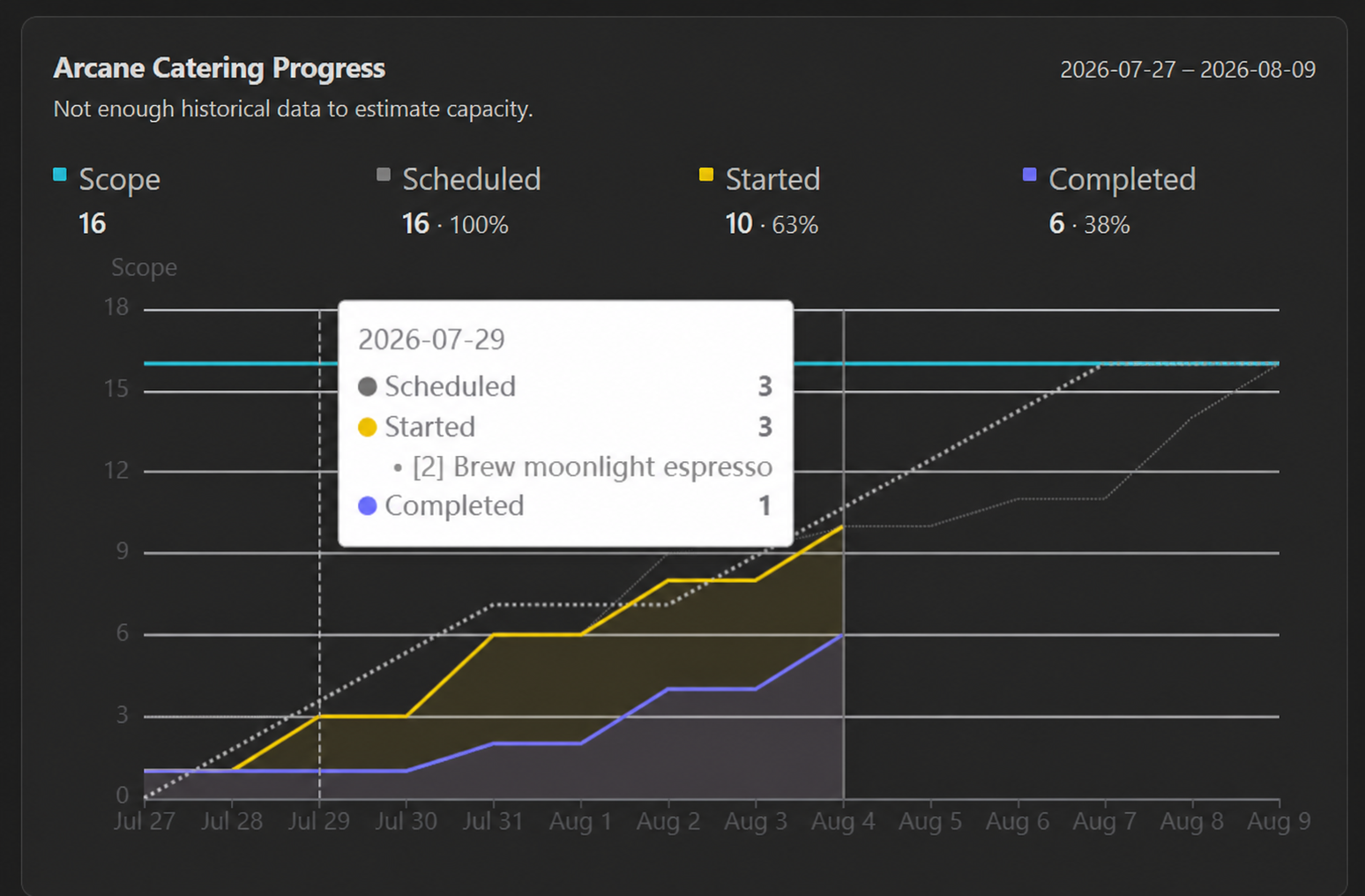
TaskNotes Views adds Project management progress charts to TaskNotes project notes in Obsidian.
Features
- Automatically embeds a progress widget in TaskNotes project notes in both reading view and Live Preview.
- Supports duration estimates such as
timeEstimateand unitless estimates such as story points. - Shows cumulative scope, scheduled, started, completed, and ideal target progress.
- Pauses ideal progress on weekends by default, with an option to count weekends.
- Shows scheduled, started, and completed task names in the hover popup, including each task's scope.
- Optionally estimates project capacity from recent historical velocity.
- Estimates virtual and materialized recurring TaskNotes occurrences.
Requirements
- Obsidian 1.13 or newer.
- The TaskNotes plugin, with its version 1 public API available.
- Notes recognized as projects by TaskNotes. TaskNotes Views uses TaskNotes' project relationship index when available and falls back to its configured project tag or property markers.
How project progress is calculated
The reporting time span comes from the configured project start and end frontmatter properties (defaults scheduled and due):
---
scheduled: 2026-07-27
due: 2026-08-09
---
When Derive date range from tasks is enabled, a missing start falls back to the earliest configured scheduled or started date among project tasks, and a missing end falls back to the latest task due date.
Chart values
- Scope is the sum of the estimated work for every included work item in the project.
- Scheduled accumulates scope on each task's configured scheduled date.
- Started accumulates scope based on a configurable start date property. (Use the "Stamp started timestamp" workflow from the TaskNotes Workflows plugin to automatically set a start date when a task is set to in-progress.)
- Completed accumulates scope on the task's completion date.
- Target distributes total scope evenly across the reporting window. By default it advances on weekdays and remains flat on weekends.
TaskNotes statuses configured as skipped are excluded from scope, scheduled, started, and completed values.
The hover popup omits Scope and Target because they do not represent task events on a particular day. Scheduled, Started, and Completed entries include matching task names with scope prefixes, such as [45m] Polish the silverware or [2] Brew moonlight espresso.
Recurring tasks
Each recurrence is treated as a logical work item:
- Virtual recurring parents are projected into the reporting window from their recurrence rule.
complete_instancesandskipped_instancesprovide completion and skip history for non-materialized occurrences.- A completed virtual occurrence uses the recurring template's estimate.
- A matching materialized occurrence overrides the projection with its own project assignment, estimate, status, scheduled date, started date, and completion state.
- A materialized occurrence moved to another project is excluded from the original project's calculations.
- The parent template is not counted as an additional unit of scope.
- Materialized completions are not counted again from the parent's compatibility history.
Virtual occurrences cannot expose an independent started date. They remain unstarted until completed. Materialized occurrences can contribute started work through their configured started property.
Capacity estimation
Enable Estimate capacity from past velocity to compare planned scope with an estimated capacity. Estimated capacity appears in the Scope heading for the progress graph, for example:
Scope / Capacity
9 / 10 (90%)
Capacity is calculated from completed task scope during the six weeks before the project starts:
- Completed work is grouped into six weekly buckets.
- The oldest through newest buckets receive linear weights from 1 through 6.
- Project capacity is computed from the weighted weekly velocity scaled to the number of working days in the project date range.
An estimate requires at least three completed scoped work items spanning at least three weeks. If history is insufficient, the widget retains the normal Scope metric and displays a notice that not enough historical data exists to estimate capacity.
Settings
| Setting | Default | Purpose |
|---|---|---|
| Project start property | scheduled |
Project frontmatter property containing the reporting start date. |
| Project end property | due |
Project frontmatter property containing the reporting end date. |
| Derive date range from tasks | Off | Fills missing project boundaries from task dates. |
| Scope property | timeEstimate |
Task property containing duration, points, or another numeric scope value. |
| Scope is a duration | On | Formats scope as minutes and hours instead of a unitless number. |
| Estimate capacity from past velocity | Off | Compares planned scope with recency-weighted historical capacity. |
| Task started property | startedAt |
Task property recording when work actually began. |
| Task scheduled property | scheduled |
Task property recording when work is planned to begin. |
| In-progress statuses | in-progress |
Comma-separated status values that count as started. TaskNotes-completed statuses are always included. |
| Count weekends | Off | Allows ideal target progress and capacity scaling to count Saturdays and Sundays. |
Installation
Install from the Obsidian community plugin catalog and enable TaskNotes Views under Settings → Community plugins.
Development
Install dependencies and start the watch build:
npm install
npm run dev
Available validation and packaging commands:
npm run typecheck
npm test
npm run lint
npm run build
npm run copy-files
npm run build:test
npm run copy-files copies main.js, manifest.json, and styles.css to destinations listed in .copy-files.local, the OBSIDIAN_PLUGIN_PATH environment variable, or the default TaskNotes end-to-end test vault.
Releases
Add user-facing changes to docs/releases/unreleased.md, then prepare a release with npm's version command:
npm version patch
git push --follow-tags
Use minor, major, or an explicit semantic version instead of patch when appropriate. The version lifecycle synchronizes manifest.json and versions.json, promotes the unreleased notes to docs/releases/<version>.md, regenerates the release index, commits the changes, and creates the version tag. Pushing the tag triggers GitHub Actions, which builds the plugin and creates a draft GitHub release using that Markdown file. Review and publish the draft in GitHub.
npm run version only invokes the lifecycle script directly and does not create npm's version commit or Git tag; use npm version ... for releases.