
README file from
GithubTask Archive
Moves completed tasks, with their sub-items, into an archive section or note.
What it does
Run Archive completed tasks (command palette, or right-click a note in the file explorer) and every finished task moves to an archive section at the end of the note, with the lines nested under it.
Before:
# Plan
- [ ] Write the report
- [x] Send the invoice
  - paid by card
- [ ] Review the draft
  - [x] Fix the intro
After:
# Plan
- [ ] Write the report
- [ ] Review the draft

## Archive

### 2026-10-08

- [x] Send the invoice
  - paid by card
- [x] Fix the intro
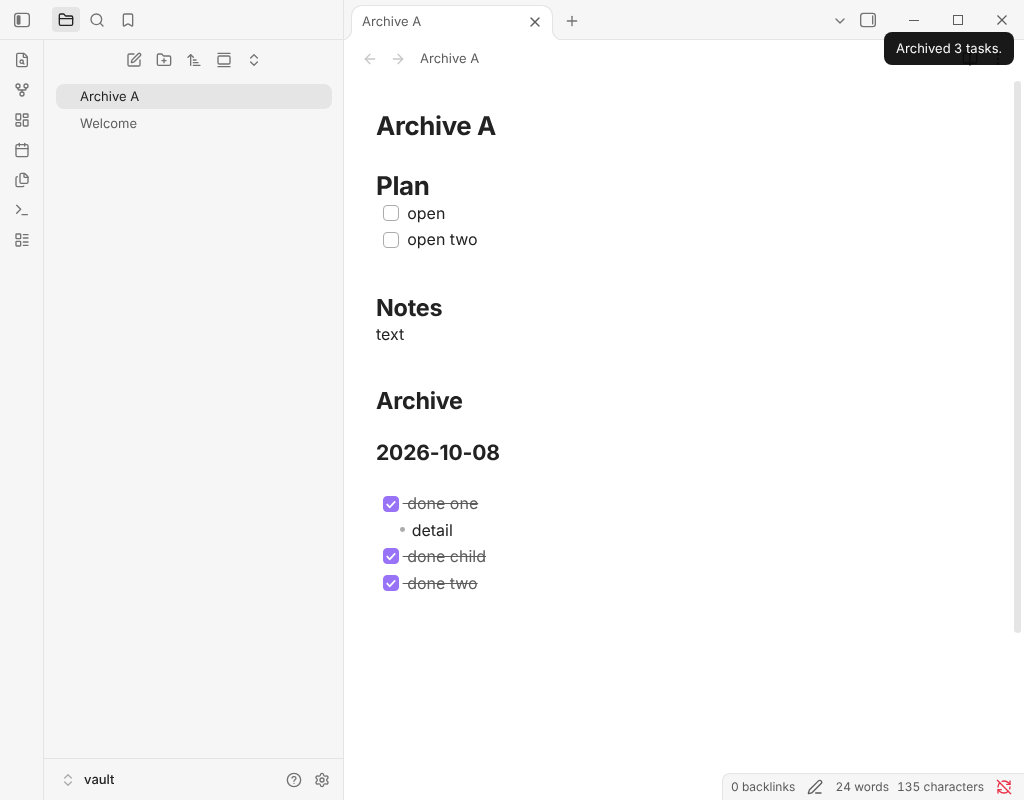
Works on desktop and mobile.
Commands
- Archive completed tasks: the current note, or only the selected lines when something is selected.
- Archive the current task: the task the cursor is in, with what is nested under it, even if it is not finished.
- File menu → Archive completed tasks: any note, without opening it.
In the open editor the whole change is one edit, so a single undo puts everything back.
Details that matter
- Nested lines go with their task. A finished task takes its sub-bullets and sub-tasks with it. A finished sub-task of an open task moves alone, to the top level (turn that off in settings to leave it until its parent is done).
- Grouped by date. Tasks go under a smaller heading with today's date, and archiving again the same day adds to the same group.
- Archive in the note or in another one. Give a path such as
Archive/Tasks.mdand the tasks go there instead, under the same heading. The note and its folder are created when missing. Undo in the source note does not undo what was written to the archive note. - Leaves code and properties alone. A
- [x]inside a code block or the front matter is not a task. - Custom checkboxes. Choose which characters count as finished (
xXby default; add-to archive cancelled tasks too). - Safe order. With an archive note, the tasks are written there first and removed from the source second. If the source changed in between, nothing is removed and you are told.
Settings
Finished markers, whether finished sub-tasks of open tasks move, the archive note, the heading text and level, and the date group with its format.
Installation
In Obsidian, open Settings → Community plugins → Browse and search for "Task Archive".
More plugins by Siulved54
| Plugin | What it does | Source |
|---|---|---|
| Shared Blocks | Write a block of text once and reuse it in any note. Edit the source and every reference re-renders live. | shared-blocks |
| Text Case and Cleanup | Change case, make camelCase or slugs, sort lines and remove duplicates, and repair text pasted out of a PDF, without touching code or URLs. | text-format |
| Typography as You Type | Curly quotes, dashes and ellipses as you type, kept out of code and maths, with Backspace to take one back. | smart-typography-plugin |
| Section Numbering | Number headings as an outline (1, 1.1, 1.2) and keep every link to them working when they renumber. | section-numbering |
| Spreadsheet to Table | Paste cells from Excel or Google Sheets as a Markdown table with a real header, insert CSV files, and copy tables back out. | spreadsheet-to-table |
| Hybrid Line Numbers | Relative and hybrid line numbers for Vim-style jumps, where a folded section counts as one line. | hybrid-line-numbers |
| List Item Callouts | Colour a single list item as a callout by starting it with a character such as &, ! or ?. |
list-item-callouts |
| Folder Counts | See how many notes or files each folder holds, right in the file explorer, with a vault total and folder exclusions. | folder-counts |
| Note Reading Time | Reading time of the current note or your selection in the status bar, optionally saved to a property. | note-reading-time |
| Task Rollover | Roll unfinished tasks from your last daily note into today's when it is created, with a real undo. | task-rollover |
| Zoom Into Section | Zoom into a heading or list item to see only it and its contents, with a breadcrumb bar to climb back out. | zoom-into-section |
| Link Title on Paste | Paste a web address and get a Markdown link with the page's title, fetched in the background and undone in one step. | link-title-on-paste |
| Update Radar | Checks your installed community plugins for updates in the background, shows what changed, and flags the ones that look abandoned. | community-update-checker |
| Dataview to Bases | Convert Dataview queries into Bases blocks, and see which queries in your vault can be converted. | dataview-to-bases |
| Line Editing Commands | Duplicate, join, sort and reverse lines, insert blank lines and jump to a line number, with multi-cursor support. | line-editing-commands |
| Note Mover Rules | Move notes into folders by ordered rules on tags, properties, titles and paths, with a preview before any bulk move. | note-mover-rules |
| Tab History | Keeps each tab's back and forward history across restarts, and adds commands to move, maximize and close tabs. | tab-history |
| URL Cards | Shows web addresses as cards with title, description and image, and reads existing cardlink blocks. | url-cards |
| Vim Config | Loads a vimrc-style file from your vault so your key mappings and editor commands are ready when vim mode starts. | vim-config |
| Revisit Later | Link the current note into a future daily note, with a date typed in plain English, so it comes back when you want to review it. | revisit-later |
| Explorer Colors Plus | Color files and folders in the file explorer, with a palette, cascading to children, and import from File Color. | explorer-colors-plus |
| Book Lookup | Create book notes from Open Library or Google Books, with cover images, ISBN search and Book Search compatible templates. | book-lookup |
| Web Search Menu | Search the web for selected text or the note title from the right-click menu, with engines you define. | web-search-menu |
| Word Lookup | Look up any word in a sidebar dictionary with definitions, phonetics, synonyms and antonyms, or create a note for it. | word-lookup |
| Quick Translate | Translate the selection or a whole note into another language with no account, keeping links, code and front matter untouched. | quick-translate |
| Dice Rolls | Inline dice rolls you click to reroll, in Live Preview and Reading view, with full dice notation, a roll dialog and a roll history. Reads Dice Roller notes. | dice-rolls |
| Claude Studio | Notion-style AI writing, chat and vault tools powered by your local Claude Code CLI. | claude-studio |
| Book Studio | Turn notes into a print-ready paperback PDF and an EPUB 3, entirely on your device. | book-studio |
| Emoji Search | Insert emojis from a searchable picker or by typing a :shortcode. | emoji-search |
| Inline TOC | Show a live table of contents inside any note with a toc code block, or insert a plain Markdown one. | inline-toc |
All of them are in the community directory: Settings -> Community plugins -> Browse, then search for the name. Demos and install links for every one: the catalog.
Follow new plugins and updates on X: @luenpereza