
README file from
GithubTahoe Math
A calculator in your notes. Type an expression ending in = and the answer appears right after it, as you type. No code block and no special syntax: it works in ordinary text.
Install: in Obsidian, open Settings → Community plugins → Browse, search for “Tahoe Math”, then Install and Enable. (Directory page)
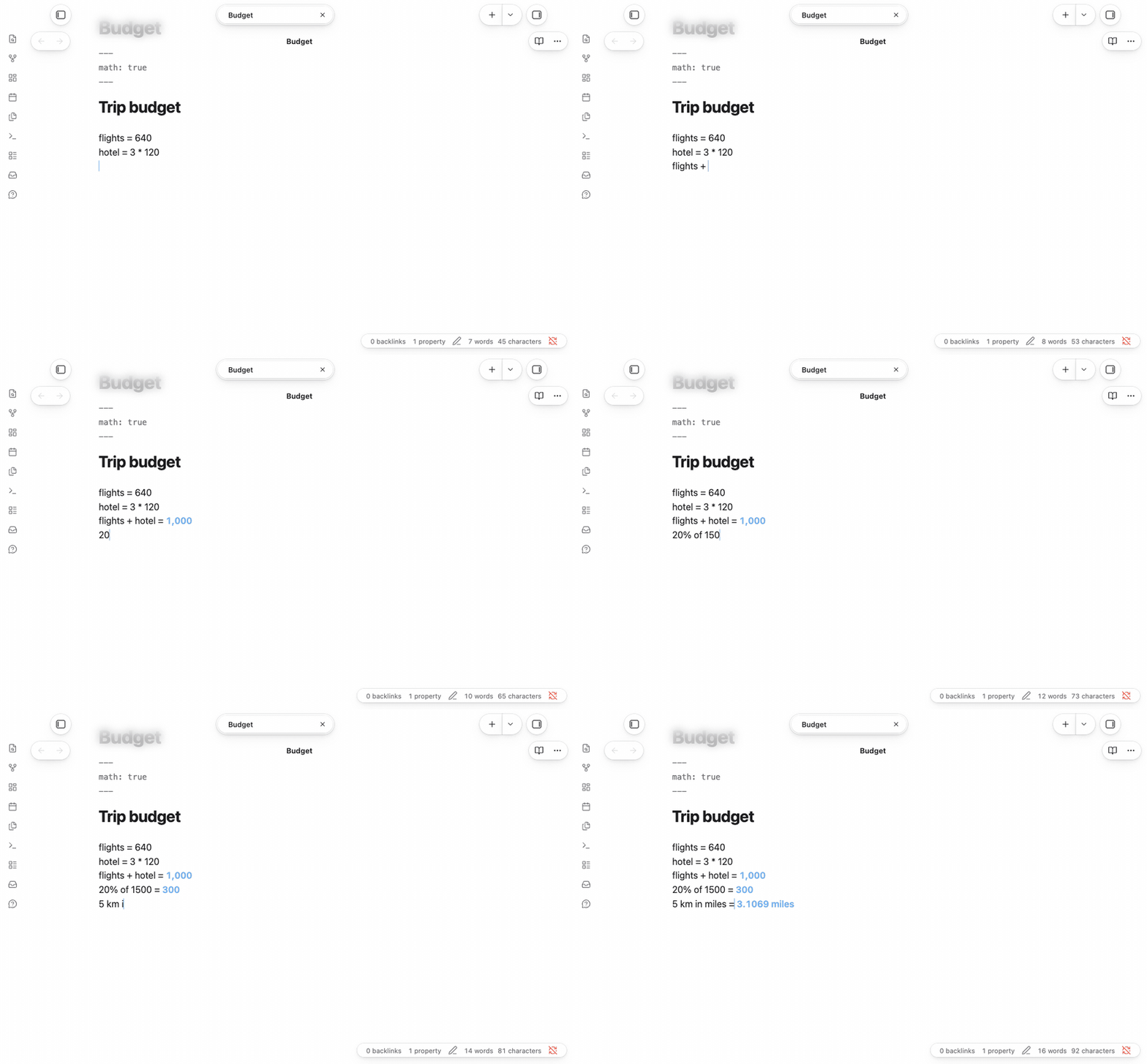
5 km + 300 m =→ 5.3 kmflights = $420,hotel = $135 * 3, thenflights + hotel =→ $825.00f(t) = t^2 + 1thenf(4) =→ 17
What it understands
| You type | You see |
|---|---|
x = 12 then x * 3.5 = |
42 |
5 km + 300 m = |
5.3 km |
3 ft to cm = |
91.44 cm |
72 degF to degC = |
22.222 degC |
20% of 80 = |
16 |
$12.50 * 4 = |
$50.00 |
f(t) = t^2 + 1 then f(4) = |
17 |
daysUntil("Dec 25") = |
the days left |
Variables and functions carry down the note, so later lines can use earlier ones. Answers are worked out exactly by math.js, not guessed.
Using it
- Answers show as you type. Nothing is written into your note until you want it.
- Keep an answer: click it, or press Tab at the end of the line, and it's written in.
- Use the answer above:
previs the last answer in the note, so2 * 21 =thenprev + 8 =gives 50. If your note defines its ownprev, that one is used. - Write every answer in at once: run Write all answers into this note from the command palette.
- Reading view shows the answers too.
- Only where you want it: turn on Only in notes marked for maths in the settings, then add
math: trueto the properties of the notes that should show answers. - Precision: choose how many significant digits answers show (whole numbers are never rounded; unit conversions show at most 5, money always shows cents).
- Multiplication just works: Obsidian normally pairs a typed
*for italics; in a line of maths, Tahoe Math keeps it a single*.
It uses nothing desktop-only, so it runs in Obsidian on phones and tablets too.
Questions in plain English (optional)
With the companion plugin Tahoe Intelligence (Mac only), you can also type questions like days until Oct 14 = or 20% tip on $86 split 3 ways =. An on-device model rewrites the question as a calculation, and Tahoe Math works it out exactly. These answers are marked with ✦. Without Tahoe Intelligence, everything else works as normal.
Coming from Numerals
Numerals and Tahoe Math both use math.js, and both work on phones and tablets. The main difference is where the maths lives: Numerals works in ```math blocks and in inline code like `#: 3ft * 4ft`, while Tahoe Math works on ordinary lines of text that end in =.
The same: units and conversions (72 degF to degC), variables, your own functions, currency symbols, answers in Reading view.
Different:
- Tahoe Math skips code blocks, so it doesn't read Numerals'
```mathblocks or#:inline code. To switch a calculation, move it out of the block and end the line with=. - Variables in Tahoe Math carry down the whole note. In Numerals they stay in their block unless you name them with
$. - Numerals treats a currency as a unit (
7,200 USD). Tahoe Math keeps the symbol you typed and shows cents ($50.00).
Numerals does things Tahoe Math doesn't: @total, @sum and @prev; values from frontmatter, Dataview and other notes; writing results back as Dataview fields; TeX and highlighted render styles; a choice of layouts and number formats; and autocomplete.
Side by side: Numerals works inside its blocks and #: code, and Tahoe Math on plain lines, so each leaves the other's text alone.
Disclosures
- No network use. Tahoe Math works entirely offline.
- No files outside your vault. Its settings, and any plain-English rewrites, are saved in the plugin's own data in your vault.
- No telemetry, ads, accounts or payments.
The Tahoe family
Tahoe is a set of plugins and a theme that work on their own and fit together.
| Tahoe Run | Run the code in your notes, like a notebook: Python with a debugger and variables view, MATLAB, and ~25 other languages. | available |
| Tahoe Math | A calculator in your notes: type an expression ending in = and the answer appears. |
this one |
| Tahoe | A clean, Mac-like theme, in light and dark. | available |
| Tahoe Code | An IDE in your code blocks: suggestions, checking as you type, quick fixes, go to definition, formatting and AI edits. | available |
| Tahoe Glass | Real refraction for the Tahoe theme's glass, and header cards on settings pages. | available |
| Tahoe Organize | Keep a growing vault tidy: inbox triage, smart folders, colored tags, link suggestions, vault health, literature notes and text from images. | available |
| Tahoe Intelligence | On-device AI for your notes: ask your notes, related notes, distilling permanent notes and more. | available |
Better together
- With Tahoe Intelligence: ask in words:
days until Oct 14 =or20% tip on $86 split 3 ways =. An on-device model turns the question into a calculation, and Tahoe Math works it out exactly. - With Tahoe Run: when a calculation outgrows a line, a Python block in the same note picks up from there, with variables that carry across blocks.
- With Tahoe: answers take your accent colour, in Tahoe or any theme.
Feedback
Questions are welcome in Discussions, and bugs and ideas in Issues. If Tahoe Math is useful to you, a star helps others find it.
Credits
math.js by Jos de Jong does the arithmetic, under the Apache License 2.0. See THIRD_PARTY_NOTICES.md.
Tahoe Math is an independent project. It isn't affiliated with, or endorsed by, Apple.
License
MIT © 2026 Krishnan Adaikkappan
Building from source
npm ci
npm run build     # writes main.js
Releases are built by GitHub Actions: push a tag that matches the version in manifest.json, then publish the draft release it creates.