
README file from
GithubObsdian Tag to Page — 标签转页面
让 Obsidian 中的
#标签像 Logseq 一样工作:点击标签,直接打开对应的[[标签]]页面。
Obsdian Tag to Page 会把标签点击从默认的标签搜索行为改为页面导航。目标页面不存在时,它还可以自动创建对应的 Markdown 笔记。
🎬 演示动画
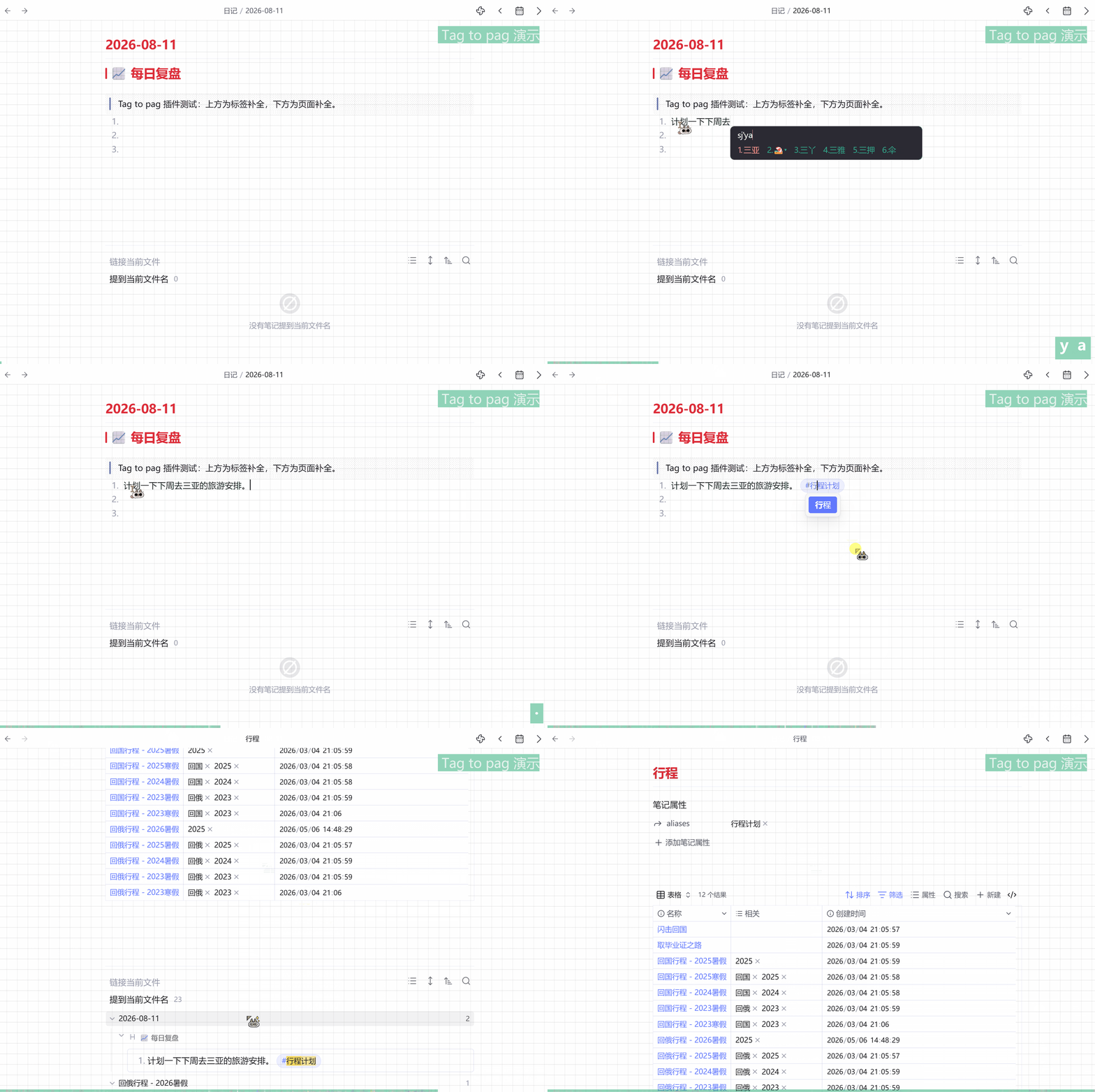
✨ 主要功能
- 点击
#tag打开页面 — 支持阅读视图和实时预览。 - 自动创建页面 — 目标笔记不存在时创建空白 Markdown 文件。
- 解析别名 — 查找目标时检查 frontmatter 中的
alias和aliases。 - 支持嵌套标签 —
#parent/child会按需创建parent/child.md及父目录。 - 在新窗格打开 — Windows/Linux 按住
Ctrl,macOS 按住Cmd后点击。 - 可选页面补全 — 输入
#时,从笔记名和别名中提供补全建议。 - 标签反链归类 — 解析到当前页面的
#标签会显示在反链的“链接当前文件”列表中,并从“提到当前文件名”中移除对应标签片段。 - 双语和响应式设置 — 支持中文/English,并适配窄窗口和移动端。
一句话总结 — 把标签从“搜索入口”变成“页面入口”,更接近 Logseq 的笔记流。
🔧 工作原理
点击标签后,插件会:
- 在 DOM 捕获阶段拦截
.tag和.cm-hashtag元素的点击。 - 使用
metadataCache.getFirstLinkpathDest()查找同名页面。 - 如果没有找到,再检查 frontmatter 中的
alias和aliases。 - 如果仍然没有匹配页面,创建对应的 Markdown 文件并打开它。
开启页面补全后,插件使用 CodeMirror 6 autocomplete,从 Markdown 笔记名和别名中生成建议。
⚙️ 设置
| 设置项 | 说明 |
|---|---|
| 语言 | 在中文和 English 之间切换设置界面。 |
| 在反链中显示标签 | 控制相关 #标签 是否显示在“链接当前文件”列表中。 |
输入 # 时显示页面补全 |
根据笔记名和别名提供补全建议,可能增加一些扫描开销。 |
📦 安装
通过 BRAT 安装(推荐)
- 安装 Obsidian BRAT 插件。
- 在 BRAT 设置中添加
agarcabin/obsdian-tag-to-page。 - 在已安装的社区插件列表中启用 Tag to Page。
手动安装
从 Releases 下载 main.js、manifest.json 和 styles.css,复制到:
<你的库>/.obsidian/plugins/tag-to-page/
然后在 设置 → 社区插件 中启用 Tag to Page。
仓库名称是
obsdian-tag-to-page;为兼容已有安装,插件 ID 和安装目录仍保持为tag-to-page。
⚠️ 已知限制
- 开启
#页面补全后,会替换默认的[[页面补全提供器。 - 源码模式暂不支持标签点击跳转。
- 标签反链归类使用 Obsidian 当前版本的反链内部渲染结构;如果结构不可用,插件会跳过该功能,不影响标签点击跳转。
🛠️ 从源码构建
git clone https://github.com/agarcabin/obsdian-tag-to-page.git
cd obsdian-tag-to-page
npm install
npm run dev    # 监听模式
npm run build  # 正式构建
📄 许可证
Tag to Page 使用 MIT License 开源。
Obsdian Tag to Page — Tag to Page
Source: agarcabin/obsdian-tag-to-page · Releases
Make
#tagsbehave more like Logseq: click a tag to open its matching[[tag]]page.
Obsdian Tag to Page changes tag clicks from Obsidian's default tag-search behavior into page navigation. If the target page does not exist, it can create the Markdown note automatically.
✨ Features
- Open a page from
#tag— Works in Reading view and Live Preview. - Create missing pages — Create an empty Markdown note when no target exists.
- Resolve aliases — Check frontmatter
aliasandaliasesvalues when resolving a tag. - Support nested tags —
#parent/childcreatesparent/child.mdand its parent directory when needed. - Open in a new pane — Hold
Ctrlon Windows/Linux orCmdon macOS while clicking. - Optional page completion — Type
#to search note names and aliases for suggestions. - Classify tag backlinks —
#tagsthat resolve to the current page appear in the linked-backlinks list, and the matching tag ranges are removed from unlinked mentions. - Bilingual, responsive settings — Switch between Chinese and English in a layout that also works on narrow windows and mobile.
TL;DR — Turn tags from search triggers into page links for a more Logseq-like note flow.
🔧 How it works
When you click a tag, the plugin:
- Intercepts
.tagand.cm-hashtagclicks during the DOM capture phase. - Uses
metadataCache.getFirstLinkpathDest()to find a page with the matching name. - Checks frontmatter
aliasandaliasesvalues if the direct name is not found. - Creates and opens the Markdown page if no match exists.
When page completion is enabled, CodeMirror 6 autocomplete suggests Markdown note names and aliases.
⚙️ Settings
| Setting | Description |
|---|---|
| Language | Switch the settings UI between Chinese and English. |
| Show tags in backlinks | Control whether related #tags appear in the linked-backlinks list. |
Show page completion when typing # |
Suggest matching note names and aliases; this may add some scanning overhead. |
📦 Install
Using BRAT (recommended)
- Install the Obsidian BRAT plugin.
- Add
agarcabin/obsdian-tag-to-pagein BRAT settings. - Enable Tag to Page in the list of installed community plugins.
Manual installation
Download main.js, manifest.json, and styles.css from the Releases page, then copy them into:
<your vault>/.obsidian/plugins/tag-to-page/
Enable Tag to Page under Settings → Community plugins.
The repository name is
obsdian-tag-to-page; the plugin ID and installation directory remaintag-to-pagefor compatibility with existing installations.
⚠️ Known limitations
- Enabling
#page completion replaces the default[[page completion provider. - Tag clicks are not supported in Source mode.
- Tag-backlink classification uses Obsidian's current internal backlink rendering structure; if it is unavailable, the plugin skips this feature without affecting tag-to-page navigation.
🛠️ Build from source
git clone https://github.com/agarcabin/obsdian-tag-to-page.git
cd obsdian-tag-to-page
npm install
npm run dev    # watch mode
npm run build  # production build
📄 License
Tag to Page is released under the MIT License.