
README file from
GithubT3 Attachment Tools (Obsidian plugin)
Rename and move attachments in your Obsidian vault using configurable patterns.
Example
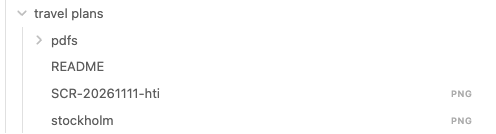
The note README.md embeds three attachments.


Choose Rename All and select the pattern below to move the attachments beside the note.
{documentpath}/{documentname}-pic-{number}.{extension}
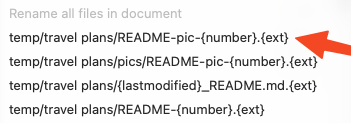
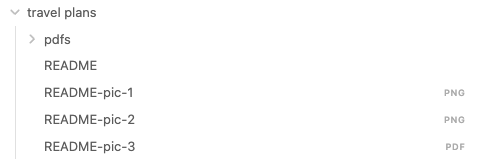
With numbers 1 through 3 available and automatic link updates enabled in Obsidian, the embeds can look like this.



Settings
It's possible to configure up to four patterns. These are the defaults:
{documentpath}/{documentname}-pic-{number}.{extension}{documentpath}/pics/{documentname}-pic-{number}.{extension}{documentpath}/{lastmodified}_{documentname}.{extension}{documentpath}/{documentname:[a-zA-Z]}-{number}.{extension}
Supported tokens
| Token | Description |
|---|---|
{name} |
Filename without extension (e.g. foo) |
{name:[\p{L}\p{M} ]} |
Keep only letters from all languages, combining accents, and spaces (e.g. Åäö 123! → Åäö) |
{extension} |
Original extension (e.g. png) |
{filename} |
Full name with extension (e.g. foo.png) |
{path} |
Full path to folder (e.g. Bar/Baz) |
{fullpath} |
Full path including name (e.g. Bar/Baz/foo.png) |
{directoryname} |
Only the folder name (e.g. Baz) |
{parentdirectoryname} |
Grandparent folder name (e.g. Bar) |
{number} |
Next available number, starting at 1 |
{date} |
Current date (YYYYMMDD) |
{time} |
Current time (HHmmss) |
{date:FORMAT} |
Custom date format (e.g. {date:YYYY-MM-DD}) |
{lastmodified} |
Modification time (YYYYMMDD_HHmmss) |
{lastmodified:FORMAT} |
Modification time with custom format |
{documentname} |
Active document name without extension |
{documentname:[\p{L}\p{M} ]} |
Keep only letters from all languages, combining accents, and spaces (e.g. Notes 123! → Notes) |
{documentextension} |
Active document extension only |
{documentfullname} |
Active document including extension |
{documentpath} |
Vault-relative folder containing the active document |
Path resolution examples
The active note is Foo/Bar/Notes.md. The examples assume number 1 is available and the attachment was last modified in 2026.
| Original | Configured setting | Result |
|---|---|---|
Foo/Bar/file.png |
{filename} |
file.png |
Foo/Bar/file.png |
Bar/{filename} |
Bar/file.png |
Foo/Bar/file.png |
/Foo/Bar/{filename} |
Foo/Bar/file.png |
Foo/Bar/Pictures/file.png |
{documentpath}/{documentname}-pic-{number}.{extension} |
Foo/Bar/Notes-pic-1.png |
Foo/Bar/Pictures/file.png |
{documentpath}/Pictures/{lastmodified:YYYY}/{filename} |
Foo/Bar/Pictures/2026/file.png |
Letter filtering
These patterns filter the name of the active note Foo/Bar/Åäö file with spaces and numbers123!!.md. Both examples use a PNG attachment and assume number 1 is available.
| Input | Result |
|---|---|
{documentpath}/{documentname:[\p{L}\p{M} ]}-{number}.{extension} |
Foo/Bar/Åäö file with spaces and numbers-1.png |
{documentpath}/{documentname:[a-zA-Z]}-{number}.{extension} |
Foo/Bar/filewithspacesandnumbers-1.png |
Developer notes
- Place this repo inside the
.obsidian/plugins/pluginnamefolder - Inside Obsidian
- Install the hot reload plugin https://github.com/shabegom/obsidian-hot-reload-mobile to get automatic reload when saving a
.tsfile - Enable both plugins in settings
- Install the hot reload plugin https://github.com/shabegom/obsidian-hot-reload-mobile to get automatic reload when saving a
- Run
npm run dev - See the top right notification inside Obsidian that the change was detected
Also, show the developer console inside obsidian to view console.log output :)
Ps. Obsidian loads the compiled main.js from this folder.