
README file from
Github中文 | English
Symbol Stripper


选中文本,一键剔除指定字符或正则匹配。
Select text and strip specified characters or regex matches with one click.
预览 / Preview
右键菜单 / Context Menu

跟随栏 / Floating Toolbar

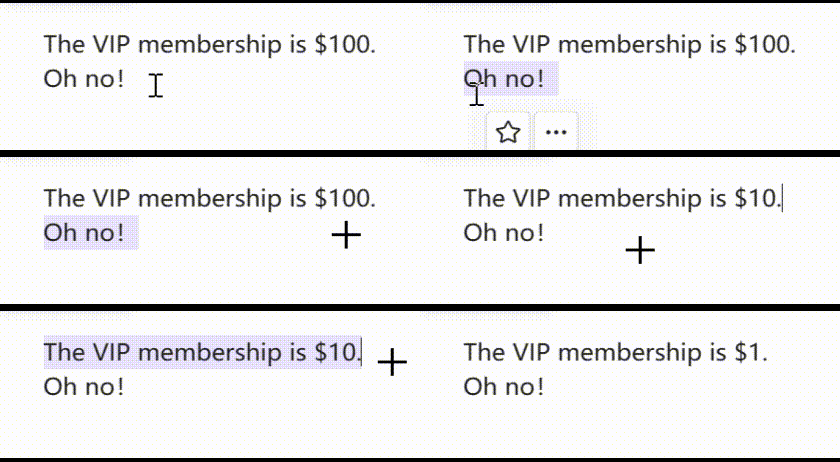
剔除刷 / Eraser Brush
中文
功能特性
- 🔤 字符模式 — 逐字符剔除,如剔除所有数字、标点
- 🔍 正则模式 — 按正则表达式匹配剔除,如剔除所有空白、中文标点
- 🎯 浮动工具栏 — 选中文本后自动出现跟随光标的工具栏,一键执行常用预设
- ✨ 剔除刷 — 双击工具栏星标按钮激活,连续选中文本自动应用预设
- 📋 右键菜单 — 选中文本 → 右键 → 选择预设
- ⌨️ 命令面板 —
Ctrl+P→ 搜索"剔除" → 选择预设执行 - ⚙️ 预设管理 — 在设置页自定义预设(增删改查、筛选、导入导出)
- 🌐 多语言 — 支持中文 / English,跟随系统语言自动切换
内置预设
| 预设名称 | 模式 | 内容 |
|---|---|---|
| 剔除数字 | 字符 | 0-9 |
| 剔除空白 | 正则 | \s+ |
| 剔除中文标点 | 正则 | 中文标点字符集 |
| 剔除英文标点 | 字符 | 常见英文标点 |
安装
Obsidian 社区插件(推荐)
- 设置 → 社区插件 → 浏览 → 搜索 "Symbol Stripper"
- 安装并启用
BRAT
- 安装 BRAT 插件
- BRAT 设置 →
Add Beta plugin with frozen version→ 输入仓库地址 - 搜索
Tacai/symbol-stripper,安装并启用
手动安装
- 从 Releases 下载
main.js、manifest.json、styles.css - 在 vault 中创建
.obsidian/plugins/symbol-stripper/目录 - 将三个文件复制到该目录
- 重启 Obsidian → 设置 → 社区插件 → 启用 Symbol Stripper
致谢
浮动工具栏交互设计和设置界面分页设计参考了 editing-toolbar(MPL-2.0 License, by Cuman / PKM-er)。
许可证
MIT License, Copyright (c) 2026 Tacai
English
Features
- 🔤 Char Mode — Strip individual characters, e.g. remove all digits or punctuation
- 🔍 Regex Mode — Strip by regex match, e.g. remove all whitespace or Chinese punctuation
- 🎯 Floating Toolbar — Auto-appears next to the cursor on text selection for one-click preset execution
- ✨ Eraser Brush — Double-click the star button to activate; auto-applies preset on each selection
- 📋 Context Menu — Select text → Right-click → Choose a preset
- ⌨️ Command Palette —
Ctrl+P→ Search "strip" → Choose a preset to execute - ⚙️ Preset Management — Add, edit, delete, filter, import, and export presets in settings
- 🌐 i18n — Chinese / English support with auto language detection
Default Presets
| Preset Name | Mode | Content |
|---|---|---|
| Strip Digits | char | 0-9 |
| Strip Whitespace | regex | \s+ |
| Strip Cn Punctuation | regex | Chinese punctuation character set |
| Strip En Punctuation | char | Common English punctuation |
Installation
Obsidian Community Plugins (Recommended)
- Settings → Community Plugins → Browse → Search "Symbol Stripper"
- Install and enable
BRAT
- Install the BRAT plugin
- BRAT Settings →
Add Beta plugin with frozen version→ Enter repository URL - Search for
Tacai/symbol-stripper, install and enable
Manual Installation
- Download
main.js,manifest.json,styles.cssfrom Releases - Create
.obsidian/plugins/symbol-stripper/directory in your vault - Copy the three files into that directory
- Restart Obsidian → Settings → Community Plugins → Enable Symbol Stripper
Acknowledgments
The floating toolbar interaction design and settings page tab design were inspired by editing-toolbar (MPL-2.0 License, by Cuman / PKM-er).
License
MIT License, Copyright (c) 2026 Tacai