
README file from
GithubSwiftMatch
An Obsidian plugin for quick text search and highlight across your vault. / 一个 Obsidian 快速搜索高亮插件。
Features / 功能
-
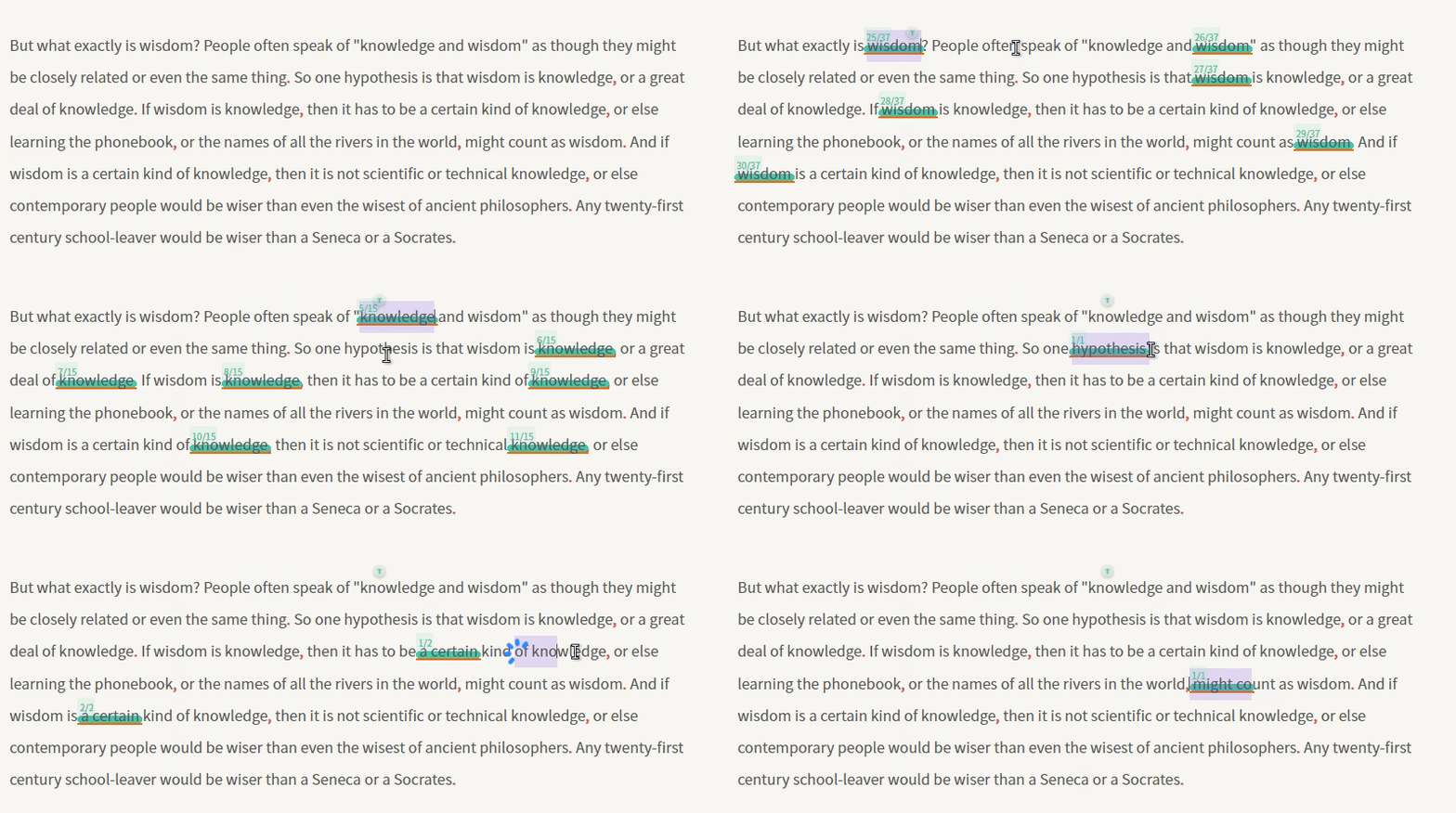
Swift Seek / 即划即搜 — Select text, instantly highlight all matches on the current page with a live counter / 选中文本,当前页面即时显示所有匹配并计数
-
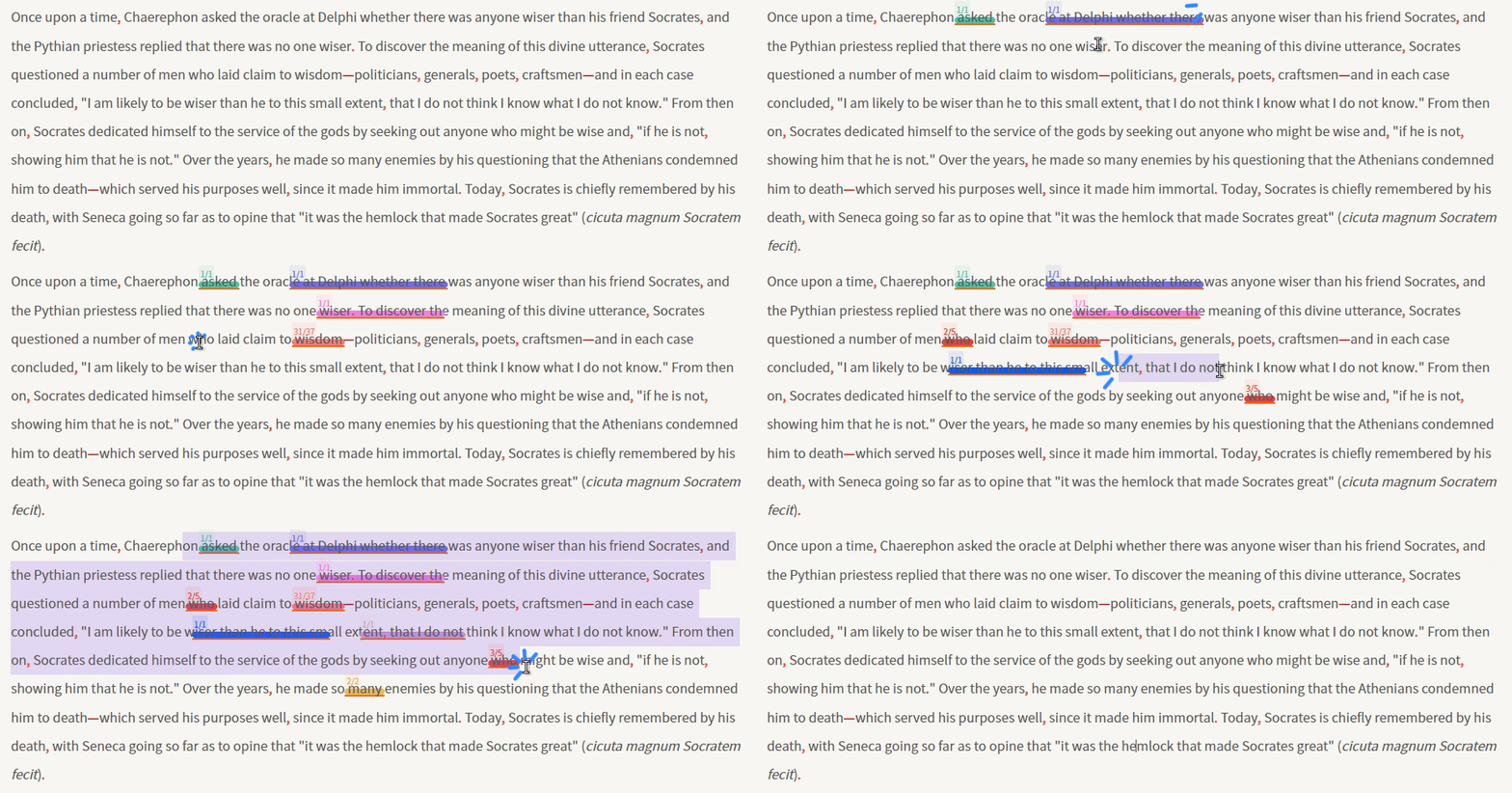
Pin Tally / 固定计数 — Pin keywords to track match counts across multiple terms at a glance / 固定关键词,同时查看多个关键词的匹配次数
-
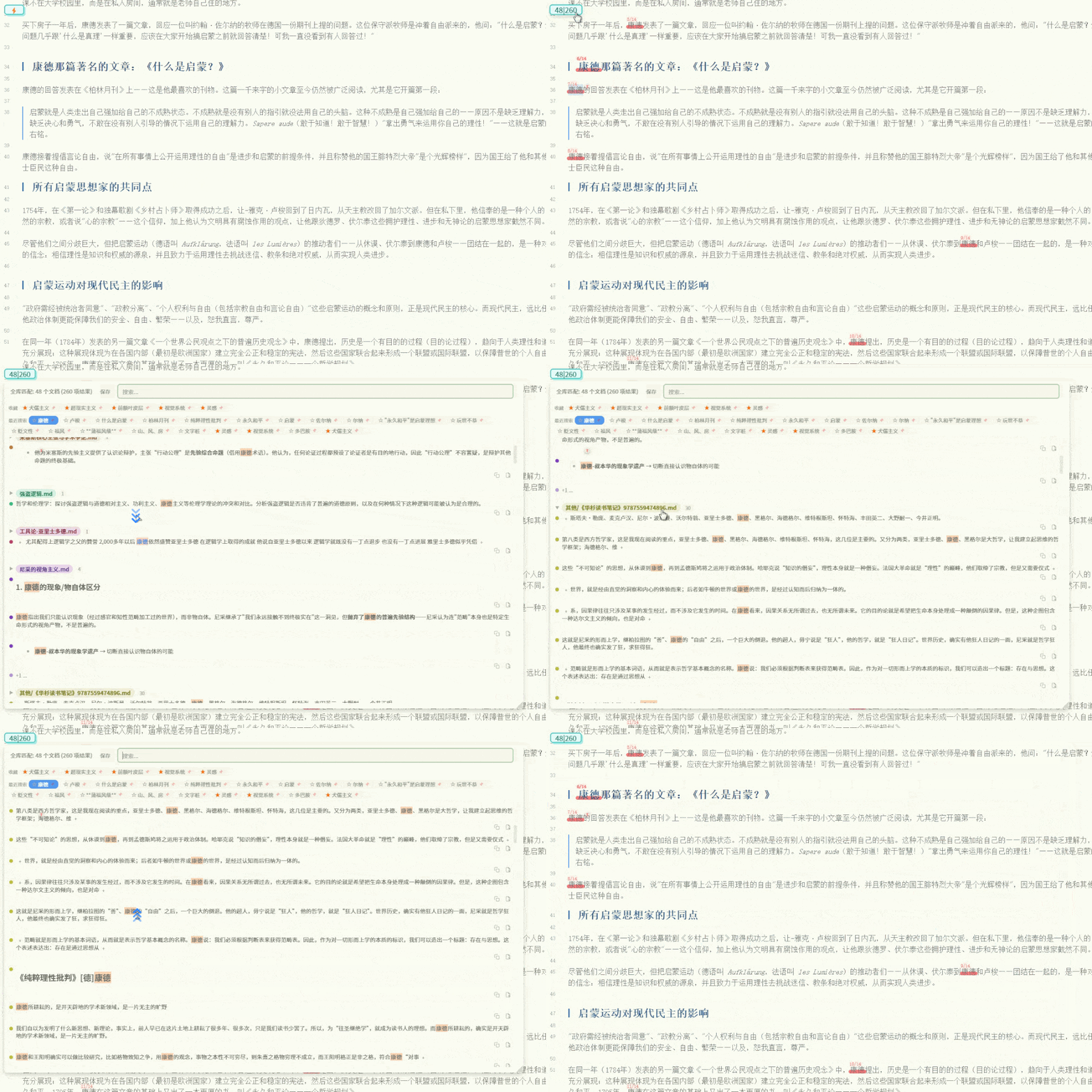
Vault Scan / 搜索全库 — Background search across your entire vault the moment you select text; floating toggle shows matched document count / total matches / 使用 Obsidian 搜索 API,选中文字即后台搜索,悬浮按钮显示匹配文档数/总匹配数量
-
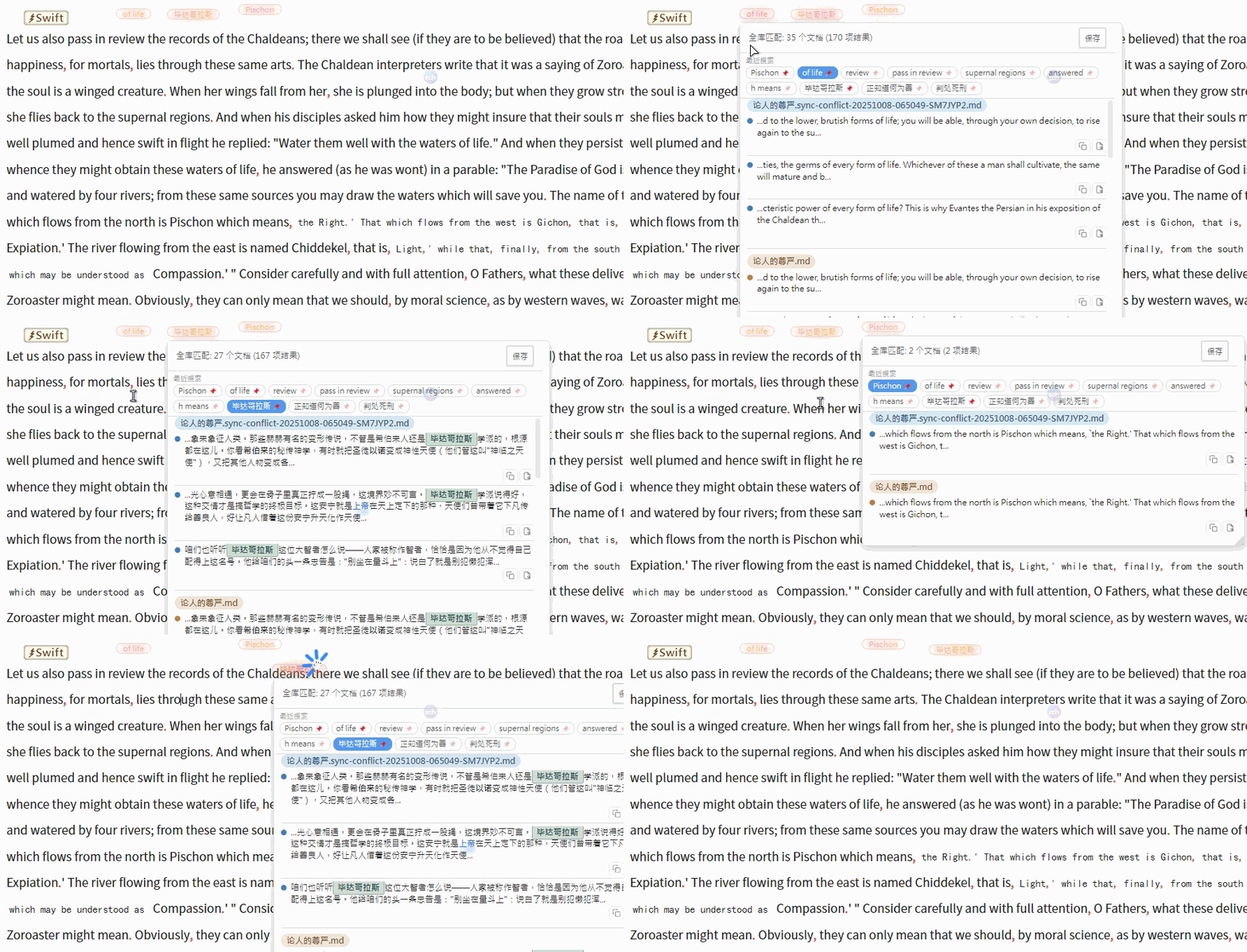
Keyword Fleet / 多组关键词悬浮 — Float multiple keyword groups independently on screen, each with its own counter / 搜索关键词可单独悬浮显示,支持同时悬浮多组关键词
Installation / 安装
Search for "SwiftMatch" in Obsidian Settings → Community Plugins → Browse, then click Install and Enable. / 在 Obsidian 设置 → 社区插件 → 浏览中搜索"SwiftMatch",点击安装并启用即可。
Changelog / 更新日志
- Outline on Minimap Hover / 悬浮显示大纲 — Hover over the minimap to display a document outline popup with current heading highlighted; click any heading to jump to it / 鼠标悬浮到 minimap 时显示文档大纲弹窗,高亮当前所在标题;点击标题可跳转
- Glassmorphism Outline Panel / 毛玻璃大纲面板 — Outline popup uses backdrop-filter blur effect matching SwiftGloss remark popup style / 大纲弹窗采用毛玻璃模糊效果,与 SwiftGloss 备注弹窗风格一致
- Pin Outline / 固定大纲 — 📌 button in top-left corner pins the outline panel so it stays visible after mouse leaves / 左上角📌按钮可固定大纲面板,鼠标离开后不自动关闭
- Ctrl+Scroll Opacity / Ctrl+滚轮调整透明度 — Ctrl + mouse wheel adjusts the outline panel opacity (0.2–1.0) / Ctrl+鼠标滚轮调整大纲面板透明度(0.2–1.0)
- Pinned Outline Margin / 固定时调整正文边距 — Optional setting to add right margin to editor content when outline is pinned, preventing overlap / 可选设置:固定大纲时为正文添加右边距,避免遮挡
- Tree-Style Heading Lines / 树形标题连线 — Vertical and horizontal guide lines connect parent-child headings in the outline for clear hierarchy / 大纲中父子标题间用竖线和短横线连接,层级关系一目了然
- Smart Scrollbar / 智能滚动条 — Scrollbar hidden by default, only appears when outline content overflows and user hovers / 滚动条默认隐藏,仅当内容溢出且鼠标悬浮时显示
- Full Height Outline / 自适应高度 — Outline panel expands to show all headings when screen space allows, only limits height when necessary / 屏幕空间足够时大纲面板完全展开显示所有标题,仅在必要时限制高度
- Floating Button Cleanup on Disable / 禁用插件时悬浮按钮清理 — Fixed floating toggle button remaining visible after disabling the plugin;
onunload()now properly removes the floating toggle wrapper DOM element / 修复禁用插件后悬浮按钮仍显示的问题;onunload()现在正确移除悬浮按钮包装 DOM 元素
- Fixed Search & Selection Not Working / 修复搜索与划词失效 — Search box and text selection auto-search were broken because the default
searchWordCountMin: 2blocked all single-phrase queries; Chinese text (no spaces) was always counted as 1 "word", so every search was silently rejected / 搜索框和划词自动搜索失效,原因是默认值searchWordCountMin: 2拦截了所有单短语查询;中文无空格永远算作 1 个"词",导致所有搜索被静默拦截 - CJK-Aware Word Counting / 中文按字符计数 — Added
countWords()method: pure CJK text counts by characters, mixed CJK+Latin counts CJK chars + Latin words, pure Latin counts by whitespace-separated words — so word count limits now work correctly for both Chinese and English / 新增countWords()方法:纯中文按字符数、中英混合按中文字符+英文词、纯英文按空格分词,使字数限制对中英文都生效 - Legacy Settings Migration / 旧设置迁移 — Automatically resets the buggy legacy default (min 2 / max 7) to 0/0 (no limit) on load, so existing users get search working again without manual intervention / 加载时自动将有问题的旧默认值(最少2/最多7)重置为 0/0(无限制),现有用户无需手动操作即可恢复搜索
- Default Limits Removed / 默认限制移除 — Default
searchWordCountMinandsearchWordCountMaxchanged to 0 (no limit); users can set custom limits in settings / 默认searchWordCountMin和searchWordCountMax改为 0(无限制);用户可在设置中自定义限制 - Bilingual Label Update / 双语标签更新 — Updated min/max words setting labels to note that CJK text counts by character / 更新最少/最多字数设置标签,注明中文按字符数计算
- Candy-mark Default Style / 糖果标记默认样式 — Reset to defaults now applies the candy-mark floating button style (warm gradient background, rounded corners) / 重置默认时应用 candy-mark 悬浮按钮样式(暖色渐变背景、圆角)
- Edit Panel Rename / 编辑面板重命名 — Renamed "编辑悬浮球" to "编辑悬浮按钮" / 将"编辑悬浮球"改为"编辑悬浮按钮"
- Display Text Font Size / 显示文字字体大小 — Default display text font size changed from 11 to 16 / 显示文字默认字体大小从11改为16
- Settings Panel Cleanup / 设置面板精简 — Removed font size, horizontal padding, vertical padding, opacity, and hide status bar settings from the floating button style section / 移除悬浮按钮样式下的文字大小、水平内边距、垂直内边距、透明度、隐藏底部状态栏设置
- Floating Button Default Visible / 悬浮按钮默认显示 — Floating button is now shown by default after resetting to defaults / 重置默认后悬浮按钮默认显示
- Outlined Counter Opacity Link / 描边气泡透明度联动 — In outlined counter style, counter border and text opacity now follow the match opacity setting / 描边气泡样式下,计数边框和文字透明度跟随"匹配透明度"设置
- Counter Settings Cleanup / 计数设置精简 — Removed counter opacity, counter background opacity, counter horizontal/vertical padding settings; hardcoded padding to 0px 2px and opacity to 1 / 移除计数透明度、计数背景透明度、计数水平/垂直内边距设置;内边距硬编码为0px 2px,透明度硬编码为1
- Pin Icon Simplification / 固定图标简化 — Pin icon is now always a gray circle with gray "p"; clear/unpin icon is a gray circle with gray "x"; removed icon text setting / 固定图标始终为灰色圆圈灰色"p";清除/取消固定图标为灰色圆圈灰色"x";移除图标文字设置
- Word Count for English / 英文按单词计数 — Search word count limits now count words (space-separated) instead of characters / 搜索限制按单词数(空格分隔)计算,而非字符数
- Default Settings Update / 默认设置更新 — Updated default values: slider color #F0B27F, opacity 1.0, content opacity 1.0, hover collapse off, top 40, bottom offset 65, match opacity 0.15, pin icon size 12/opacity 0.7/offset 20/-20, min words 2, max words 7 / 更新默认值:滑块颜色#F0B27F、透明度1.0、内容透明度1.0、悬停展开关闭、顶部40、底部偏移65、匹配透明度0.15、图标大小12/透明度0.7/偏移20/-20、最少字数2、最多字数7
- Snippet Expand Highlight Fix / 片段展开高亮修复 — Fixed keyword highlights being lost when clicking the "+" button to expand truncated snippets; highlights now re-apply after markdown rendering completes for both single-keyword and multi-keyword searches / 修复点击"+"按钮展开截断片段后关键词高亮丢失的问题;markdown渲染完成后自动重新应用高亮,支持单关键词和多关键词搜索
- Multi-Keyword Data Restore / 多关键词数据恢复 —
_multiKeywordDatais now automatically restored from search text whenrenderMatchListis called from cached paths, preventing missing highlights on list re-render / 从缓存路径调用renderMatchList时自动从搜索文本恢复_multiKeywordData,避免列表重新渲染时高亮缺失 - Preserve Search Data on Clear / 清除时保留搜索数据 —
clearHighlights()no longer clears_pendingSearchTextand_pendingMatchCountwhen cached match data exists, so the match window can be restored after clicking the editor /clearHighlights()在有缓存数据时不再清空搜索文本和匹配计数,点击编辑器后重新打开匹配窗口仍可恢复之前的结果
- Counter Style Presets / 计数样式预设 — Added 6 counter badge style presets (Glassmorphism, Gradient Capsule, Outlined, Ribbon, Dot Indicator) selectable in settings / 新增6种计数badge样式预设(毛玻璃、渐变胶囊、描边气泡、丝带旗帜、圆点指示器),设置面板可选
- Counter line-height Fix / 计数行高修复 — Added
line-height:1to counter::afterpseudo-elements, fixing vertical padding that couldn't be reduced below a minimum / 计数器::after伪元素添加line-height:1,修复垂直内边距无法继续缩小的问题 - Settings Section Shading / 设置面板底纹 — Collapsible section titles now have background shading for better visual separation / 可折叠标题部分添加底纹,增强视觉分隔
- Multi-Keyword Search / 多关键词搜索 — Pipe-separated keywords (e.g.
鸽子|导航|磁场) search across vault; results sorted by keyword match count; each keyword highlighted in a different color / 竖线分隔多关键词全库搜索,按匹配关键词数排序,每个关键词不同颜色高亮 - Require All Keywords / 仅显示包含所有关键词的文档 — New option (default on) to only show documents containing all search keywords / 新增选项(默认开启),仅显示包含所有搜索关键词的文档
- Search Loading Indicator / 搜索加载提示 — All search modes now show a "Building..." indicator while searching / 所有搜索模式搜索时显示"正在构建..."提示
- Search on Input Toggle / 输入即搜选项 — New option (default off) to require Enter key to trigger search instead of typing / 新增选项(默认关闭),需按Enter才触发搜索而非输入即搜
- Background Search on Selection / 选中文字后台搜索 — Selecting text no longer auto-shows the match window; search runs in background and badge updates; click floating toggle to view results / 选中文本不再自动弹出匹配窗口,搜索在后台进行并更新badge;点击悬浮按钮查看结果
- Minimap Blacklist for Plugin Pages / minimap黑名单支持插件页面 — Blacklist now matches view titles (e.g. "Thino") and view types for plugin pages without file paths; case-insensitive matching / 黑名单支持通过视图标题(如"Thino")和视图类型匹配无文件路径的插件页面;大小写不敏感匹配
- Selection Match Window Fix / 选中关键词匹配窗口修复 — Fixed bug where hovering the floating toggle after selecting new text would show the previous keyword instead of the current selection; now correctly prioritizes the active search term over the last-displayed term / 修复选中新关键词后悬停悬浮按钮仍显示旧关键词的问题;现在正确优先使用当前搜索词而非上次显示的词
- Pinned List State Sync / 固定列表状态同步 —
_pendingShowListnow updates even when the list is pinned or in exhaustive mode, preventing stale display after keyword switch / 列表固定或全库搜索模式下切换关键词时也同步更新_pendingShowList,避免显示过期内容
- Keyword Switching Fix / 关键词切换修复 — Fixed race condition where switching keywords via recent search chips would jump back to the previous keyword; added generation-based search cancellation to fully discard stale async results / 修复点击最近搜索关键词后跳回上一个关键词的竞态问题;用搜索代次机制彻底废弃旧异步搜索结果
- Immediate Switch for Uncached Keywords / 无缓存关键词立即切换 — Clicking a keyword without cache now immediately shows a searching state and starts incremental result rendering / 点击无缓存关键词时立即显示搜索中状态并增量渲染结果
- Disk Cache Loading on Restart / 重启后加载磁盘缓存 — Chip clicks and showMatchList now load cached results from disk when memory cache is empty after restart / 重启后内存缓存为空时,chip点击和showMatchList会从磁盘加载缓存
- Cancel Search on Switch / 切换时取消搜索 — Switching keywords or hitting cache now immediately cancels any in-progress background search / 切换关键词或命中缓存时立即取消后台搜索
- No Reorder on Chip Click / 点击不移动位置 — Clicking a recent search keyword no longer moves it to the top of the list; new keywords are still added normally / 点击最近搜索关键词不再将其移到列表开头;新词仍正常添加
- Scroll Position Cleanup / 滚动位置清理 — Deleting a search keyword now also removes its saved scroll position; persistence and loading filter out stale entries / 删除搜索词时同步清理保存的滚动位置;持久化和加载时过滤无效条目
- Remove Console Logs / 移除控制台日志 — Removed all console.log/time/timeEnd calls; kept console.error for error reporting / 移除所有console.log/time/timeEnd调用,保留console.error
- Expandable Match Entries / 可展开匹配条目 — Each document now shows match count in header; default shows 3 entries with expand/collapse toggle; snippet limit raised from 3 to 30 / 文档标题显示匹配数量,默认折叠显示3条可展开,snippets上限从3提升到30
- Multi-Style Support / 多组样式支持 — Floating edit panel now supports multiple custom CSS styles with auto-parsed class previews; click to select default style / 编辑悬浮球窗口支持多组自定义CSS样式,自动解析class并预览,点击选择默认样式
- Style Persistence / 样式数据持久化 — Custom styles saved to data.json, preserving user styles across plugin updates / 自定义样式保存到data.json,插件更新时不覆盖用户样式
- Style Stacking Fix / 修复样式叠加 — Fixed bug where applying a new style would stack with the previous one / 修复应用新样式时与旧样式叠加的bug
- Compact Settings Layout / 设置面板紧凑布局 — "Basic", "Counter Style", and "Pin Icon" sections reorganized to horizontal compact layout / "基础"、"计数样式"、"固定图标"部分改为横向紧凑布局
- Live Style Preview / 实时样式预览 — Floating button in settings panel now displays actual current style as clickable text / 设置面板中的悬浮按钮改为可点击文字,实时显示当前样式
- Settings Panel Restructure / 设置面板重组 — Moved "Show/Hide Floating Button" under "Floating Button Style" heading; renamed "Floating Toggle Style" to "Floating Button Style"; added "minimap" section title in Basic tab / "显示/隐藏悬浮按钮"移至"悬浮按钮样式"标题下方;"悬浮球样式"改名为"悬浮按钮样式";基础tab下新增"minimap"分组标题
- Minimap Blacklist / minimap 黑名单 — New blacklist setting under minimap section to hide minimap on specific pages (supports * wildcard); default rule
*.canvashides minimap on canvas pages; supports path matching for non-markdown views / minimap 分类下新增黑名单设置,支持通配符匹配路径屏蔽页面;默认规则*.canvas屏蔽画布页面;支持非 markdown 视图的路径匹配 - Pin Icon Fix / 固定按钮修复 — Pin icon now appears only once after text selection; no longer re-creates on repeated events / 选中文字后固定按钮只显示一次,不再因重复事件重复创建
- Cache Limit Increased / 缓存上限提升 — Recent search cache limit raised from 10 to 20 / 最近搜索缓存上限从10提升到20
- Middle-Click Cache Cleanup / 中键删除缓存文件 — Middle-clicking to delete a recent search now also removes its disk cache file / 中键删除最近搜索词时一并删除磁盘缓存文件
- Empty State Match Window / 空状态匹配窗口 — Hovering the floating toggle with no selection, cache, or recent searches now shows the match window with search box / 无选中文字、无缓存、无最近搜索时,悬浮按钮hover也弹出匹配窗口
- Search Box in Header / 搜索框移入标题栏 — Moved search input into the header bar alongside match info to save vertical space / 搜索框移至匹配信息header中,压缩纵向空间
- Close Clears Search Box / 关闭清除搜索框 — Closing the match window now clears the search input / 关闭匹配窗口时清空搜索框文字
- Search Term Highlight / 搜索词高亮 — Matched keywords are highlighted with orange background in the match list results / 匹配列表结果中高亮显示搜索关键词
- Favorites Feature / 收藏功能 — Star button on recent search chips to add/remove favorites; favorites section with persistent cache; middle-click to delete; scroll position saved / 最近搜索词前添加五角星按钮,点击收藏/取消;收藏区独立显示,缓存不清除;中键删除;滚动位置保存
- Compact Layout / 紧凑布局 — Favorites and recent searches labels now inline with chips on the same row / 收藏和最近搜索标签与关键词同一行显示
- Expand All at Once / 一键展开全文 — Clicking the "+" expand button now reveals the full line instead of incrementing by 30 chars; expanded state is preserved across reopens / 点击"+"按钮直接展开整行内容,展开状态跨次保留
- Selected Text Open Document / 选中文字打开文档 — When text is selected in the match list, clicking "Open Document" highlights the selected text instead of the auto-detected text / 匹配窗口选中文字后点击"打开文档",高亮选中文字而非自动检测文字
- Open Document Jump Fix / 打开文档跳转修复 — Full-text search instead of per-line search; suppress Remember Cursor Position plugin restore; scroll to vertical center / 全文搜索替代逐行搜索;抑制 Remember Cursor Position 插件恢复光标;滚动到垂直居中
- Marshmallow Highlight / 棉花糖高亮样式 — Jump text highlighted with custom marshmallow style after opening document; click anywhere in editor to dismiss / 打开文档后用自定义棉花糖样式高亮跳转文本;点击编辑器任意位置移除高亮
- Snippet Expand Buttons / 摘要扩展按钮 — Replaced "..." truncation markers with "+" buttons; click to incrementally expand context before/after / 截断的"..."替换为"+"按钮,点击逐步扩展前后上下文
- Title Click Opens Document / 标题点击打开文档 — Clicking match list title now opens document in new tab; removed preview panel trigger / 点击匹配窗口标题直接新标签页打开文档;移除预览窗口触发
- Search Box in Match List / 搜索框移至匹配窗口 — Moved search input from floating toggle to match list header; auto-focus on open; instant search on input with debounce / 搜索输入框从悬浮按钮移到匹配窗口顶部;自动聚焦;输入即时搜索(防抖)
- Independent Cache Storage / 缓存独立存储 — Search caches and floating keyword data moved from list-data.json to separate cache/ and keywords/ directories / 搜索缓存和悬浮关键词数据从 list-data.json 移到 cache/ 和 keywords/ 子目录
- Document Count Fix / 文档数量修复 — Exhaustive search now correctly updates document count and total matches in header after completion / 全库搜索完成后正确更新标题中的文档数和结果总数
- Middle-Click Delete Search / 中键删除搜索 — Middle-click on recent search chip removes it from history / 最近搜索关键词中键点击删除
- CSS Lint Fixes / CSS 规范修复 — Removed box-decoration-break and all !important declarations / 移除 box-decoration-break 和所有 !important 声明
- Placeholder Language Switch / 搜索框语言切换 — Search box placeholder updates immediately on language change / 搜索框占位符随语言即时更新
- Edit Panel Horizontal Layout / 编辑面板横向排列 — Rearranged display text, font size, padding, and opacity fields into a flex row; added "Get more styles" link to GitHub Discussions / 显示文字、字体大小、内边距、透明度改为横向布局;自定义样式标题后添加"获取更多样式"链接
- Follow Mouse Offset / 跟随鼠标偏移设置 — Added pinIconFollowOffsetX/Y settings with live preview box; only visible in follow-mouse mode / 新增 pinIconFollowOffsetX/Y 偏移设置,含实时预览框;仅跟随鼠标模式显示
- Rounded Cap Highlight / 圆帽高亮样式 — Replaced underline with radial-gradient rounded cap decoration; removed border width setting; added match opacity slider / 下划线改为圆帽底部装饰;移除下划线宽度设置;新增匹配透明度滑块
- Floating Toggle Settings Rework / 悬浮球设置面板改造 — Removed display text input; toggle button now shows/hides with capsule styling; no longer closes settings panel / 移除显示文字输入框;按钮改为胶囊样式切换显示/隐藏,不再关闭设置面板
- Pin Border Residue Fix / 固定边框残留修复 — Cleared boxShadow on unpinned items with custom styles to prevent inset border residue / 非固定且有自定义样式时清除 boxShadow,避免边框残留
- Pin Color Overlap Fix / 固定颜色叠加修复 — Skipped current selection decoration when already pinned to avoid double color overlay / 当前选中文本已固定时跳过装饰,避免双层颜色叠加
- Pin Highlight Missing Fix / 固定高亮不显示修复 — Set filePath on new pinned items; added fallback for legacy items without filePath / 为新固定项设置 filePath;兼容无 filePath 的旧数据
- Floating Toggle Context Menu / 悬浮球右键菜单 — Right-click the floating toggle to show options: Edit, Hide, Settings / 右键点击悬浮球弹出选项:编辑、隐藏、设置
- Floating Toggle Edit Panel / 悬浮球编辑面板 — Edit display text, font size, padding, opacity, CSS class name, and custom CSS with live preview; custom styles override default inline styles for full appearance control / 可编辑显示文字、字体大小、内边距、透明度、CSS类名和自定义CSS,支持实时预览;自定义样式时移除默认内联样式,完全控制外观
- Keyword Button Context Menu / 搜索词按钮右键菜单 — Right-click keyword buttons to show options: Edit, Close / 右键点击搜索词按钮弹出选项:编辑、关闭
- Keyword Button Edit Panel / 搜索词按钮编辑面板 — Edit display text, CSS class name, and custom CSS with live preview; styles are persisted per keyword / 可编辑显示文字、CSS类名和自定义CSS,支持实时预览;样式按关键词持久化保存
- Language Switch Fix / 语言切换修复 — Fixed null.style error when switching language in settings panel; language switch now reopens the panel instead of reloading the plugin / 修复设置面板切换语言时的 null.style 错误;语言切换改为重新打开面板而非重载插件
- Language Button Style / 语言按钮样式 — Changed from button to clickable text; removed border, padding, and background / 从按钮改为可点击文本;移除边框、内边距和背景
- Follow Mouse Mode Fix / 跟随鼠标模式修复 — Fixed pin icon constantly following the cursor making it unclickable; now shows at cursor position once and stays fixed / 修复固定图标一直跟随鼠标导致无法点击的问题;现在只在光标位置显示一次然后固定
- Z-Index Fix / Z-Index修复 — Hovered floating button now raises z-index to cover other buttons, preventing accidental clicks / 悬浮按钮hover时提升z-index盖住其他按钮,避免误触
- Title Cleanup / 标题清理 — Removed (helloworld) from settings panel title / 移除设置面板标题中的(helloworld)
- i18n Support / 国际化支持 — Added CN/EN language switch button in settings panel header; all UI text fully internationalized / 设置面板标题栏添加中英文切换按钮;所有 UI 文本完整国际化
- Local Pinned Mode / 固定计数局部模式 — Pinned keyword counters now only display in their source document instead of globally / 固定关键词计数仅在来源文档中显示,不再全局显示
- Open Document Highlight / 打开文档高亮 — Clicking "Open Document" now selects and highlights the search text with custom style; added delay to avoid conflict with "Remember Cursor Position" plugin / 点击"打开文档"后选中文本并以自定义样式高亮;增加延迟避免与"Remember Cursor Position"插件冲突
- File Name Matching / 文件名匹配 — Search now matches file names including extension (e.g. searching "论人的尊严" finds "论人的尊严.md") / 搜索时匹配文件名(含后缀),如搜索"论人的尊严"可找到"论人的尊严.md"
- Persistent Recent Searches / 持久化最近搜索 — Recent search results are saved to disk and restored after restart / 最近搜索结果保存到磁盘,重启后恢复
- Per-Keyword Scroll Position / 按关键词保存滚动位置 — Each search keyword's result list scroll position is saved and restored independently / 每个搜索关键词的结果列表滚动位置独立保存和恢复
- Search Window Improvements / 搜索窗口改进 — Right-side 10px padding; full file path display (with directory and extension); default cursor instead of grab cursor / 右侧 10px 边距;显示完整文件路径(含目录和后缀);默认光标替代抓取光标
- UI Cleanup / UI 清理 — Removed delete button and keyword tag from match entries; removed "Rebuild Heading Cache" and "About" from settings footer / 移除匹配条目的删除按钮和关键词标签;移除设置面板底部的"重建标题缓存"和"关于"
- Drag Window Height Compression / 拖动窗口高度压缩 — Dragging keyword buttons below window height now compresses the list instead of jumping to top / 拖动关键词按钮低于窗口高度时压缩列表高度,而非跳到顶部
- Hover Behavior Fix / 悬停行为修复 — Hovering keyword floating buttons no longer changes the main toggle button state / 悬浮关键词按钮悬停时不再改变主按钮状态
- Added "Selection Match List" toggle in settings to enable/disable the match list popup on text selection / 新增"划词匹配列表"设置开关,可以启用或禁用划词时弹出匹配列表的功能
- Fixed preview panel not closing when middle-clicking a list entry to open a document in a new tab / 修复了中键点击列表条目在新标签页打开文档时,预览弹窗无法关闭的问题