
README file from
GithubSubtle TOC
A floating, Capacities-style table of contents for Obsidian.
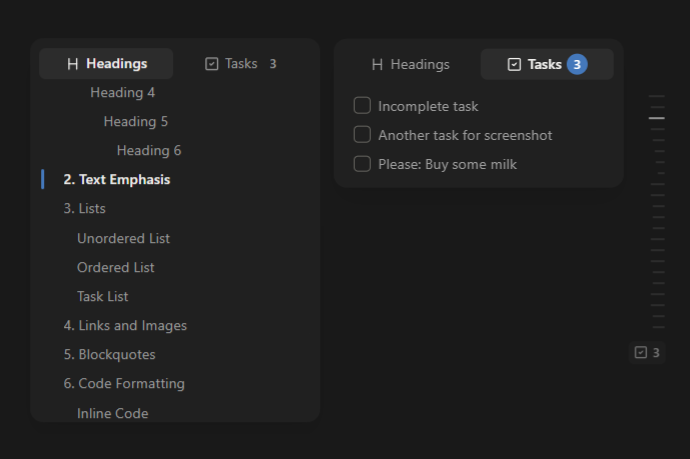
A discreet dashed minimap lives on the edge of your note. Hover (or click) it and a popover outline slides out — the heading for the section you're reading is highlighted, and clicking any heading jumps to it.
It can also surface the note's open tasks in a second tab — with a live count and optional one-click completion — while the minimap stays focused on structure.
Features
- Floating popover overlaid on the note (no sidebar pane needed).
- Edge minimap of dashes, one per heading, sized by heading level.
- Active-heading tracking in both Editing (Live Preview / Source) and Reading mode.
- Click to navigate with optional smooth scroll — works in both modes.
- Preview headings on hover (optional) — moving across heading rows in the popover temporarily scrolls the note without moving the editor cursor. Leaving returns to the previous position; clicking stays at the heading.
- Tasks tab — the note's open tasks (unchecked checkboxes), in document order, as a second tab in the popover, with a live open-task count on the tab.
- Edge task badge — a checkbox + count on the edge whenever the note has open tasks (below the dashes, or on its own when the note has no headings).
- Complete from the TOC (optional) — turn on task checkboxes to tick a task straight from the popover; it's marked done in the note (undoable in Editing mode), strikes through, and drops out the next time you open the popover.
- Show what you want: headings, tasks, or both.
- Multi-line rows so long headings and tasks are readable in full — or turn them off for single-line rows with the full text in a tooltip.
- Tweakable feel: which tab leads the popover, how long it waits before closing, the color of the selected tab, and whether the edge shows the task badge. Leaving the popover sideways, back toward the note, always closes it at once.
- Configurable side (left/right), open trigger (hover/click) and heading-level range. The heading-level range doesn't apply to tasks.
Settings
| Setting | Default | What it does |
|---|---|---|
| Show | Both | Surface headings, tasks, or both. |
| Default tab | Headings | Tab that leads the tab bar and opens first; after that the last-used tab is kept. |
| Show task checkboxes | Off | Add a checkbox to each task row to complete it from the popover. |
| Show multiple lines | On | Wrap long rows; when off, rows are single-line and hovering shows the full text. |
| Active tab color | theme | Background of the selected tab. Reset it to follow the theme. |
| Show minimap | On | The dashed markers on the edge of the note. |
| Minimap marker width | 100% | Scale marker length from 50% to 200%; above 100%, higher-level headings grow progressively more. |
| Minimap vertical scale | 100% | Scale marker thickness and spacing from 50% to 200%. |
| Show tasks in minimap | On | The open-task badge on the edge. Notes with tasks but no headings always show it. |
| Side | Right | Which edge the TOC docks on. |
| Open the popover on | Hover | Hover the minimap, or require a click. |
| Close delay | 160 ms | Grace period before the popover closes once the mouse leaves it. |
| Popover width | 264 px | Set the TOC popover width from 160 to 480 pixels. |
| Smooth scroll | On | Animate the scroll when navigating. |
| Scroll to heading on hover | Off | Temporarily scroll to a hovered heading and return on leave; click to navigate normally and stay there. |
| Minimum / maximum heading level | 1 / 6 | Heading levels to include (tasks are unaffected). |
Screenshots
Install (Community plugins)
- Open Settings → Community plugins in Obsidian.
- Make sure Restricted mode is turned off (click Turn on community plugins if needed).
- Click Browse, search for Subtle TOC, and open its page.
- Click Install, then Enable.
Install (BRAT — beta / before it's in the directory)
If the plugin isn't in the official Community plugins directory yet, you can install it with BRAT:
- Install BRAT from Settings → Community plugins → Browse and enable it.
- Open the command palette and run BRAT: Add a beta plugin for testing.
- Paste the repository URL:
https://github.com/xupisco/obisidian-suble-toc - Confirm — BRAT downloads the latest release and keeps it up to date.
- Enable Subtle TOC in Settings → Community plugins.
Install (manual / for development)
- Build the plugin:
npm install npm run build # produces main.js - Copy
main.js,manifest.jsonandstyles.cssinto your vault at:<vault>/.obsidian/plugins/subtle-toc/ - Reload Obsidian and enable Subtle TOC in Settings → Community plugins.
Develop
npm install
npm run dev          # esbuild watch -> rebuilds main.js on change
Point the output at a test vault by symlinking the plugin folder, or copy the three files after each build. Use the "Toggle TOC popover" command (assign a hotkey) to open/close the outline from the keyboard.
How it works
- Headings and tasks both come from Obsidian's
metadataCache, so the outline stays in sync as you type. Tasks are the open list items (- [ ]) of the active note only. - Active-heading detection uses CodeMirror 6 line geometry in Editing mode and the preview scroll position in Reading mode. Clicking a task navigates to it the same way headings do.
- Completing a task edits the note through the editor in Editing mode (so it's undoable) and writes the file directly in Reading mode.
- One overlay instance is bound to the active Markdown view at a time and rebuilt when you switch notes, panes or modes.
License
MIT