
README file from
GithubStudy Time Statistics
English (this page) · 中文完整版 · 中文摘要
This repository is documented in both English and Chinese. The English documentation appears first, followed by a Chinese summary on the same page.
Study Time Statistics is a privacy-first Obsidian plugin that measures how you study across notes and PDFs. It combines unobtrusive per-note metrics with an Anki-inspired analytics dashboard—without adding anything to your Markdown files.
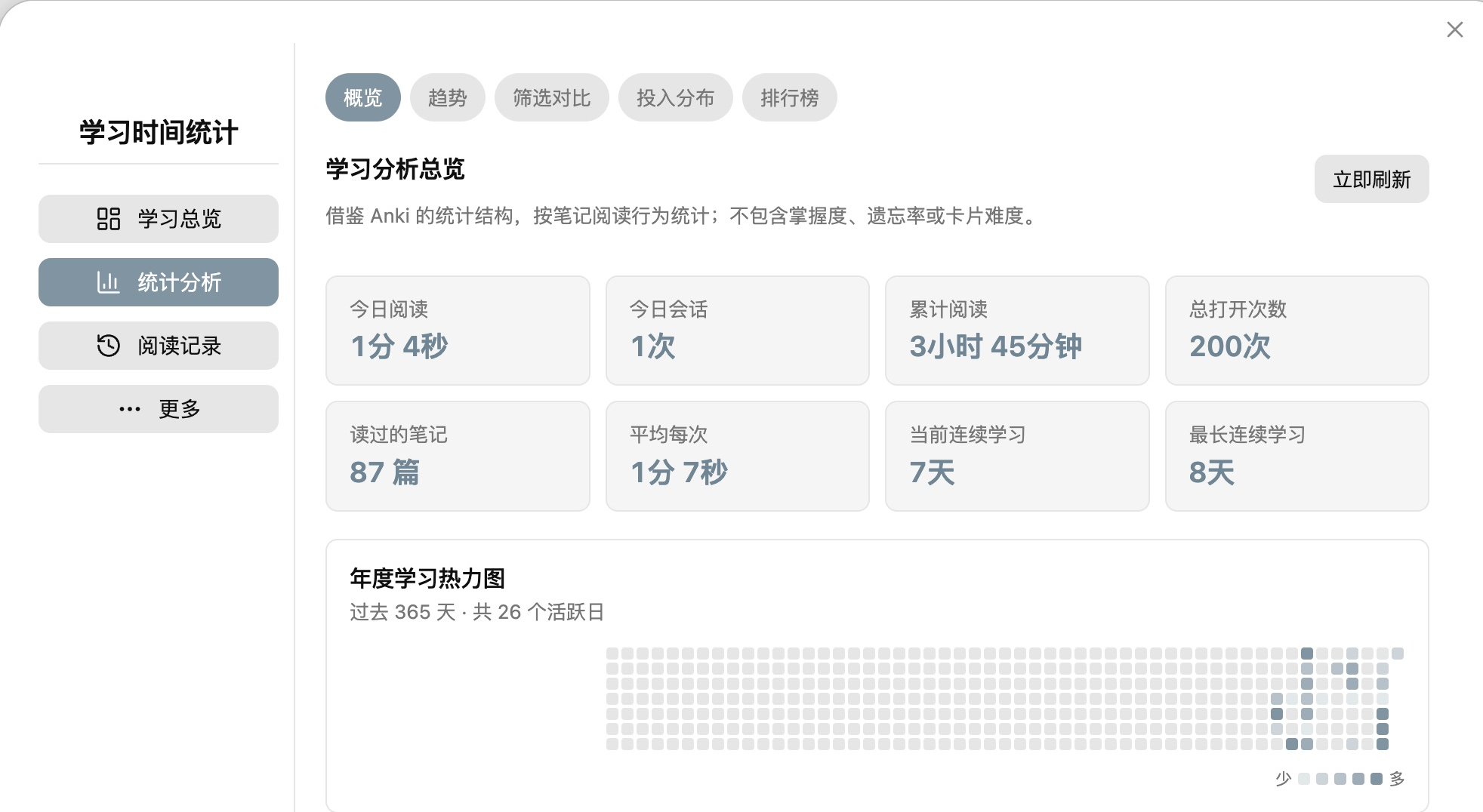
Actual Obsidian interface, captured on 2026-10-02 from a 3.0.0 development build. At capture time, the public release was 2.2.0, so some controls may differ. This is a direct crop of aggregate statistics—not a UI mockup. No note titles, paths, folders, or contents are shown.
Highlights
- Automatically track active reading time for Markdown notes and PDFs.
- Count opens and completed reading sessions per note.
- Show an inline statistics strip at the top of every note. It belongs to the view, scrolls away with the note, and never changes the source file.
- Display opens, total time, average time per visit, longest session, active days, current streak, and last read time.
- Explore day, week, month, year, and all-time statistics.
- Review a 365-day heatmap, 30-day time and session trends, hourly and weekday patterns, session-length distribution, folder summaries, and recent sessions.
- Review every recorded session, add a missed session, or correct and delete inaccurate entries without editing plugin data by hand.
- Create timestamped local backups and restore the latest backup from the dashboard or Command Palette.
- Optionally record self-reported reading coverage for each visit. Coverage describes how much content you reached—not how much you understood, remembered, or mastered.
- Explore per-note and folder coverage, a 365-day coverage heatmap, hourly patterns, estimated covered characters, and character-based reading pace.
- Set private daily and weekly study targets, follow a 28-day goal trend, and review ambiguous long sessions without automatic deletion.
- Start from a Study Overview that combines goals, week-over-week change, session quality, high-investment hours, and a conservative revisit queue.
- Track optional start/end position and manual or estimated characters read, then compare unique reach, repeated reading, equivalent passes, and time per 1,000 characters.
- Classify new sessions from local interaction signals as interactive, quiet study, needs review, or unclassified. Ambiguous sessions are never silently discarded.
- Rank notes by most opens, longest total reading time, longest average visit, longest single session, and most active days.
- Pause tracking when Obsidian is not focused by enabling Strict mode.
- Keep all statistics inside the local vault—no account, telemetry, advertising, or cloud upload.
Real, anonymized snapshot
The captured development build shows 87 notes read, 200 opens, and 3h 45m of recorded reading time as of 2026-10-02. These are the owner's real, point-in-time aggregate values, shared with permission—not sample data, a benchmark, or a live counter. The screenshot excludes note-level rankings and all private titles, paths, folders, and contents.
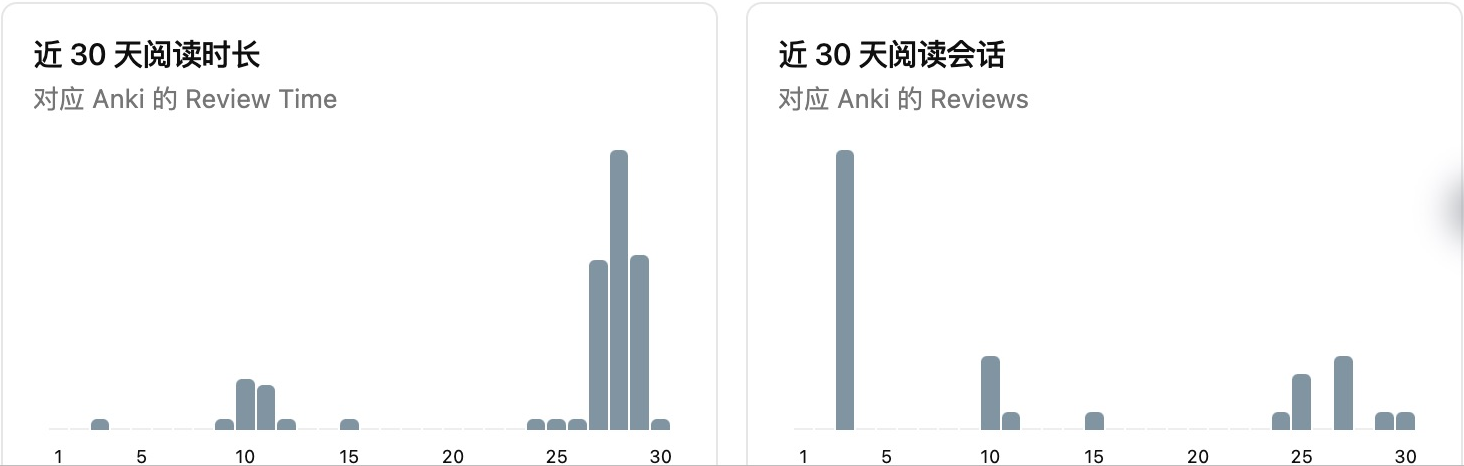
The two 30-day charts are another direct crop of the same interface capture. We show aggregate views here to keep private note details out of public screenshots.
Open the dashboard
Select the bar-chart icon in the left ribbon, or open the Command Palette and run Open Study Time Statistics. The current dashboard has four main areas: Study overview, Analytics, Records, and More. Rankings and filtered analysis live under Analytics; sessions, reading coverage, and goals live under Records; reports, data management, and feedback live under More. Reading Coverage is off by default and can be enabled from its page or the plugin settings.
Installation
Community Plugins
Study Time Statistics is available in the Obsidian Community Plugins directory. Open Settings → Community plugins → Browse, search for Study Time Statistics, and select Install.
View Study Time Statistics in the Obsidian plugin directory
Manual installation
- Download
main.js,manifest.json, andstyles.cssfrom the latest GitHub release. - Create
<vault>/.obsidian/plugins/study-time-statistics/. - Copy the three files into that directory.
- Restart Obsidian, then enable Study Time Statistics under Settings → Community plugins.
Privacy and storage
All data stays under .obsidian/plugins/study-time-statistics/ in your own vault. The plugin stores note paths and local study metrics needed for its charts. When Reading Coverage is enabled, it also stores self-reported percentages, note character-count snapshots, related active durations, and local interaction counts and timestamps. It never stores note contents. Timestamped backups are saved to Study Time Statistics Backups/ in the vault and therefore contain the same private note paths and metrics. It does not send data over the network. The public screenshots contain a permissioned, point-in-time snapshot of real aggregate values, but no note title, path, folder, or content field is visible.
Syncing between devices
The plugin does not implement or require a separate cloud service. If your whole vault—including its .obsidian configuration folder—is synchronized by Obsidian Sync, iCloud Drive, Nutstore, or another file-sync provider, the plugin data can travel with that vault according to the provider's settings. Enable configuration-folder syncing on every device and avoid editing the same data concurrently while a provider is still resolving conflicts. Backups in Study Time Statistics Backups/ may also be synchronized because they are normal vault files.
Feedback and support
The dashboard includes a Feedback page that opens the appropriate GitHub form for bugs, inaccurate statistics, feature requests, or discussions. The plugin never submits study data automatically; nothing is sent until the user explicitly submits a GitHub form.
Before posting screenshots or logs, replace private note titles and paths with anonymous examples.
Development
npm install
npm test
npm run build
The production build generates main.js. A GitHub release must include main.js, manifest.json, and styles.css, with a tag matching the version in manifest.json exactly.
Compatibility
- Obsidian 1.13.0 or later
- Desktop and mobile manifests are supported; background-focus behavior depends on the operating system
Credits and license
Study Time Statistics is an independent plugin inspired by Anki's statistical presentation. It is not affiliated with or endorsed by Anki.
The codebase is derived from AstraDev's open-source Obsidian time tracker, used under the Apache License 2.0. Original copyright notices and license terms are preserved. See LICENSE and NOTICE.
中文摘要
Study Time Statistics(学习时间统计)是一款本地隐私优先的 Obsidian 插件,用来统计 Markdown 笔记和 PDF 的有效阅读时间、打开次数、平均每次阅读、最长单次阅读、活跃天数和连续学习天数。每篇笔记顶部的统计条属于界面层,会随正文滚动消失,不会写入或修改 Markdown 原文。
仪表盘提供日、周、月、年和全部时间范围,并包含 365 天热力图、近 30 天趋势、时段与星期分布、会话时长分布、文件夹汇总、最近会话,以及按打开次数、累计阅读、平均阅读、最长单次和活跃天数排列的榜单。1.3.0 新增学习目标与会话复核;2.0.0 新增学习总览;2.1.0 新增阅读起止位置、手填/估算阅读字符、重复阅读量、等效通读遍数和每千字用时。覆盖度与位置都不代表吸收、理解、记忆或掌握程度。
上方图片是 2026-10-02 从实际 Obsidian 界面直接裁切的截图,显示当时 87 篇已读笔记、200 次打开、累计 3 小时 45 分钟。截图来自当时尚未公开发布的 3.0.0 开发版;截取时公开最新版为 2.2.0,部分控件可能不同。公开图片仅展示汇总数据,没有笔记标题、路径、文件夹或正文。
所有学习数据仅保存在本地库中,插件不上传数据、不收集遥测、无广告,也不需要云端账户。若整库同步包含 .obsidian 配置文件夹,数据可随 Obsidian Sync、iCloud、坚果云等现有方案同步,无需插件另建同步服务。完整中文说明见 README_zh.md。