
README file from
GithubSprint
Sprint adds automatic sprint planning and project-based Kanban boards to Obsidian. It creates sprint notes on a configurable cadence, rolls unfinished work forward, and provides task, sprint, velocity, and project views using Obsidian Bases.
Sprint also works with AI coding agents. It can install local skills that teach Claude Code and compatible agents how to create and manage projects, tasks, and sprints using the generated workspace structure.
Features
- Automatic current and future sprint generation on a 1-8 week cadence, with the next two sprints generated by default for near-term and provisional planning.
- Catch-up generation after Obsidian has been closed for one or more sprint cycles.
- Configurable rollover of unfinished tasks to the current sprint, backlog, or original sprint.
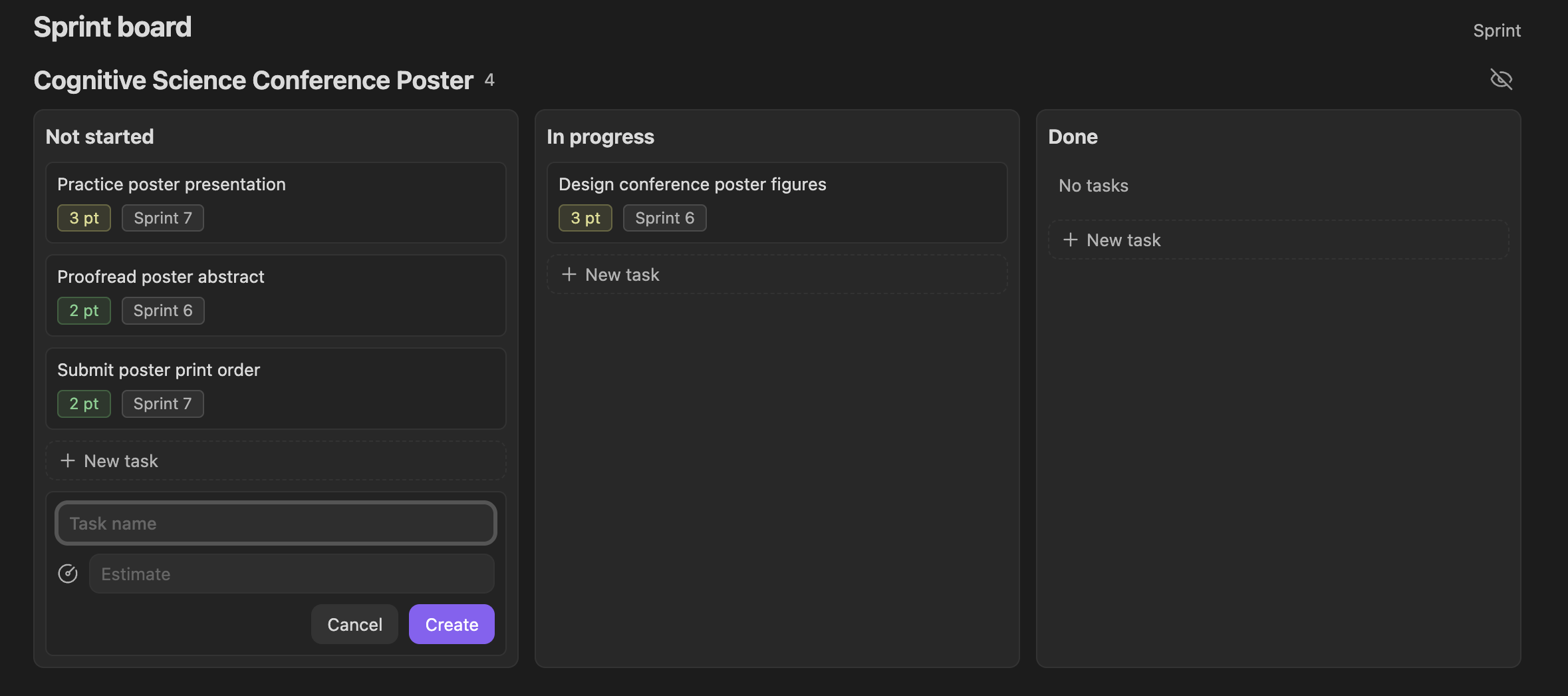
- Project-grouped Kanban boards for all, current, and next-sprint tasks.
- A Sprint Planner with project swimlanes and Backlog/sprint columns. Drag tasks across projects and sprints while preserving their task state.
- Drag-and-drop task state changes and inline task creation.
- Collapsible and hideable project sections.
- Native Bases Properties selection for task-card fields, with Estimate and Sprint as sensible defaults.
- Inline task creation with Estimate and Due date fields by default.
- Task archiving without deleting the underlying notes.
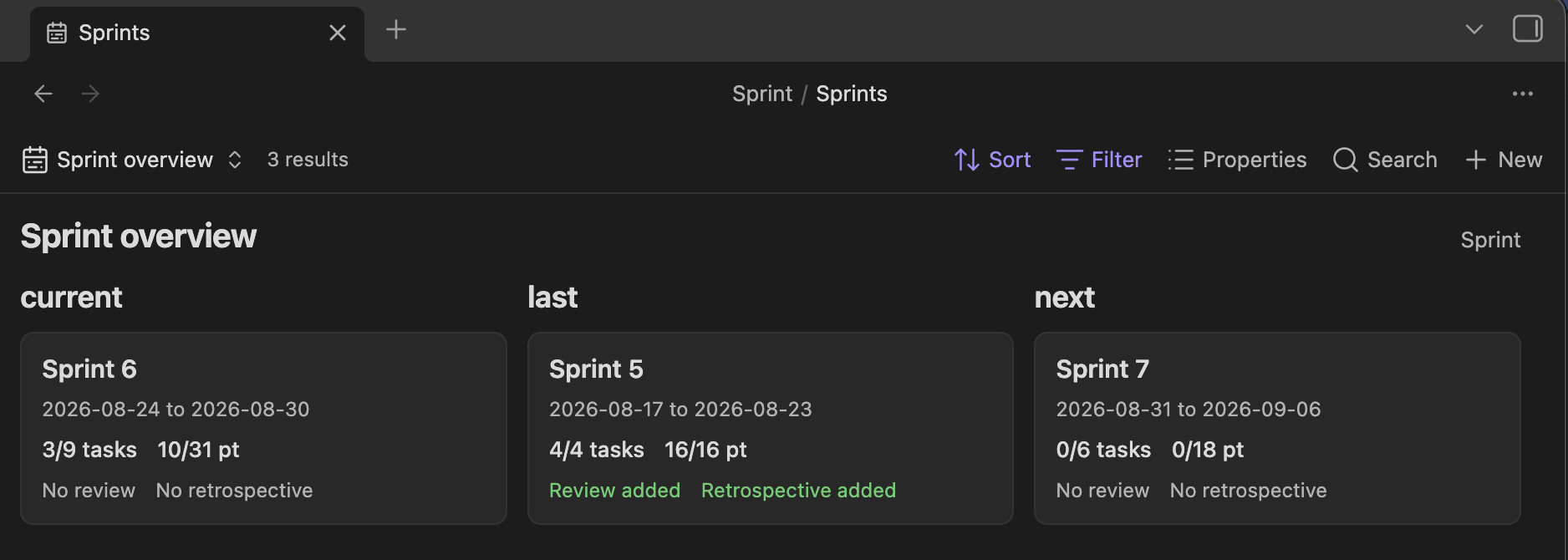
- Sprint overview cards with dates, completed tasks, completed points, reviews, and retrospectives.
- A dependency-free velocity bar chart.
- A generated Sprint Summary and an Open Sprint Summary command.
- Optional vault-local skills for Claude Code and agents that support the Agent Skills convention.
Screenshots
Plan work by project
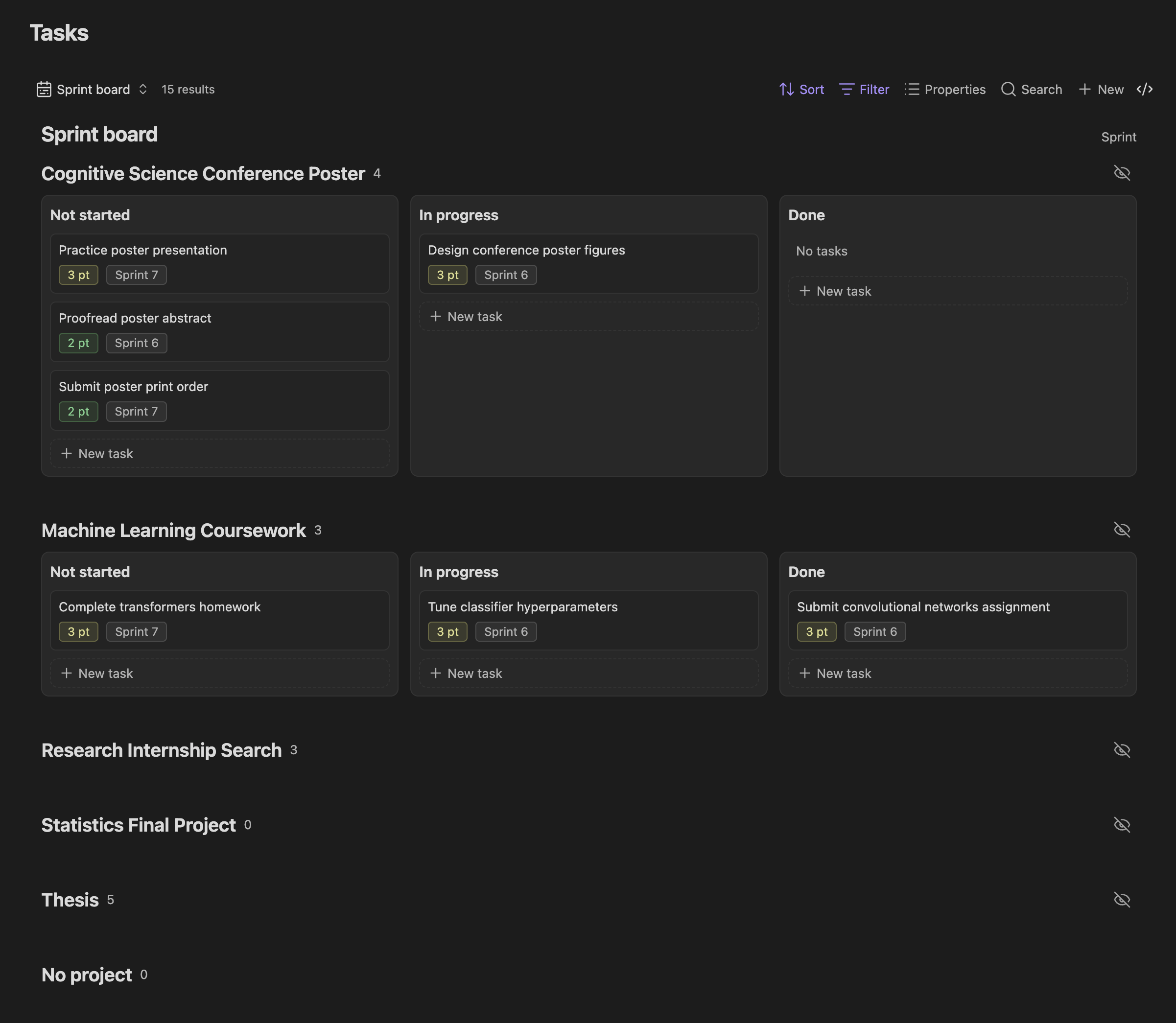
The full Sprint board groups tasks by project and separates Not started, In progress, and Done work. Cards can show estimates, sprint assignments, and other configured properties.
Create tasks from the board
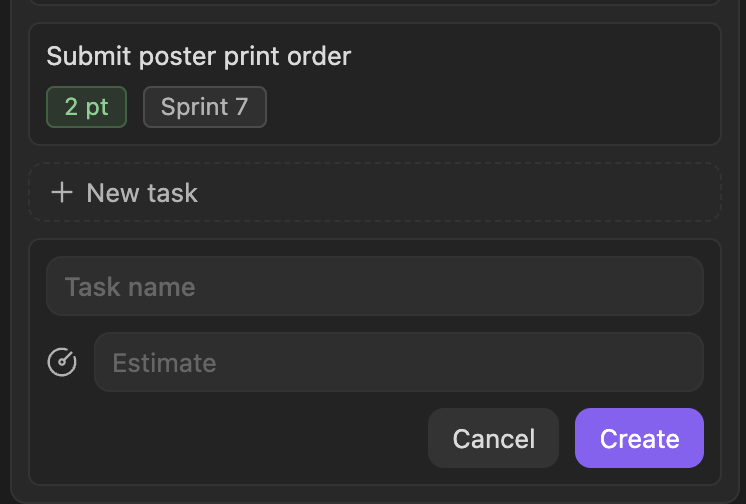
Each project and state column includes a New task action. New tasks inherit the selected project and state. Current and Next views also assign their sprint; the full board leaves Sprint unassigned unless you select one. The form follows the view's visible editable Properties, with Estimate and Due shown by default.
Track velocity
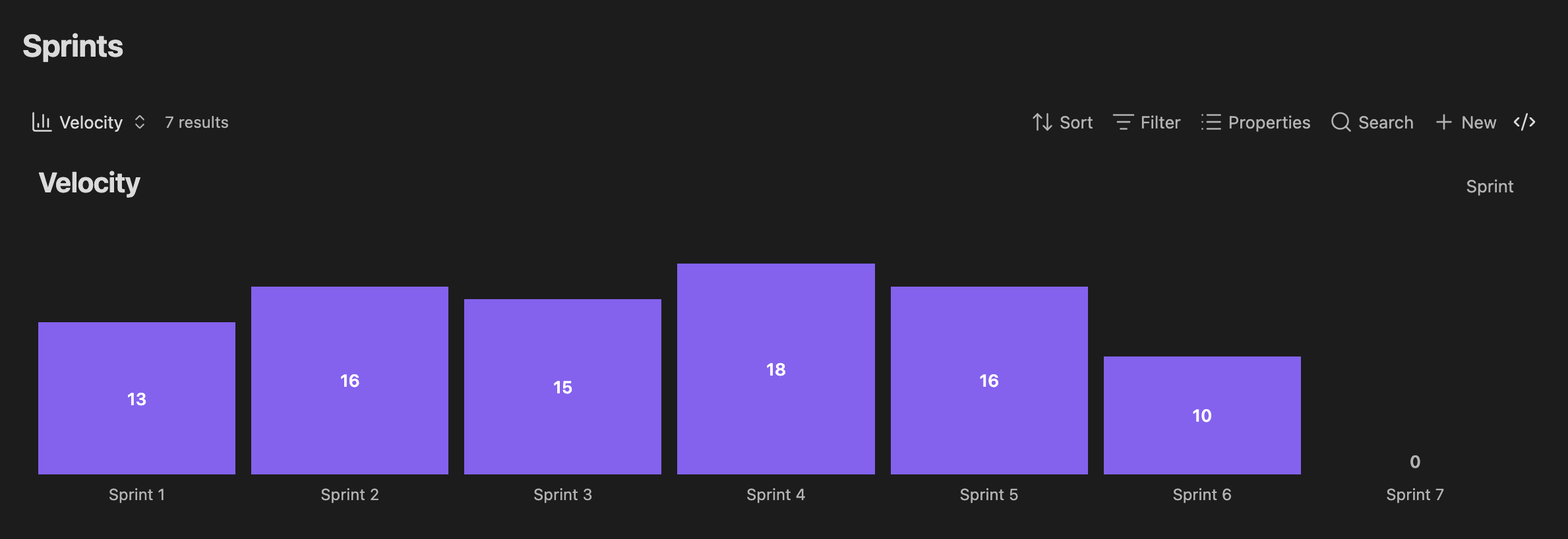
The dependency-free Velocity view charts completed story points for every generated sprint, including sprints with zero completed points.
Review active sprints
Sprint overview cards show active and generated future sprints with dates, completed tasks, completed points, and review status. Use Add Sprint N in the overview or planner to extend the planning horizon by one sprint.
Requirements
- Obsidian 1.13.0 or later.
- The Obsidian Bases core plugin enabled.
Installation
In Obsidian, open Settings -> Community plugins -> Browse, search for Sprint by shijimi-soup, then install and enable it. In the welcome prompt, select Set up Sprint and confirm the workspace creation.
For screenshots and the complete first-time setup, see the English installation guide or Japanese installation guide.
For workspace concepts, generated files, views, properties, reset instructions, and troubleshooting, see the Sprint reference.
Community Plugins
- Open Settings -> Community plugins.
- Select Browse and search for Sprint.
- Select the plugin by shijimi-soup, then install and enable it.
Manual Installation
-
Open the latest Sprint release.
-
Under Assets, download
main.js,manifest.json, andstyles.css. Do not download the Source code archives; they are not installable plugin packages. -
In the target vault, create
.obsidian/plugins/sprint/if it does not already exist. The.obsidiandirectory may be hidden by your operating system. -
Place the three downloaded files directly inside the
sprintdirectory:<vault>/ └── .obsidian/ └── plugins/ └── sprint/ ├── main.js ├── manifest.json └── styles.css -
Restart Obsidian, or run Reload app without saving from the command palette.
-
Open Settings → Community plugins, find Sprint under the installed plugins, and enable it. If Community plugins are disabled, turn off Restricted mode first.
Getting Started
- Open Settings -> Sprint.
- Review the Sprint folder, cadence anchor, duration, start day, and rollover settings.
- If you skipped the first-run setup, turn on Automatic sprints and confirm the file-creation warning.
- Open the command palette and run Open Sprint Summary.
The first initialization creates tutorial projects and tasks to demonstrate the workflow. They are created only once. Deleting them later does not cause them to reappear on startup.
The default vault layout is:
Vault root/
├── .agents/skills/sprint/SKILL.md
├── .claude/skills/sprint/SKILL.md
└── Sprint/
    ├── Tasks.base
    ├── Sprints.base
    ├── Projects.base
    ├── Projects/
    ├── Tasks/
    ├── Sprints/
    ├── AGENTS.md
    ├── CLAUDE.md
    └── Sprint Summary.md
Using Sprint
Task States
Sprint derives three task states from two checkbox properties:
| State | in progress |
is done |
|---|---|---|
| Not started | false |
false |
| In progress | true |
false |
| Done | Either value | true |
Dragging a card between Kanban columns updates these properties. Checking archived removes a task from sprint boards while keeping it in the Tasks table and vault.
Project Visibility
Projects can be collapsed or hidden from sprint boards. Hidden projects remain available under the board's Hidden section. Current and next sprint boards show only projects in progress; the full Sprint board also shows projects that are not started or done.
Generated Files and Migrations
Sprint creates missing support files during first-time setup and applies versioned, additive migrations when its managed schema changes. Existing task and project notes are not reset during normal startup. Custom Base views, properties, and unknown view settings are preserved.
Changing the Sprint folder through the rename action moves the existing workspace and updates configured Base paths. Renames made in Obsidian while Sprint is running are detected automatically. If an initialized workspace is missing at startup, synchronization pauses and Sprint offers to locate it or create a confirmed empty replacement. Reset Sprint workspace is destructive and requires typing Yes, delete. before Sprint deletes and recreates the configured folder.
AI Skills
Sprint installs its own skill at .agents/skills/sprint/SKILL.md and .claude/skills/sprint/SKILL.md in the vault root. Existing folders, unrelated skills, and unmanaged files are preserved.
Sprint also creates managed AGENTS.md and CLAUDE.md files inside the Sprint workspace. Creating corresponding instruction files at the vault root is optional and disabled by default because a vault may already contain user-managed instructions. The generated skill and vault-specific additions can be reviewed and edited from Sprint settings.
The skills direct people to Sprint's controls for adding future sprints and document a safe manual fallback for AI agents that cannot invoke the UI.
Sprint does not send vault content over the network or invoke an AI model. External AI tools run independently and have their own permissions and privacy behavior.
Commands
- Sprint: Open Sprint Summary opens the generated dashboard.
- Sprint: Open planner opens the Sprint Planner view directly, regardless of the Tasks Base's default view.
- Sprint: Sync sprints creates missing sprint notes, updates lifecycle states, and applies rollover rules.
- Sprint: Generate sprint Bases creates missing support files and applies managed Base schema updates.
- Sprint: Generate future creates one additional sprint after the latest generated sprint without changing the automatic horizon.
Development
npm install
npm run check
The production build creates the standalone main.js and styles.css files and an embeddable ESM module under dist/.
src/domain/        Scheduling, workspace settings, rollover, and contracts
src/obsidian/      Vault, Bases, settings, and storage adapters
src/SprintFeature  Embeddable lifecycle and public API
src/main.ts        Standalone plugin entry point
src/domain/ is independent of Obsidian and AI integrations. See docs/AGENT_GUIDE.md for the rules exposed to optional external agents and docs/DEVLOG.md for development history.
License
MIT Copyright 2026 Shijimi.