
README file from
GithubGuanlan is an Obsidian plugin that brings together updates from WeChat Official Accounts, YouTube, Bilibili, and other RSS feeds. Open one workbench to see what the creators you follow have published, pick a few things to read, or find something you saved earlier. When you finish reading, send the article straight to your AI agent in Obsidian with the one-click Claudian handoff.
Try it locally: Open 藏卷 → 添加材料 → 导入文件 (Library → Add material → Import file) and choose a Markdown file. Reading, local Markdown or subtitle imports, and reading progress need no account, model, or material service. What connects to the network, what is sent, and what may cost money.
Optional connections: The separately run service fetches the sites and feeds you configure. AI features use your configured provider (DeepSeek by default); search may also use Tavily or X. Some feeds, search and model services may require an account or payment. Local import reads the file you select, including files outside the Vault. Claudian handoff is optional and sends only the selected material and task context to Claudian.
Why I built it
I noticed that finding things often took more effort than reading them. I'd open WeChat to check a writer's latest posts, then search a video platform for another creator. Somewhere along the way, I'd get pulled into watching clips when I'd sat down to learn something. If I found a link worth returning to, I'd still have to send it to myself or paste it into Obsidian. Every switch meant finding the right place again, remembering where I'd left off, and keeping track of what I'd come for.
Attention is scarce and valuable. I'd open an app for one video, and the home screen already had a stream of shorts, trending topics, and autoplay lined up. By the time I remembered why I was there, I'd spent much of the time and energy I'd set aside for the article or long video. Guanlan starts with that tradeoff.
01 / Check and read updates in one place
I wanted to keep up with a handful of creators. The tedious part was checking each one every day. Updates brings collected entries together by author and actual publication date, with the latest item from each source shown first. Videos show their title, creator, and link, so you can decide whether to open the platform after looking through the page. While your computer is on and the service is running, it can collect in the background. The saved items sync when you open Obsidian with auto-sync enabled.
02 / Give a short reading session an endpoint
Before I open the workbench, I often know I have twenty minutes. Hundreds of unread entries won't help me spend them. Today's Reading picks a few items for the time and attention I have that day. I can always go back to Updates for the full list. Discover has its own page for finding new writers and material beyond my subscriptions. It can offer a few picks a day, explain why each is worth opening, and show what the recommendation is based on. If little fits, it offers less. I can read with a question in mind and close the workbench when I've had enough.
03 / Pick up where I left off
A platform bookmark remembers that I clicked Save. When I only remember one line from an article I was halfway through two weeks ago, I need a way back to the text. Guanlan stores the reading note, its source and captured original, and where I stopped in Obsidian. The Library filters by source, category, and reading state. Rediscover rotates through older unread saves. Both lead back to the same note and annotations.
04 / See where an update got stuck
A blank list could mean an author published nothing. It could also mean the feed expired, a request timed out, the original page failed an identity check, or the service saved material that the plugin has yet to sync. Each case calls for a different response. Sources shows the actual check and retry time. Updates shows what's in the library. A video link, an article excerpt, and a saved full text come with their own coverage, so I know when I still need a transcript or the original page.
05 / Keep the source close when I write a knowledge note
A book, a saved article, and a recommendation blurb give me different evidence to work with. I want the original capture, my annotations, and what the AI wrote to remain traceable. Guanlan saves originals, reading note versions, and short guides separately. When I want a knowledge note, I choose a specific version and send it to Claudian for discussion or direct synthesis. Knowledge Handoff shows progress against receipts and actual files, so I can find out where a note came from later.
These choices grew out of my own reading habits. Start with one RSS feed and one reading folder if that's all you need. Tell your agent what you'd like to change, from sources and categories to your reading budget, interests, model, or knowledge workflow.
06 / Hand an article to your AI agent in one click
A manual handoff usually means dragging the material into your vault, opening an agent like Claude Code or Codex, and telling it where the file is and what to do. With a compatible version of Claudian enabled, click 交给 Claudian 处理 (Send to Claudian) in Guanlan. It opens the article’s Claudian conversation and sends a prepared prompt with links to the original and your reading note. You can return to the same conversation later to pick up where you left off.
Complete workflow
Subscriptions, discovery, and manual imports all feed the same Obsidian reading library. The service collects and serves updates. The plugin saves them and manages what you read. You choose which material to send to Claudian for further work. Start with the whole system, then follow each stage through success, failure, and recovery.

Legend · Green: automatic processing · Gold: your decision · Purple: model work · Blue: saved files and state · Red: checks and safeguards.
01 Subscription collection and sync · 02 Discovery · 03 Links, files, and video transcripts · 04 Reading, daily picks, and older unread items · 05 Claudian, RAW, and Wiki handoff · 06 Recovery, updates, and backups
Trace each step to its inputs, outputs, saved files, and source code → Full technical reference
01 · Subscription collection and sync
Validate identity, date, and content after retrieval. The service writes its ledger first. The plugin syncs in pages and advances the cursor after each successfully handled page.

Open full-size diagram · Technical walkthrough
02 · Discovery
Merge web, optional X, and recent unread subscription candidates. Gather bounded evidence, then validate the model scores in code. Daily runs are stored separately from reading notes.

Open full-size diagram · Technical walkthrough
03 · Links, files, and video transcripts
Extract and label coverage for each input. Deduplicate by material identity and content version. Write order and recovery records allow an interrupted save to resume.

Open full-size diagram · Technical walkthrough
04 · Reading, daily picks, and older unread items
One index supports the daily shortlist, older unread rotation, and material management. Rules, AI guides, and trash each have their own persistence rules.

Open full-size diagram · Technical walkthrough
05 · Claudian, RAW, and Wiki handoff
Queue a specific version and save the submission intent before sending. Discussion and direct synthesis both verify the original, the run receipt, and Wiki files. I use Andrej Karpathy’s LLM Wiki approach to organize the knowledge base. Original LLM Wiki write-up

Open full-size diagram · Technical walkthrough
06 · Recovery, updates, and backups
Retry network failures according to type and recover model work from the first result. The Community directory delivers plugin updates; back up service data before upgrading the service separately.

Open full-size diagram · Technical walkthrough
Quick start
Once listed, look for Guanlan in Obsidian's Community plugins. For manual installation, see GitHub Releases or build from source. Set up the material service separately when you want subscriptions or web imports.
You need Obsidian desktop 1.13.0 or later. Building from source and running the material service require Node.js 22.13 or later. The examples use Windows, the environment verified for the login startup controller, the bundled RSSHub setup scripts, and free X setup.
-
For manual installation, download
manifest.json,main.js, andstyles.cssfrom the GitHub release. To build the files from source, run these commands in the repository.npm ci npm run buildCopy the three release files, or the files built in
dist/plugin/, to.obsidian/plugins/source-workbench/in your vault. Enable Guanlan under Obsidian's Community plugins. -
Start the material service from source for subscriptions, webpage extraction, public captions, or external search. Run
npm cifirst if you have yet to install dependencies.npm run dev:server -
Click the radar icon in Obsidian, then 设置 → 订阅连接与自动同步 (Settings → Connection and sync). The standalone service defaults to
http://127.0.0.1:27183. Its token is in.local/server/token.txtunder the service's project directory. Enter both, click 检查连接 (Test connection), and 保存配置 (Save settings). If you are connecting to another instance, use that instance's address and token. -
Go to 信源 → 添加来源 (Sources → Add source). Paste an RSS, Atom, or supported channel link, confirm the source and category, and add it. The built-in source entries are disabled examples with blank feeds.
-
Use 信源 → 管理订阅与分类 → 立即检查更新 (Sources → Manage subscriptions and categories → Check now). Once a source reports success, use 同步已采集材料 (Sync collected items) in Updates. You can also start by importing a local file from the Library.
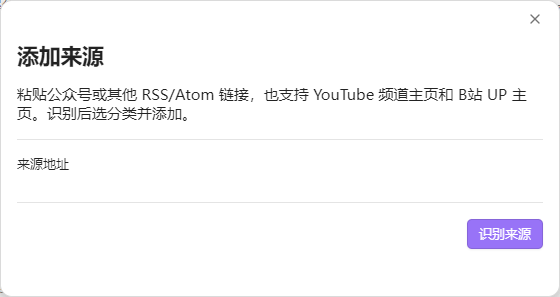
In Add source, click 识别来源 (Identify source), confirm the account or channel, and choose its name, category, and automatic check setting. Click 添加订阅 (Add subscription) to save. An aggregated feed can be added as a general feed. Use an individual account URL to track one WeChat account.
On Windows, you can start the service manually to try it out and configure it to run in the background when you sign in. For Bilibili feeds through RSSHub, follow the RSSHub setup guide to install its dependencies. If you run a manual instance alongside the background instance, give each its own service address and data directory. RSSHub setup · Windows background collection · Service configuration
How each platform is connected
WeChat Official Accounts
Pasting an article link works for a one-off import. For automatic collection, I needed a source that would keep returning new posts. The public tools for WeChat Official Accounts are for operators managing their own accounts. I didn't find a public API for subscribing to any account. By October 2026, the batch article listing route I'd tried was no longer working in my setup, and several open source tools that relied on that approach were also affected.
I tried self-hosting WeRSS. I could register all five accounts in the test, but listing requests returned 200013 and the test collected no article bodies automatically. Backoff reduced repeated requests. That test alone can't tell us precisely what WeChat changed, when it changed, or how every other deployment behaves. Importing a public article still worked when I already had its URL. WeRSS test record
I also looked into how a handful of services like Quyue collect posts. The patterns I identified included the Official Accounts backend's appmsgpublish, short-lived WeChat client credentials for profile_ext/getmsg (about 25 minutes in my notes), hooks for posts sent from live accounts, and server-side collection with account and proxy pools. In my isolated test, searchbiz worked, but appmsgpublish still returned 200013 on a single request after a 30-minute pause. That pointed to account access in my setup, though it didn't establish the cause for everyone. Among the local alternatives I found, tools such as mpider used a Frida hook into an existing desktop WeChat session instead. The build I reviewed kept credentials on the machine, but depended on WeChat 4.1.15.56 and carried a risk of account suspension. I didn't find a self-hosted route I wanted to maintain, so I chose a hosted service and kept a paid API as an alternative. Original research notes in Chinese
| Route | How to use it |
|---|---|
| Quyue (取阅), tested in this project | Subscribe to an account at Quyue. On a plan that supports full text, enable RSS 全文输出 and copy the individual account's RSS URL into Add source. Group feeds may offer summaries. The maintainer reported CNY 29/month for up to 20 accounts on November 15, 2026. Check the provider's checkout before purchasing. Treat private feed URLs as credentials. Quyue · Project test record |
| Dajiala (极致了), a paid API alternative | Get your own key from the provider. Use an account identifier with the history endpoint (post_history), then query details as needed with the article URL (article_detail). To use it with Guanlan, build a small feed adapter or add a collector on the service side. Retain the article URL, publication date, and original response. The repository doesn't include a Dajiala collector, and I haven't run a paid collection test with it. Provider's workflow · Article details API |
| An existing feed or a single article | Use Add source for a feed you already have. For a one-off save, use Library → Add material → Add link. |
The feed supplies candidate articles. When the original page fails the account, date, or text checks, the source shows an error. A public video or a preview of a paid article is saved with the coverage actually obtained. If you renew an expired Quyue subscription and still see failures, use Check now under subscription management. The older failures stay in the history. Use the latest result to see whether collection has recovered. Collection and catch-up
If you've found an open source option that runs locally, I'd like to hear about it.
YouTube
I wanted to see a channel's new videos with their actual publication dates. Channel feeds sometimes failed and public pages had their own limits, so my first choice now is the official YouTube Data API v3, with two fallbacks. The service uses channels.list to find the channel's uploads playlist and playlistItems.list to read it. It checks the channel and video IDs and saves each video under its actual publication date.
- Add a YouTube channel.
- Enable YouTube Data API v3 in Google Cloud. Create an API key and restrict it to that API.
- Open 信源 → 管理订阅与分类 → YouTube 稳定连接 (Sources → Manage subscriptions and categories → YouTube connection). Click 验证并保存YouTube密钥 (Verify and save YouTube key). Then run Check now and look for YouTube官方接口 in the source receipt.
| Route | When it fits |
|---|---|
| Official Data API | The primary route, with your own key and Google project quota. For timeouts, check the service's connection to Google first. Consult Google Cloud for explicit key, permission, or quota errors. Google's setup guide · Guanlan setup |
| Channel Atom feed | Useful for recent uploads. Guanlan checks it when the key is absent or the API read fails. The URL is https://www.youtube.com/feeds/videos.xml?channel_id=CHANNEL_ID. In the version studied for this project, Khazix's AIHOT handled channel feeds through its general RSS collector, including intermittent YouTube feed 404s. Pinned AIHOT code |
| Public channel pages | When Atom fails, Guanlan checks the same channel's Videos, Shorts, or Streams pages. Login restrictions and missing verifiable dates can stop collection. Coverage depends on what YouTube serves. |
| WebSub push | A design option for a service with a reachable callback. Google can deliver channel updates to a subscriber. Guanlan's existing implementation polls. Google's push notification guide |
These routes save video entries with titles, channels, publication dates, and links. If you need text, use 取得视频文字稿 (Get transcript) in the detail pane to try public captions, or import your own SRT/VTT. Captions can be missing or inaccessible, in which case the material shows the gap. Import and transcript contracts
Bilibili, X, and the open web
- Bilibili supports uploader pages and configured RSSHub feeds. The service can also read public uploads or fall back to a browser, depending on source configuration and local setup. Check the source receipt for rate limits and network failures. Source options
- X participates in keyword discovery. The free route uses your own X account, a dedicated login window, and local
twscrape. It checks at most three Top result pages per day, up to 20 posts each. A failed or uncertain request pauses the route for the day. SocialData is an optional paid route you can select. Saving a post captures its text and original response. Video captions and linked pages have their own collection steps. X setup and login - Other sites can be followed through RSS/Atom or saved from a supported public article URL. Discover also supports DeepSeek web search, public Hacker News/GitHub lookups, and Tavily. The public lookups need no search key and lean toward tech sources. AI selection still needs a configured model. Discovery workflow
The material service process needs a working network path to each provider. On the maintainer's tested Windows network, YouTube and X needed a working proxy. A standalone service can inherit HTTPS_PROXY at startup. Check the service receipt even if the same site opens in your browser. Saved vault notes are available offline.
Interface guide
Screenshots show v0.22.5 in an isolated demo vault with example sources, notes, and recommendations. The plugin's interface is in Chinese, so the guide includes the on-screen labels.
来讯 · Updates
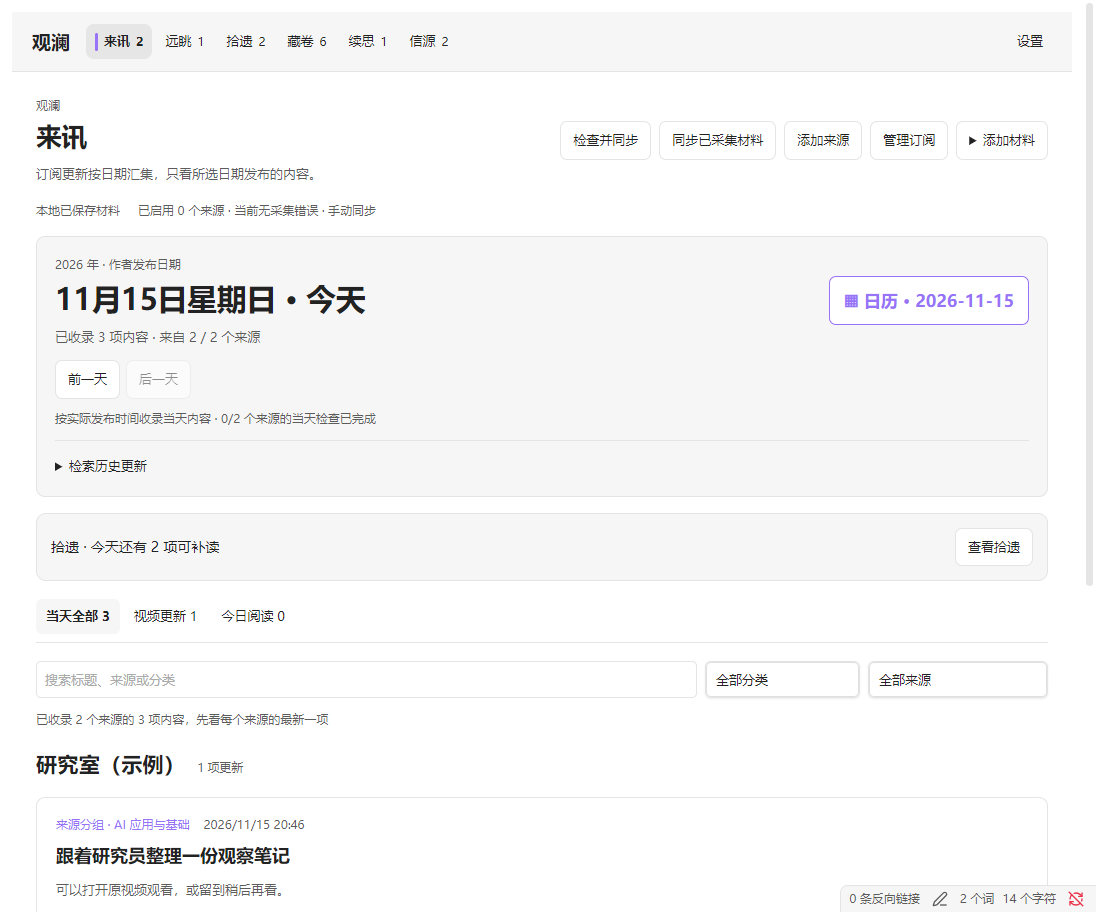
| Control | What it does |
|---|---|
| 检查并同步 / 同步已采集材料 (Check and sync / Sync collected items) | The first pulls material already saved, checks due or eligible network-failed sources, then pulls newly collected items. The UI follows the check for up to three minutes. The second only reads the existing service ledger. |
| 添加来源 / 管理订阅 (Add source / Manage subscriptions) | Add an ongoing subscription or go to Sources to inspect and edit existing ones. |
| 更新日期日历 / 前一天 / 后一天 / 回到今天 (Calendar / Previous / Next / Today) | Browse by author publication date in Beijing time. 检索历史更新 searches titles, sources, and saved text across dates. |
| 当天全部 / 视频更新 / 今日阅读 (All updates / Videos / Today's Reading) | Switch lists or open the reading shortlist. The newest item per author appears first. Use 展开本日全部 and 收起其他更新 to show or hide the rest. |
| 打开今日阅读笔记 / 生成 AI 精选 (Open reading note / Generate AI picks) | Open the local shortlist, which can use basic rules, or request evidence-linked short notes from the configured model. The budget limits the shortlist. |
| 查看原因和重试时间 / 查看拾遗 (View failures and retry times / Rediscover) | Jump to source receipts or older unread picks. |
Today's Reading and video transcripts
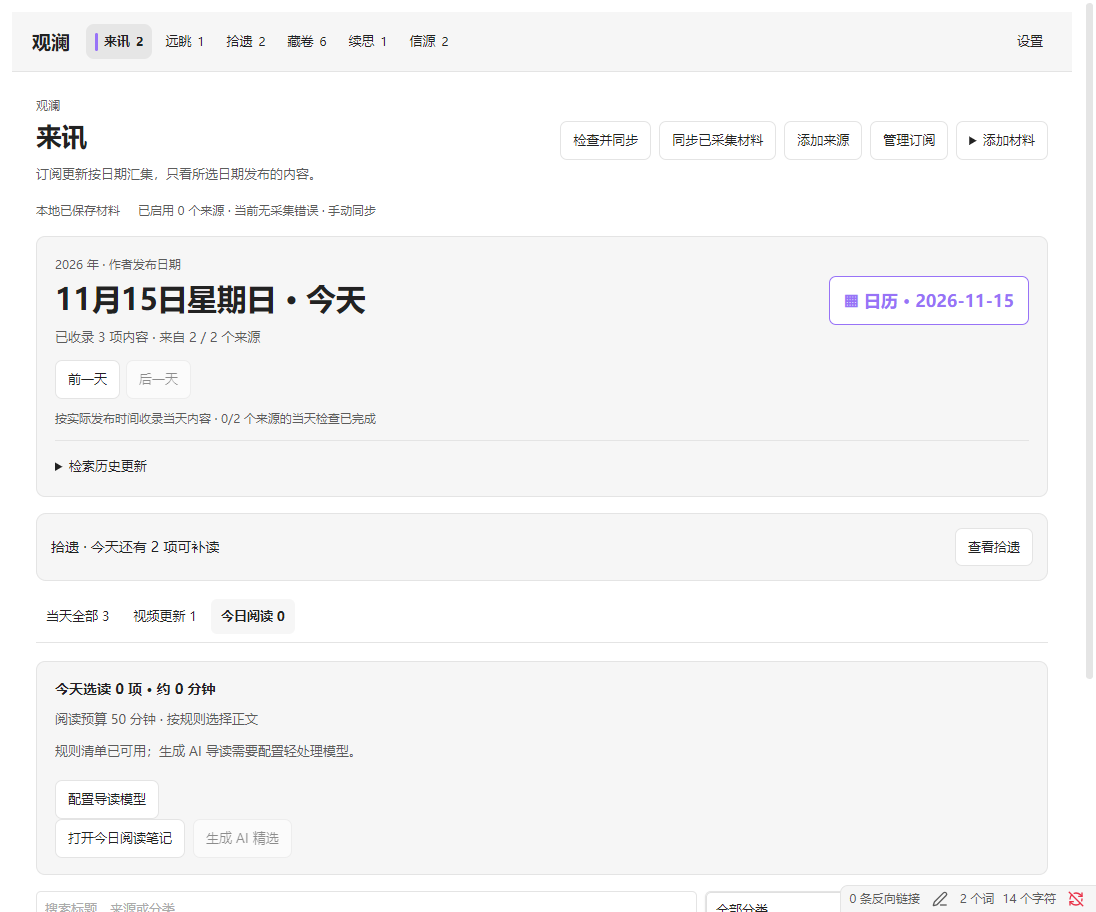
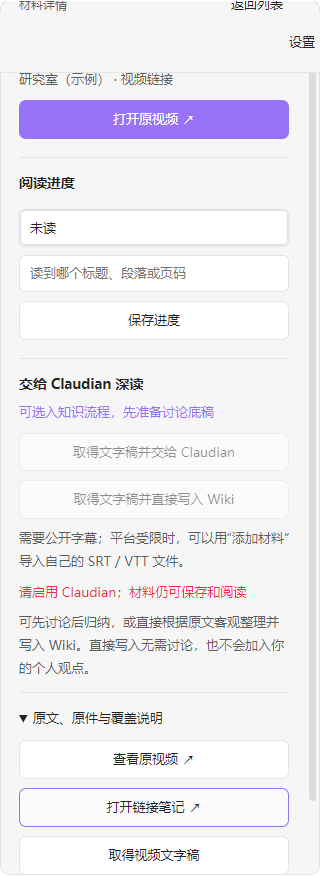
观看视频 / 打开原视频 open the platform. 打开链接笔记 opens the local entry. If you obtain public captions or import your own captions, a transcript version appears for the same video. The detail pane can also obtain a transcript before sending it to Claudian or the Wiki.
远眺 · Discover
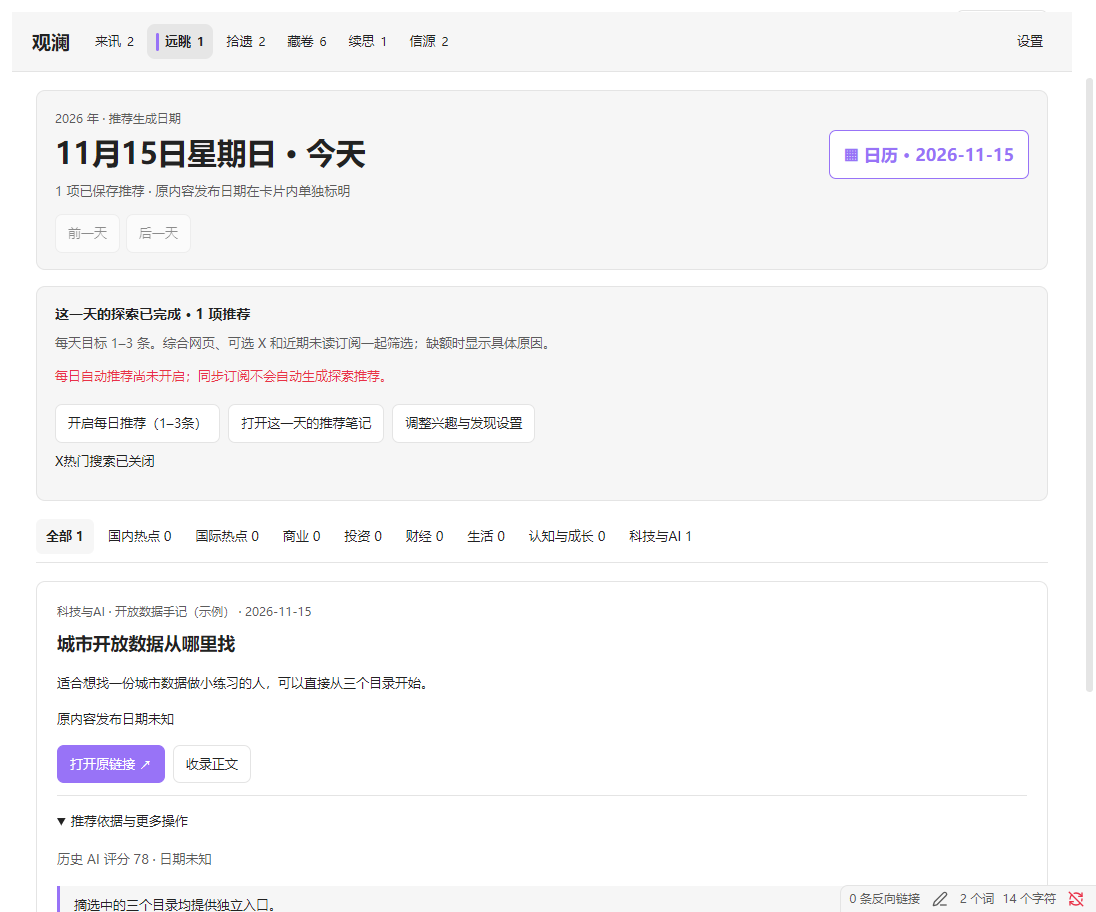
- 发现新内容 runs discovery for today. 开启每日推荐 schedules daily discovery. 调整兴趣与发现设置 opens the provider, topic, keyword, preference, and limit settings.
- The calendar, day buttons, and topic filters browse by recommendation date. The item's publication date is shown separately. 打开这一天的推荐笔记 opens the saved daily results.
- 打开原链接 / 打开X视频 opens the original link. 收录正文 / 收录帖文 tries to save the available content. For saved items, use 阅读已保存正文 or 标记已读.
- 推荐依据与更多操作 expands evidence, gaps, external links, and handoff actions. 不再推荐 removes the item from the recommendations. 检查已保存结果, 重试保存, and 重新校验首次结果 recover an existing run. Daily run records protect completed and uncertain calls from duplicate model requests.
拾遗 · Rediscover
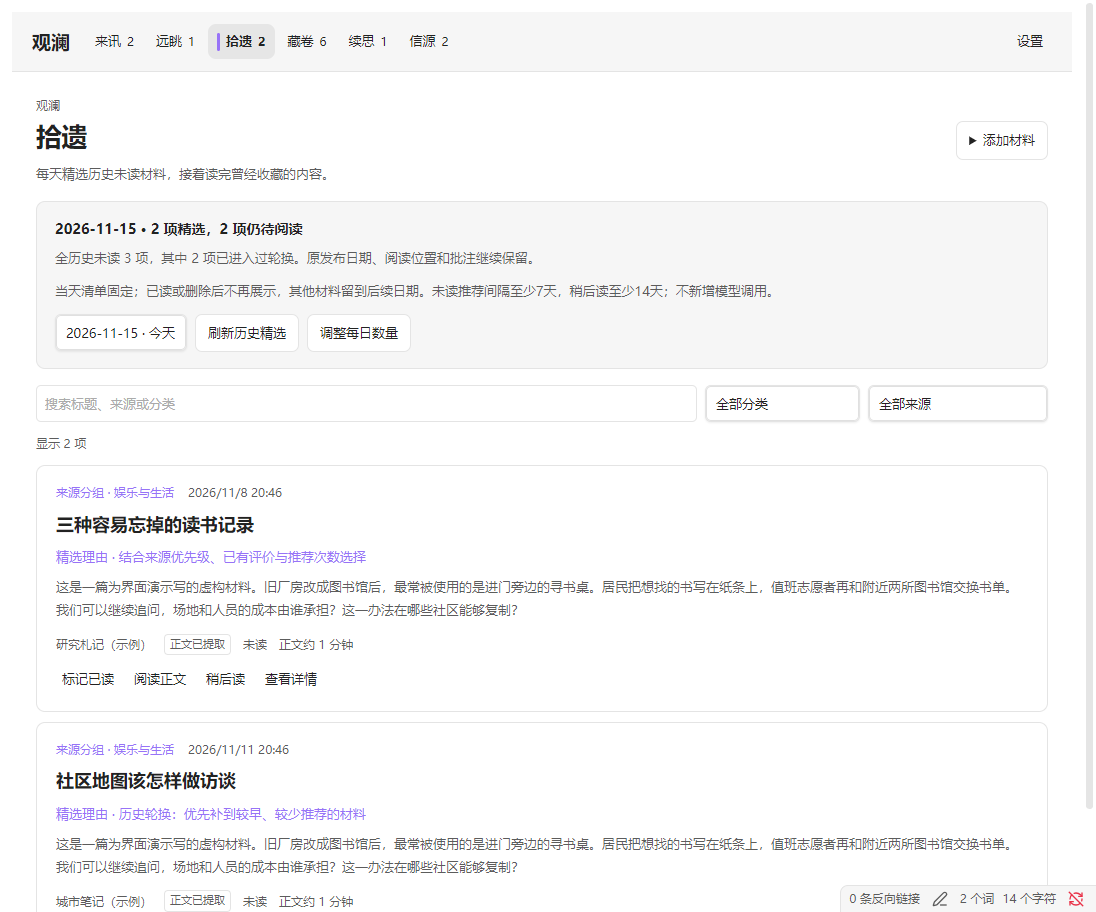
Rediscover rotates through all older unread reading material, two picks per day by default. 历史精选日期 opens prior lists, 刷新历史精选 reloads the saved list, and 调整每日数量 sets 1–5 items starting the next day. 标记已读 removes an item from today's list. Other items get their turn on later days. Reading opens the original note with its annotations and position, with no model call.
藏卷 · Library
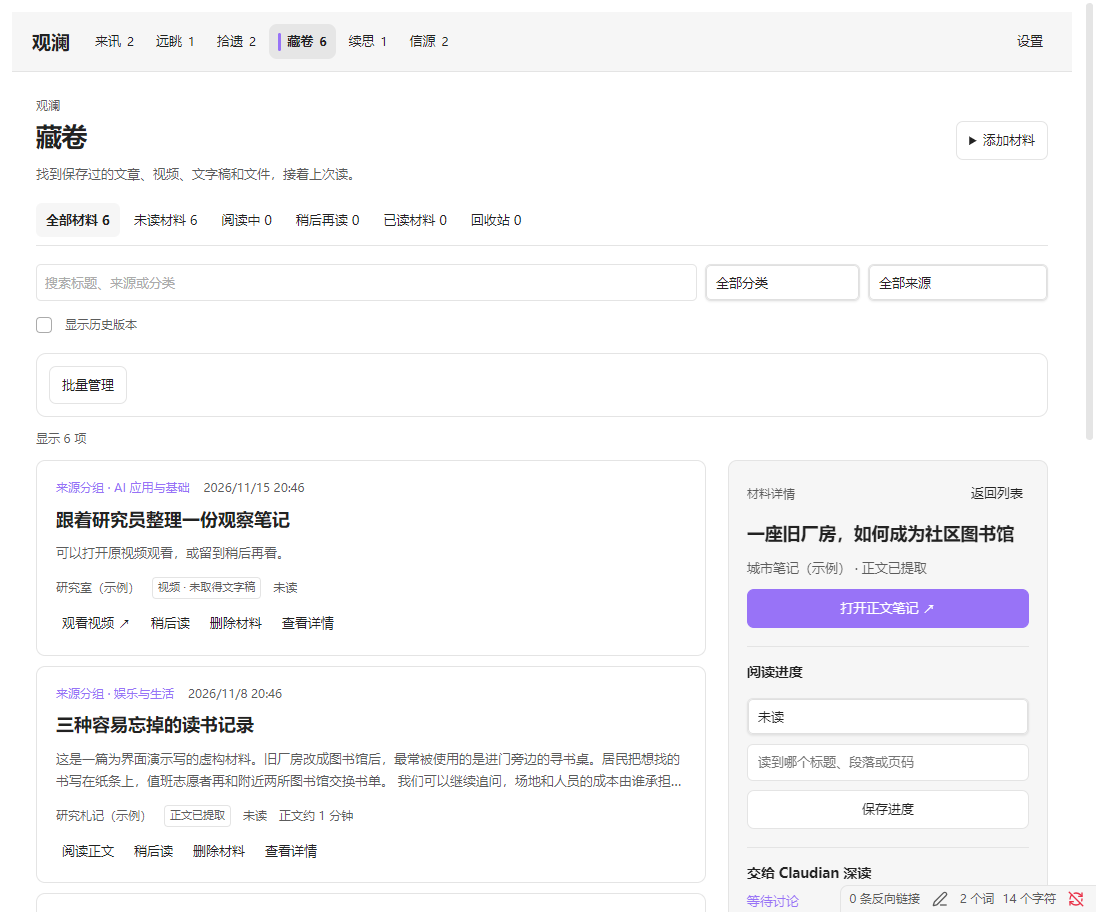
| Control | What it does |
|---|---|
| 添加材料 → 添加链接 / 导入文件 (Add material → Add link / Import file) | Choose a category, then save a public page or a Markdown, HTML, PDF, SRT, or VTT file. Text PDFs can be extracted. For a scanned PDF, attach Markdown prepared elsewhere and keep the PDF. |
| Search, category, source, state, and paging | Find saved items by title, source, or category, or switch between unread, in progress, later, read, and trash. Clear filters to return to the full list. 显示历史版本 reveals earlier versions. |
| 阅读正文 / 查看详情 / 返回列表 (Read / Details / Back) | Open the Markdown or the detail pane. Details show versions, coverage, the original URL, and the captured original when available. |
| 稍后读 / 移回未读 / 保存进度 (Read later / Mark unread / Save progress) | Change the state or save a reading position. Add annotations and Obsidian links directly in the Markdown note. |
| 批量管理 / 全选筛选结果 / 清空选择 (Bulk actions / Select filtered items / Clear selection) | Select across pages, change reading states, trash or restore items. Trashing keeps originals and all versions and stops sync from adding that item back. Restore from the trash view. |
The file import dialog lets you set a source identifier. Reuse it for a new version of the same file. Give unrelated files different identifiers even if they share a filename. 导入 or 确认导入 saves to the reading library. You can also choose Claudian discussion or direct Wiki handoff at import.
Add link dialog
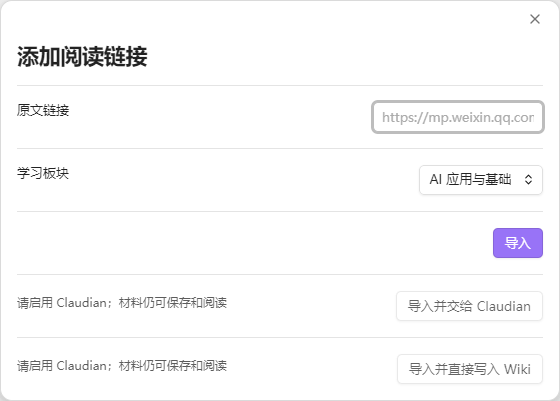
Captured HTML preserves the fetched response. Remote images in Markdown may still need internet access. Scripts, interactive behavior, and complex layouts are outside the Markdown capture. Material management
续思 · Knowledge handoff
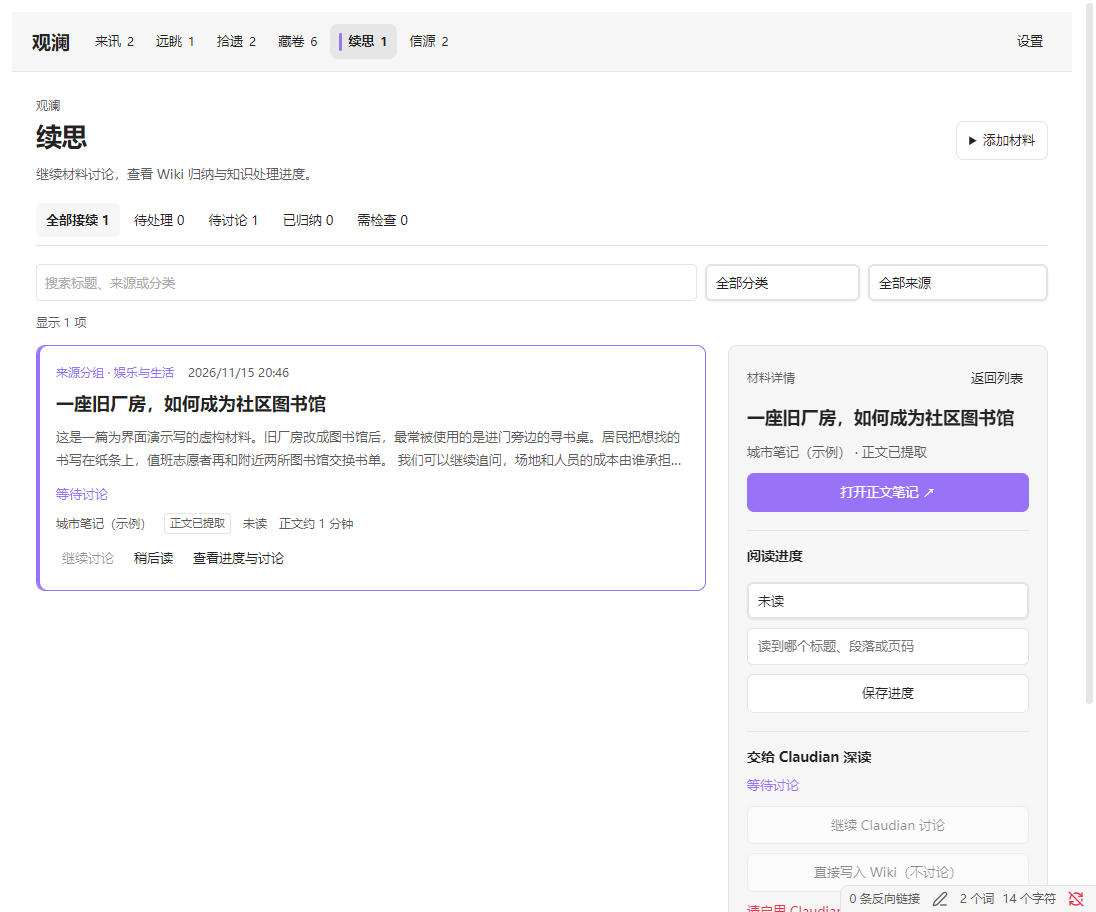
- 交给 Claudian 处理 / 继续 Claudian 讨论 hands the selected material to a verified Claudian installation and reopens the same conversation later. 直接写入 Wiki passes the source for direct synthesis. Both routes can also be chosen during import and from a discovery card.
- 取消待处理 cancels a queued item before submission. 打开接续笔记, 打开讨论记录, 查看来源与覆盖, 阅读 Wiki, and 查看晋升结果 open the corresponding records and files when available. 从回执恢复 is for a conversation that cannot be reopened. The first recovery round reads the existing work. 准备 RAW 交接材料 prepares a manual handoff.
- In the maintainer's vault,
08_LLM Wikiholds RAW originals, topic notes, source records, and receipts. Promotion to a personal note or board needs a specified destination and separate authorization. These paths and checks are tied to the maintainer's workflow. Other vaults can use the library or a manual handoff and adapt the bridge if needed. - Use 设置 → Claudian 接续 to verify the installed version. That check proves interface compatibility. Look at the corresponding state and files to confirm RAW registration, Wiki completion, or promotion. Knowledge handoff and recovery
信源 · Sources
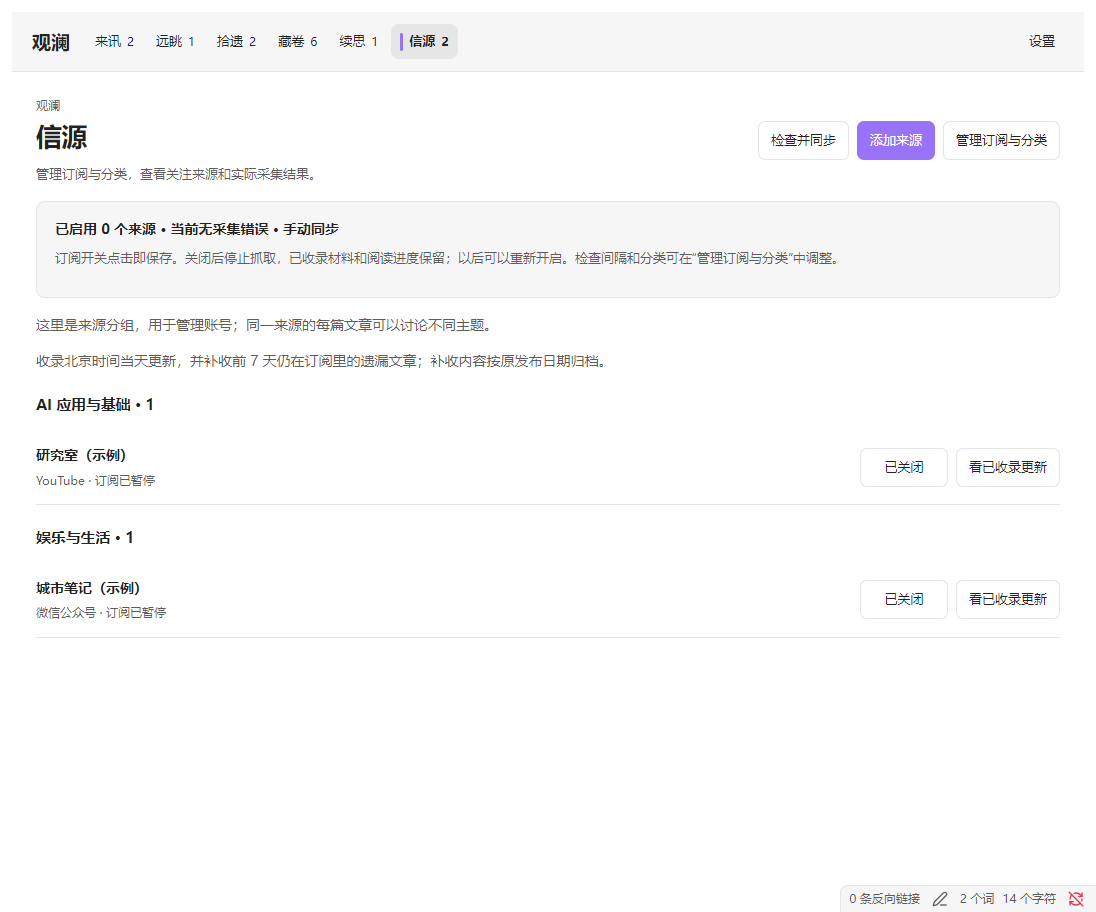
- 订阅中 / 已关闭 toggles collection and saves immediately. 看已收录更新 opens the most recent date with saved items for that source. 最近检查记录 shows individual checks. 最近失败 stays visible after recovery.
- 管理订阅与分类 opens the editor for display names, categories, toggles, check intervals, and catch-up. Create or rename categories there. Move sources out of a custom category before deleting it. Click 保存订阅配置 to commit the dialog changes. Vaults connected to the same service share subscription settings.
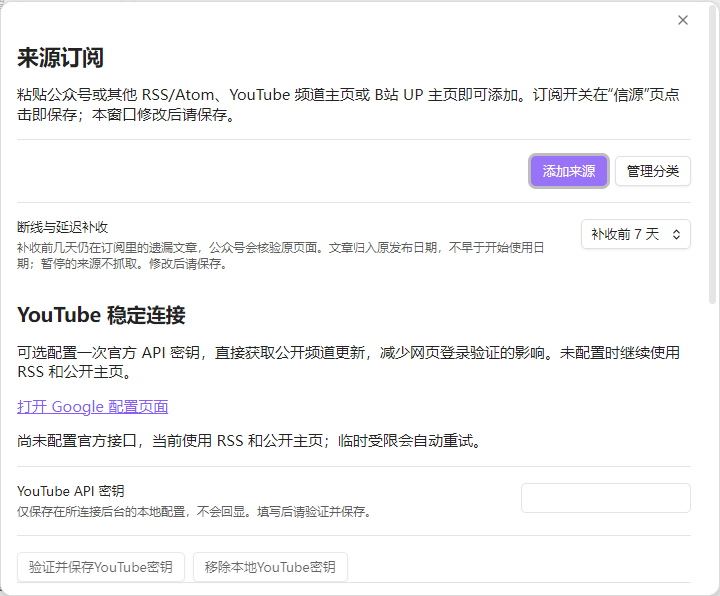
- 立即检查更新 checks saved enabled sources before their usual scheduled time. Use it after renewing access, then sync the results. 验证并保存YouTube密钥 verifies a key before storing it. 移除本地YouTube密钥 returns to the keyless fallback routes.
设置 · Make it fit your own habits
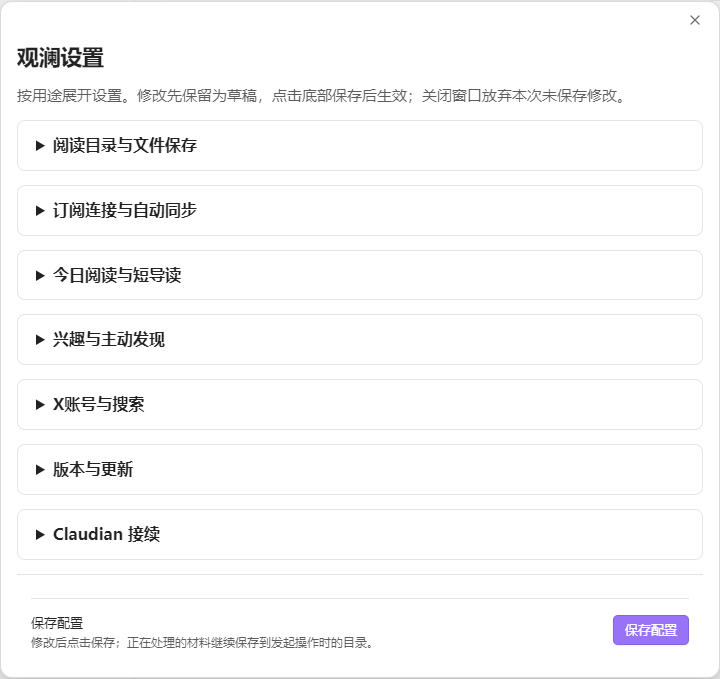
| Group | What you can change |
|---|---|
| 阅读目录与文件保存 (Storage) | Default is 09_信息源. Pick an existing folder or enter a vault-relative path, check the preview, and save. The first write creates a new folder. Switching opens an independent library. Moving an existing library also requires moving its index and originals. |
| 订阅连接与自动同步 (Connection and sync) | Service address, token, and automatic sync. The interval is 1–60 minutes and defaults to 5. Per-source collection intervals live in subscription management. They default to 60 minutes and range from 15–1440. |
| 今日阅读与短导读 (Reading and short guides) | The 50-minute, three-item reading list can be set to 5–180 minutes and 1–5 items. Set your learning goals, model address, name, and key. Automatic AI picks start off, with one batch per day by default. Rediscover has its own daily limit. |
| 兴趣与主动发现 (Discovery) | Toggle automatic discovery, choose among eight topic areas, and change the search provider, keywords, and preferences. The daily default is up to 3 recommendations, adjustable to 1–12. Automatic discovery starts off. |
| X账号与搜索 (X account and search) | Include or exclude X, and choose a free account connection or a paid provider. 连接X账号 opens a dedicated login window, and 检查X连接 shows connection state. |
| Claudian 接续 (Claudian handoff) | Verify the installed version. Choose discussion or direct Wiki handoff for each item. Switching to a different agent or Wiki layout calls for a source change to the bridge and storage contract. |
| 版本与更新 (Updates) | See the installed version. Check for and install community releases from Obsidian's Community plugins settings. |
Edits are a draft until you click 保存配置 (Save settings). Set categories per source in Sources. An agent can change the built-in category names, defaults, and scoring rules in source.
Adapt it with your own agent
For installation, give your own agent the release files, this README, and a description of what you need. To change how it works, give it the source repository, which includes the modules, types, tests, workflow diagrams, and build scripts.
Start with your reading habits. For example, “I follow ten legal blogs and two video channels. I read for 20 minutes a day. Group sources under courts, corporate compliance, and technology. Keep my notes local and leave X and Wiki writing off.” Much of that can be handled in settings.
You can give your agent this prompt:
Read the README and any repository instructions first. Set up Guanlan in a test vault. Connect one test feed and verify that the plugin can check, sync, and open both the saved note and the captured original. Configure my sources, reading directory, daily budget, and discovery interests. For any behavior that needs a code change, explain where it belongs and how you will verify it. Test duplicate imports, timeouts, identity mismatches, and recovery for new providers. I will enter credentials locally. Deliver the settings, a summary of changes, verification results, and an installable plugin package.
| To change | Start here |
|---|---|
| Default interests, categories, budgets, or example sources | Settings defaults · Categories · Discovery topics · Source registry |
| Add a feed or provider API | Subscription service · HTTP contracts |
| Change pages, controls, or the Obsidian integration | Workbench views · Plugin entry point |
| Change deduplication, storage, or reading history | Reading library · Architecture |
| Connect your own agent or Wiki | Claudian adapter · Handoff contracts |
Run npm run verify for type checks, tests, and both builds. On Windows, npm run package creates release/source-workbench-<version>.zip. Use the workflow generator to update the diagrams. Run py -3 -X utf8 docs/workflow/generate.py --public to rebuild the public workflow reference.
Credentials and credits
Enter service tokens, private RSS URLs, model keys, Google keys, and X login information locally. Use a demo vault for screenshots or shared reproductions. Plugin settings, raw captures, runtime folders, and backups can hold private material. Configured search and model providers receive the queries and source excerpts required by the relevant feature.
Guanlan is distributed under the MIT License. Some collection and discovery code and ideas came from AIHOT by Khazix (数字生命卡兹克). RSSHub is used for the optional Bilibili route. See AIHOT reuse and the third-party notices for the respective third-party terms.