
README file from
GithubSoftView
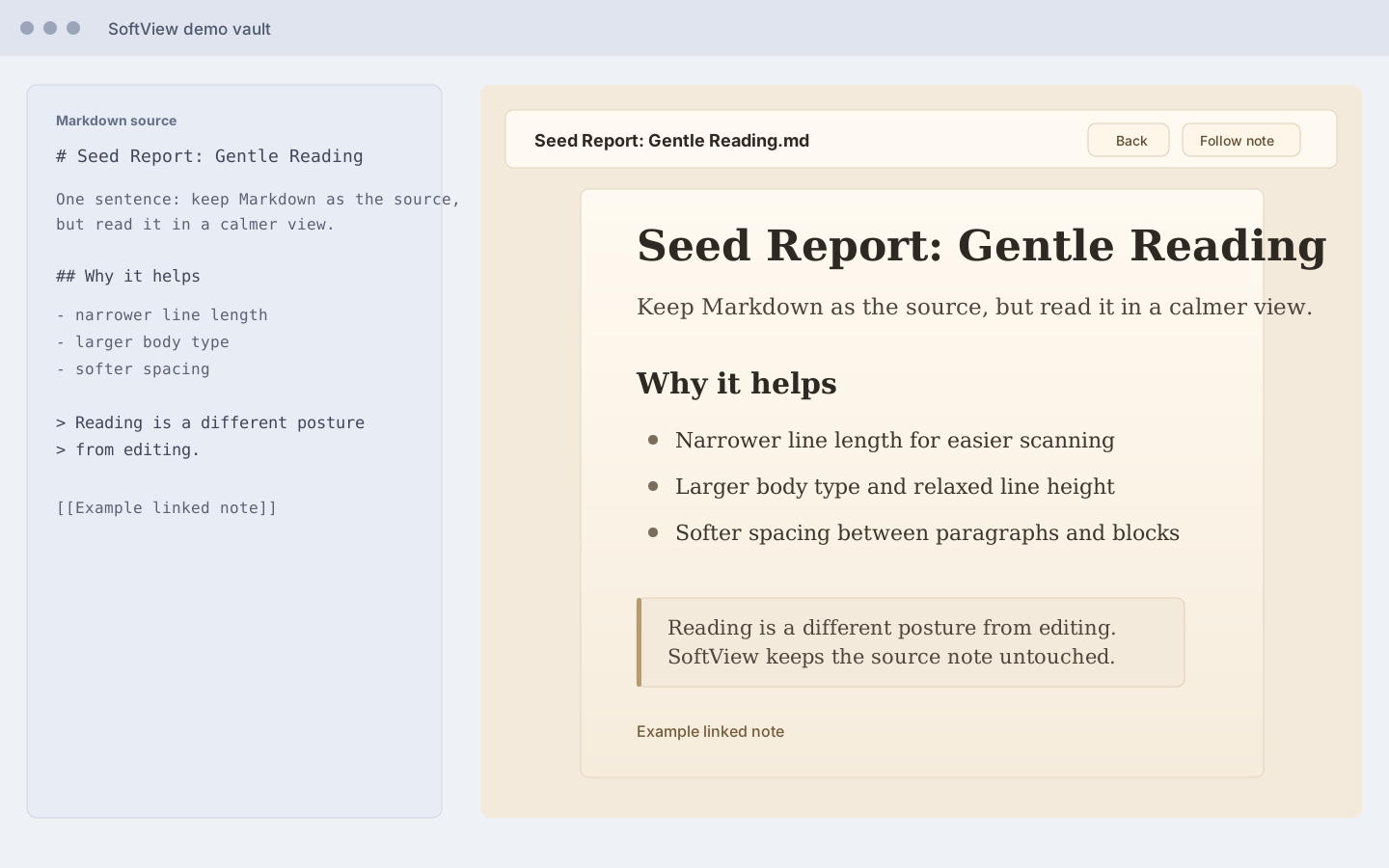
SoftView opens the current Markdown note in a warm, focused reading view inside Obsidian.
It does not generate external HTML, does not open a system browser, and does not modify your Markdown files. Your note remains the single source of truth; SoftView is only a softer way to read it.
Why SoftView
Obsidian is excellent for writing, linking, and editing. Reading often wants a different posture: narrower lines, warmer background, gentler spacing, and less interface noise.
SoftView keeps you inside Obsidian while giving the active note a paper-like reading surface.
Features
- Open the current Markdown note in a custom SoftView pane.
- Render Markdown through Obsidian's
MarkdownRenderer. - Preserve Obsidian-style internal links, images, callouts, tags, and embeds as closely as possible.
- Use a warm reading layout with comfortable width, line height, spacing, quotes, callouts, and code blocks.
- Open from the ribbon book icon.
- Open from the command
Open current note. - Refresh with the icon button in the toolbar.
- Toggle
Follow current noteto update SoftView when you switch Markdown files. - Click internal links inside SoftView and navigate within the reading pane.
- Use
Backto return to the previous SoftView article and restore the prior scroll position.
Installation
Once SoftView is available in the Obsidian community plugin browser:
- Open Obsidian Settings.
- Go to Community plugins.
- Search for
SoftView. - Install and enable the plugin.
Manual Installation
Download the latest release files:
main.jsmanifest.jsonstyles.css
Place them in:
<your-vault>/.obsidian/plugins/softview/
Then restart Obsidian or reload community plugins, and enable SoftView.
Usage
- Open any Markdown note in Obsidian.
- Click the ribbon book icon, or run
Open current notefrom the command palette. - Read in the SoftView pane.
- Use the refresh icon after editing the source note.
- Turn on
Follow current noteif you want SoftView to update when you switch notes. - Click internal links to move through your notes inside SoftView, then use
Backto return.
Development
npm install
npm run build
On Windows PowerShell, if npm.ps1 is blocked:
npm.cmd install
npm.cmd run build
Privacy
SoftView runs locally inside Obsidian. It does not upload your notes or send note content to any external service.
License
MIT