
README file from
GithubSmart Done Mover
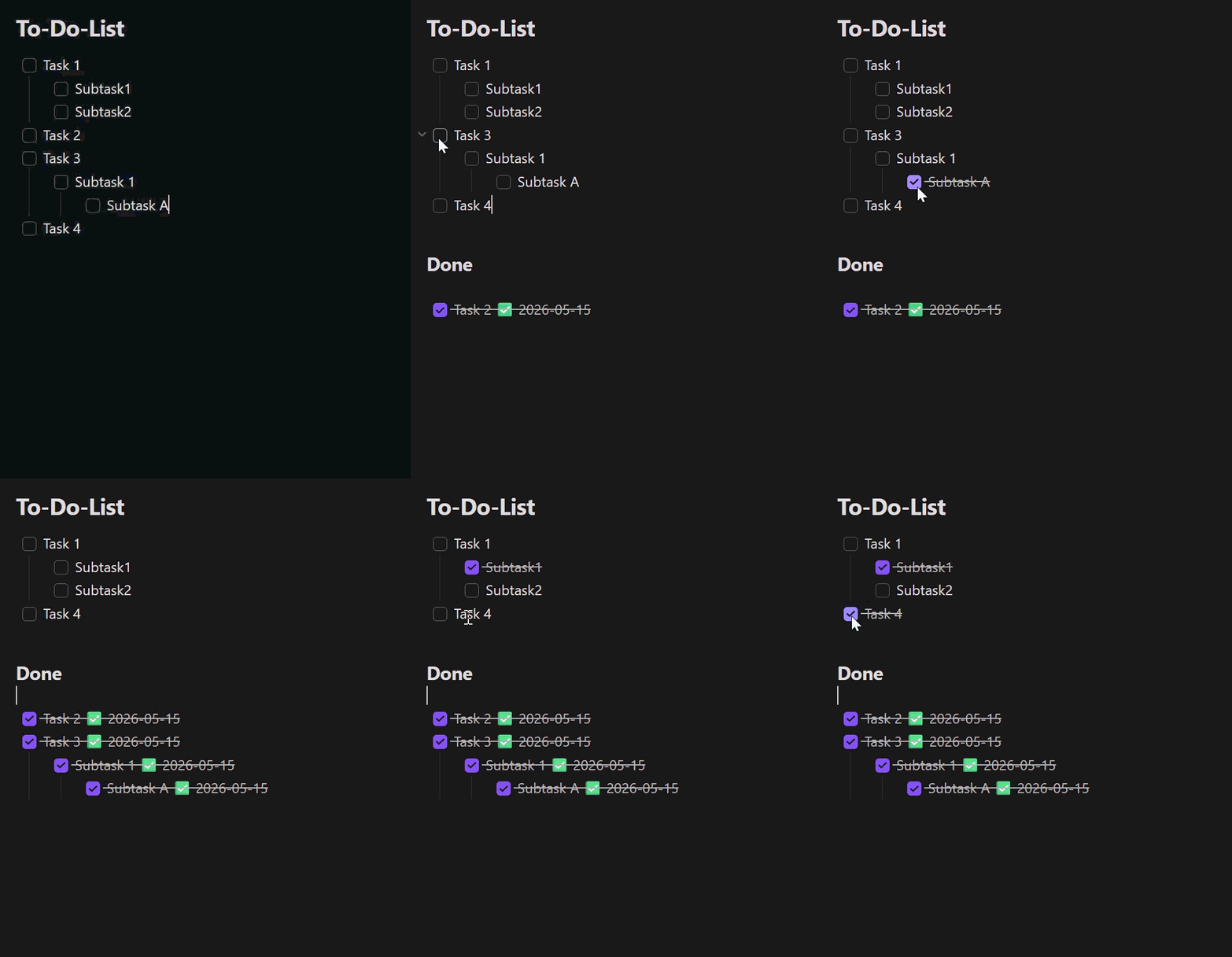
An Obsidian plugin that moves completed checkbox tasks — including their indented sub-tasks — into a customizable Done section of the same note.
🌍 Languages: English (this page) · Deutsch · 简体中文 The plugin interface follows Obsidian's UI language: English by default, German when Obsidian is set to German, and Simplified Chinese when Obsidian is set to Chinese.
Demo
Features
- Right-click menu in the editor:
- Move completed tasks to Done — moves every fully completed task.
- Move selection to Done — moves the task blocks touched by the current text selection (only shown when text is selected).
- The same actions are available as commands (command palette, can be bound to hotkeys).
- Auto mode (optional): as soon as a task is checked, it moves to Done automatically. It also detects task completions written back to source notes by the Tasks plugin after a short debounce (about 400 ms or more).
- Task filter (optional): move only tasks matching a text filter such as
#task. The filter applies to auto mode, Move completed tasks to Done, and Move selection to Done.- Leave the filter empty to keep the original behavior: all fully completed task blocks can move.
- A matching task must be checked. If it has matching descendants, they must be checked too; non-matching descendants do not block the move.
- A matching parent moves its complete indented block, including notes and non-matching child checkboxes. A matching child under a non-matching parent moves independently with its own indented block.
- Excluded folders/files (optional): auto mode stays inactive in the configured vault paths (including subfolders); manual commands still work there.
- Sub-tasks move along with their parent; indentation is preserved.
- Optionally appends a completion date
✅ YYYY-MM-DDto each moved, checked line (no duplicate dates). - Use a plain Done heading name for the original
### Donebehavior, or enter a full Markdown heading such as# Completedto choose its level. An existing heading with the same title is reused.
Settings
| Setting | Description | Default |
|---|---|---|
| Auto mode | Move completed tasks automatically | off |
| Done heading | Target heading. Plain text creates ###; a Markdown heading keeps its level. |
Done |
| Task filter | Text a task must contain before it can move; empty disables filtering. | empty |
| Append completion date | Append a ✅ date to moved lines |
on |
| Excluded folders/files | Vault paths (one per line) where auto mode stays inactive | empty |
Usage
- Open a note that contains a checkbox to-do list.
- Configure the optional Task filter if only marked tasks, such as
#task, should move. - Right-click in the editor and choose an action, run the matching command from the command palette, or enable Auto mode.
- Completed tasks are moved under the configured Done heading.
Disclosures
- The plugin works entirely offline and makes no network requests.
- It collects no telemetry and stores no data outside your vault.
- It only modifies the note in which a move action runs (manually or via auto mode) and never touches other files.
- Settings are stored in the plugin's
data.jsoninside your vault's configuration folder. - No account, payment, or external service is required.
Build from source
npm ci
npm test          # unit tests (Vitest)
npm run build     # produces main.js
Install into a vault
For normal installation, download main.js and manifest.json from the
matching GitHub Release. Copy them into
<Vault>/.obsidian/plugins/smart-done-mover/, then enable the plugin under
Settings → Community plugins.
For development you can use the project folder directly as the plugin folder
(npm run dev for a watch build).
Releases
Pushing a git tag triggers the GitHub Actions workflow in
.github/workflows/release.yml, which builds the plugin and attaches
main.js and manifest.json to a new GitHub release. Make sure the tag
matches the version in manifest.json.
Project structure
| File | Purpose |
|---|---|
main.ts |
Plugin class: commands, context menu, auto mode |
src/taskParser.ts |
Markdown parsing, section and block detection |
src/mover.ts |
Pure move logic (moveCompletedTasks, moveSelectedTasks) |
src/settings.ts |
Settings UI |
src/exclusions.ts |
Path-exclusion matching for auto mode |
src/i18n.ts |
UI string localization (English / German / Simplified Chinese) |
src/types.ts |
Shared types and defaults |
src/*.test.ts |
Unit tests |
taskParser.ts, mover.ts and exclusions.ts have no Obsidian dependencies,
so they are unit-testable without a running Obsidian instance.
Origin
Smart Done Mover is an independent project based on To-Do to Done Mover by DonnervS. It retains the original MIT license.